openshift4.10 acm with ztp disconnected static-ip auto
本文介绍,在openshift4.10上,装ACM组件以后,如何通过zero touch provision的方式,来部署一个单节点openshift4.10的集群(SNO),在部署的过程中,我们模拟离线的网络环境,并且禁止DHCP,只用静态IP。
ZTP(zero touch provision)模式之所以诱人,是因为他只需要baremetal的bmc信息,以及网卡的mac地址,就可以完成集群的部署。ACM会创建一个iso,并调用bmc的api,去挂载这个iso并启动。
本次实验,使用一个半自动流程,就是让ACM创建iso,但是手动用iso启动kvm。整个流程如下:
- 在openshift4上安装ACM组件
- 在ACM上配置cluster, infra env等配置。
- ACM通过网络启动kvm
- kvm自动开始集群安装,但是由于kvm+redfish的限制,需要手动配置之后的重启都是由硬盘启动。
- 集群安装完成,保存集群登录信息
本次实验的部署架构图:

本次实验有一个前导实验,就是用一个单机版本的assisted install service部署一个SNO集群,这个SNO集群是本次实验部署ACM的基础。这个前导实验如何做,请参见这里。
参考资料:
- https://github.com/jparrill/ztp-the-hard-way/blob/main/docs/connected-ZTP-flow-hub-deployment.md
- https://github.com/jparrill/ztp-the-hard-way/blob/main/docs/disconnected-ZTP-flow-hub-deployment.md
视频讲解
静态变量和 kvm 配置
assisted install 模式下,如果想静态ip安装,需要在实验网络上部署一个dns服务。因为我们部署的是single node openshift,只需要把如下4个域名,指向同一个ip地址就可以。当然,你需要提前想好域名。同时,我们的实验环境里面,其实有2个SNO,所以要配置2套域名。
- acm-demo-hub.redhat.ren
- api.acm-demo-hub.redhat.ren
- api-int.acm-demo-hub.redhat.ren
- *.apps.acm-demo-hub.redhat.ren
- acm-demo-hub-master.acm-demo-hub.redhat.ren
- acm-demo1.redhat.ren
- api.acm-demo1.redhat.ren
- api-int.acm-demo1.redhat.ren
- *.apps.acm-demo1.redhat.ren
- acm-demo1-master.acm-demo1.redhat.ren
我们复用本作者基于上游改的一套ansible脚本来配置这个dns
# on helper

# 做一些配置参数定义
INSTALL_IMAGE_REGISTRY=quaylab.infra.redhat.ren
PULL_SECRET='{"auths":{"registry.redhat.io": {"auth": "ZHVtbXk6ZHVtbXk=","email": "noemail@localhost"},"registry.ocp4.redhat.ren:5443": {"auth": "ZHVtbXk6ZHVtbXk=","email": "noemail@localhost"},"'${INSTALL_IMAGE_REGISTRY}'": {"auth": "'$( echo -n 'quayadmin:password' | openssl base64 )'","email": "noemail@localhost"}}}'

ACM_DEMO_CLUSTER=acm-demo1

SNO_BASE_DOMAIN=redhat.ren
SNO_IP=192.168.7.15
SNO_GW=192.168.7.1
SNO_NETMAST=255.255.255.0
SNO_NETMAST_S=24
SNO_HOSTNAME=acm-demo1-master
SNO_IF=enp1s0
SNO_IF_MAC=`printf '00:60:2F:%02X:%02X:%02X' $[RANDOM%256] $[RANDOM%256] $[RANDOM%256]`
SNO_DNS=192.168.7.11
SNO_DISK=/dev/vda
SNO_CORE_PWD=redhat

echo ${SNO_IF_MAC} > /data/install/acm.demo1.mac

# back to kvm host

create_lv() {
    var_vg=$1
    var_lv=$2
    var_size=$3
    lvremove -f $var_vg/$var_lv
    lvcreate -y -L $var_size -n $var_lv $var_vg
    wipefs --all --force /dev/$var_vg/$var_lv
}

create_lv vgdata lvacmdemo1 120G

export KVM_DIRECTORY=/data/kvm

mkdir -p  ${KVM_DIRECTORY}
cd ${KVM_DIRECTORY}
scp root@192.168.7.11:/data/install/acm.demo1.mac ${KVM_DIRECTORY}/

# on kvm host
# export KVM_DIRECTORY=/data/kvm
virt-install --name=ocp4-acm-demo1-master0 --vcpus=16 --ram=32768 \
--cpu=host-model \
--disk path=/dev/vgdata/lvacmdemo1,device=disk,bus=virtio,format=raw \
--disk device=cdrom \
--os-variant rhel8.3 --network bridge=baremetal,model=virtio,mac=$(<acm.demo1.mac) \
--graphics vnc,port=59013 \
--boot uefi,nvram_template=/usr/share/OVMF/OVMF_VARS.fd,menu=on \
--print-xml > ${KVM_DIRECTORY}/ocp4-acm-demo1.xml
virsh define --file ${KVM_DIRECTORY}/ocp4-acm-demo1.xml


cd /data/kvm/
# for i in master{0..2} worker{0..2}
for i in acm-demo1-master{0..0}
do
  echo -ne "${i}\t" ;
  virsh dumpxml ocp4-${i} | grep "mac address" | cut -d\' -f2 | tr '\n' '\t'
  echo
done > mac.list
cat /data/kvm/mac.list
# acm-demo1-master0       00:60:2f:ee:aa:4e

scp /data/kvm/mac.list root@192.168.7.11:/data/install/
DNS 配置
# back to helper

# set up dns
cd /data/ocp4/ocp4-upi-helpernode-master/
cat << 'EOF' > /data/ocp4/ocp4-upi-helpernode-master/vars.yaml
---
ocp_version: 4.10.4
ssh_gen_key: false
staticips: true
bm_ipi: true
firewalld: false
dns_forward: true
iso:
  iso_dl_url: "file:///data/ocp4/rhcos-live.x86_64.iso"
  my_iso: "rhcos-live.iso"
helper:
  name: "helper"
  ipaddr: "192.168.7.11"
  networkifacename: "enp1s0"
  gateway: "192.168.7.1"
  netmask: "255.255.255.0"
dns:
  domain: "redhat.ren"
  clusterid: "ocp4"
  forwarder1: "172.21.1.1"
  forwarder2: "172.21.1.1"
  api_vip: "192.168.7.100"
  ingress_vip: "192.168.7.101"
bootstrap:
  name: "bootstrap"
  ipaddr: "192.168.7.12"
  interface: "enp1s0"
  install_drive: "vda"
  # macaddr: "52:54:00:7e:f8:f7"
masters:
  - name: "master-0"
    ipaddr: "192.168.7.13"
    interface: "enp1s0"
    install_drive: "vda"
    # macaddr: "$(cat /data/install/mac.list | grep master0 | awk '{print $2}')"
#   - name: "master-1"
#     ipaddr: "192.168.7.14"
#     interface: "enp1s0"
#     install_drive: "vda"
#     macaddr: "$(cat /data/install/mac.list | grep master1 | awk '{print $2}')"
#   - name: "master-2"
#     ipaddr: "192.168.7.15"
#     interface: "enp1s0"
#     install_drive: "vda"
#     macaddr: "$(cat /data/install/mac.list | grep master2 | awk '{print $2}')"
# workers:
#   - name: "worker-0"
#     ipaddr: "192.168.7.16"
#     interface: "enp1s0"
#     install_drive: "vda"
#     macaddr: "$(cat /data/install/mac.list | grep worker0 | awk '{print $2}')"
#   - name: "worker-1"
#     ipaddr: "192.168.7.17"
#     interface: "enp1s0"
#     install_drive: "vda"
#     macaddr: "$(cat /data/install/mac.list | grep worker1 | awk '{print $2}')"
#   - name: "worker-2"
#     ipaddr: "192.168.7.18"
#     interface: "enp1s0"
#     install_drive: "vda"
#     macaddr: "$(cat /data/install/mac.list | grep worker2 | awk '{print $2}')"
others:
  - name: "registry"
    ipaddr: "192.168.7.103"
  - name: "yum"
    ipaddr: "172.21.6.103"
  - name: "quay"
    ipaddr: "172.21.6.103"
  - name: "nexus"
    ipaddr: "172.21.6.103"
  - name: "git"
    ipaddr: "172.21.6.103"
otherdomains:
  - domain: "infra.redhat.ren"
    hosts:
    - name: "registry"
      ipaddr: "192.168.7.1"
    - name: "yum"
      ipaddr: "192.168.7.1"
    - name: "quay"
      ipaddr: "192.168.7.1"
    - name: "quaylab"
      ipaddr: "192.168.7.1"
    - name: "nexus"
      ipaddr: "192.168.7.1"
    - name: "git"
      ipaddr: "192.168.7.1"
  - domain: "acm-demo1.redhat.ren"
    hosts:
    - name: "api"
      ipaddr: "192.168.7.15"
    - name: "api-int"
      ipaddr: "192.168.7.15"
    - name: "acm-demo1-master"
      ipaddr: "192.168.7.15"
    - name: "*.apps"
      ipaddr: "192.168.7.15"
  - domain: "acm-demo-hub.redhat.ren"
    hosts:
    - name: "api"
      ipaddr: "192.168.7.13"
    - name: "api-int"
      ipaddr: "192.168.7.13"
    - name: "acm-demo-hub-master"
      ipaddr: "192.168.7.13"
    - name: "*.apps"
      ipaddr: "192.168.7.13"
force_ocp_download: false
remove_old_config_files: false
ocp_client: "file:///data/ocp4/{{ ocp_version }}/openshift-client-linux-{{ ocp_version }}.tar.gz"
ocp_installer: "file:///data/ocp4/{{ ocp_version }}/openshift-install-linux-{{ ocp_version }}.tar.gz"
ppc64le: false
arch: 'x86_64'
chronyconfig:
  enabled: true
  content:
    - server: "192.168.7.11"
      options: iburst
setup_registry: # don't worry about this, just leave it here
  deploy: false
  registry_image: docker.io/library/registry:2
  local_repo: "ocp4/openshift4"
  product_repo: "openshift-release-dev"
  release_name: "ocp-release"
  release_tag: "4.6.1-x86_64"
ocp_filetranspiler: "file:///data/ocp4/filetranspiler.tgz"
registry_server: "registry.ocp4.redhat.ren:5443"
EOF

ansible-playbook -e @vars.yaml tasks/main.yml

# then followin AIS, to install sno using 192.168.7.13
部署CNV
我们部署ACM,是需要存储的,最简单的存储,就是本地目录啦,那我们就需要一个自动的auto provisioner,正好CNV带有一个hostpath auto provisioner,所以作者就犯懒,部署一个CNV,为的是里面的本地目录的自动部署。
# 首先需要一个本地目录
cat << EOF > /data/install/host-path.yaml
---
apiVersion: machineconfiguration.openshift.io/v1
kind: MachineConfig
metadata:
  name: 50-set-selinux-for-hostpath-master
  labels:
    machineconfiguration.openshift.io/role: master
spec:
  config:
    ignition:
      version: 3.2.0
    systemd:
      units:
        - contents: |
            [Unit]
            Description=Set SELinux chcon for hostpath baicell
            Before=kubelet.service

            [Service]
            Type=oneshot
            RemainAfterExit=yes
            ExecStartPre=-mkdir -p /var/hostpath
            ExecStart=chcon -Rt container_file_t /var/hostpath/

            [Install]
            WantedBy=multi-user.target
          enabled: true
          name: hostpath-baicell.service
EOF
oc create -f /data/install/host-path.yaml

# install operator OpenShift Virtualization
# active HostPathProvisioner deployment

# https://docs.openshift.com/container-platform/4.9/virt/install/installing-virt-cli.html

cat << EOF > /data/install/cnv.subscript.yaml
apiVersion: v1
kind: Namespace
metadata:
  name: openshift-cnv
---
apiVersion: operators.coreos.com/v1
kind: OperatorGroup
metadata:
  name: kubevirt-hyperconverged-group
  namespace: openshift-cnv
spec:
  targetNamespaces:
    - openshift-cnv
---
apiVersion: operators.coreos.com/v1alpha1
kind: Subscription
metadata:
  name: hco-operatorhub
  namespace: openshift-cnv
spec:
  source: redhat-operators
  sourceNamespace: openshift-marketplace
  name: kubevirt-hyperconverged
  # startingCSV: kubevirt-hyperconverged-operator.v4.9.3
  channel: "stable"
EOF
oc create -f /data/install/cnv.subscript.yaml

# 创建hostpath配置
cat << EOF > /data/install/host-path-provision.yaml
apiVersion: hostpathprovisioner.kubevirt.io/v1beta1
kind: HostPathProvisioner
metadata:
  name: hostpath-provisioner
spec:
  imagePullPolicy: IfNotPresent
  pathConfig:
    path: "/var/hostpath"
    useNamingPrefix: false

EOF
oc create -f /data/install/host-path-provision.yaml -n openshift-cnv

# 创建storage class配置
cat << EOF > /data/install/host-path-storage-class.yaml
apiVersion: storage.k8s.io/v1
kind: StorageClass
metadata:
  name: hostpath-provisioner
  annotations:
    storageclass.kubernetes.io/is-default-class: 'true'
provisioner: kubevirt.io/hostpath-provisioner
reclaimPolicy: Delete
volumeBindingMode: WaitForFirstConsumer
EOF
oc create -f /data/install/host-path-storage-class.yaml
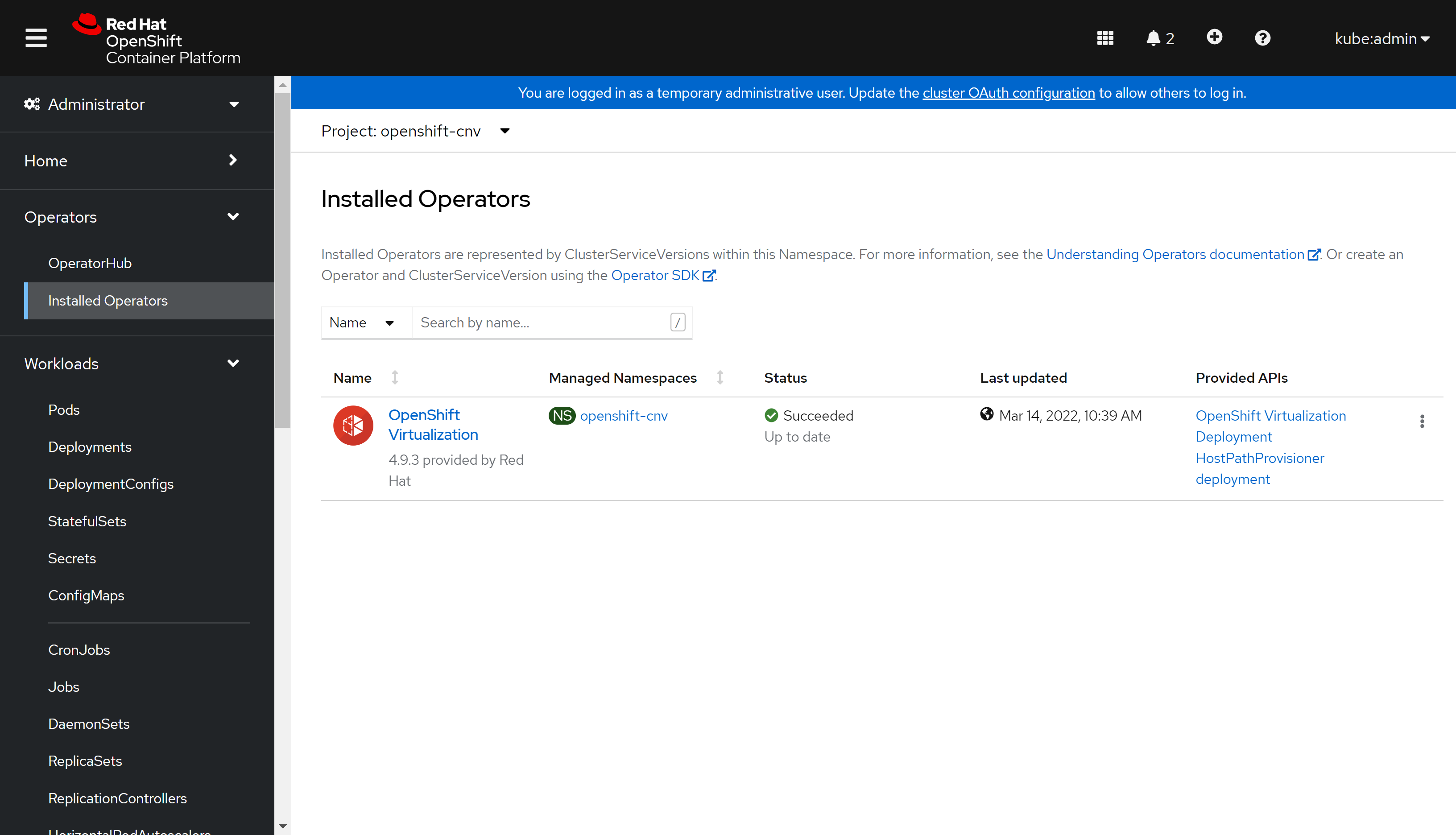
部署完了这样:
部署ACM
接下来,我们就部署ACM,我们用最简单的部署模式。
# install operator Advanced Cluster Management for Kubernetes

# https://docs.openshift.com/container-platform/4.9/scalability_and_performance/ztp-deploying-disconnected.html#enabling-assisted-installer-service-on-bare-metal_ztp-deploying-disconnected
# https://access.redhat.com/documentation/en-us/red_hat_advanced_cluster_management_for_kubernetes/2.4/html/install/installing#installing-from-the-cli


cat << EOF > /data/install/acm.subscript.yaml
apiVersion: v1
kind: Namespace
metadata:
  name: open-cluster-management
---
apiVersion: operators.coreos.com/v1
kind: OperatorGroup
metadata:
  name:  open-cluster-management-wzh
  namespace: open-cluster-management
spec:
  targetNamespaces:
    - open-cluster-management
---
apiVersion: operators.coreos.com/v1alpha1
kind: Subscription
metadata:
  name: advanced-cluster-management
  namespace: open-cluster-management
spec:
  sourceNamespace: openshift-marketplace
  source: redhat-operators
  channel: release-2.4
  installPlanApproval: Automatic
  name: advanced-cluster-management
  # startingCSV: advanced-cluster-management.v2.4.2
EOF
oc create -f /data/install/acm.subscript.yaml

# RHACM create the MultiClusterHub resource

cat << EOF > /data/install/acm.mch.mch.yaml
apiVersion: operator.open-cluster-management.io/v1
kind: MultiClusterHub
metadata:
  name: multiclusterhub
  namespace: open-cluster-management
spec: {}
EOF
oc create -f /data/install/acm.mch.mch.yaml
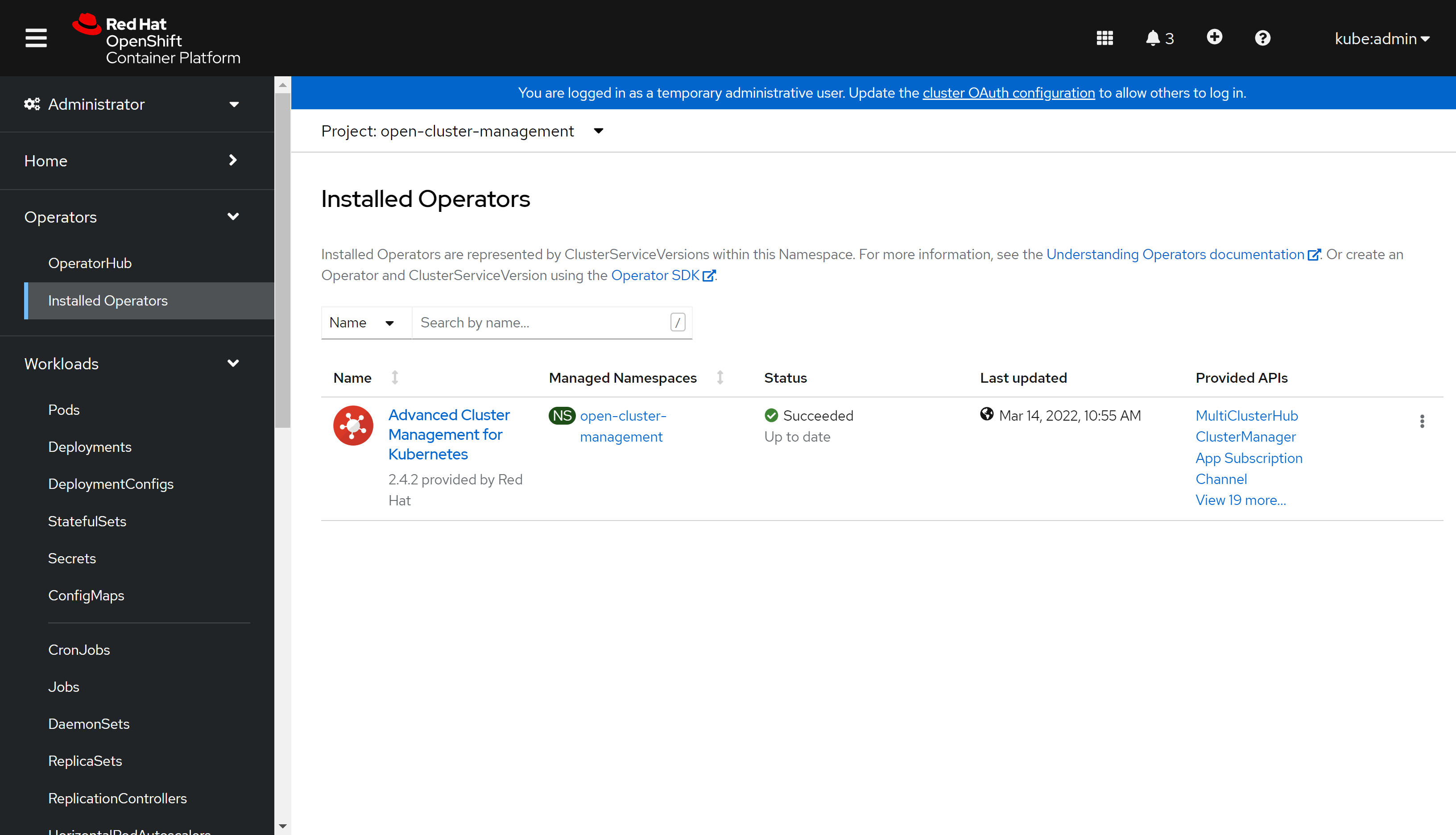
装好了是这样:
我们可以通过webUI访问ACM: https://multicloud-console.apps.acm-demo-hub.redhat.ren/overview
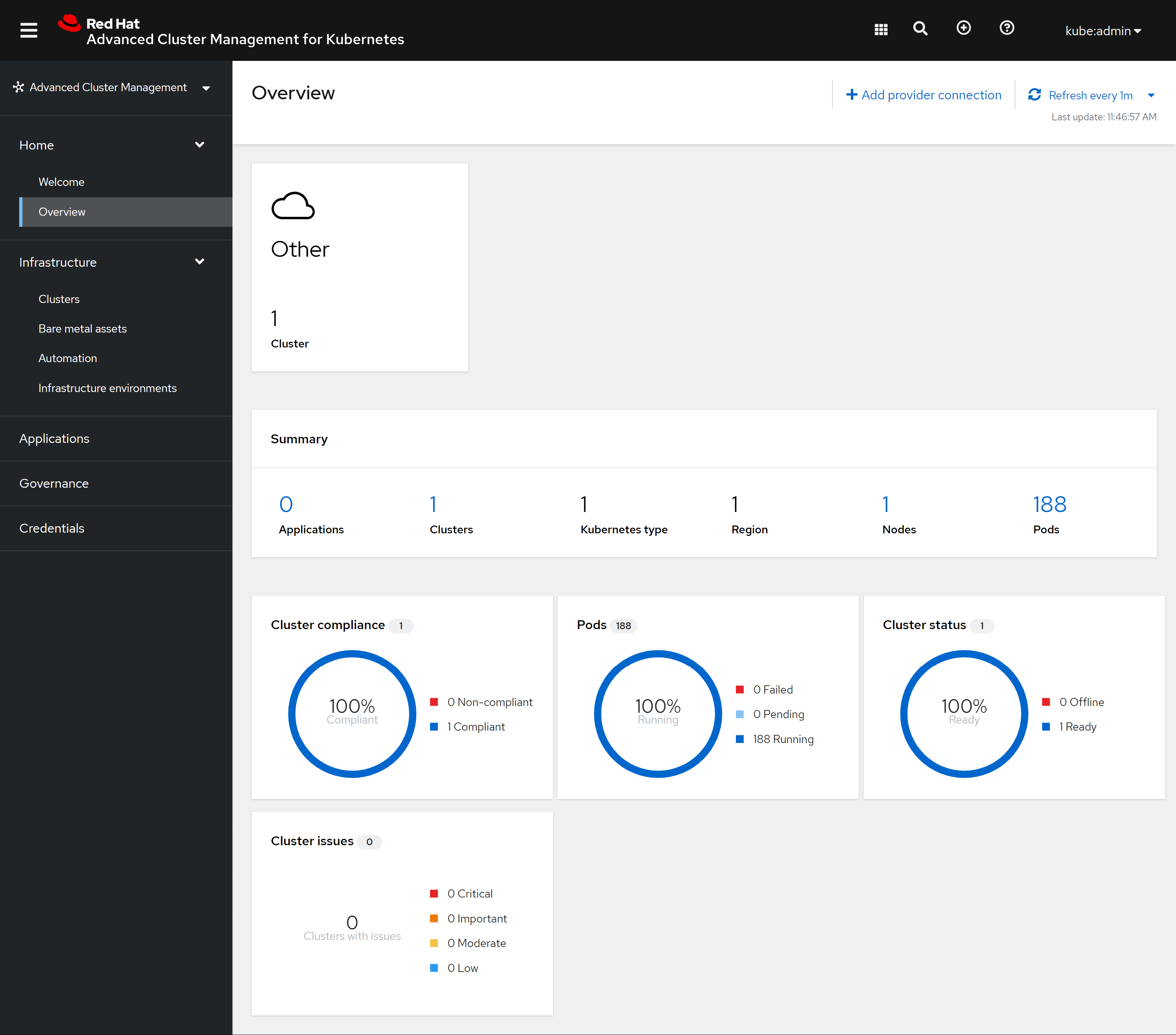
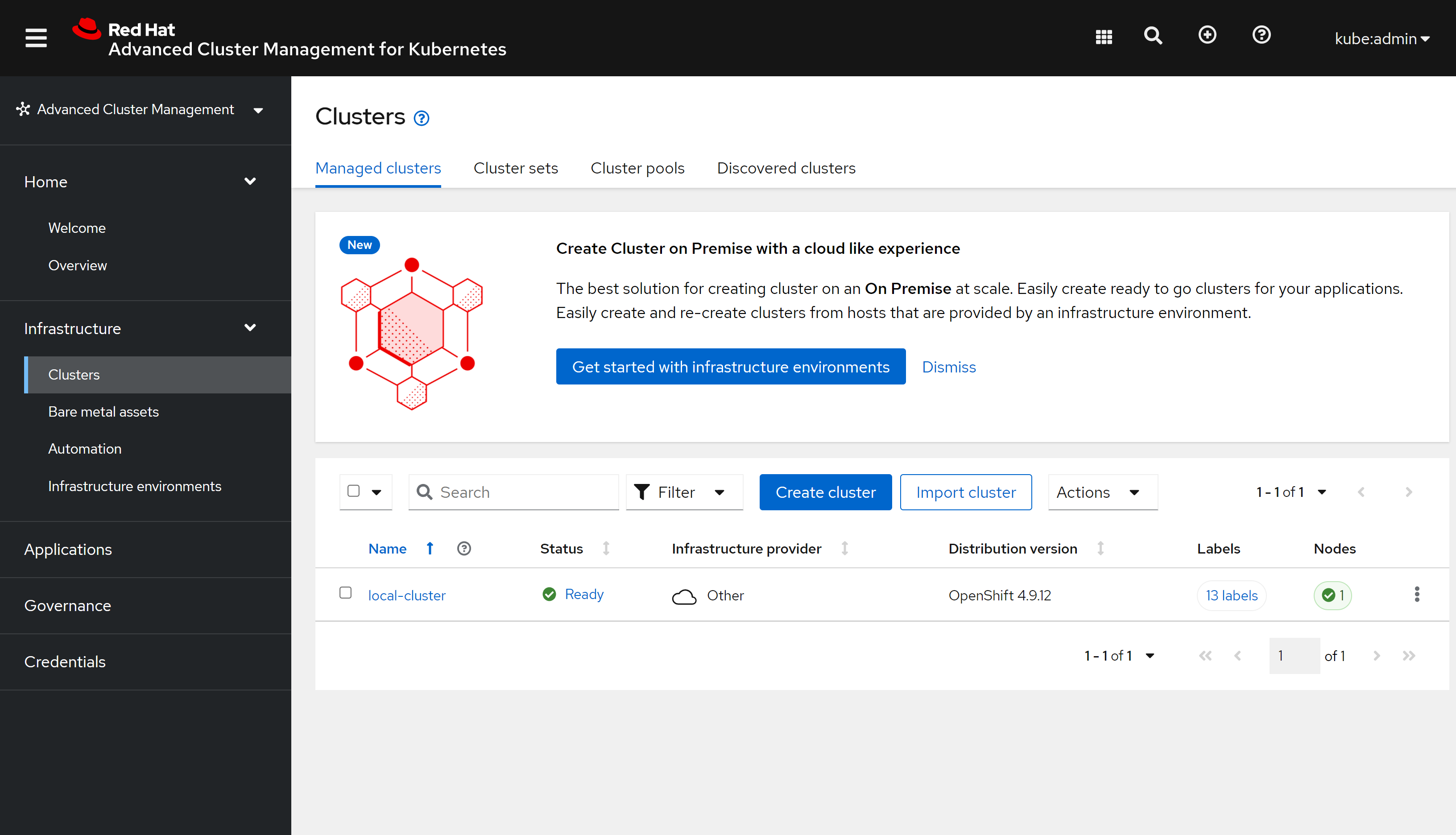
我们可以看到有一个local clustr,这个就是ACM自己运行的集群:
用ZTP模式部署一个SNO
有过部署assisted install service,并通过AIS来部署SNO的经验,那么通过ACM,用ZTP的模式来部署,就容易理解了,整个过程一样,都是配置ACM里面的assisted install service,然后创建一个iso出来,调用BMC API,来直接挂载iso,并启动主机。
命令行配置新集群
ACM 2.4 UI 上并不是完全支持ZTP,所以有些配置要用命令行完成,后续版本会把UI补上。
# https://access.redhat.com/documentation/en-us/red_hat_advanced_cluster_management_for_kubernetes/2.4/html-single/clusters/index#infra-env-prerequisites
oc project open-cluster-management

# do not need, because now, it is acm 2.4.2
# but it seems doesn't matter, if you enable it
oc patch hiveconfig hive --type merge -p '{"spec":{"targetNamespace":"hive","logLevel":"debug","featureGates":{"custom":{"enabled":["AlphaAgentInstallStrategy"]},"featureSet":"Custom"}}}'

oc get hiveconfig hive -o yaml
# ......
# spec:
#   featureGates:
#     custom:
#       enabled:
#       - AlphaAgentInstallStrategy
#     featureSet: Custom
#   logLevel: debug
#   targetNamespace: hive
# ......

oc patch provisioning provisioning-configuration --type merge -p '{"spec":{"watchAllNamespaces": true }}'

oc get provisioning provisioning-configuration -o yaml
# ......
# spec:
#   preProvisioningOSDownloadURLs: {}
#   provisioningIP: 192.168.7.103
#   provisioningMacAddresses:
#   - 00:60:2f:ab:66:f6
#   provisioningNetwork: Disabled
#   provisioningNetworkCIDR: 192.168.7.0/24
#   provisioningOSDownloadURL: http://192.168.7.11:8080/install/rhcos-openstack.x86_64.qcow2.gz?sha256=6b5731d90fa78eb50c07928811675d$f9c1d3f94eca0a94afef17cfbce706ddf
#   watchAllNamespaces: true
# ......

cat << EOF > /data/install/acm.ocp.release.yaml
apiVersion: hive.openshift.io/v1
kind: ClusterImageSet
metadata:
  name: openshift-v4.10.4
  namespace: open-cluster-management
spec:
  releaseImage: ${INSTALL_IMAGE_REGISTRY}/ocp4/openshift4:4.10.4-x86_64
EOF
oc create -f /data/install/acm.ocp.release.yaml

oc get ClusterImageSet
# NAME                RELEASE
# openshift-v4.10.4   quaylab.infra.redhat.ren/ocp4/openshift4:4.10.4-x86_64

cat << EOF > /data/install/acm.cm.asc.yaml
apiVersion: v1
kind: ConfigMap
metadata:
  name: assisted-service-config
  namespace: open-cluster-management
  labels:
    app: assisted-service
data:
  LOG_LEVEL: "debug"
EOF
oc create -f /data/install/acm.cm.asc.yaml


cat << EOF > /data/install/acm.secret.yaml
apiVersion: v1
kind: Secret
metadata:
  name: assisted-deployment-pull-secret
  namespace: open-cluster-management
stringData:
  .dockerconfigjson: '$PULL_SECRET'
EOF
oc create -f /data/install/acm.secret.yaml

# oc get pod -A | grep metal3
# the result is empty, so we will go in manual way
oc get pod -A | grep metal3
# openshift-machine-api                              metal3-697fb46867-8zxxw                                           7/7     Running     8 (42m ago)    4h40m
# openshift-machine-api                              metal3-image-cache-hhvnm                                          1/1     Running     1              4h40m
# openshift-machine-api                              metal3-image-customization-577f886bb4-cwl2l                       1/1     Running     1              4h40m

# curl -s https://mirror.openshift.com/pub/openshift-v4/x86_64/clients/ocp/4.9.12/release.txt | grep 'machine-os '
cat /data/ocp4/4.10.4/release.txt | grep 'machine-os '
  # machine-os 410.84.202203081640-0 Red Hat Enterprise Linux CoreOS

cat << EOF > /data/install/acm.mirror.yaml
apiVersion: v1
kind: ConfigMap
metadata:
  name: hyper1-mirror-config
  namespace: open-cluster-management
  labels:
    app: assisted-service
data:
  ca-bundle.crt: |
$( cat /etc/crts/redhat.ren.ca.crt | sed 's/^/    /g' )
  registries.conf: |
    unqualified-search-registries = ["registry.access.redhat.com", "docker.io"]

    [[registry]]
      prefix = ""
      location = "quay.io/openshift-release-dev/ocp-release"
      mirror-by-digest-only = true

      [[registry.mirror]]
        location = "${INSTALL_IMAGE_REGISTRY}/ocp4/openshift4"

    [[registry]]
      prefix = ""
      location = "quay.io/openshift-release-dev/ocp-v4.0-art-dev"
      mirror-by-digest-only = true

      [[registry.mirror]]
        location = "${INSTALL_IMAGE_REGISTRY}/ocp4/openshift4"

---
EOF
oc create -f /data/install/acm.mirror.yaml


cat << EOF > /data/install/acm.agentservicecofnig.yaml
apiVersion: agent-install.openshift.io/v1beta1
kind: AgentServiceConfig
metadata:
  name: agent
  namespace: open-cluster-management
  ### This is the annotation that injects modifications in the Assisted Service pod
  annotations:
    unsupported.agent-install.openshift.io/assisted-service-configmap: "assisted-service-config"
###
spec:
  databaseStorage:
    accessModes:
      - ReadWriteOnce
    resources:
      requests:
        storage: 40Gi
  filesystemStorage:
    accessModes:
      - ReadWriteOnce
    resources:
      requests:
        storage: 40Gi
  ### This is a ConfigMap that only will make sense on Disconnected environments
  mirrorRegistryRef:
    name: "hyper1-mirror-config"
  ###
  osImages:
    - openshiftVersion: "4.10"
      version: "410.84.202203081640-0"
      url: "http://192.168.7.11:8080/install/live.iso"
      rootFSUrl: "http://192.168.7.11:8080/install/rootfs.img.4.9"
      cpuArchitecture: x86_64
EOF
oc create -f /data/install/acm.agentservicecofnig.yaml
# oc delete -f /data/install/acm.asc.yaml

oc get AgentServiceConfig/agent -n open-cluster-management -o yaml
# ......
# status:
#   conditions:
#   - lastTransitionTime: "2022-04-06T09:38:21Z"
#     message: AgentServiceConfig reconcile completed without error.
#     reason: ReconcileSucceeded
#     status: "True"
#     type: ReconcileCompleted

# logs in infrastructure-operator

# stop here, and wait the assisted-service pod run into ok status
oc get pod -n open-cluster-management | grep assisted
# assisted-image-service-b686cf67d-4hs2t                            1/1     Running   0                44s
# assisted-service-7476bfdd8c-lnnn8                                 2/2     Running   0                44s

# begin to create new cluster

oc create ns ${ACM_DEMO_CLUSTER}
oc project ${ACM_DEMO_CLUSTER}

cat << EOF > /data/install/acm.managed.secret.yaml
apiVersion: v1
kind: Secret
metadata:
  name: assisted-deployment-pull-secret
  namespace: ${ACM_DEMO_CLUSTER}
stringData:
  .dockerconfigjson: '$PULL_SECRET'
EOF
oc create -f /data/install/acm.managed.secret.yaml

cat << EOF > /data/install/acm.nmsc.yaml
apiVersion: agent-install.openshift.io/v1beta1
kind: NMStateConfig
metadata:
 name: ${ACM_DEMO_CLUSTER}
 namespace: ${ACM_DEMO_CLUSTER}
 labels:
   nmstate-conf-cluster-name: ${ACM_DEMO_CLUSTER}
spec:
 config:
   interfaces:
     - name: ${SNO_IF}
       type: ethernet
       state: up
       ipv4:
         enabled: true
         address:
           - ip: ${SNO_IP}
             prefix-length: ${SNO_NETMAST_S}
         dhcp: false
   dns-resolver:
     config:
       server:
         - ${SNO_DNS}
   routes:
     config:
       - destination: 0.0.0.0/0
         next-hop-address: ${SNO_GW}
         next-hop-interface: ${SNO_IF}
         table-id: 254
 interfaces:
   - name: "${SNO_IF}"
     macAddress: ${SNO_IF_MAC}
EOF
oc create -f /data/install/acm.nmsc.yaml

cat << EOF > /data/install/acm.clusterdeployment.yaml
apiVersion: hive.openshift.io/v1
kind: ClusterDeployment
metadata:
  name: ${ACM_DEMO_CLUSTER}
  namespace: ${ACM_DEMO_CLUSTER}
spec:
  baseDomain: ${SNO_BASE_DOMAIN}
  clusterName: ${ACM_DEMO_CLUSTER}
  controlPlaneConfig:
    servingCertificates: {}
  installed: false
  clusterInstallRef:
    group: extensions.hive.openshift.io
    kind: AgentClusterInstall
    name: ${ACM_DEMO_CLUSTER}
    version: v1beta1
  platform:
    agentBareMetal:
      agentSelector:
        matchLabels:
          cluster-name: "${ACM_DEMO_CLUSTER}"
  pullSecretRef:
    name: assisted-deployment-pull-secret
EOF
oc create -f /data/install/acm.clusterdeployment.yaml

oc get ClusterDeployment/${ACM_DEMO_CLUSTER} -n ${ACM_DEMO_CLUSTER} -o json | jq .status | head
# {
#   "conditions": [
#     {
#       "lastProbeTime": "2022-04-08T14:58:11Z",
#       "lastTransitionTime": "2022-04-08T14:58:11Z",
#       "message": "Platform credentials passed authentication check",
#       "reason": "PlatformAuthSuccess",
#       "status": "False",
#       "type": "AuthenticationFailure"
#     },

cat << EOF > /data/install/acm.agentclusterinstall.yaml
apiVersion: extensions.hive.openshift.io/v1beta1
kind: AgentClusterInstall
metadata:
  name: ${ACM_DEMO_CLUSTER}
  namespace: ${ACM_DEMO_CLUSTER}
  # Only include the annotation if using OVN, otherwise omit the annotation
#   annotations:
#     agent-install.openshift.io/install-config-overrides: '{"networking":{"networkType":"OVNKubernetes"}}'
spec:
  clusterDeploymentRef:
    name: ${ACM_DEMO_CLUSTER}
  imageSetRef:
    name: openshift-v4.10.4
  networking:
    clusterNetwork:
      - cidr: "10.128.0.0/14"
        hostPrefix: 23
    serviceNetwork:
      - "172.30.0.0/16"
    machineNetwork:
      - cidr: "192.168.7.0/24"
  provisionRequirements:
    controlPlaneAgents: 1
  sshPublicKey: "$(< ~/.ssh/id_rsa.pub)"
EOF
oc create -f /data/install/acm.agentclusterinstall.yaml
# oc delete -f /data/install/acm.agentclusterinstall.yaml

# wait a moment, and this will be ok
oc get AgentClusterInstall/${ACM_DEMO_CLUSTER} -n ${ACM_DEMO_CLUSTER} -o json | jq .status | head
# {
#   "conditions": [
#     {
#       "lastProbeTime": "2022-04-06T13:50:43Z",
#       "lastTransitionTime": "2022-04-06T13:50:43Z",
#       "message": "SyncOK",
#       "reason": "SyncOK",
#       "status": "True",
#       "type": "SpecSynced"
#     },

cat << EOF > /data/install/acm.klusterletaddonconfig.yaml
apiVersion: agent.open-cluster-management.io/v1
kind: KlusterletAddonConfig
metadata:
  name: ${ACM_DEMO_CLUSTER}
  namespace: ${ACM_DEMO_CLUSTER}
spec:
  clusterName: ${ACM_DEMO_CLUSTER}
  clusterNamespace: ${ACM_DEMO_CLUSTER}
  clusterLabels:
    cloud: auto-detect
    vendor: auto-detect
  applicationManager:
    enabled: true
  certPolicyController:
    enabled: true
  iamPolicyController:
    enabled: true
  policyController:
    enabled: true
  searchCollector:
    enabled: true
EOF
oc create -f /data/install/acm.klusterletaddonconfig.yaml

oc get KlusterletAddonConfig/${ACM_DEMO_CLUSTER} -n ${ACM_DEMO_CLUSTER} -o yaml
# apiVersion: agent.open-cluster-management.io/v1
# kind: KlusterletAddonConfig
# metadata:
#   creationTimestamp: "2022-04-06T13:51:19Z"
#   generation: 1
#   name: acm-demo1
#   namespace: acm-demo1
#   resourceVersion: "2187935"
#   uid: 1615ed53-80a3-48d2-823f-8dff08a97d75
# spec:
#   applicationManager:
#     enabled: true
#   certPolicyController:
#     enabled: true
#   clusterLabels:
#     cloud: auto-detect
#     vendor: auto-detect
#   clusterName: acm-demo1
#   clusterNamespace: acm-demo1
#   iamPolicyController:
#     enabled: true
#   policyController:
#     enabled: true
#   searchCollector:
#     enabled: true
# status:
#   conditions:
#   - lastTransitionTime: "2022-04-06T13:51:19Z"
#     message: The cluster is not provisioned by ACM.
#     reason: OCPGlobalProxyNotDetected
#     status: "False"
#     type: OCPGlobalProxyDetected
#   ocpGlobalProxy: {}

cat << EOF > /data/install/acm.managedcluster.yaml
apiVersion: cluster.open-cluster-management.io/v1
kind: ManagedCluster
metadata:
  name: ${ACM_DEMO_CLUSTER}
spec:
  hubAcceptsClient: true
EOF
oc create -f /data/install/acm.managedcluster.yaml

# 我们是离线安装,所以要定制一下启动配置文件
# generate the ignition

cat << EOF > /data/sno/ign.base.json
{
  "ignition": {
    "version": "3.1.0"
  }
}
EOF

cat << EOF > /data/sno/install.images.bu
variant: openshift
version: 4.9.0
metadata:
  labels:
    machineconfiguration.openshift.io/role: master
  name: 99-zzz-master-install-images
storage:
  files:
    - path: /etc/containers/registries.conf.d/base.registries.conf
      overwrite: true
      contents:
        inline: |
          unqualified-search-registries = ["registry.access.redhat.com", "docker.io"]
          short-name-mode = ""

          [[registry]]
            prefix = ""
            location = "quay.io/openshift-release-dev/ocp-release"
            mirror-by-digest-only = true

            [[registry.mirror]]
              location = "${INSTALL_IMAGE_REGISTRY}/ocp4/openshift4"

          [[registry]]
            prefix = ""
            location = "quay.io/openshift-release-dev/ocp-v4.0-art-dev"
            mirror-by-digest-only = true

            [[registry.mirror]]
              location = "${INSTALL_IMAGE_REGISTRY}/ocp4/openshift4"

EOF

cat << EOF > /data/sno/install.crts.bu
variant: openshift
version: 4.9.0
metadata:
  labels:
    machineconfiguration.openshift.io/role: master
  name: 99-zzz-master-install-crts
storage:
  files:
    - path: /etc/pki/ca-trust/source/anchors/quaylab.crt
      overwrite: true
      contents:
        inline: |
$( cat /etc/crts/redhat.ren.ca.crt | sed 's/^/          /g' )

EOF

mkdir -p /data/sno/disconnected/
# copy ntp related config
/bin/cp -f  /data/ocp4/ocp4-upi-helpernode-master/machineconfig/* /data/sno/disconnected/

# copy image registry proxy related config
cd /data/ocp4
bash image.registries.conf.sh nexus.infra.redhat.ren:8083

/bin/cp -f /data/ocp4/99-worker-container-registries.yaml /data/sno/disconnected/
/bin/cp -f /data/ocp4/99-master-container-registries.yaml /data/sno/disconnected/

cd /data/sno/
# load ignition file generation function
source /data/ocp4/acm.fn.sh


get_file_content_for_ignition "/opt/openshift/openshift/99-master-chrony-configuration.yaml" "/data/sno/disconnected/99-master-chrony-configuration.yaml"
VAR_99_master_chrony=$RET_VAL
VAR_99_master_chrony_2=$RET_VAL_2

get_file_content_for_ignition "/opt/openshift/openshift/99-worker-chrony-configuration.yaml" "/data/sno/disconnected/99-worker-chrony-configuration.yaml"
VAR_99_worker_chrony=$RET_VAL
VAR_99_worker_chrony_2=$RET_VAL_2

get_file_content_for_ignition "/opt/openshift/openshift/99-master-container-registries.yaml" "/data/sno/disconnected/99-master-container-registries.yaml"
VAR_99_master_container_registries=$RET_VAL
VAR_99_master_container_registries_2=$RET_VAL_2

get_file_content_for_ignition "/opt/openshift/openshift/99-worker-container-registries.yaml" "/data/sno/disconnected/99-worker-container-registries.yaml"
VAR_99_worker_container_registries=$RET_VAL
VAR_99_worker_container_registries_2=$RET_VAL_2

butane /data/sno/install.images.bu > /data/sno/disconnected/99-zzz-master-install-images.yaml
get_file_content_for_ignition "/opt/openshift/openshift/99-zzz-master-install-images.yaml" "/data/sno/disconnected/99-zzz-master-install-images.yaml"
VAR_99_master_install_images=$RET_VAL
VAR_99_master_install_images_2=$RET_VAL_2

butane /data/sno/install.crts.bu > /data/sno/disconnected/99-zzz-master-install-crts.yaml
get_file_content_for_ignition "/opt/openshift/openshift/99-zzz-master-install-crts.yaml" "/data/sno/disconnected/99-zzz-master-install-crts.yaml"
VAR_99_master_install_crts=$RET_VAL
VAR_99_master_install_crts_2=$RET_VAL_2

# https://access.redhat.com/solutions/6194821
# butane /data/sno/static.ip.bu | python3 -c 'import json, yaml, sys; print(json.dumps(yaml.load(sys.stdin)))'

# https://stackoverflow.com/questions/2854655/command-to-escape-a-string-in-bash
# VAR_PULL_SEC=`printf "%q" $(cat  /data/pull-secret.json)`

# https://access.redhat.com/solutions/221403
# VAR_PWD_HASH="$(openssl passwd -1 -salt 'openshift' 'redhat')"
VAR_PWD_HASH="$(python3 -c 'import crypt,getpass; print(crypt.crypt("redhat"))')"

tmppath=$(mktemp)
cat /data/sno/ign.base.json \
  | jq --arg VAR "$VAR_PWD_HASH" --arg VAR_SSH "$NODE_SSH_KEY" '.passwd.users += [{ "name": "wzh", "system": true, "passwordHash": $VAR , "sshAuthorizedKeys": [ $VAR_SSH ], "groups": [ "adm", "wheel", "sudo", "systemd-journal"  ] }]' \
  | jq --argjson VAR "$VAR_99_master_chrony" '.storage.files += [$VAR] ' \
  | jq --argjson VAR "$VAR_99_worker_chrony" '.storage.files += [$VAR] ' \
  | jq --argjson VAR "$VAR_99_master_container_registries" '.storage.files += [$VAR] ' \
  | jq --argjson VAR "$VAR_99_worker_container_registries" '.storage.files += [$VAR] ' \
  | jq --argjson VAR "$VAR_99_master_chrony_2" '.storage.files += [$VAR] ' \
  | jq --argjson VAR "$VAR_99_master_container_registries_2" '.storage.files += [$VAR] ' \
  | jq --argjson VAR "$VAR_99_master_install_images_2" '.storage.files += [$VAR] ' \
  | jq --argjson VAR "$VAR_99_master_install_crts_2" '.storage.files += [$VAR] ' \
  | jq -c . \
  > ${tmppath}
VAR_IGNITION=$(cat ${tmppath})
rm -f ${tmppath}


cat << EOF > /data/install/acm.infraenv.yaml
apiVersion: agent-install.openshift.io/v1beta1
kind: InfraEnv
metadata:
  name: ${ACM_DEMO_CLUSTER}
  namespace: ${ACM_DEMO_CLUSTER}
spec:
  additionalNTPSources:
    - 192.168.7.11
  clusterRef:
    name: ${ACM_DEMO_CLUSTER}
    namespace: ${ACM_DEMO_CLUSTER}
  sshAuthorizedKey: "$(< ~/.ssh/id_rsa.pub)"
  pullSecretRef:
    name: assisted-deployment-pull-secret
  ignitionConfigOverride: '${VAR_IGNITION}'
  nmStateConfigLabelSelector:
    matchLabels:
      nmstate-conf-cluster-name: ${ACM_DEMO_CLUSTER}
  # imageType: "full-iso"
EOF
oc create -f /data/install/acm.infraenv.yaml
# oc delete -f /data/install/acm.infraenv.yaml

oc get infraenv/${ACM_DEMO_CLUSTER} -n ${ACM_DEMO_CLUSTER} -o json | jq .status
# {
#   "agentLabelSelector": {
#     "matchLabels": {
#       "infraenvs.agent-install.openshift.io": "acm-demo1"
#     }
#   },
#   "conditions": [
#     {
#       "lastTransitionTime": "2022-04-06T13:52:54Z",
#       "message": "Image has been created",
#       "reason": "ImageCreated",
#       "status": "True",
#       "type": "ImageCreated"
#     }
#   ],
#   "createdTime": "2022-04-06T13:52:54Z",
#   "debugInfo": {
#     "eventsURL": ""
#   },
#   "isoDownloadURL": "https://assisted-image-service-open-cluster-management.apps.acm-demo-hub.redhat.ren/images/a87141aa-d980-4f34-ba59-d236e2158c98?api_key=eyJhbGciOiJFUzI1NiIsInR5cCI6IkpXVCJ9.eyJpbmZyYV9lbnZfaWQiOiJhODcxNDFhYS1kOTgwLTRmMzQtYmE1OS1kMjM2ZTIxNThjOTgifQ.muD_hlhMIgcNaAZk00M09QW-EwI1REGkxavKo26P-CZ_IkPR3GcdPhWLVtBjdTkrcAOgt__pcWkmJQyko5sqtw&arch=x86_64&type=minimal-iso&version=4.10"
# }


# VAR_ISO=`oc get infraenv ${ACM_DEMO_CLUSTER} -n ${ACM_DEMO_CLUSTER} -o jsonpath={.status.isoDownloadURL}`

# cd /data/install/
# wget --no-check-certificate -O acm.demo1.iso $VAR_ISO

oc get pod -A | grep metal3
# openshift-machine-api                              metal3-6b7b4665f6-knwzr                                           7/7     Running     0               39m
# openshift-machine-api                              metal3-image-cache-hhvnm                                          1/1     Running     1               6h14m
# openshift-machine-api                              metal3-image-customization-577f886bb4-cwl2l                       1/1     Running     1               6h13m

cd /data/ocp4/
cat << 'EOF' > redfish.sh
#!/usr/bin/env bash

curl -k -s https://192.168.7.1:8000/redfish/v1/Systems/ | jq -r '.Members[]."@odata.id"' >  list

while read -r line; do
    curl -k -s https://192.168.7.1:8000/$line | jq -j '.Id, " ", .Name, "\n" '
done < list

EOF
bash redfish.sh > /data/install/vm.list
cat /data/install/vm.list
# 075b17f7-9be9-4576-8d72-2ddd99909e19 ocp4-acm-demo1-master0
# c991312a-26de-438d-8c2d-6aa6cd586bca ocp4-master0
# e70f66bc-7878-4617-811d-89cdaf62cc8c ocp4-Helper

# oc patch provisioning provisioning-configuration --type merge -p '{"spec":{"watchAllNamespaces": true}}'

cat << EOF > /data/install/acm.demo.secret.bmc.yaml
apiVersion: v1
kind: Secret
metadata:
  name: ${ACM_DEMO_CLUSTER}-bmc-master-0
  namespace: ${ACM_DEMO_CLUSTER}
data:
  password: $(echo password | base64)
  username: $(echo admin | base64)
type: Opaque
EOF
oc create -f /data/install/acm.demo.secret.bmc.yaml

cat << EOF > /data/install/acm.demo.bmh.master.yaml
apiVersion: metal3.io/v1alpha1
kind: BareMetalHost
metadata:
  name: ${ACM_DEMO_CLUSTER}-master0
  namespace: ${ACM_DEMO_CLUSTER}
  labels:
    infraenvs.agent-install.openshift.io: "${ACM_DEMO_CLUSTER}"
  annotations:
    ## Disable the Introspection
    inspect.metal3.io: disabled
    ## Set Static Hostname
    bmac.agent-install.openshift.io/hostname: "${SNO_HOSTNAME}"
    ## Set Static Role
    bmac.agent-install.openshift.io/role: "master"
spec:
  online: true
  bmc:
    address: redfish-virtualmedia://192.168.7.1:8000/redfish/v1/Systems/$(cat /data/install/vm.list | grep acm-demo1-master0 | awk '{print $1}')
    credentialsName: ${ACM_DEMO_CLUSTER}-bmc-master-0
    disableCertificateVerification: true
  bootMACAddress: $(cat /data/install/mac.list | grep acm-demo1-master0 | awk '{print $2}')
  automatedCleaningMode: disabled
EOF
oc create -f /data/install/acm.demo.bmh.master.yaml
# oc delete -f /data/install/acm.demo.bmh.master.yaml
我们回到ACM的界面中,能从基础架构中,看到我们新创建的HOST了,能看到ACM正在通过redfish配置这个kvm
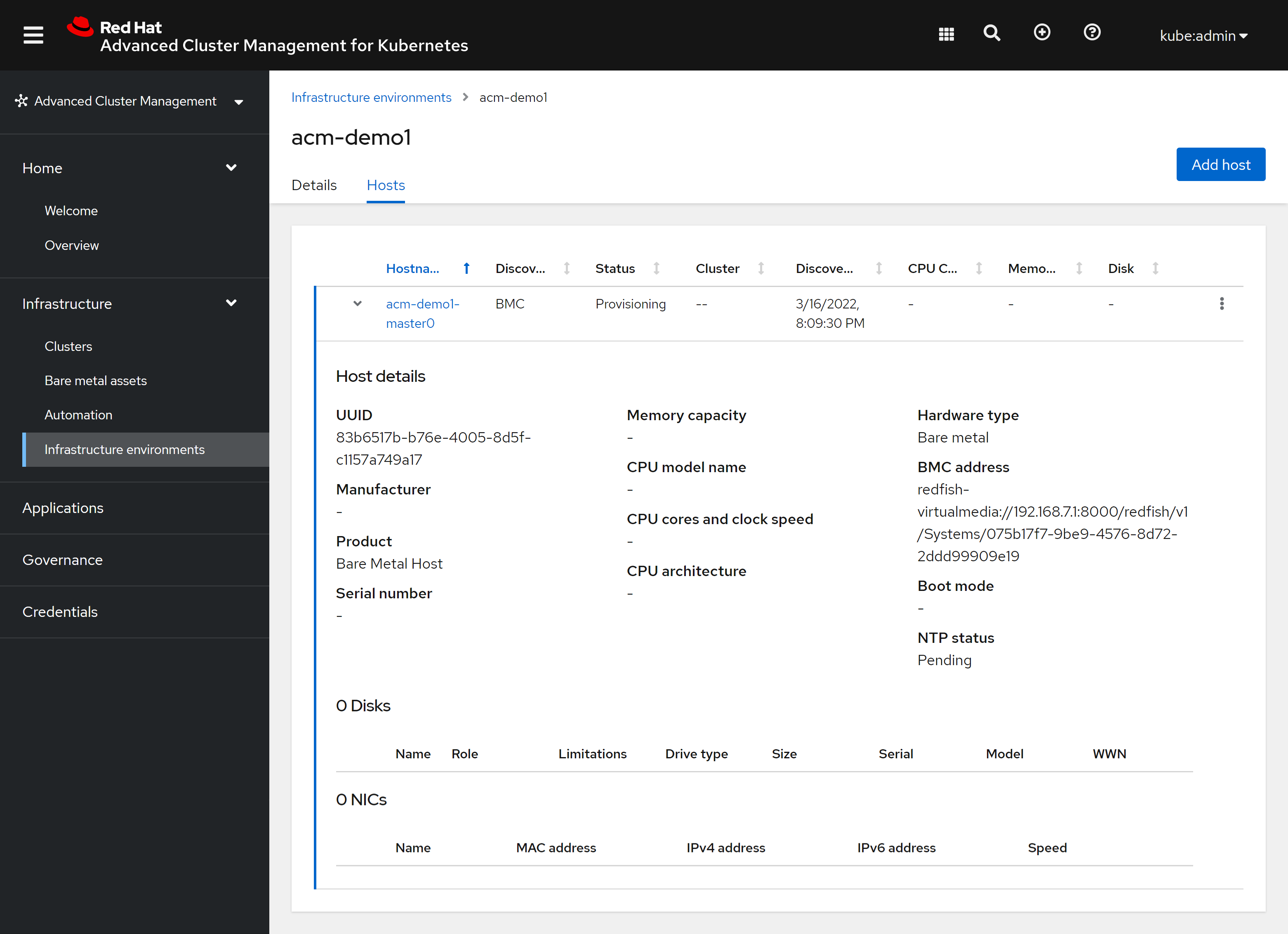
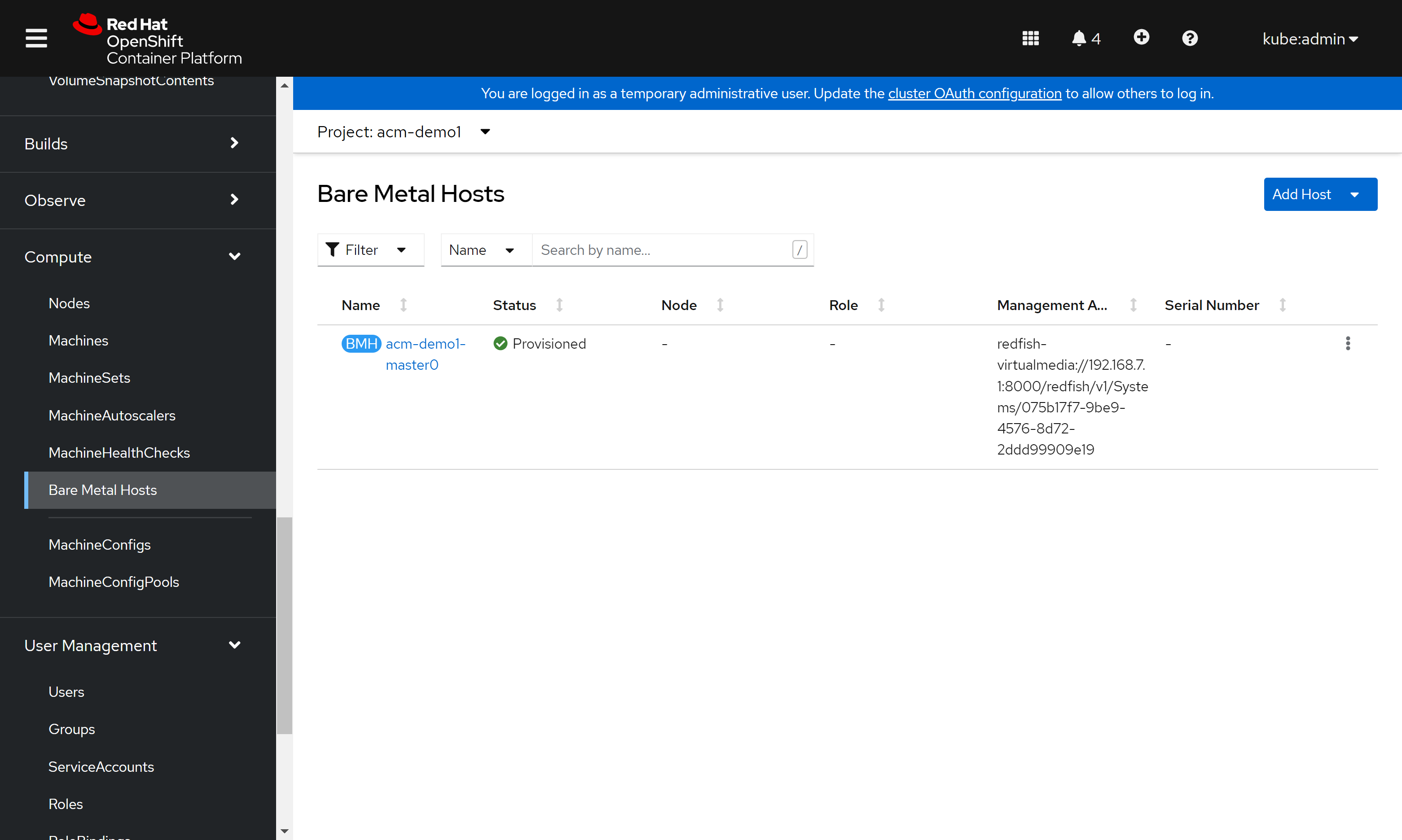
这个bare metal
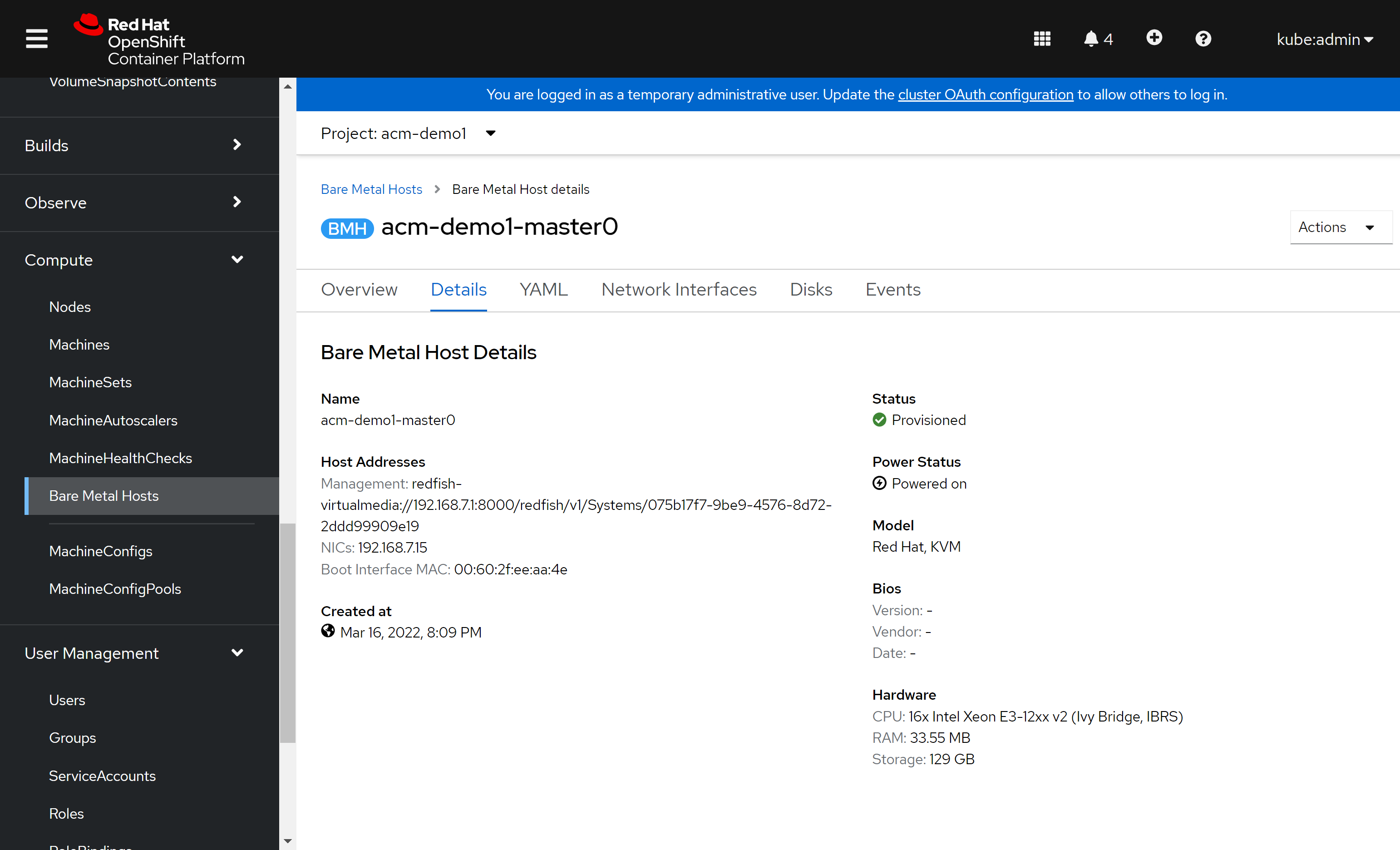
host其实是调用的openshift4平台上的服务创建的,所以从openshift4的console上也能看得到:
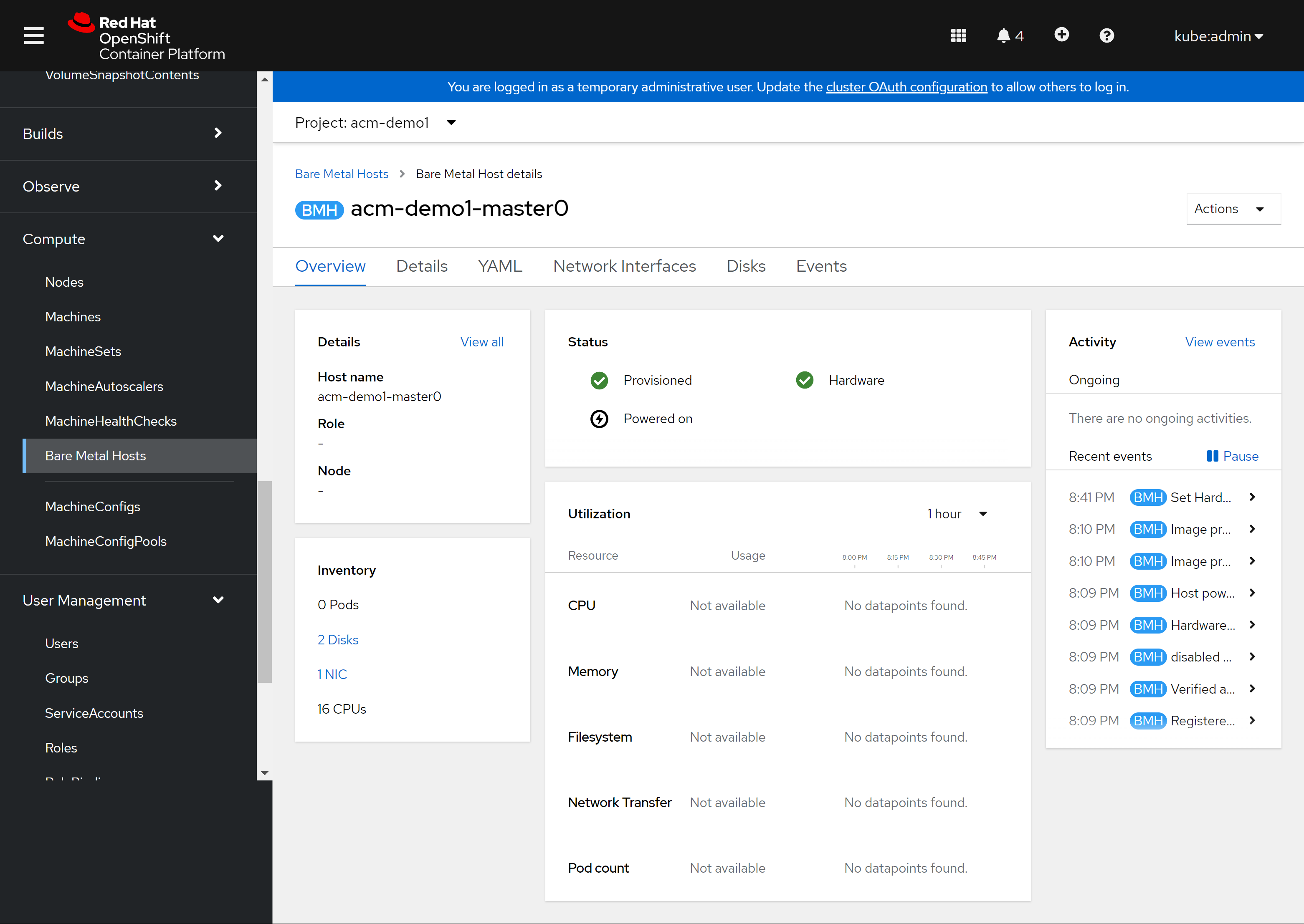
能从openshift4 console上看到这个bare metal host的详细信息:
回到ACM的界面中,我们能看到安装正在继续: 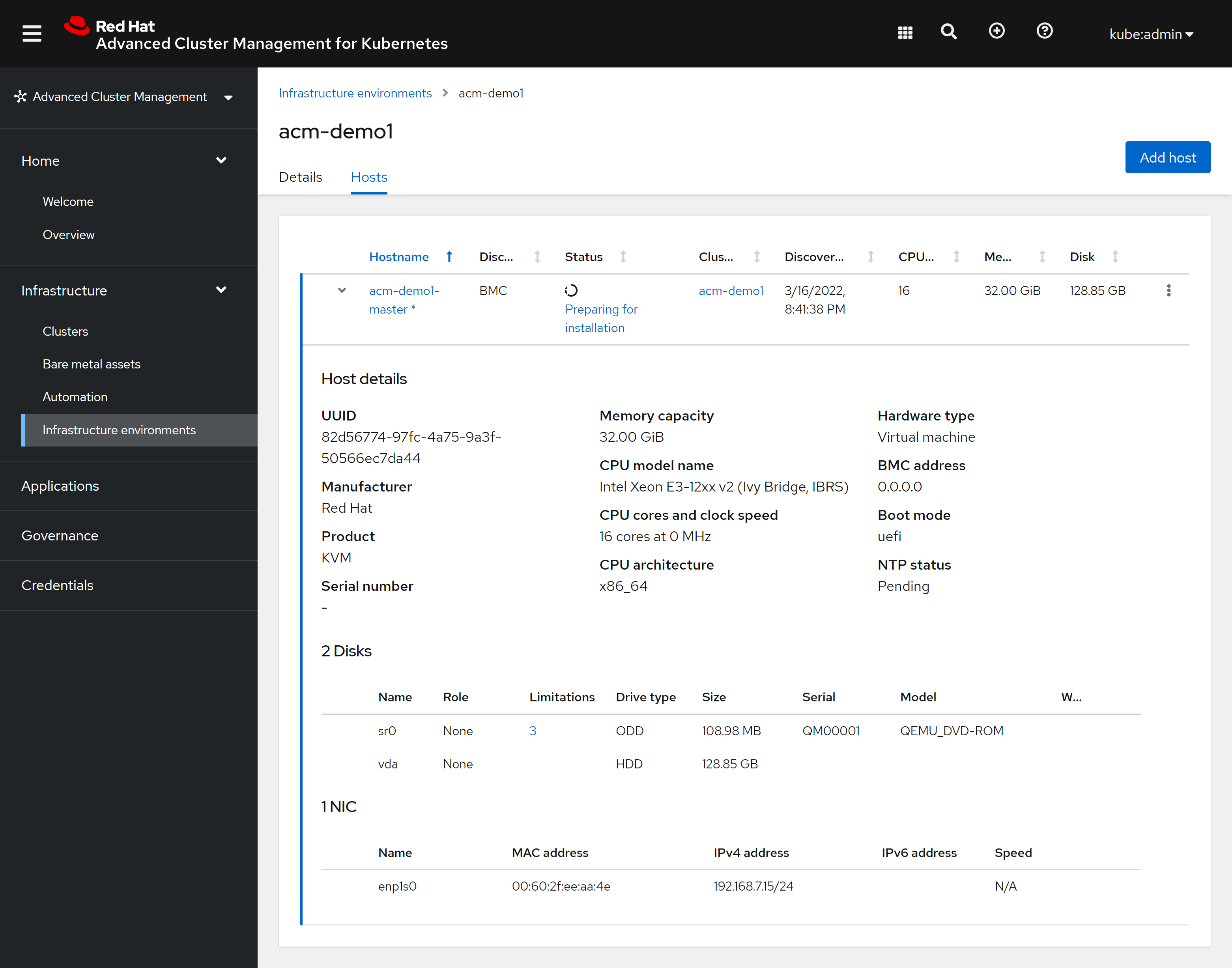
从ACM的cluster界面中,我们能看到安装的详细进展情况: 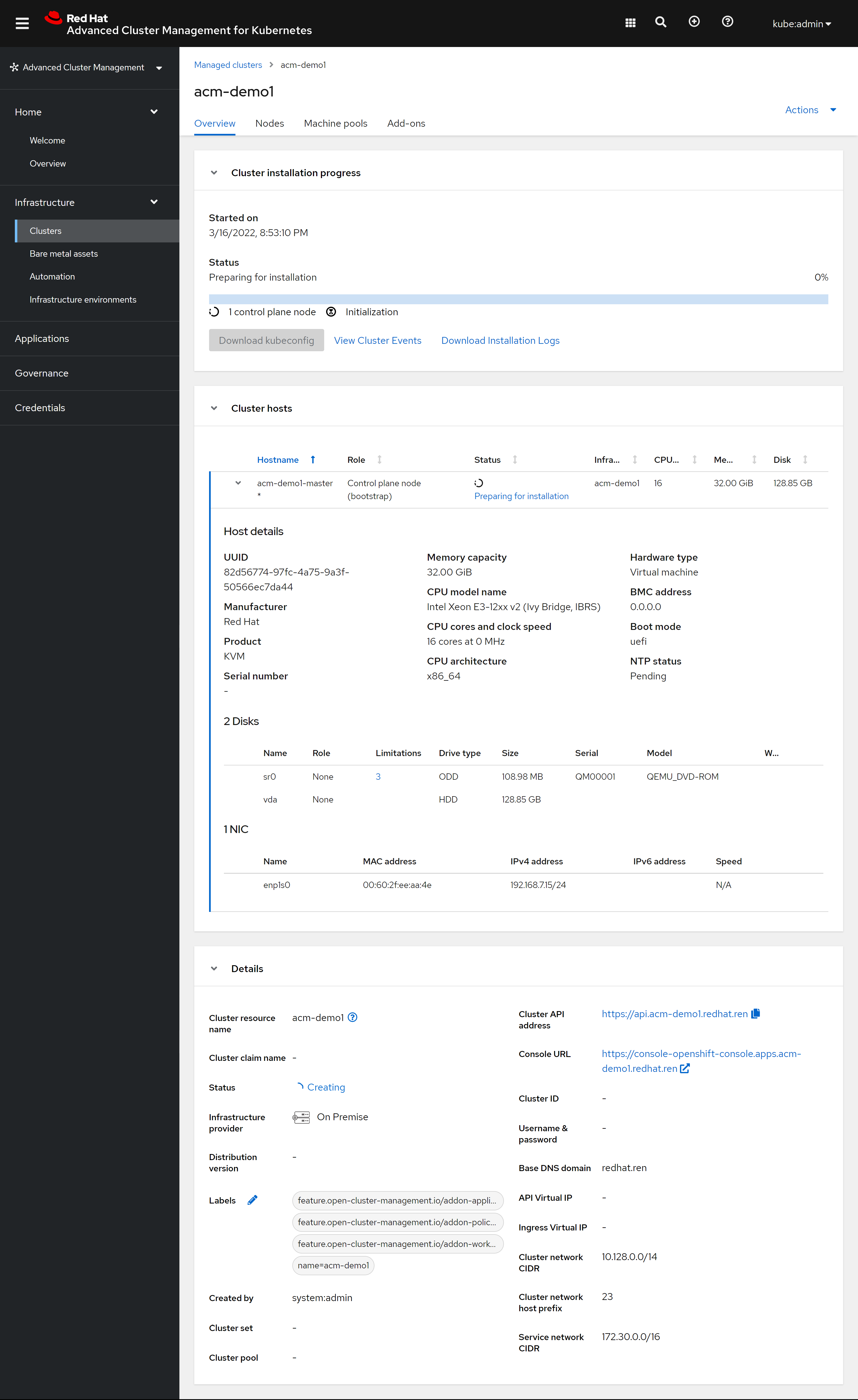
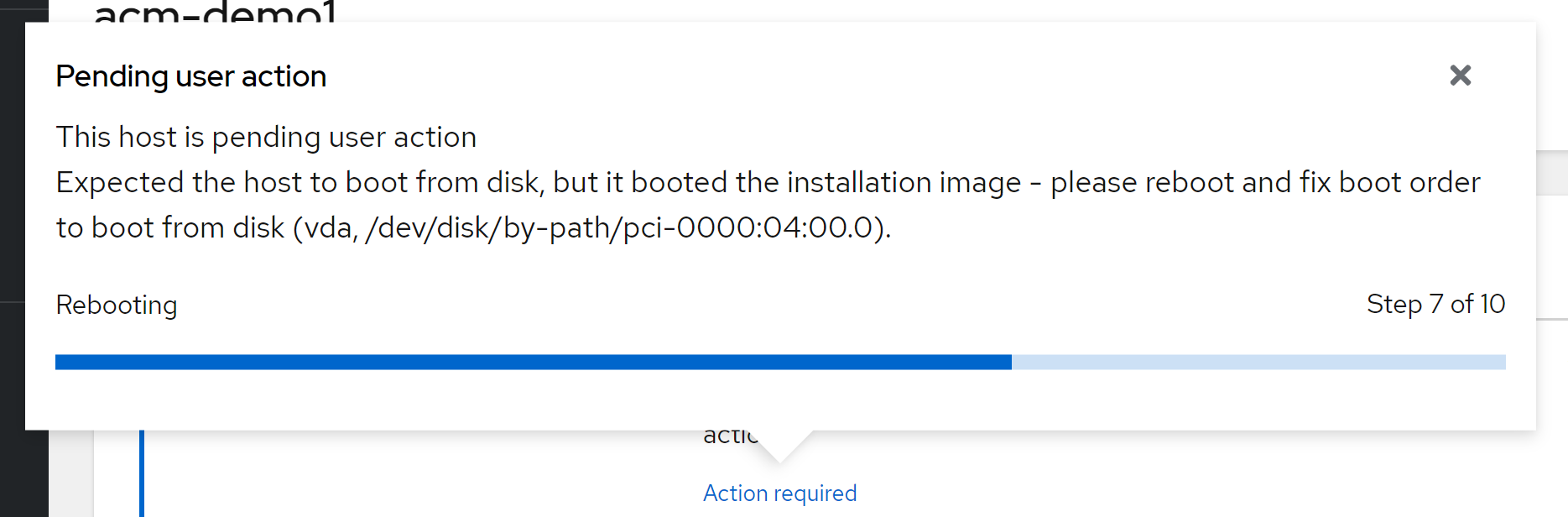
但是安装的中途,提示我们需要动手操作一下。这是因为我们是用kvm模拟的物理机,并且模拟了一个redfish,这个redfish功能比较简单,在安装ocp的过程中,kvm会重启,但是远程挂载的光盘没有卸载,所以我们需要卸载掉这个光驱,然后继续安装:
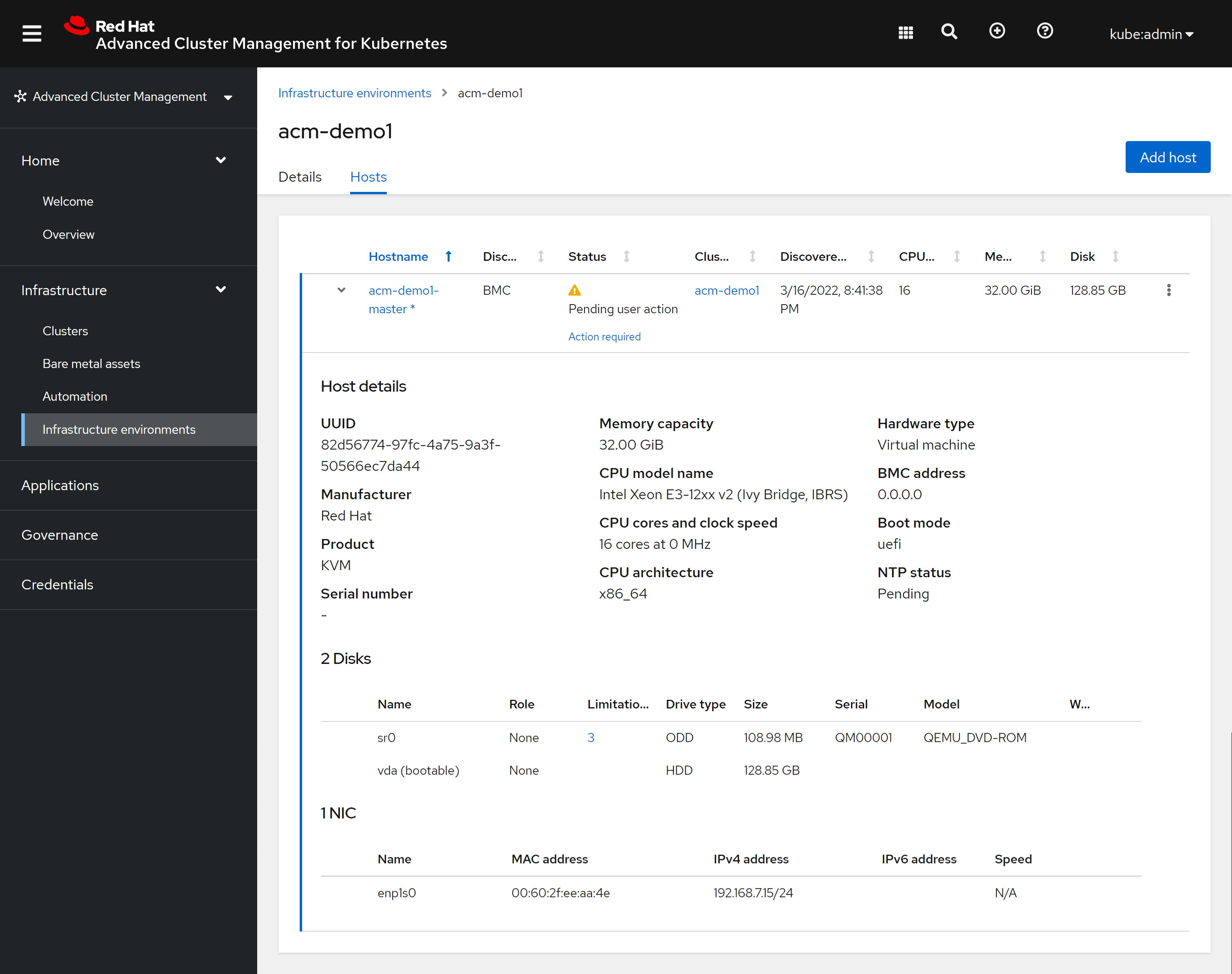
进入kvm的界面,调整一下启动顺序: 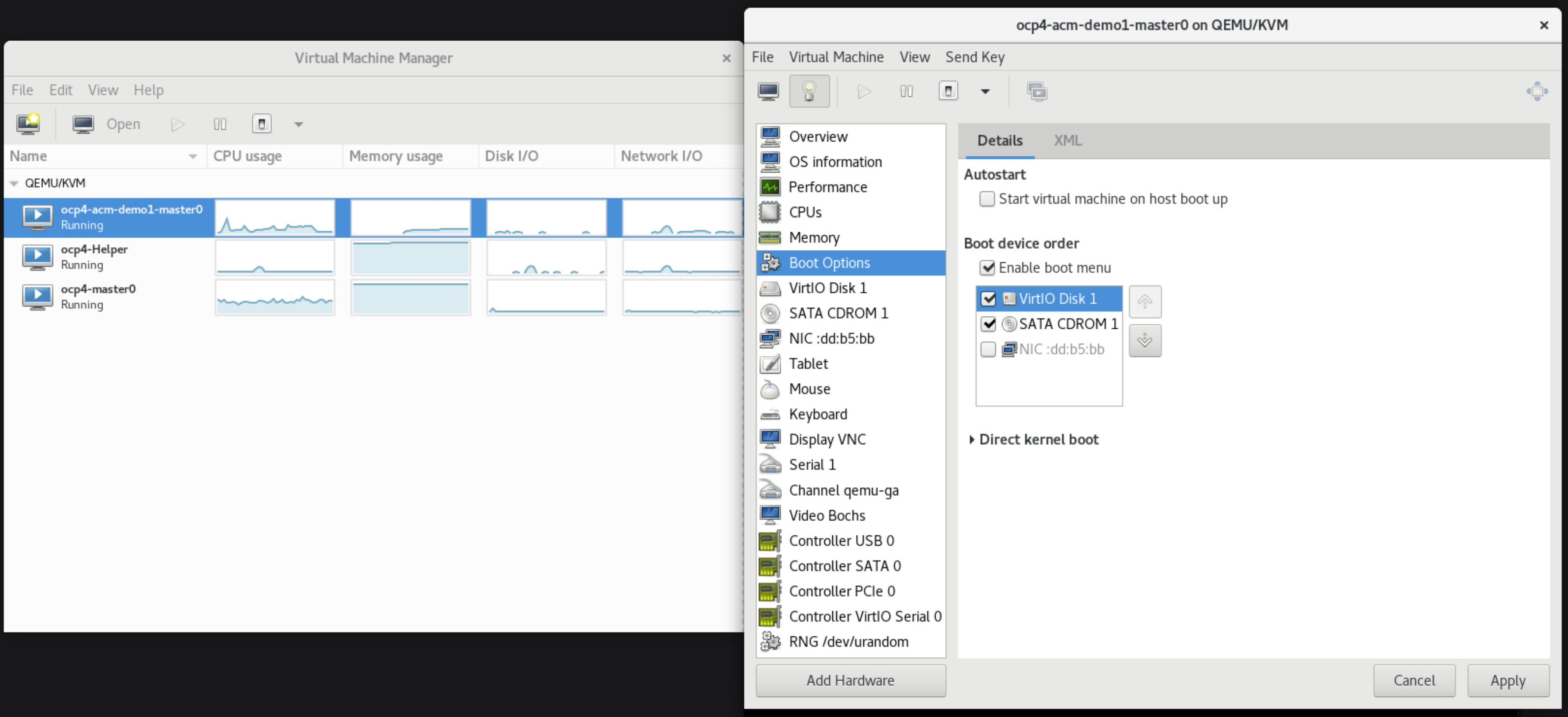
然后重启kvm,等待一段时间,infra env就安装完成了。 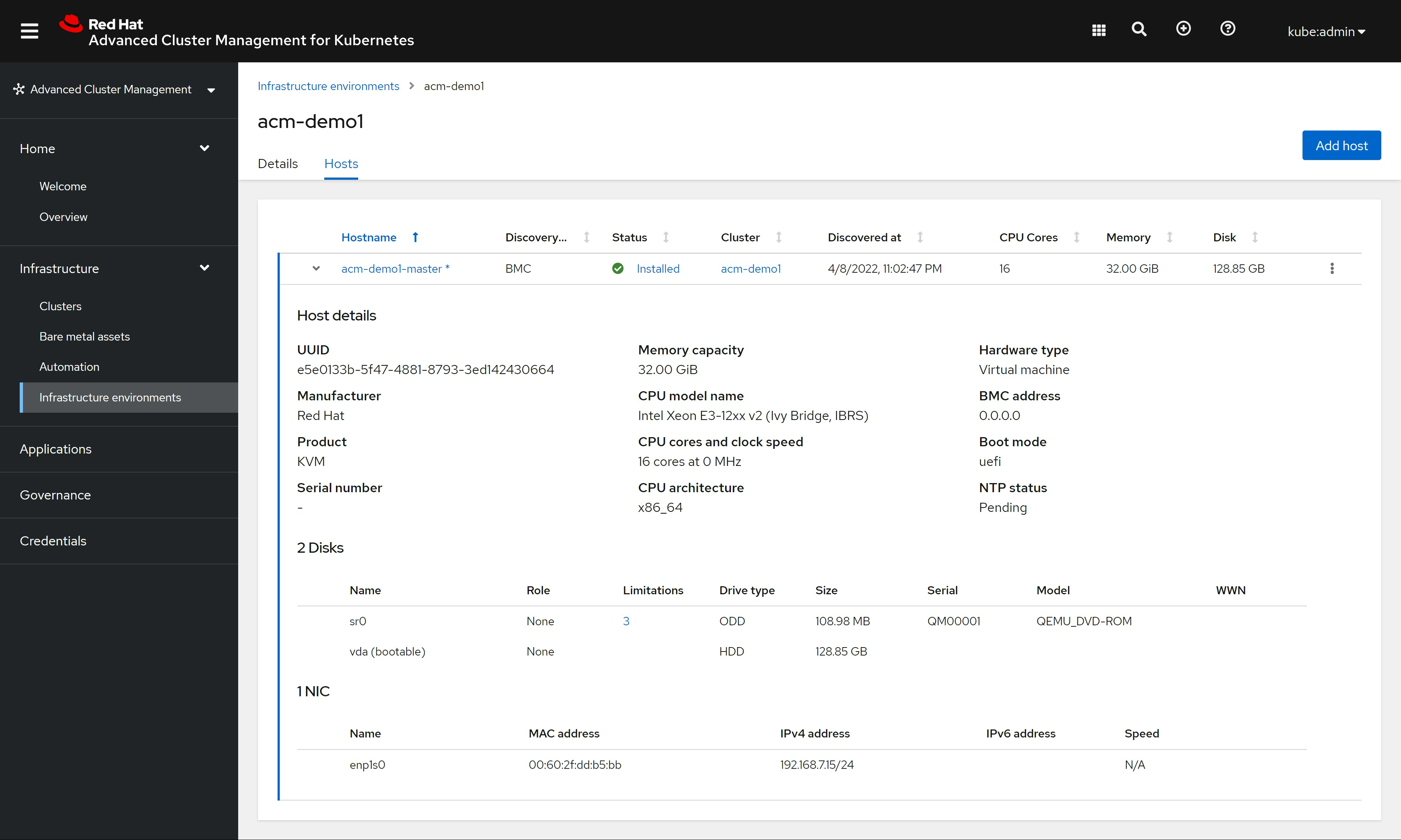
不过,cluster还在继续安装,我们安心等待安装过程完成。
安装完成
装好了以后,我们在ACM里面就能看到如下景象: https://multicloud-console.apps.acm-demo-hub.redhat.ren/overview
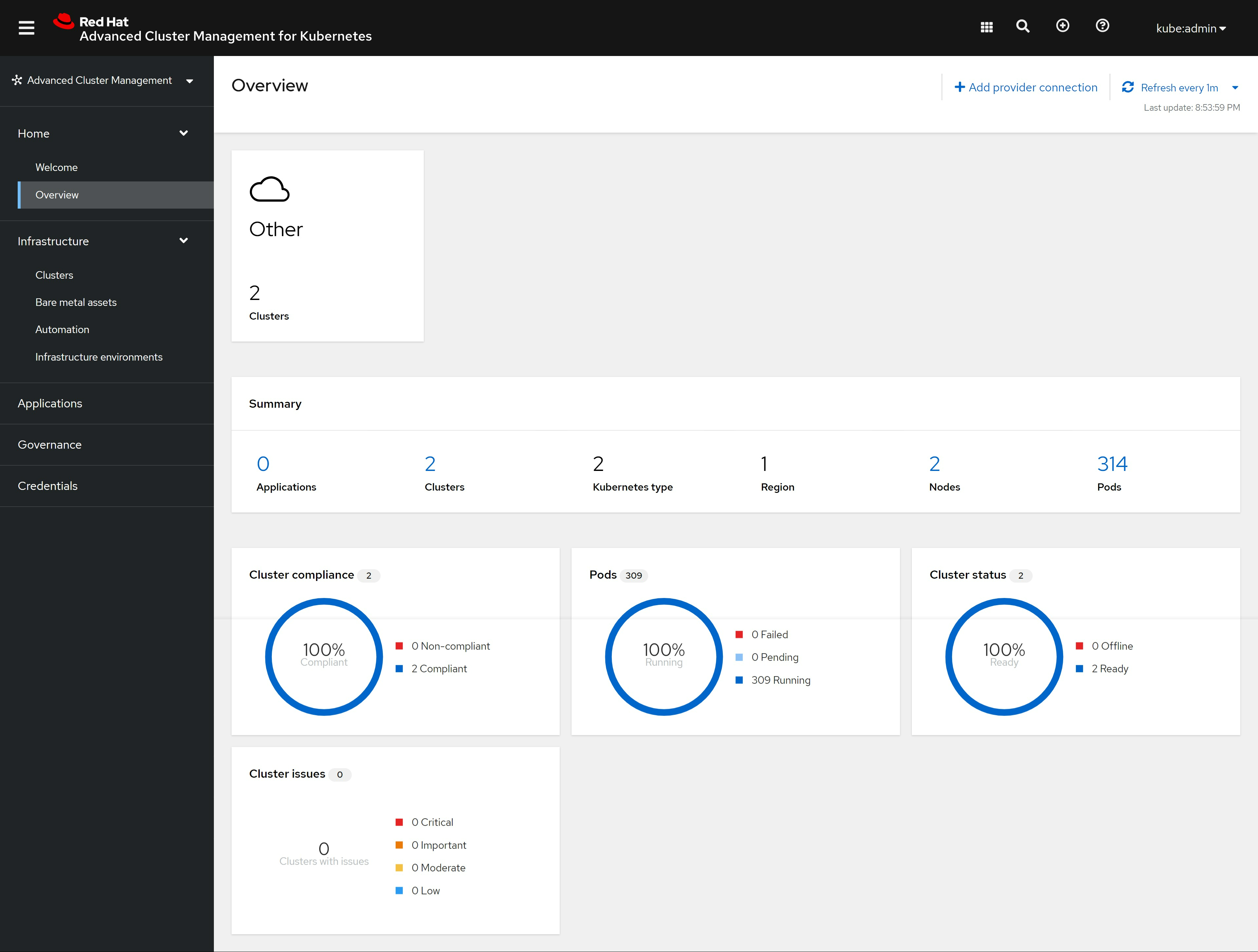
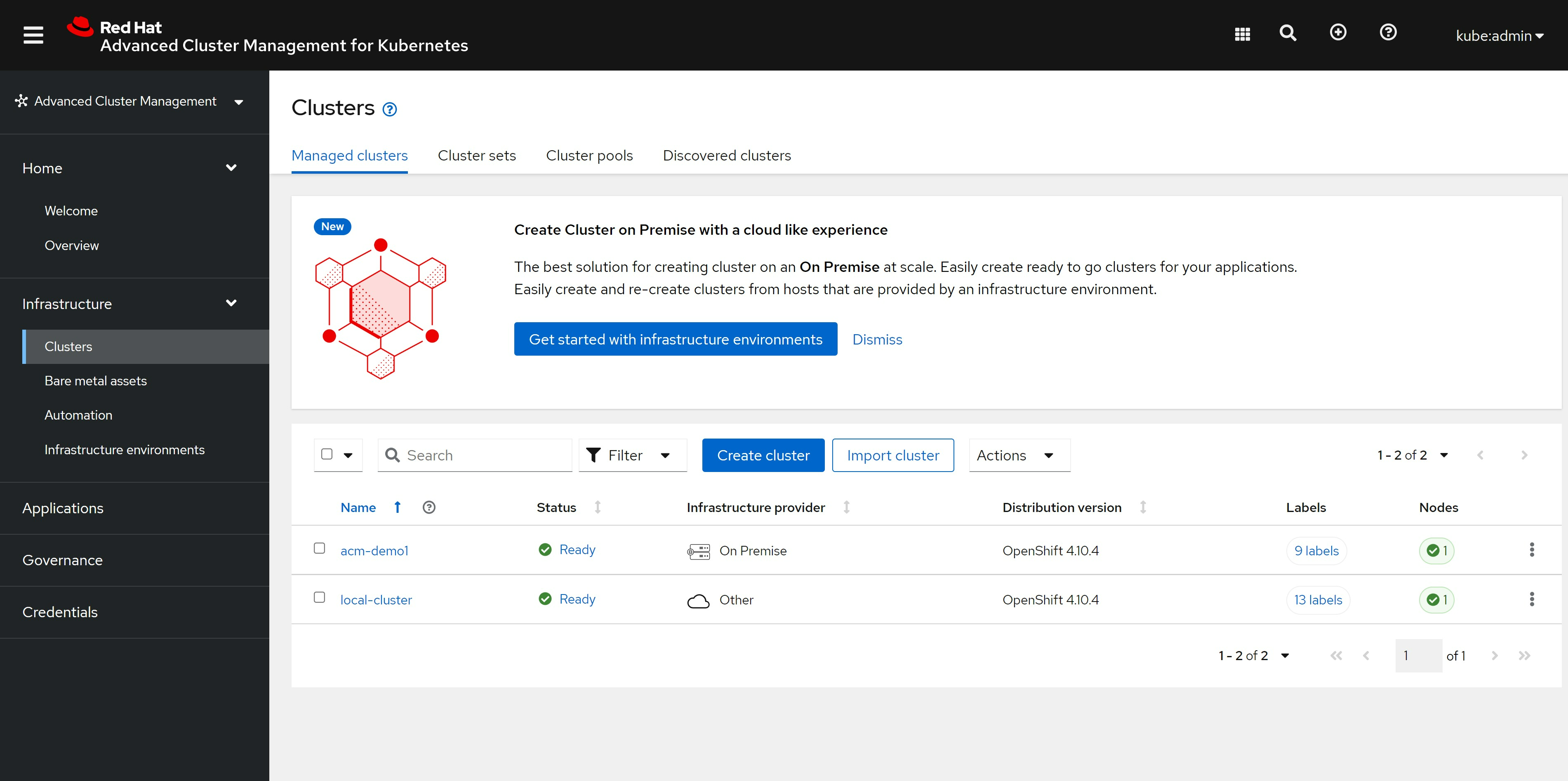
cluster 也能看到了绿色的正常状态了, 这里面local-cluster是ACM hub所在的集群:
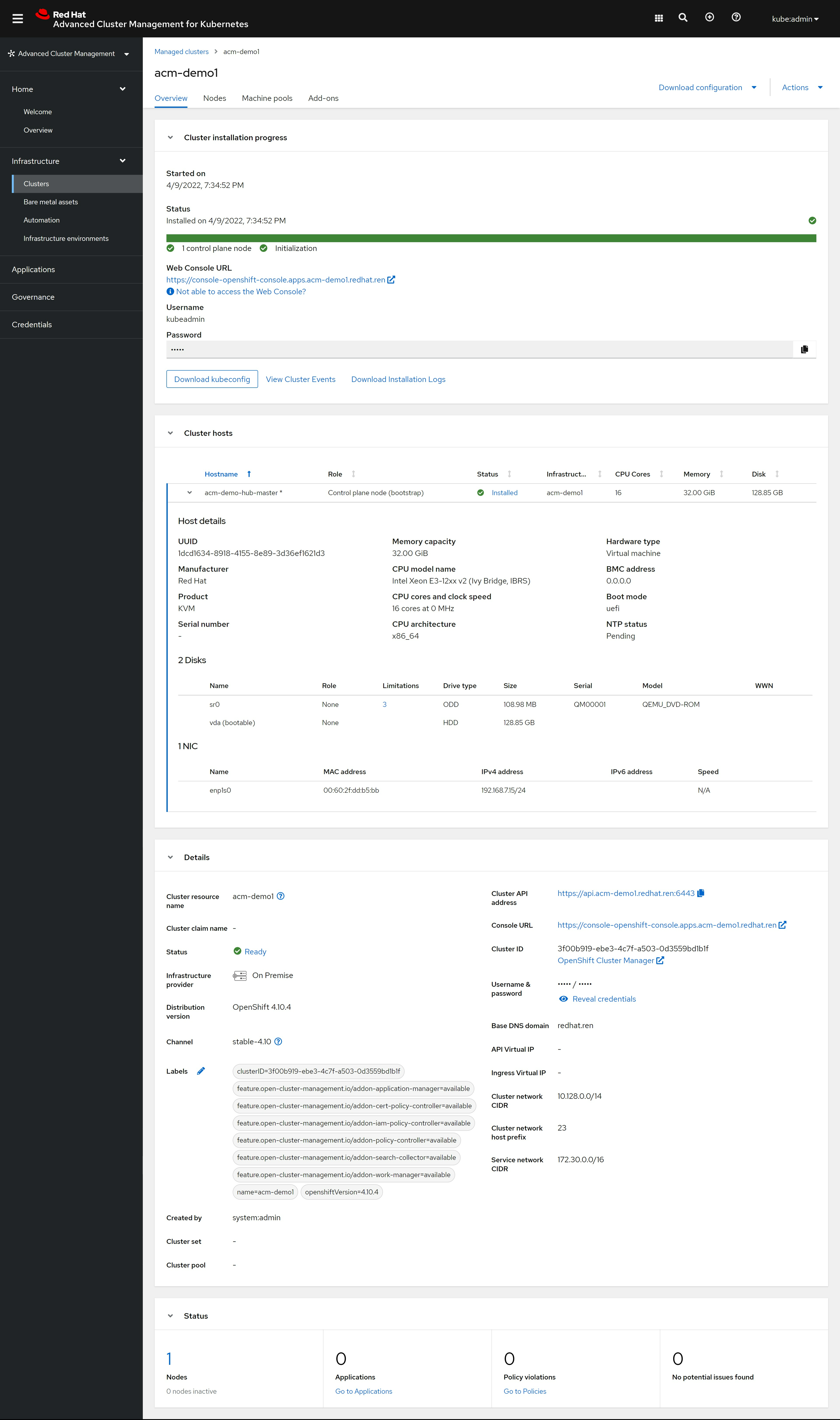
看cluster的详细信息,也正常了:
⚠️一定记得,下载kubeconfig文件,还有密码
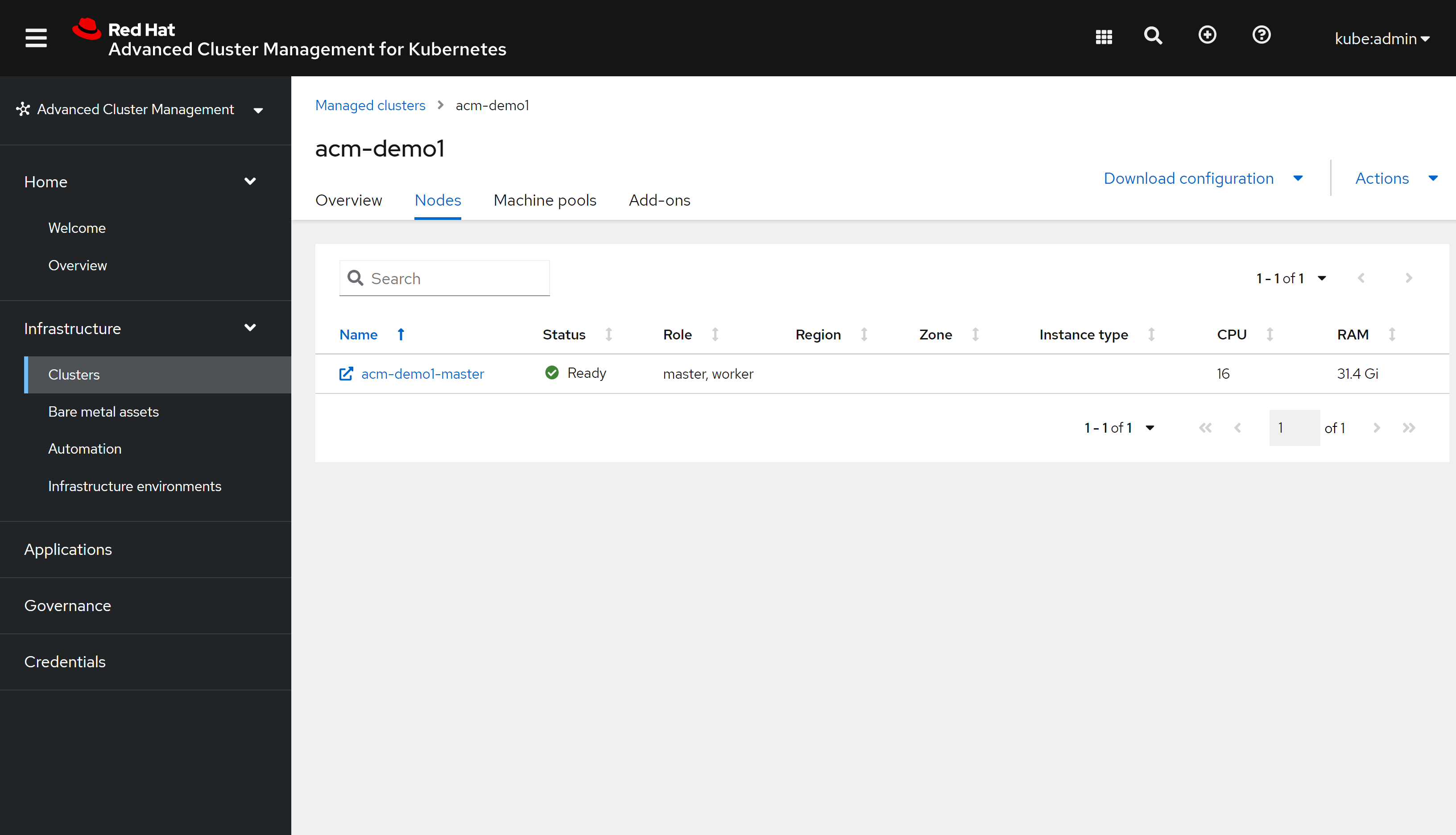
cluster的node tab也有内容了:
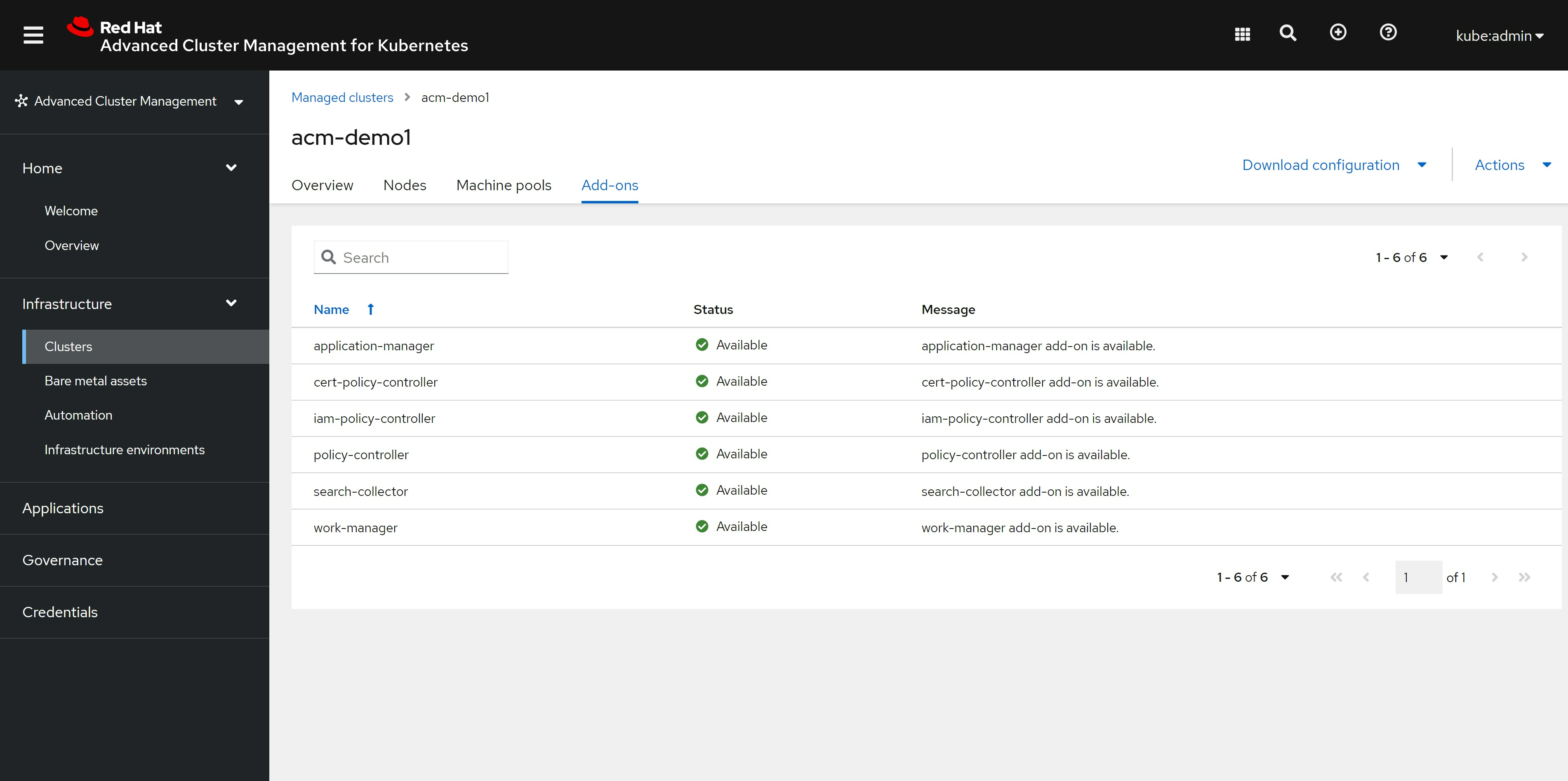
cluster的add-on,也装上了我们之前配置的组件:
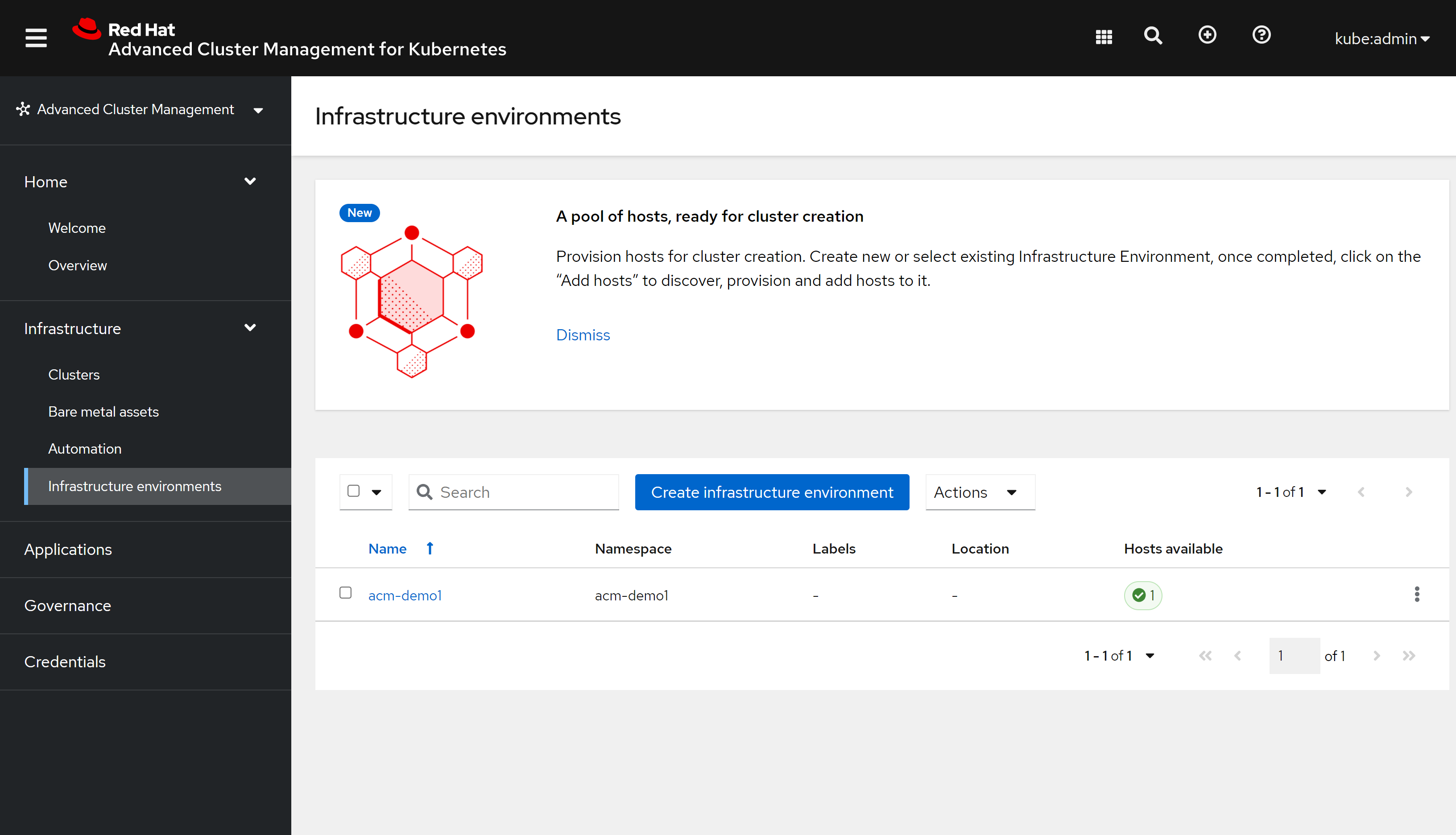
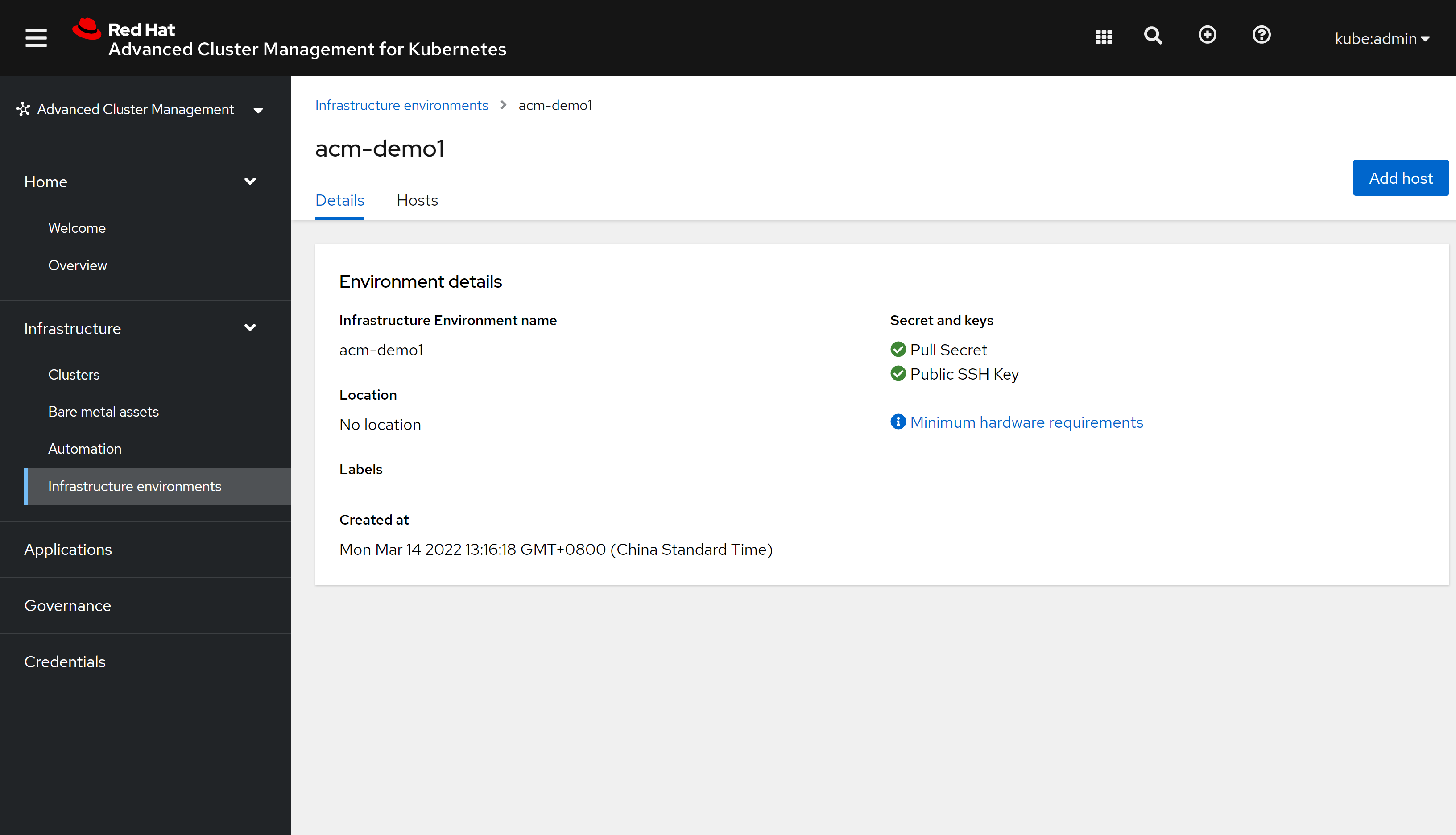
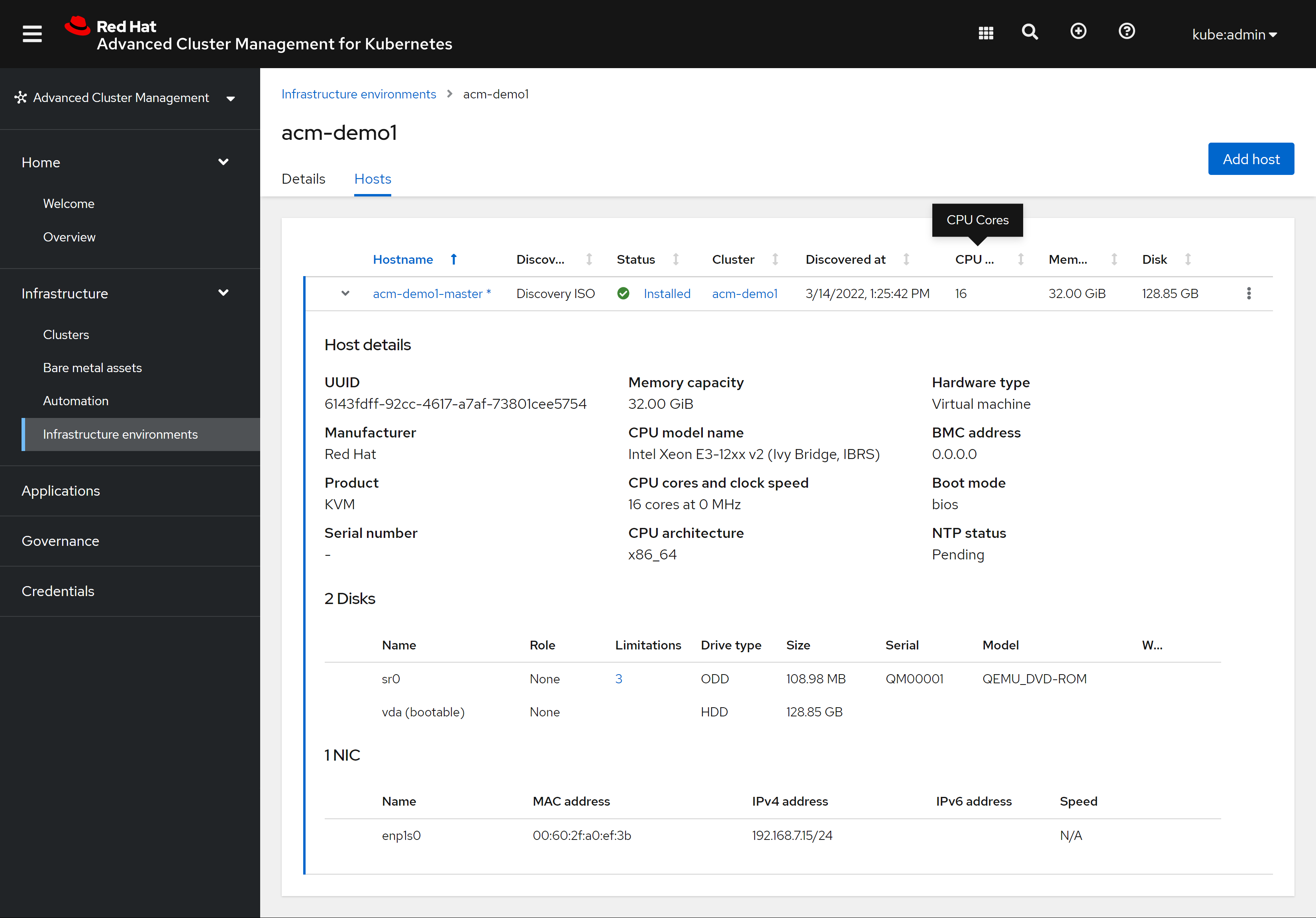
infra env也绿色状态了 https://multicloud-console.apps.acm-demo-hub.redhat.ren/multicloud/infra-environments
详细信息和原来一样:
hosts tab 也完成了
# on helper
useradd -m wzh

su - wzh
mkdir ~/auth

# upload kubeconfig.json to /home/wzh/auth/

ansible localhost -m lineinfile -a 'path=$HOME/.bashrc regexp="^export KUBECONFIG" line="export KUBECONFIG=~/auth/kubeconfig.json"'
source $HOME/.bashrc
check dhcp existed
我们是静态IP安装,那么就要确认一下环境里面是不是真的 DHCP 给关了,检查的方法如下。
https://superuser.com/questions/750359/check-if-a-dhcp-server-existing-in-my-network-using-bash
dnf install nmap -y
nmap --script broadcast-dhcp6-discover -e enp1s0
end
# revert the order
tac << EOF
oc delete -f /data/install/acm.ocp.release.yaml
oc delete -f /data/install/acm.cm.asc.yaml
oc delete -f /data/install/acm.secret.yaml
oc delete -f /data/install/acm.mirror.yaml
oc delete -f /data/install/acm.agentservicecofnig.yaml
oc delete -f /data/install/acm.managed.secret.yaml
oc delete -f /data/install/acm.agentclusterinstall.yaml
oc delete -f /data/install/acm.nmsc.yaml
oc delete -f /data/install/acm.clusterdeployment.yaml
oc delete -f /data/install/acm.klusterletaddonconfig.yaml
oc delete -f /data/install/acm.managedcluster.yaml
oc delete -f /data/install/acm.infraenv.yaml
EOF
oc delete -f /data/install/acm.infraenv.yaml
oc delete -f /data/install/acm.managedcluster.yaml
oc delete -f /data/install/acm.klusterletaddonconfig.yaml
oc delete -f /data/install/acm.clusterdeployment.yaml
oc delete -f /data/install/acm.nmsc.yaml
oc delete -f /data/install/acm.agentclusterinstall.yaml
oc delete -f /data/install/acm.managed.secret.yaml
oc delete -f /data/install/acm.agentservicecofnig.yaml
oc delete -f /data/install/acm.mirror.yaml
oc delete -f /data/install/acm.secret.yaml
oc delete -f /data/install/acm.cm.asc.yaml
oc delete -f /data/install/acm.ocp.release.yaml