FlexRAN 20.11 enable on ocp4
本文描述,如何把 intel 的 oran 解决方案 flexran ,移植到 openshift 平台之上。
容器镜像构建和运行架构,文件目录结构:

容器运行的时候,和operator以及硬件的关系结构图:

问题
- ptp服务配置了,vbbu 怎么用?
prepare public cloud env
我们先在公网环境里面编译镜像,并且上传到quay.io
basic init setup
# vultr, ssh enhance

# disable user/passwd login
# ChallengeResponseAuthentication no
# PasswordAuthentication no
# UsePAM no
sed -i 's/PasswordAuthentication yes/PasswordAuthentication no/g' /etc/ssh/sshd_config
sed -i 's/UsePAM yes/UsePAM no/g' /etc/ssh/sshd_config

systemctl restart sshd

ssh root@v.redhat.ren -o PubkeyAuthentication=no
# root@v.redhat.ren: Permission denied (publickey,gssapi-keyex,gssapi-with-mic).

subscription-manager register --auto-attach --username ******** --password ********

subscription-manager release --list
subscription-manager release --set=8.4

subscription-manager repos \
    --enable="codeready-builder-for-rhel-8-x86_64-rpms"

dnf -y install https://dl.fedoraproject.org/pub/epel/epel-release-latest-8.noarch.rpm

dnf install -y byobu htop fail2ban

cat << EOF > /etc/fail2ban/jail.d/wzh.conf
[sshd]
enabled = true
# [recidive]
# enabled = true
EOF

systemctl enable --now fail2ban

cat << EOF > /etc/fail2ban/jail.d/wzh.conf
[sshd]
enabled = true
[recidive]
enabled = true
EOF

systemctl restart fail2ban

# byobu
dnf update -y

reboot
install ocp rhcos rt kernel
mkdir -p /data/ostree

export BUILDNUMBER=4.9.5

wget -O openshift-client-linux-${BUILDNUMBER}.tar.gz https://mirror.openshift.com/pub/openshift-v4/clients/ocp/${BUILDNUMBER}/openshift-client-linux-${BUILDNUMBER}.tar.gz
wget -O openshift-install-linux-${BUILDNUMBER}.tar.gz https://mirror.openshift.com/pub/openshift-v4/clients/ocp/${BUILDNUMBER}/openshift-install-linux-${BUILDNUMBER}.tar.gz

tar -xzf openshift-client-linux-${BUILDNUMBER}.tar.gz -C /usr/local/sbin/
tar -xzf openshift-install-linux-${BUILDNUMBER}.tar.gz -C /usr/local/sbin/

oc image extract --path /:/data/ostree --registry-config /data/pull-secret.json   `  curl -s https://mirror.openshift.com/pub/openshift-v4/x86_64/clients/ocp/$BUILDNUMBER/release.txt | grep machine-os-content | awk '{print $2}'  `

mkdir -p /data/dnf
mv /data/ostree/extensions /data/dnf/
rm -rf /data/ostree

mkdir -p /etc/yum.repos.d
cat > /etc/yum.repos.d/rt.repo << 'EOF'
[rt]
name=rt
baseurl=file:///data/dnf/extensions
gpgcheck=0
EOF

dnf install -y kernel-rt-core kernel-rt-devel kernel-rt-modules kernel-rt-modules-extra kernel-headers libhugetlbfs-devel zlib-devel numactl-devel cmake gcc gcc-c++

reboot
build flexran with intel icc/icx
dnf groupinstall -y 'Development Tools'
dnf install -y cmake

# flexran install on host
# yum install centos-release-scl devtoolset-8 -y

# install intel icc icx

cd /data/down
tar zvxf  system_studio_2019_update_3_ultimate_edition_offline.tar.gz

cd /data/down/system_studio_2019_update_3_ultimate_edition_offline

cat > s.cfg << 'EOF'
ACCEPT_EULA=accept
CONTINUE_WITH_OPTIONAL_ERROR=yes
PSET_INSTALL_DIR=/opt/intel
CONTINUE_WITH_INSTALLDIR_OVERWRITE=yes
COMPONENTS=ALL
PSET_MODE=install
ACTIVATION_SERIAL_NUMBER=******************
ACTIVATION_TYPE=serial_number
EOF

./install.sh -s s.cfg

echo "source  /opt/intel/system_studio_2019/bin/compilervars.sh intel64" >> /root/.bashrc


cd /data/down/

# wget https://registrationcenter-download.intel.com/akdlm/irc_nas/18236/l_BaseKit_p_2021.4.0.3422_offline.sh

bash l_BaseKit_p_2021.4.0.3422_offline.sh

# source /opt/intel/oneapi/setvars.sh
echo "source /opt/intel/oneapi/setvars.sh" >> /root/.bashrc
download dpdk and patch, and comile flexran sdk
cd /data/down/

# wget https://fast.dpdk.org/rel/dpdk-19.11.tar.xz

tar xf dpdk-19.11.tar.xz
rm -rf /opt/dpdk-19.11
mv /data/down/dpdk-19.11 /opt

export RTE_SDK=/opt/dpdk-19.11
cd $RTE_SDK
patch -p1 < /data/down/dpdk_19.11_20.11.7.patch

# patch flexran
pip3 install meson ninja
# dnf install -y ninja-build

# dnf install -y cmake

rm -rf /data/flexran/
mkdir -p /data/flexran/
cd /data/down
tar zvxf FlexRAN-20.11.tar.gz -C /data/flexran/

export RTE_SDK=/opt/dpdk-19.11
cd /data/flexran
./extract.sh

cd /data/flexran
source set_env_var.sh -d
# for intel: /opt/intel/system_studio_2019/
# for dpdk: /opt/dpdk-19.11

# sourcing /opt/intel/system_studio_2019//bin/iccvars.sh  intel64 -platform linux
# Set RTE_SDK=/opt/dpdk-19.11
# Set RTE_TARGET=x86_64-native-linuxapp-icc


# ====================================================================================
# Environment Variables:
# ====================================================================================
# RTE_SDK=/opt/dpdk-19.11
# RTE_TARGET=x86_64-native-linuxapp-icc
# WIRELESS_SDK_TARGET_ISA=avx512
# RPE_DIR=/data/flexran/libs/ferrybridge
# CPA_DIR=/data/flexran/libs/cpa
# ROE_DIR=/data/flexran/libs/roe
# XRAN_DIR=/data/flexran/xran
# DIR_WIRELESS_SDK_ROOT=/data/flexran/sdk
# SDK_BUILD=build-avx512-icc
# DIR_WIRELESS_SDK=/data/flexran/sdk/build-avx512-icc
# FLEXRAN_SDK=/data/flexran/sdk/build-avx512-icc/install
# DIR_WIRELESS_FW=/data/flexran/framework
# DIR_WIRELESS_TEST_4G=/data/flexran/tests/lte
# DIR_WIRELESS_TEST_5G=/data/flexran/tests/nr5g
# DIR_WIRELESS_TABLE_5G=/data/flexran/bin/nr5g/gnb/l1/table
# ====================================================================================

./flexran_build.sh -e -r 5gnr_sub6 -i avx512 -m sdk

# https://www.i4k.xyz/article/qq_40982287/119571504
sed -i "s/.ndo_tx_timeout = kni_net_tx_timeout,/\/\/.ndo_tx_timeout = kni_net_tx_timeout,/g" /opt/dpdk-19.11/kernel/linux/kni/kni_net.c

sed -i 's/DEFAULT_PATH=.*/DEFAULT_PATH=\/opt\/intel\/system_studio_2019\/bin\/iccvars.sh/' /opt/dpdk-19.11/usertools/dpdk-setup.sh

sed -i 's/CONFIG_RTE_BBDEV_SDK_AVX2=.*/CONFIG_RTE_BBDEV_SDK_AVX2=y/' /opt/dpdk-19.11/config/common_base
sed -i 's/CONFIG_RTE_BBDEV_SDK_AVX512=.*/CONFIG_RTE_BBDEV_SDK_AVX512=y/' /opt/dpdk-19.11/config/common_base
# DEFAULT_PATH=/opt/intel/system_studio_2019/bin/iccvars.sh
# sed -i 's/CONFIG_RTE_BUILD_SHARED_LIB=.*/CONFIG_RTE_BUILD_SHARED_LIB=y/' /opt/dpdk-19.11/config/common_base

sed -i 's/MODULE_CFLAGS += -Wall -Werror/#MODULE_CFLAGS += -Wall -Werror/' /opt/dpdk-19.11/kernel/linux/kni/Makefile

cd /opt/dpdk-19.11/usertools/
./dpdk-setup.sh
# 39
# 62

sed -i 's/#include <linux\/bootmem.h>/\/\/#include <linux\/bootmem.h>/' /data/flexran/libs/cpa/sub6/rec/drv/src/nr_dev.c

# export LD_LIBRARY_PATH=$LD_LIBRARY_PATH:/data/flexran/wls_mod/lib

# export CC=icc

# export DEV_OPT=" -Wl,--exclude-libs,/usr/lib64/libmvec_nonshared.a "

# export LDFLAGS=" -Wl,--exclude-libs,/usr/lib64/libmvec_nonshared.a "

# export RTE_LIBS=" -Wl,--exclude-libs,/usr/lib64/libmvec_nonshared.a "

# -Wl,--exclude-libs=libmvec_nonshared.a
# -Wl,--allow-multiple-definition

sed -i 's/@$(LD) -o $@ $(LD_FLAGS) -Wl,-L $(BUILDDIR) $(INC_LIBS) -lm -lrt -lpthread/@$(LD) -o $@ $(LD_FLAGS) -Wl,-L $(BUILDDIR) $(INC_LIBS) -lm -lrt -lpthread  -Wl,--allow-multiple-definition/' /data/flexran/build/nr5g/gnb/l1app/makefile_phy

sed -i 's/@$(LD) -o $@ $(LD_FLAGS) -Wl,-L $(BUILDDIR) $(INC_LIBS) -lm -lrt -lpthread/@$(LD) -o $@ $(LD_FLAGS) -Wl,-L $(BUILDDIR) $(INC_LIBS) -lm -lrt -lpthread -Wl,--allow-multiple-definition -Wl,-lrte_port -Wl,-lrte_cryptodev -Wl,-lrte_eventdev/' /data/flexran/build/nr5g/gnb/testapp/linux/makefile_phy

sed -i 's/@$(LD) -o $@ $(LD_FLAGS) -Wl,-L $(BUILDDIR) $(INC_LIBS) -lm -lrt -lpthread/@$(LD) -o $@ $(LD_FLAGS) -Wl,-L $(BUILDDIR) $(INC_LIBS) -lm -lrt -lpthread -Wl,--allow-multiple-definition/' /data/flexran/build/lte/l1app_nbiot/makefile

sed -i 's/@$(LD) -o $@ $(LD_FLAGS) -Wl,-L $(BUILDDIR) $(INC_LIBS) -lm -lrt -lpthread/@$(LD) -o $@ $(LD_FLAGS) -Wl,-L $(BUILDDIR) $(INC_LIBS) -lm -lrt -lpthread -Wl,--allow-multiple-definition/' /data/flexran/build/lte/bbdevapp/Makefile

sed -i 's/@$(LD) -o $@ $(LD_FLAGS) -Wl,-L $(BUILDDIR) $(INC_LIBS) -lm -lrt -lpthread/@$(LD) -o $@ $(LD_FLAGS) -Wl,-L $(BUILDDIR) $(INC_LIBS) -lm -lrt -lpthread -Wl,--allow-multiple-definition/' /data/flexran/build/lte/l1app/makefile

sed -i 's/@$(LD) -o $@ $(LD_FLAGS) -Wl,-L $(BUILDDIR) $(INC_LIBS) -lm -lrt -lpthread/@$(LD) -o $@ $(LD_FLAGS) -Wl,-L $(BUILDDIR) $(INC_LIBS) -lm -lrt -lpthread -Wl,--allow-multiple-definition/' /data/flexran/build/nr5g/gnb/bbdevapp/Makefile

sed -i 's/@$(CC) -o $(APP) $(OBJS) $(RTE_LIBS) $(LDFLAGS)/@$(CC) -o $(APP) $(OBJS) $(RTE_LIBS) $(LDFLAGS) -Wl,--allow-multiple-definition/' /data/flexran/build/nr5g/gnb/testmac/makefile

sed -i 's/@$(CC) -o $(APP) $(OBJS) $(RTE_LIBS) $(LDFLAGS)/@$(CC) -o $(APP) $(OBJS) $(RTE_LIBS) $(LDFLAGS) -Wl,--allow-multiple-definition/' /data/flexran/build/lte/l1app_nbiot/makefile

# -Wl,-lrte_port -Wl,-lrte_cryptodev -Wl,-lrte_eventdev
# build/nr5g/gnb/testapp/linux/makefile_phy:540

export LD_LIBRARY_PATH=$LD_LIBRARY_PATH:/data/flexran/wls_mod/lib

cd /data/flexran
./flexran_build.sh -e -r 5gnr_sub6 -i avx512 -b


# dnf install -y podman-docker

# export RTE_SDK=/opt/dpdk-19.11
# cd /data/flexran
# bash ./flexran_build_dockerfile.sh -v -e -i avx512 -r 5gnr_sub6 -b -m all

# podman image ls
# # REPOSITORY                           TAG         IMAGE ID      CREATED         SIZE
# # flexran.docker.registry/flexran_vdu  latest      8c5460a697e6  16 minutes ago  1.36 GB
# # quay.io/centos/centos                7.9.2009    8652b9f0cb4c  17 months ago   212 MB

# podman tag flexran.docker.registry/flexran_vdu:latest  quay.io/nepdemo/flexran_vdu:flexran-20.11-dpdk-20.11.3-ocp4.9.5-centos-7.9

# podman push quay.io/nepdemo/flexran_vdu:flexran-20.11-dpdk-20.11.3-ocp4.9.5-centos-7.9
vsftpd
我们需要在本地准备一个ftp服务器,来承载rt-kernel的repo,后面编译容器镜像,需要访问这个临时的repo
dnf install -y vsftpd
sed -i 's/anonymous_enable=NO/anonymous_enable=YES/g' /etc/vsftpd/vsftpd.conf
systemctl disable --now firewalld
systemctl enable --now vsftpd

mkdir -p /var/ftp/dnf
mount --bind /data/dnf /var/ftp/dnf
chcon -R -t public_content_t  /var/ftp/dnf
find /data/dnf/extensions -type f -exec chmod 644 {} \;

chmod +x /etc/rc.d/rc.local
cat << EOF >>/etc/rc.d/rc.local

iptables -A INPUT -d 10.88.0.1 -j ACCEPT
iptables -A INPUT -p tcp --dport 21 -j REJECT

EOF
systemctl enable --now rc-local
flexran_vdu for rhel8.4
dnf install -y podman-docker

export RTE_SDK=/opt/dpdk-19.11
cd /data/flexran

bash ./flexran_build_dockerfile.wzh.sh -v -e -i avx512 -r 5gnr_sub6 -b -m all

podman tag flexran.docker.registry/flexran_vdu:latest  quay.io/nepdemo/flexran_vdu:flexran-20.11-dpdk-19.11-ocp4.9.5-ubi-8.4

podman push quay.io/nepdemo/flexran_vdu:flexran-20.11-dpdk-19.11-ocp4.9.5-ubi-8.4
copy flexran sdk to image
cat << 'EOF' > /data/flexran.sdk.dockerfile
FROM registry.access.redhat.com/ubi8/ubi:8.4

RUN dnf repolist
RUN sed -i 's|enabled=1|enabled=0|g' /etc/yum/pluginconf.d/subscription-manager.conf
RUN sed -i 's|$releasever|8.4|g' /etc/yum.repos.d/redhat.repo
RUN sed -i '/codeready-builder-for-rhel-8-x86_64-rpms/,/\[/ s/enabled = 0/enabled = 1/' /etc/yum.repos.d/redhat.repo
RUN mv -f /etc/yum.repos.d/ubi.repo /etc/yum.repos.d/ubi.repo.bak

RUN dnf -y update
RUN dnf -y install rsync

COPY flexran /data/flexran
EOF

cd /data
podman build --squash -t quay.io/nepdemo/flexran_basekit:flexran-sdk-20.11-ocp-4.9.5-ubi-8.4 -f flexran.sdk.dockerfile ./

podman push quay.io/nepdemo/flexran_basekit:flexran-sdk-20.11-ocp-4.9.5-ubi-8.4
copy intel icc to image
cat << 'EOF' > /opt/intel/flexran.intel.icc.dockerfile
FROM registry.access.redhat.com/ubi8/ubi:8.4

RUN dnf repolist
RUN sed -i 's|enabled=1|enabled=0|g' /etc/yum/pluginconf.d/subscription-manager.conf
RUN sed -i 's|$releasever|8.4|g' /etc/yum.repos.d/redhat.repo
RUN sed -i '/codeready-builder-for-rhel-8-x86_64-rpms/,/\[/ s/enabled = 0/enabled = 1/' /etc/yum.repos.d/redhat.repo
RUN mv -f /etc/yum.repos.d/ubi.repo /etc/yum.repos.d/ubi.repo.bak

RUN dnf -y update
RUN dnf -y install rsync

COPY system_studio_2019 /opt/intel/system_studio_2019
COPY licenses /opt/intel/licenses
COPY packagemanager /opt/intel/packagemanager
EOF

cd /opt/intel
podman build --squash -t quay.io/nepdemo/flexran_basekit:intel.icc-21.11-ocp-4.9.5-ubi-8.4 -f flexran.intel.icc.dockerfile ./

podman push quay.io/nepdemo/flexran_basekit:intel.icc-21.11-ocp-4.9.5-ubi-8.4
copy intel icx to image
cat << 'EOF' > /opt/intel/flexran.intel.icx.dockerfile
FROM registry.access.redhat.com/ubi8/ubi:8.4

RUN dnf repolist
RUN sed -i 's|enabled=1|enabled=0|g' /etc/yum/pluginconf.d/subscription-manager.conf
RUN sed -i 's|$releasever|8.4|g' /etc/yum.repos.d/redhat.repo
RUN sed -i '/codeready-builder-for-rhel-8-x86_64-rpms/,/\[/ s/enabled = 0/enabled = 1/' /etc/yum.repos.d/redhat.repo
RUN mv -f /etc/yum.repos.d/ubi.repo /etc/yum.repos.d/ubi.repo.bak

RUN dnf -y update
RUN dnf -y install rsync

COPY oneapi /opt/intel/oneapi
COPY licenses /opt/intel/licenses
COPY packagemanager /opt/intel/packagemanager
EOF

cd /opt/intel
podman build --squash -t quay.io/nepdemo/flexran_basekit:intel.icx-21.11-ocp-4.9.5-ubi-8.4 -f flexran.intel.icx.dockerfile ./

podman push quay.io/nepdemo/flexran_basekit:intel.icx-21.11-ocp-4.9.5-ubi-8.4
build dev docker image with dpdk 19.11
cat << 'EOF' > /opt/flexran.dpdk.dockerfile
FROM registry.access.redhat.com/ubi8/ubi:8.4

RUN dnf repolist
RUN sed -i 's|enabled=1|enabled=0|g' /etc/yum/pluginconf.d/subscription-manager.conf
RUN sed -i 's|$releasever|8.4|g' /etc/yum.repos.d/redhat.repo
RUN sed -i '/codeready-builder-for-rhel-8-x86_64-rpms/,/\[/ s/enabled = 0/enabled = 1/' /etc/yum.repos.d/redhat.repo
RUN mv -f /etc/yum.repos.d/ubi.repo /etc/yum.repos.d/ubi.repo.bak

RUN echo -e "\
[localrepo]\n\
name=LocalRepo\n\
baseurl=ftp://10.88.0.1/dnf/extensions/\n\
enabled=1\n\
gpgcheck=0" \
> /etc/yum.repos.d/local.repo

RUN dnf -y update
RUN dnf -y install rsync

RUN dnf -y install kernel-rt-core kernel-rt-devel kernel-rt-modules kernel-rt-modules-extra kernel-headers libhugetlbfs-devel zlib-devel numactl-devel cmake gcc gcc-c++ libhugetlbfs-utils libhugetlbfs-devel libhugetlbfs numactl-devel pciutils libaio libaio-devel net-tools libpcap python3-pip
RUN dnf install -y --allowerasing coreutils
RUN dnf groupinstall -y development server
RUN pip-3 install meson ninja

COPY dpdk-19.11 /opt/dpdk-19.11
# RUN ln -s /opt/dpdk-stable-20.11.3 /opt/dpdk-20.11

EOF

cd /opt/
podman build --squash -t quay.io/nepdemo/flexran_basekit:dpdk-19.11-ocp-4.9.5-ubi-8.4 -f flexran.dpdk.dockerfile ./

podman push quay.io/nepdemo/flexran_basekit:dpdk-19.11-ocp-4.9.5-ubi-8.4
build in nepdemo env
在nepdemo的内网环境中,编译镜像,并将镜像推送到nepdemo的镜像仓库
create a image registry to hold the large container image
# found a centos7 host

mkdir /etc/crts/ && cd /etc/crts
openssl req \
   -newkey rsa:2048 -nodes -keyout redhat.ren.key \
   -x509 -days 3650 -out redhat.ren.crt -subj \
   "/C=CN/ST=GD/L=SZ/O=Global Security/OU=IT Department/CN=*.redhat.ren"

cp /etc/crts/redhat.ren.crt /etc/pki/ca-trust/source/anchors/
update-ca-trust extract

mkdir -p /home/data/registry
cd /data
# tar zxf registry.tgz
yum -y install docker-distribution

cat << EOF > /etc/docker-distribution/registry/config.yml
version: 0.1
log:
  fields:
    service: registry
storage:
    cache:
        layerinfo: inmemory
    filesystem:
        rootdirectory: /home/data/registry
    delete:
        enabled: true
http:
    addr: :5443
    tls:
       certificate: /etc/crts/redhat.ren.crt
       key: /etc/crts/redhat.ren.key
EOF
# systemctl restart docker
# systemctl stop docker-distribution
systemctl enable --now docker-distribution
build container image for intel sdk
cat << EOF >>  /etc/hosts
192.168.123.252 reg-tmp.redhat.ren
EOF

export REG_TMP="reg-tmp.redhat.ren:5443"

podman tag flexran.docker.registry/flexran_vdu:latest  ${REG_TMP}/nepdemo/flexran_vdu:flexran-20.11-dpdk-19.11-ocp4.9.5-ubi-8.4

podman push --tls-verify=false ${REG_TMP}/nepdemo/flexran_vdu:flexran-20.11-dpdk-19.11-ocp4.9.5-ubi-8.4

# copy flexran sdk to image
cd /data
podman build --squash -t ${REG_TMP}/nepdemo/flexran_basekit:flexran-sdk-20.11-ocp-4.9.5-ubi-8.4 -f flexran.sdk.dockerfile ./

podman push --tls-verify=false ${REG_TMP}/nepdemo/flexran_basekit:flexran-sdk-20.11-ocp-4.9.5-ubi-8.4

# dpdk-kmods
cd /data/git
podman build --squash -t ${REG_TMP}/nepdemo/flexran_vdu:dpdk-kmods-ocp-4.9.5-ubi -f flexran.sdk.dockerfile ./

podman push --tls-verify=false ${REG_TMP}/nepdemo/flexran_vdu:dpdk-kmods-ocp-4.9.5-ubi

# copy intel icc to image
cd /opt/intel
podman build --squash -t ${REG_TMP}/nepdemo/flexran_basekit:intel.icc-21.11-ocp-4.9.5-ubi-8.4 -f flexran.intel.icc.dockerfile ./

podman push --tls-verify=false ${REG_TMP}/nepdemo/flexran_basekit:intel.icc-21.11-ocp-4.9.5-ubi-8.4

# copy intel icx to image
cd /opt/intel
podman build --squash -t ${REG_TMP}/nepdemo/flexran_basekit:intel.icx-21.11-ocp-4.9.5-ubi-8.4 -f flexran.intel.icx.dockerfile ./

podman push --tls-verify=false ${REG_TMP}/nepdemo/flexran_basekit:intel.icx-21.11-ocp-4.9.5-ubi-8.4


# build dev docker image with dpdk 19.11
cat << 'EOF' > /opt/flexran.dpdk.dockerfile
FROM registry.access.redhat.com/ubi8/ubi:8.4

RUN dnf repolist
RUN sed -i 's|enabled=1|enabled=0|g' /etc/yum/pluginconf.d/subscription-manager.conf
RUN sed -i 's|$releasever|8.4|g' /etc/yum.repos.d/redhat.repo
RUN sed -i 's|cdn.redhat.com|china.cdn.redhat.com|g' /etc/yum.repos.d/redhat.repo
RUN sed -i '/codeready-builder-for-rhel-8-x86_64-rpms/,/\[/ s/enabled = 0/enabled = 1/' /etc/yum.repos.d/redhat.repo
RUN mv -f /etc/yum.repos.d/ubi.repo /etc/yum.repos.d/ubi.repo.bak

RUN echo -e "\
[localrepo]\n\
name=LocalRepo\n\
baseurl=ftp://192.168.122.1/dnf/extensions/\n\
enabled=1\n\
gpgcheck=0" \
> /etc/yum.repos.d/local.repo

RUN dnf -y update
RUN dnf -y install rsync

RUN dnf -y install kernel-rt-core kernel-rt-devel kernel-rt-modules kernel-rt-modules-extra kernel-headers libhugetlbfs-devel zlib-devel numactl-devel cmake gcc gcc-c++ libhugetlbfs-utils libhugetlbfs-devel libhugetlbfs numactl-devel pciutils libaio libaio-devel net-tools libpcap python3-pip
RUN dnf install -y --allowerasing coreutils
RUN dnf groupinstall -y development server
RUN pip-3 install meson ninja

COPY dpdk-19.11 /opt/dpdk-19.11
# RUN ln -s /opt/dpdk-19.11 /opt/dpdk-20.11

EOF

cd /opt/
podman build --squash -t ${REG_TMP}/nepdemo/flexran_basekit:dpdk-19.11-ocp-4.9.5-ubi-8.4 -f flexran.dpdk.dockerfile ./

podman push --tls-verify=false ${REG_TMP}/nepdemo/flexran_basekit:dpdk-19.11-ocp-4.9.5-ubi-8.4
deploy on ocp 4.9.5
镜像都准备好了,我们开始在openshift4 上进行部署测试。
set security for temp image registry
我们临时创建了一个镜像仓库,那么我们就要把这个配置放到集群里面去,主要是让ocp集群,不要检查这个新镜像仓库的证书。
oc patch schedulers.config.openshift.io/cluster --type merge -p '{"spec":{"mastersSchedulable":false}}'

install /data/ocp4/clients/butane-amd64 /usr/local/bin/butane

cat << EOF > /data/sno/tmp.images.bu
variant: openshift
version: 4.9.0
metadata:
  labels:
    machineconfiguration.openshift.io/role: worker
  name: 99-zzz-worker-temp-images
storage:
  files:
    - path: /etc/containers/registries.conf.d/temp.registries.conf
      overwrite: true
      contents:
        inline: |

            [[registry]]
            location = "tmp-registry.ocp4.redhat.ren:5443"
            insecure = true
            blocked = false
            mirror-by-digest-only = false
            prefix = ""

EOF

butane /data/sno/tmp.images.bu > /data/sno/99-zzz-worker-temp-images.yaml

oc create -f /data/sno/99-zzz-worker-temp-images.yaml
set a host-path dir for flexran sdk
我们需要在 worker-2 上创建本地目录,好承载 flexran sdk, intel icc, intel icx 等超级大的目录和文件,主要是开发组有在容器平台做开发和测试的需求。如果是生成运行环境,这个本地目录是不应该存在的。
# do not need, as it is already deployed
cat << EOF > /data/install/host-path.yaml
---
apiVersion: machineconfiguration.openshift.io/v1
kind: MachineConfig
metadata:
  name: 50-set-selinux-for-hostpath-nepdemo-worker-rt-2
  labels:
    machineconfiguration.openshift.io/role: worker-rt-2
spec:
  config:
    ignition:
      version: 3.2.0
    systemd:
      units:
        - contents: |
            [Unit]
            Description=Set SELinux chcon for hostpath nepdemo
            Before=kubelet.service

            [Service]
            Type=oneshot
            RemainAfterExit=yes
            ExecStartPre=-mkdir -p /var/nepdemo
            ExecStart=chcon -Rt container_file_t /var/nepdemo/

            [Install]
            WantedBy=multi-user.target
          enabled: true
          name: hostpath-nepdemo.service
EOF
oc create -f /data/install/host-path.yaml
using job to copy files to local path
我们使用job的方式,把flexran sdk, intel icc/icx sdk复制到worker-2的本地目录,以便后续使用。用job的方式,主要考虑,这个是一次性的工作,并且我们在container image 里面还装了rsync,这样以后如果破坏了本地目录,重新运行以下job,就可以很快的同步目录。
export REG_TMP='tmp-registry.ocp4.redhat.ren:5443'

# copy dpdk to local
cat << EOF > /data/install/job.flexran.dpdk.yaml
---
apiVersion: batch/v1
kind: Job
metadata:
  name: flexran.basekit.dpdk.copy
  namespace: default
spec:
  template:
    spec:
      containers:
      - name: files
        image: ${REG_TMP}/nepdemo/flexran_basekit:dpdk-19.11-ocp-4.9.5-ubi-8.4
        command: [ "/bin/sh","-c","--" ]
        # command: ["rsync", "--delete", "-arz", "/opt/dpdk-19.11", "/nepdemo/"]
        args: [" rsync -P --delete -arz /opt/dpdk-19.11 /nepdemo/ "]
        volumeMounts:
          - name: nepdemo
            mountPath: /nepdemo
      restartPolicy: Never
      nodeName: worker-2.ocp4.redhat.ren
      volumes:
        - name: nepdemo
          hostPath:
            path: /var/nepdemo
EOF

oc create -f /data/install/job.flexran.dpdk.yaml

# copy flexran sdk to local
cat << EOF > /data/install/job.flexran.sdk.yaml
---
apiVersion: batch/v1
kind: Job
metadata:
  name: flexran.basekit.sdk.copy
  namespace: default
spec:
  template:
    spec:
      containers:
      - name: files
        image: ${REG_TMP}/nepdemo/flexran_basekit:flexran-sdk-20.11-ocp-4.9.5-ubi-8.4
        command: [ "/bin/sh","-c","--" ]
        # command: ["rsync", "--delete", "-arz", "/data/flexran", "/nepdemo/"]
        args: [" rsync -P --delete -arz /data/flexran /nepdemo/ "]
        volumeMounts:
          - name: nepdemo
            mountPath: /nepdemo
      restartPolicy: Never
      nodeName: worker-2.ocp4.redhat.ren
      volumes:
        - name: nepdemo
          hostPath:
            path: /var/nepdemo
EOF

oc create -f /data/install/job.flexran.sdk.yaml

# copy intel icc sdk to local
cat << EOF > /data/install/job.intel.icc.yaml
---
apiVersion: batch/v1
kind: Job
metadata:
  name: flexran.basekit.intel.icc.copy
  namespace: default
spec:
  template:
    spec:
      containers:
      - name: files
        image: ${REG_TMP}/nepdemo/flexran_basekit:intel.icc-21.11-ocp-4.9.5-ubi-8.4
        command: [ "/bin/sh","-c","--" ]
        # command: ["rsync", "--delete", "-arz", "/opt/intel/system_studio_2019", "/nepdemo/"]
        args: [" rsync -P --delete -arz /opt/intel/system_studio_2019 /nepdemo/ "]
        volumeMounts:
          - name: nepdemo
            mountPath: /nepdemo
      restartPolicy: Never
      nodeName: worker-2.ocp4.redhat.ren
      volumes:
        - name: nepdemo
          hostPath:
            path: /var/nepdemo
EOF

oc create -f /data/install/job.intel.icc.yaml

# copy intel icx sdk to local
cat << EOF > /data/install/job.intel.icx.yaml
---
apiVersion: batch/v1
kind: Job
metadata:
  name: flexran.basekit.intel.icx.copy
  namespace: default
spec:
  template:
    spec:
      containers:
      - name: files
        image: ${REG_TMP}/nepdemo/flexran_basekit:intel.icx-21.11-ocp-4.9.5-ubi-8.4
        command: [ "/bin/sh","-c","--" ]
        # command: ["rsync", "--delete", "-arz", "/opt/intel/oneapi", "/nepdemo/"]
        args: [" rsync -P --delete -arz /opt/intel/oneapi /nepdemo/ "]
        volumeMounts:
          - name: nepdemo
            mountPath: /nepdemo
      restartPolicy: Never
      nodeName: worker-2.ocp4.redhat.ren
      volumes:
        - name: nepdemo
          hostPath:
            path: /var/nepdemo
EOF

oc create -f /data/install/job.intel.icx.yaml

# copy intel license to local
cat << EOF > /data/install/job.intel.license.yaml
---
apiVersion: batch/v1
kind: Job
metadata:
  name: flexran.basekit.intel.icx.copy
  namespace: default
spec:
  template:
    spec:
      containers:
      - name: files
        image: ${REG_TMP}/nepdemo/flexran_basekit:intel.icx-21.11-ocp-4.9.5-ubi-8.4
        command: [ "/bin/sh","-c","--" ]
        args: ["rsync -P --delete -arz /opt/intel/licenses /nepdemo/ ; rsync -P --delete -arz /opt/intel/packagemanager /nepdemo/ "]
        volumeMounts:
          - name: nepdemo
            mountPath: /nepdemo
      restartPolicy: Never
      nodeName: worker-2.ocp4.redhat.ren
      volumes:
        - name: nepdemo
          hostPath:
            path: /var/nepdemo
EOF

oc create -f /data/install/job.intel.license.yaml
setup sriov operator
openshift有sriov的operator,官方支持intel x710网卡,我们直接用就好了。
the env has nic Intel X710 : 8086 1572
# install sriov operator
cat << EOF > /data/install/sriov.yaml
---
apiVersion: v1
kind: Namespace
metadata:
  name: openshift-sriov-network-operator
  annotations:
    workload.openshift.io/allowed: management
---
apiVersion: operators.coreos.com/v1
kind: OperatorGroup
metadata:
  name: sriov-network-operators
  namespace: openshift-sriov-network-operator
spec:
  targetNamespaces:
  - openshift-sriov-network-operator
---
apiVersion: operators.coreos.com/v1alpha1
kind: Subscription
metadata:
  name: sriov-network-operator-subscription
  namespace: openshift-sriov-network-operator
spec:
  channel: "4.9"
  installPlanApproval: Manual
  name: sriov-network-operator
  source: redhat-operators
  sourceNamespace: openshift-marketplace
EOF
oc create -f /data/install/sriov.yaml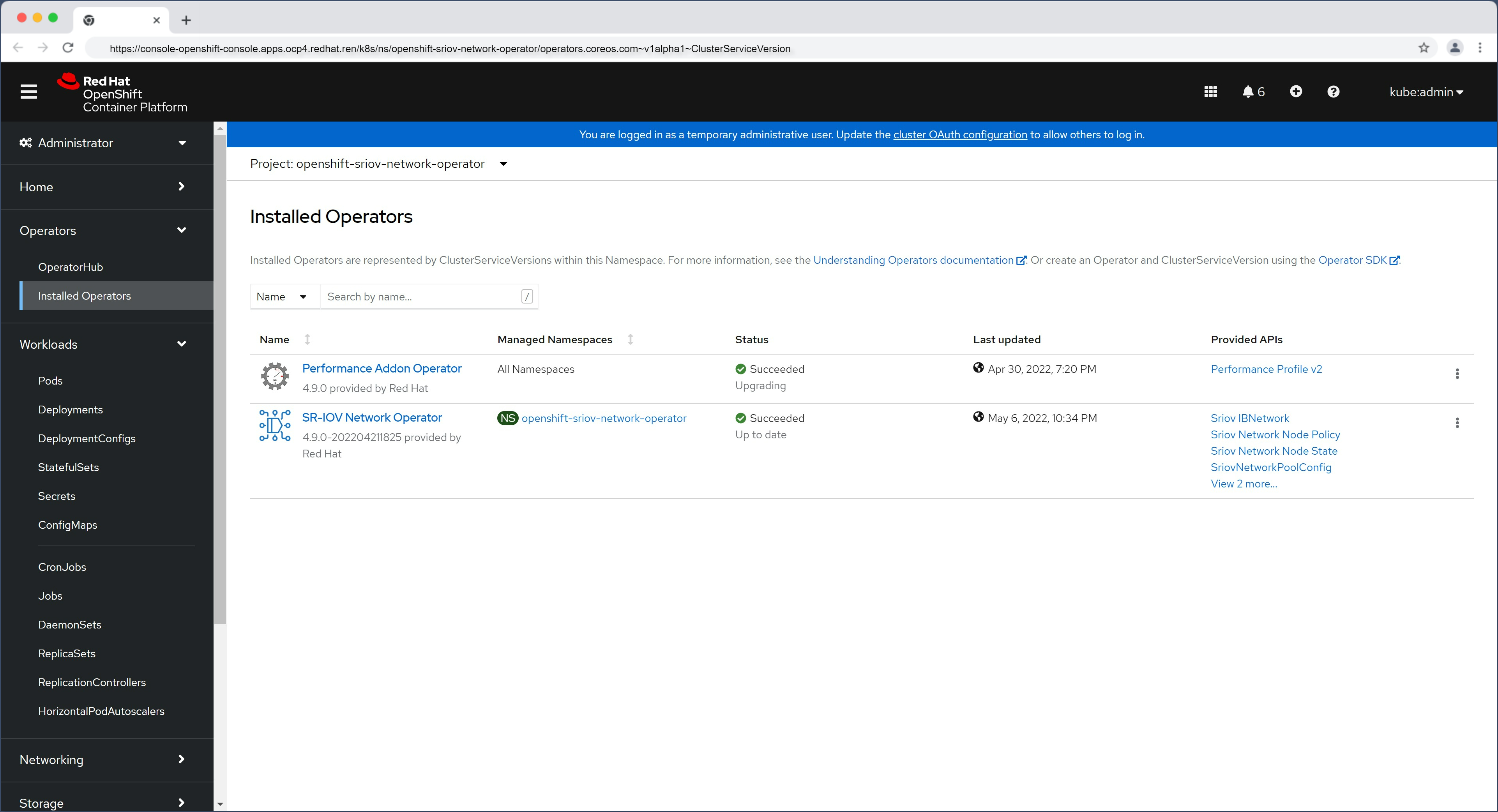
oc get SriovNetworkNodeState -n openshift-sriov-network-operator
# NAME                       AGE
# master-0                   42m
# worker-0.ocp4.redhat.ren   42m
# worker-1                   42m
# worker-2.ocp4.redhat.ren   42m

oc get SriovNetworkNodeState/worker-2.ocp4.redhat.ren -n openshift-sriov-network-operator -o yaml
# apiVersion: sriovnetwork.openshift.io/v1
# kind: SriovNetworkNodeState
# metadata:
#   creationTimestamp: "2022-05-06T14:34:54Z"
#   generation: 1
#   name: worker-2.ocp4.redhat.ren
#   namespace: openshift-sriov-network-operator
#   ownerReferences:
#   - apiVersion: sriovnetwork.openshift.io/v1
#     blockOwnerDeletion: true
#     controller: true
#     kind: SriovNetworkNodePolicy
#     name: default
#     uid: 4eca5eea-e1e5-410f-8833-dd2de1434e53
#   resourceVersion: "70932404"
#   uid: 1d122c8e-b788-4f1e-a3d5-865c6230a476
# spec:
#   dpConfigVersion: "70930693"
# status:
#   interfaces:
#   - deviceID: "1572"
#     driver: i40e
#     linkSpeed: -1 Mb/s
#     linkType: ETH
#     mac: 90:e2:ba:a8:29:e6
#     mtu: 1500
#     name: ens2f0
#     pciAddress: 0000:65:00.0
#     totalvfs: 64
#     vendor: "8086"
#   - deviceID: "1572"
#     driver: i40e
#     linkSpeed: -1 Mb/s
#     linkType: ETH
#     mac: 90:e2:ba:a8:29:e7
#     mtu: 1500
#     name: ens2f1
#     pciAddress: 0000:65:00.1
#     totalvfs: 64
#     vendor: "8086"
#   - deviceID: 37d1
#     driver: i40e
#     linkSpeed: 1000 Mb/s
#     linkType: ETH
#     mac: ac:1f:6b:ea:5b:32
#     mtu: 1500
#     name: eno1
#     pciAddress: 0000:b5:00.0
#     totalvfs: 32
#     vendor: "8086"
#   - deviceID: 37d1
#     driver: i40e
#     linkSpeed: 1000 Mb/s
#     linkType: ETH
#     mac: ac:1f:6b:ea:5b:33
#     mtu: 1500
#     name: eno2
#     pciAddress: 0000:b5:00.1
#     totalvfs: 32
#     vendor: "8086"
#   syncStatus: Succeeded

# how to use the sriov to create VF and attach to pod, depends on use case from nep demo request
# remember to active SRIOV in bios
# remember to active VT-d in bios
cat << EOF > /data/install/sriov.policy.yaml
---
apiVersion: sriovnetwork.openshift.io/v1
kind: SriovNetworkNodePolicy
metadata:
  name: policy-710-nic01-rt2
  namespace: openshift-sriov-network-operator
spec:
  resourceName: intel_710_nic01_rt2
  nodeSelector:
    kubernetes.io/hostname: worker-2.ocp4.redhat.ren
  numVfs: 4
  nicSelector:
    vendor: "8086"
    deviceID: "1572"
    rootDevices:
      - "0000:65:00.0"
    # pfNames:
    #   - "ens2f0"
  # linkType: eth
  # isRdma: false
  deviceType: vfio-pci
---
apiVersion: sriovnetwork.openshift.io/v1
kind: SriovNetworkNodePolicy
metadata:
  name: policy-710-nic02-rt2
  namespace: openshift-sriov-network-operator
spec:
  resourceName: intel_710_nic02_rt2
  nodeSelector:
    kubernetes.io/hostname: worker-2.ocp4.redhat.ren
  numVfs: 4
  nicSelector:
    vendor: "8086"
    deviceID: "1572"
    rootDevices:
      - "0000:65:00.1"
    # pfNames:
    #   - "ens2f1"
  # linkType: eth
  # isRdma: false
  deviceType: vfio-pci
EOF
oc create -f /data/install/sriov.policy.yaml

# oc delete -f /data/install/sriov.policy.yaml

oc get sriovnetworknodestates/worker-2.ocp4.redhat.ren -n openshift-sriov-network-operator  -o jsonpath='{.status.syncStatus}' && echo
# Succeeded


cat << EOF > /data/install/sriov.attach.yaml
---
apiVersion: sriovnetwork.openshift.io/v1
kind: SriovNetwork
metadata:
  name: intel-710-nic01-rt2
  namespace: openshift-sriov-network-operator
spec:
  resourceName: intel_710_nic01_rt2
  networkNamespace: vbbu-demo
  ipam: |-
    {
      "type": "static",
      "addresses": [
        {
          "address": "192.168.12.21/24"
        }
      ]
    }
---
apiVersion: sriovnetwork.openshift.io/v1
kind: SriovNetwork
metadata:
  name: intel-710-nic02-rt2
  namespace: openshift-sriov-network-operator
spec:
  resourceName: intel_710_nic02_rt2
  networkNamespace: vbbu-demo
  # ipam: |-
  #   {
  #     "type": "dhcp"
  #   }
  ipam: |-
    {
      "type": "static",
      "addresses": [
        {
          "address": "192.168.22.21/24"
        }
      ]
    }
EOF
oc create -f /data/install/sriov.attach.yaml

# oc delete -f /data/install/sriov.attach.yaml

oc get net-attach-def -n vbbu-demo
# NAME                  AGE
# intel-710-nic01-rt2   34s
# intel-710-nic02-rt2   34s
setup fec sriov operator
intel已经给自己的FEC加速卡做好了operator,还有非常详细的文档,我们很幸福的直接用就好了。
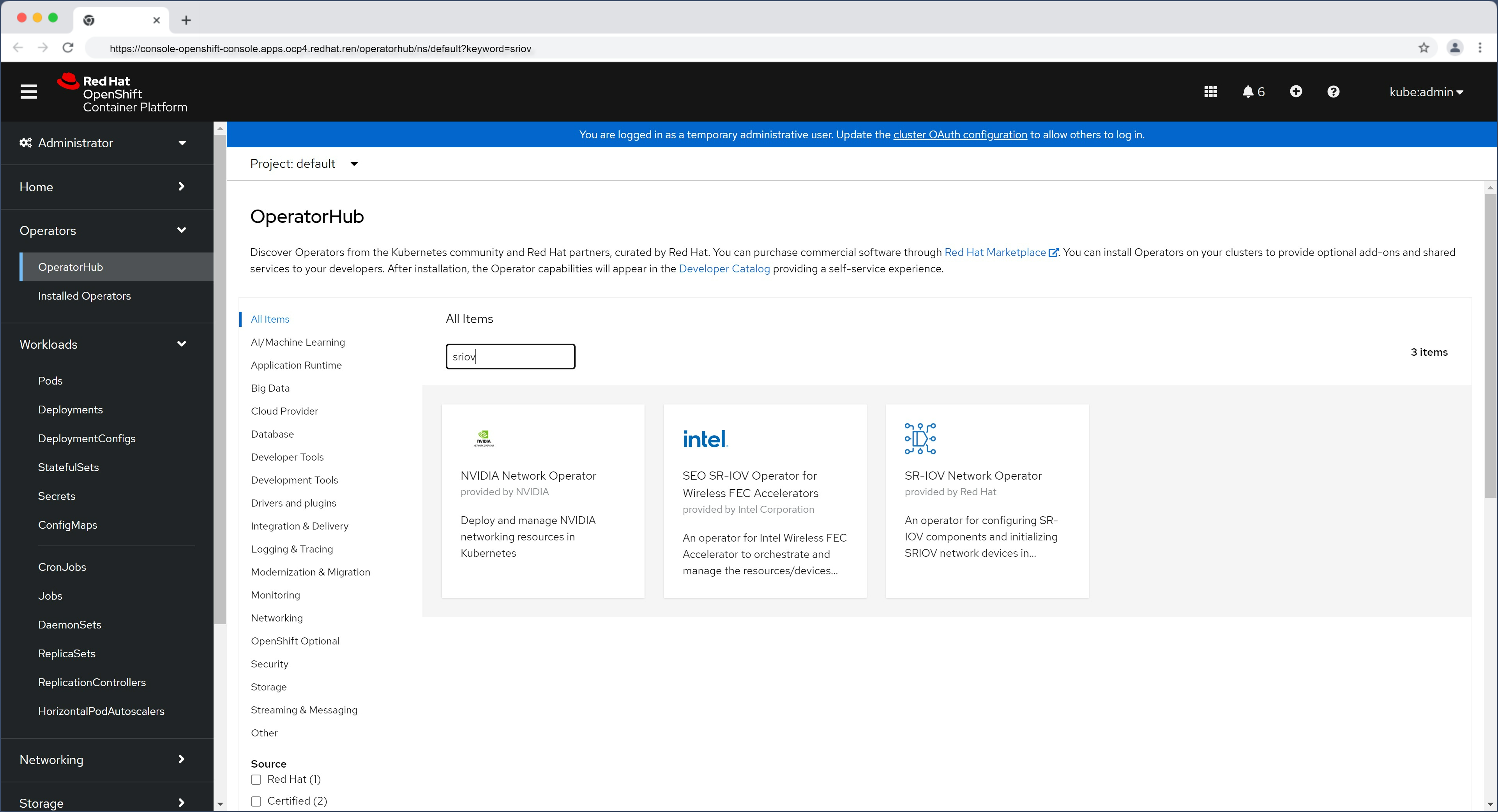
- SEO Operator for Wireless FEC Accelerators documentation
- Intel’s vRAN accelerators supported by SEO Operators on OpenShift
# install sriov operator
cat << EOF > /data/install/sriov.fec.yaml
---
apiVersion: v1
kind: Namespace
metadata:
  name: vran-acceleration-operators
  annotations:
    workload.openshift.io/allowed: management
  labels:
     openshift.io/cluster-monitoring: "true"
---
apiVersion: operators.coreos.com/v1
kind: OperatorGroup
metadata:
  name: vran-operators
  namespace: vran-acceleration-operators
spec:
  targetNamespaces:
    - vran-acceleration-operators
---
apiVersion: operators.coreos.com/v1alpha1
kind: Subscription
metadata:
  name: sriov-fec-subscription
  namespace: vran-acceleration-operators
spec:
  channel: stable
  installPlanApproval: Manual
  name: sriov-fec
  source: certified-operators
  sourceNamespace: openshift-marketplace
EOF
oc create -f /data/install/sriov.fec.yaml

oc get csv -n vran-acceleration-operators
# NAME                                DISPLAY                                             VERSION   REPLACES   PHASE
# performance-addon-operator.v4.9.0   Performance Addon Operator                          4.9.0                Succeeded
# sriov-fec.v2.2.1                    SEO SR-IOV Operator for Wireless FEC Accelerators   2.2.1                Succeeded

oc get sriovfecnodeconfig -n vran-acceleration-operators
# No resources found in vran-acceleration-operators namespace.

cat << EOF > /data/install/sriov.fec.config.yaml
apiVersion: sriovfec.intel.com/v2
kind: SriovFecClusterConfig
metadata:
  name: config
  namespace: vran-acceleration-operators
spec:
  priority: 1
  nodeSelector:
    kubernetes.io/hostname: worker-2.ocp4.redhat.ren
  acceleratorSelector:
    pciAddress: 0000:17:00.0
  physicalFunction:
    pfDriver: "pci-pf-stub"
    vfDriver: "vfio-pci"
    vfAmount: 16
    bbDevConfig:
      acc100:
        # Programming mode: 0 = VF Programming, 1 = PF Programming
        # true = PF Programming, false = VF Programming
        pfMode: true
        numVfBundles: 16
        maxQueueSize: 1024
        uplink4G:
          numQueueGroups: 0
          numAqsPerGroups: 16
          aqDepthLog2: 4
        downlink4G:
          numQueueGroups: 0
          numAqsPerGroups: 16
          aqDepthLog2: 4
        uplink5G:
          numQueueGroups: 4
          numAqsPerGroups: 16
          aqDepthLog2: 4
        downlink5G:
          numQueueGroups: 4
          numAqsPerGroups: 16
          aqDepthLog2: 4
EOF
oc create -f /data/install/sriov.fec.config.yaml

# oc delete -f /data/install/sriov.fec.config.yaml

oc get sriovfecnodeconfig -n vran-acceleration-operators
# NAME                       CONFIGURED
# worker-2.ocp4.redhat.ren   Succeeded

oc get sriovfecnodeconfig -n vran-acceleration-operators worker-2.ocp4.redhat.ren -o yaml
# apiVersion: sriovfec.intel.com/v2
# kind: SriovFecNodeConfig
# metadata:
#   creationTimestamp: "2022-05-09T06:51:45Z"
#   generation: 2
#   name: worker-2.ocp4.redhat.ren
#   namespace: vran-acceleration-operators
#   resourceVersion: "72789505"
#   uid: 265c42ae-f898-407c-a4bc-7f17aa8b94bb
# spec:
#   physicalFunctions:
#   - bbDevConfig:
#       acc100:
#         downlink4G:
#           aqDepthLog2: 4
#           numAqsPerGroups: 16
#           numQueueGroups: 0
#         downlink5G:
#           aqDepthLog2: 4
#           numAqsPerGroups: 16
#           numQueueGroups: 4
#         maxQueueSize: 1024
#         numVfBundles: 16
#         pfMode: true
#         uplink4G:
#           aqDepthLog2: 4
#           numAqsPerGroups: 16
#           numQueueGroups: 0
#         uplink5G:
#           aqDepthLog2: 4
#           numAqsPerGroups: 16
#           numQueueGroups: 4
#     pciAddress: "0000:17:00.0"
#     pfDriver: pci-pf-stub
#     vfAmount: 16
#     vfDriver: vfio-pci
# status:
#   conditions:
#   - lastTransitionTime: "2022-05-09T12:48:10Z"
#     message: Configured successfully
#     observedGeneration: 2
#     reason: Succeeded
#     status: "True"
#     type: Configured
#   inventory:
#     sriovAccelerators:
#     - deviceID: 0d5c
#       driver: pci-pf-stub
#       maxVirtualFunctions: 16
#       pciAddress: "0000:17:00.0"
#       vendorID: "8086"
#       virtualFunctions:
#       - deviceID: 0d5d
#         driver: vfio-pci
#         pciAddress: "0000:18:00.0"
#       - deviceID: 0d5d
#         driver: vfio-pci
#         pciAddress: "0000:18:00.1"
#       - deviceID: 0d5d
#         driver: vfio-pci
#         pciAddress: "0000:18:01.2"
#       - deviceID: 0d5d
#         driver: vfio-pci
#         pciAddress: "0000:18:01.3"
#       - deviceID: 0d5d
#         driver: vfio-pci
#         pciAddress: "0000:18:01.4"
#       - deviceID: 0d5d
#         driver: vfio-pci
#         pciAddress: "0000:18:01.5"
#       - deviceID: 0d5d
#         driver: vfio-pci
#         pciAddress: "0000:18:01.6"
#       - deviceID: 0d5d
#         driver: vfio-pci
#         pciAddress: "0000:18:01.7"
#       - deviceID: 0d5d
#         driver: vfio-pci
#         pciAddress: "0000:18:00.2"
#       - deviceID: 0d5d
#         driver: vfio-pci
#         pciAddress: "0000:18:00.3"
#       - deviceID: 0d5d
#         driver: vfio-pci
#         pciAddress: "0000:18:00.4"
#       - deviceID: 0d5d
#         driver: vfio-pci
#         pciAddress: "0000:18:00.5"
#       - deviceID: 0d5d
#         driver: vfio-pci
#         pciAddress: "0000:18:00.6"
#       - deviceID: 0d5d
#         driver: vfio-pci
#         pciAddress: "0000:18:00.7"
#       - deviceID: 0d5d
#         driver: vfio-pci
#         pciAddress: "0000:18:01.0"
#       - deviceID: 0d5d
#         driver: vfio-pci
#         pciAddress: "0000:18:01.1"
setup ptp
intel flexran文档里面说,必须要用ptp,这个正常,在o-ran架构中,ptp是必须的。
# install ptp operator
cat << EOF > /data/install/ptp.yaml
---
apiVersion: v1
kind: Namespace
metadata:
  name: openshift-ptp
  annotations:
    workload.openshift.io/allowed: management
  labels:
    name: openshift-ptp
    openshift.io/cluster-monitoring: "true"
---
apiVersion: operators.coreos.com/v1
kind: OperatorGroup
metadata:
  name: ptp-operators
  namespace: openshift-ptp
spec:
  targetNamespaces:
  - openshift-ptp
---
apiVersion: operators.coreos.com/v1alpha1
kind: Subscription
metadata:
  name: ptp-operator-subscription
  namespace: openshift-ptp
spec:
  channel: "4.9"
  installPlanApproval: Manual
  name: ptp-operator
  source: redhat-operators
  sourceNamespace: openshift-marketplace
EOF
oc create -f /data/install/ptp.yaml

oc get csv -n openshift-ptp
# NAME                                DISPLAY                      VERSION              REPLACES   PHASE
# performance-addon-operator.v4.9.0   Performance Addon Operator   4.9.0                           Succeeded
# ptp-operator.4.9.0-202204211825     PTP Operator                 4.9.0-202204211825              Succeeded

oc get csv -n openshift-ptp \
  -o custom-columns=Name:.metadata.name,Phase:.status.phase
# Name                                Phase
# performance-addon-operator.v4.9.0   Succeeded
# ptp-operator.4.9.0-202204211825     Succeeded

# as nepdemo request, disable phc2sys service, but we enabled it.
# 坑爹的 ptp4lConf 配置,我查了源代码才知道,他不能有空行
cat << EOF > /data/install/ptp.config.yaml
apiVersion: ptp.openshift.io/v1
kind: PtpConfig
metadata:
  name: ordinary-clock-ptp-config-worker-2
  namespace: openshift-ptp
spec:
  profile:
  - name: "profile1"
    interface: "ens2f1"
    ptp4lOpts: "-2 -m"
    phc2sysOpts: "-a -r"
    ptp4lConf: |-
      [global]
      #
      # Default Data Set
      #
      twoStepFlag             1
      slaveOnly               0
      priority1               128
      priority2               128
      domainNumber            24
      #utc_offset             37
      clockClass              248
      clockAccuracy           0xFE
      offsetScaledLogVariance 0xFFFF
      free_running            0
      freq_est_interval       1
      dscp_event              0
      dscp_general            0
      dataset_comparison      ieee1588
      G.8275.defaultDS.localPriority  128
      #
      # Port Data Set
      # 16 TS a second use logSyncInterval  -4
      logAnnounceInterval     1
      logSyncInterval         -4
      logMinDelayReqInterval  0
      logMinPdelayReqInterval 0
      announceReceiptTimeout  3
      syncReceiptTimeout      0
      delayAsymmetry          0
      fault_reset_interval    4
      neighborPropDelayThresh 20000000
      masterOnly              0
      G.8275.portDS.localPriority     128
      #
      # Run time options
      #
      assume_two_step         0
      logging_level           6
      path_trace_enabled      0
      follow_up_info          0
      hybrid_e2e              0
      inhibit_multicast_service       0
      net_sync_monitor        0
      tc_spanning_tree        0
      tx_timestamp_timeout    1
      unicast_listen          0
      unicast_master_table    0
      unicast_req_duration    3600
      use_syslog              1
      verbose                 0
      summary_interval        0
      kernel_leap             1
      check_fup_sync          0
      #
      # Servo Options
      #
      pi_proportional_const   0.0
      pi_integral_const       0.0
      pi_proportional_scale   0.0
      pi_proportional_exponent        -0.3
      pi_proportional_norm_max        0.7
      pi_integral_scale       0.0
      pi_integral_exponent    0.4
      pi_integral_norm_max    0.3
      step_threshold          0.0
      first_step_threshold    0.00002
      max_frequency           900000000
      clock_servo             pi
      sanity_freq_limit       200000000
      ntpshm_segment          0
      #
      # Transport options
      #
      transportSpecific       0x0
      ptp_dst_mac             01:1B:19:00:00:00
      p2p_dst_mac             01:80:C2:00:00:0E
      udp_ttl                 1
      udp6_scope              0x0E
      uds_address             /var/run/ptp4l
      #
      # Default interface options
      #
      clock_type              OC
      network_transport       UDPv4
      delay_mechanism         E2E
      time_stamping           hardware
      tsproc_mode             filter
      delay_filter            moving_median
      delay_filter_length     10
      egressLatency           0
      ingressLatency          0
      boundary_clock_jbod     0
      #
      # Clock description
      #
      productDescription      ;;
      revisionData            ;;
      manufacturerIdentity    00:00:00
      userDescription         ;
      timeSource              0xA0
    ptpSchedulingPolicy: SCHED_FIFO
    ptpSchedulingPriority: 65
  recommend:
  - profile: "profile1"
    priority: 10
    match:
    - nodeLabel: "node-role.kubernetes.io/worker"
      nodeName: "worker-2.ocp4.redhat.ren"
EOF
oc create -f /data/install/ptp.config.yaml

# oc delete -f /data/install/ptp.config.yaml
create deployment ( put all together )
最终,我们可以拼装出一个完整的部署,我们的部署是一个 pod 里面有 2 个 container。一个 container 是 vbbu 应用的 container , 按照 intel sdk 中的方法来搞,也就是尽量只把编译后的应用程序本身放进来,而不是把其他的依赖包放进来。这样镜像就会比较小,大概2G左右。 另外一个container是开发用的,因为开发组需要一个开发环境,把东西编译好,然后复制到 vbbu 应用的那个container里面去。
在这里,flexran-release-running 这个container就是最终运行用的。而flexran-dev-env就是开发环境。
目前这个版本是开发版,未来开发测试结束,将把flexran-dev-env取消,另外本地host-path的目录,也会删除,也就是本地的intel sdk都删掉。
oc new-project vbbu-demo

oc project vbbu-demo

export REG_TMP='tmp-registry.ocp4.redhat.ren:5443'

# kernel driver deployment
oc create serviceaccount svcacct-driver -n vbbu-demo
oc adm policy add-scc-to-user privileged -z svcacct-driver -n vbbu-demo
# oc adm policy add-scc-to-user anyuid -z mysvcacct -n vbbu-demo

cat << EOF > /data/install/dpdk.kmod.driver.yaml
apiVersion: apps/v1
kind: Deployment
metadata:
  name: dpdk-kmod-driver
  # namespace: default
  labels:
    app: dpdk-kmod-driver
spec:
  replicas: 1
  selector:
    matchLabels:
      app: dpdk-kmod-driver
  template:
    metadata:
      labels:
        app: dpdk-kmod-driver
    spec:
      affinity:
        podAntiAffinity:
          requiredDuringSchedulingIgnoredDuringExecution:
            - labelSelector:
                matchExpressions:
                  - key: "app"
                    operator: In
                    values:
                    - dpdk-kmod-driver
              topologyKey: "kubernetes.io/hostname"
        nodeAffinity:
          requiredDuringSchedulingIgnoredDuringExecution:
            nodeSelectorTerms:
            - matchExpressions:
              - key: kubernetes.io/hostname
                operator: In
                values:
                - worker-2.ocp4.redhat.ren
      # restartPolicy: Never
      serviceAccountName: svcacct-driver
      initContainers:
      - name: copy
        image: ${REG_TMP}/nepdemo/flexran_vdu:dpdk-kmods-ocp-4.9.5-ubi
        command: ["/bin/sh", "-c", "--"]
        args: ["/bin/cp -rf /data/* /nepdemo/"]
        # imagePullPolicy: Always
        volumeMounts:
        - name: driver-files
          mountPath: /nepdemo
      containers:
      - name: driver
        image: ${REG_TMP}/nepdemo/flexran_vdu:flexran-20.11-dpdk-19.11-ocp4.9.5-ubi-8.4
        imagePullPolicy: Always
        command: ["/bin/sh", "-c", "--"]
        args: ["insmod /nepdemo/dpdk-kmods/linux/igb_uio/igb_uio.ko ; sleep infinity ;"]
        resources:
          requests:
            cpu: 10m
            memory: 20Mi
        securityContext:
          privileged: true
          runAsUser: 0
        volumeMounts:
        - name: driver-files
          mountPath: /nepdemo
        # - name: host
        #   mountPath: /host
      volumes:
      - name: driver-files
        emptyDir: {}
      # - name: host
      #   hostPath:
      #     path: /
      #     type: Directory
EOF
oc create -n vbbu-demo -f /data/install/dpdk.kmod.driver.yaml

# to restore
# oc delete -f /data/install/dpdk.kmod.driver.yaml


# the pod with vbbu container and dev container
# later, it will change to deployment
cat << EOF > /data/install/vran.intel.flexran.yaml
---
apiVersion: apps/v1
kind: Deployment
metadata:
  name: flexran-binary-release-deployment
  labels:
    app: flexran-binary-release-deployment
spec:
  replicas: 1
  selector:
    matchLabels:
      app: flexran-binary-release
  template:
    metadata:
      labels:
        app: flexran-binary-release
      name: flexran-binary-release
      annotations:
        k8s.v1.cni.cncf.io/networks: |-
          [
            {
              "name": "intel-710-nic01-rt2",
              "mac": "00:11:22:33:44:01"
            },
            {
              "name": "intel-710-nic02-rt2",
              "mac": "00:11:22:33:44:02"
            }
          ]
      cpu-load-balancing.crio.io: "true"
    spec:
      affinity:
        podAntiAffinity:
          requiredDuringSchedulingIgnoredDuringExecution:
            - labelSelector:
                matchExpressions:
                  - key: "app"
                    operator: In
                    values:
                    - flexran-binary-release
              topologyKey: "kubernetes.io/hostname"
        nodeAffinity:
          requiredDuringSchedulingIgnoredDuringExecution:
            nodeSelectorTerms:
            - matchExpressions:
              - key: kubernetes.io/hostname
                operator: In
                values:
                - worker-2.ocp4.redhat.ren
      # nodeSelector:
      #   kubernetes.io/hostname: worker-2.ocp4.redhat.ren
      runtimeClassName: performance-wzh-performanceprofile-2
      serviceAccountName: svcacct-driver
      containers:
      - securityContext:
          privileged: false
          capabilities:
            add:
              #- SYS_ADMIN
              - IPC_LOCK
              - SYS_NICE
              - SYS_RESOURCE
              - NET_RAW
        command: [ "/sbin/init" ]
        # command: [ "/bin/sh","-c","--" ]
        # args: ["  sleep infinity ; "]
        # tty: true
        # stdin: true
        image: ${REG_TMP}/nepdemo/flexran_vdu:flexran-20.11-dpdk-19.11-ocp4.9.5-ubi-8.4
        # image: ${REG_TMP}/nepdemo/flexran_basekit:dpdk-19.11-ocp-4.9.5-ubi-8.4
        # imagePullPolicy: Always
        name: flexran-release-running
        resources:
          requests:
            memory: "24Gi"
            intel.com/intel_fec_acc100: '1'
            hugepages-1Gi: 16Gi
          limits:
            memory: "24Gi"
            intel.com/intel_fec_acc100: '1'
            hugepages-1Gi: 16Gi
        volumeMounts:
        - name: hugepage
          mountPath: /hugepages
        - name: varrun
          mountPath: /var/run/dpdk
          readOnly: false
        # - name: oneapi
        #   mountPath: /opt/intel/oneapi
        #   readOnly: false
        # - name: system-studio-2019
        #   mountPath: /opt/intel/system_studio_2019
        #   readOnly: false
        # - name: licenses
        #   mountPath: /opt/intel/licenses
        #   readOnly: false
        # - name: packagemanager
        #   mountPath: /opt/intel/packagemanager
        #   readOnly: false
        - name: dpdk-19-11
          mountPath: /opt/dpdk-19.11
          readOnly: false
        - name: flexran
          mountPath: /data/flexran
          readOnly: false
        - name: sys
          mountPath: /sys/
          readOnly: false

      - securityContext:
          privileged: false
        command: [ "/bin/sh","-c","--" ]
        args: [" echo 'source  /opt/intel/system_studio_2019/bin/compilervars.sh intel64' >> /root/.bashrc ; echo 'source /opt/intel/oneapi/setvars.sh' >> /root/.bashrc ; sleep infinity"]
        # tty: true
        # stdin: true
        # env:
        image: ${REG_TMP}/nepdemo/flexran_basekit:dpdk-19.11-ocp-4.9.5-ubi-8.4
        name: flexran-dev-env
        volumeMounts:
        - name: oneapi
          mountPath: /opt/intel/oneapi
          readOnly: false
        - name: system-studio-2019
          mountPath: /opt/intel/system_studio_2019
          readOnly: false
        - name: licenses
          mountPath: /opt/intel/licenses
          readOnly: false
        - name: packagemanager
          mountPath: /opt/intel/packagemanager
          readOnly: false
        - name: dpdk-19-11
          mountPath: /opt/dpdk-19-11
          readOnly: false
        - name: flexran
          mountPath: /data/flexran
          readOnly: false
      volumes:
      - name: hugepage
        emptyDir:
          medium: HugePages
      - name: varrun
        emptyDir: {}
      - name: dpdk-19-11
        hostPath:
          path: "/var/nepdemo/dpdk-19.11"
      - name: flexran
        hostPath:
          path: "/var/nepdemo/flexran"
      - name: oneapi
        hostPath:
          path: "/var/nepdemo/oneapi"
      - name: system-studio-2019
        hostPath:
          path: "/var/nepdemo/system_studio_2019"
      - name: licenses
        hostPath:
          path: "/var/nepdemo/licenses"
      - name: packagemanager
        hostPath:
          path: "/var/nepdemo/packagemanager"
      - name: sys
        hostPath:
          path: "/sys/"

EOF
oc create -n vbbu-demo -f /data/install/vran.intel.flexran.yaml

# oc delete -n vbbu-demo -f /data/install/vran.intel.flexran.yaml

POD_ID=$(oc get pod -n vbbu-demo -o json | jq -r '.items[].metadata.name | select(. | contains("flexran-binary-release"))' )
oc rsh -c flexran-dev-env ${POD_ID}
# switch to bash, will run .bashrc, which wil bring you intel icc/icx sdk env.
# bash

# 我们从fec的device plugin里面,能看到设备已经提供出来了
POD_ID=$(oc get pod -n vran-acceleration-operators -o json | jq -r ' .items[].metadata.name | select( contains( "device-plugin" ) ) ')
oc logs -n vran-acceleration-operators $POD_ID
# ......
# I0509 12:53:38.288275       1 server.go:119] Allocate() called with &AllocateRequest{ContainerRequests:[]*ContainerAllocateRequest{&ContainerAllocateRequest{DevicesIDs:[0000:18:01.2],},},}
# I0509 12:53:38.288326       1 accelResourcePool.go:46] GetDeviceSpecs(): for devices: [0000:18:01.2]
# I0509 12:53:38.288435       1 pool_stub.go:97] GetEnvs(): for devices: [0000:18:01.2]
# I0509 12:53:38.288443       1 pool_stub.go:113] GetMounts(): for devices: [0000:18:01.2]
# I0509 12:53:38.288447       1 server.go:128] AllocateResponse send: &AllocateResponse{ContainerResponses:[]*ContainerAllocateResponse{&ContainerAllocateResponse{Envs:map[string]string{PCIDEVICE_INTEL_COM_INTEL_FEC_ACC100: 0000:18:01.2,},Mounts:[]*Mount{},Devices:[]*DeviceSpec{&DeviceSpec{ContainerPath:/dev/vfio/vfio,HostPath:/dev/vfio/vfio,Permissions:mrw,},&DeviceSpec{ContainerPath:/dev/vfio/110,HostPath:/dev/vfio/110,Permissions:mrw,},},Annotations:map[string]string{},},},}

POD_ID=$(oc get pod -n openshift-sriov-network-operator -o json | jq -r ' .items[].metadata.name | select( contains( "device-plugin" ) ) ')
oc logs -n openshift-sriov-network-operator $POD_ID
# ......
# I0511 13:03:13.167902       1 server.go:115] Allocate() called with &AllocateRequest{ContainerRequests:[]*ContainerAllocateRequest{&ContainerAllocateRequest{DevicesIDs:[0000:65:02.0],},},}
# I0511 13:03:13.167961       1 netResourcePool.go:50] GetDeviceSpecs(): for devices: [0000:65:02.0]
# I0511 13:03:13.168068       1 pool_stub.go:97] GetEnvs(): for devices: [0000:65:02.0]
# I0511 13:03:13.168077       1 pool_stub.go:113] GetMounts(): for devices: [0000:65:02.0]
# I0511 13:03:13.168082       1 server.go:124] AllocateResponse send: &AllocateResponse{ContainerResponses:[]*ContainerAllocateResponse{&ContainerAllocateResponse{Envs:map[string]string{PCIDEVICE_OPENSHIFT_IO_INTEL_710_NIC01_RT2: 0000:65:02.0,},Mounts:[]*Mount{},Devices:[]*DeviceSpec{&DeviceSpec{ContainerPath:/dev/vfio/vfio,HostPath:/dev/vfio/vfio,Permissions:mrw,},&DeviceSpec{ContainerPath:/dev/vfio/108,HostPath:/dev/vfio/108,Permissions:mrw,},},Annotations:map[string]string{},},},}
# I0511 13:03:13.168369       1 server.go:115] Allocate() called with &AllocateRequest{ContainerRequests:[]*ContainerAllocateRequest{&ContainerAllocateRequest{DevicesIDs:[0000:65:0a.0],},},}
# I0511 13:03:13.168393       1 netResourcePool.go:50] GetDeviceSpecs(): for devices: [0000:65:0a.0]
# I0511 13:03:13.168470       1 pool_stub.go:97] GetEnvs(): for devices: [0000:65:0a.0]
# I0511 13:03:13.168477       1 pool_stub.go:113] GetMounts(): for devices: [0000:65:0a.0]
# I0511 13:03:13.168481       1 server.go:124] AllocateResponse send: &AllocateResponse{ContainerResponses:[]*ContainerAllocateResponse{&ContainerAllocateResponse{Envs:map[string]string{PCIDEVICE_OPENSHIFT_IO_INTEL_710_NIC02_RT2: 0000:65:0a.0,},Mounts:[]*Mount{},Devices:[]*DeviceSpec{&DeviceSpec{ContainerPath:/dev/vfio/vfio,HostPath:/dev/vfio/vfio,Permissions:mrw,},&DeviceSpec{ContainerPath:/dev/vfio/112,HostPath:/dev/vfio/112,Permissions:mrw,},},Annotations:map[string]string{},},},}

# 到vbbu pod里面验证一下,也能看到设备出现了。
POD_ID=$(oc get pod -n vbbu-demo -o json | jq -r '.items[].metadata.name | select(. | contains("flexran-binary-release"))' )
oc exec -c flexran-release-running  ${POD_ID} -- ls /dev/vfio
# Defaulted container "flexran-release-running" out of: flexran-release-running, flexran-dev-env
# 110
# 112
# 97
# vfio

POD_ID=$(oc get pod -n vbbu-demo -o json | jq -r '.items[].metadata.name | select(. | contains("flexran-binary-release"))' )
oc rsh -c flexran-release-running ${POD_ID}

POD_ID=$(oc get pod -n vbbu-demo -o json | jq -r '.items[].metadata.name | select(. | contains("flexran-binary-release"))' )
oc exec -c flexran-release-running  ${POD_ID} -- ip link
# 1: lo: <LOOPBACK,UP,LOWER_UP> mtu 65536 qdisc noqueue state UNKNOWN mode DEFAULT group default qlen 1000
#     link/loopback 00:00:00:00:00:00 brd 00:00:00:00:00:00
# 3: eth0@if30: <BROADCAST,MULTICAST,UP,LOWER_UP> mtu 1450 qdisc noqueue state UP mode DEFAULT group default
#     link/ether 0a:58:0a:fe:0a:0a brd ff:ff:ff:ff:ff:ff link-netnsid 0

POD_ID=$(oc get pod -n vbbu-demo -o json | jq -r '.items[].metadata.name | select(. | contains("flexran-binary-release"))' )
oc exec -c flexran-release-running  ${POD_ID} -- python3 /root/dpdk-19.11/usertools/dpdk-devbind.py -s
# Network devices using DPDK-compatible driver
# ============================================
# 0000:65:02.0 'Ethernet Virtual Function 700 Series 154c' drv=vfio-pci unused=iavf,igb_uio
# 0000:65:02.1 'Ethernet Virtual Function 700 Series 154c' drv=vfio-pci unused=iavf,igb_uio
# 0000:65:02.2 'Ethernet Virtual Function 700 Series 154c' drv=vfio-pci unused=iavf,igb_uio
# 0000:65:02.3 'Ethernet Virtual Function 700 Series 154c' drv=vfio-pci unused=iavf,igb_uio
# 0000:65:0a.0 'Ethernet Virtual Function 700 Series 154c' drv=vfio-pci unused=iavf,igb_uio
# 0000:65:0a.1 'Ethernet Virtual Function 700 Series 154c' drv=vfio-pci unused=iavf,igb_uio
# 0000:65:0a.2 'Ethernet Virtual Function 700 Series 154c' drv=vfio-pci unused=iavf,igb_uio
# 0000:65:0a.3 'Ethernet Virtual Function 700 Series 154c' drv=vfio-pci unused=iavf,igb_uio

# Network devices using kernel driver
# ===================================
# 0000:65:00.0 'Ethernet Controller X710 for 10GbE SFP+ 1572' if=ens2f0 drv=i40e unused=igb_uio,vfio-pci
# 0000:65:00.1 'Ethernet Controller X710 for 10GbE SFP+ 1572' if=ens2f1 drv=i40e unused=igb_uio,vfio-pci
# 0000:b5:00.0 'Ethernet Connection X722 for 1GbE 37d1' if=eno1 drv=i40e unused=igb_uio,vfio-pci
# 0000:b5:00.1 'Ethernet Connection X722 for 1GbE 37d1' if=eno2 drv=i40e unused=igb_uio,vfio-pci

# Baseband devices using DPDK-compatible driver
# =============================================
# 0000:18:00.0 'Device 0d5d' drv=vfio-pci unused=igb_uio
# 0000:18:00.1 'Device 0d5d' drv=vfio-pci unused=igb_uio
# 0000:18:00.2 'Device 0d5d' drv=vfio-pci unused=igb_uio
# 0000:18:00.3 'Device 0d5d' drv=vfio-pci unused=igb_uio
# 0000:18:00.4 'Device 0d5d' drv=vfio-pci unused=igb_uio
# 0000:18:00.5 'Device 0d5d' drv=vfio-pci unused=igb_uio
# 0000:18:00.6 'Device 0d5d' drv=vfio-pci unused=igb_uio
# 0000:18:00.7 'Device 0d5d' drv=vfio-pci unused=igb_uio
# 0000:18:01.0 'Device 0d5d' drv=vfio-pci unused=igb_uio
# 0000:18:01.1 'Device 0d5d' drv=vfio-pci unused=igb_uio
# 0000:18:01.2 'Device 0d5d' drv=vfio-pci unused=igb_uio
# 0000:18:01.3 'Device 0d5d' drv=vfio-pci unused=igb_uio
# 0000:18:01.4 'Device 0d5d' drv=vfio-pci unused=igb_uio
# 0000:18:01.5 'Device 0d5d' drv=vfio-pci unused=igb_uio
# 0000:18:01.6 'Device 0d5d' drv=vfio-pci unused=igb_uio
# 0000:18:01.7 'Device 0d5d' drv=vfio-pci unused=igb_uio

# Baseband devices using kernel driver
# ====================================
# 0000:17:00.0 'Device 0d5c' drv=pci-pf-stub unused=igb_uio,vfio-pci

# No 'Crypto' devices detected
# ============================

# No 'Eventdev' devices detected
# ==============================

# No 'Mempool' devices detected
# =============================

# No 'Compress' devices detected
# ==============================

# Misc (rawdev) devices using kernel driver
# =========================================
# 0000:00:04.0 'Sky Lake-E CBDMA Registers 2021' drv=ioatdma unused=igb_uio,vfio-pci
# 0000:00:04.1 'Sky Lake-E CBDMA Registers 2021' drv=ioatdma unused=igb_uio,vfio-pci
# 0000:00:04.2 'Sky Lake-E CBDMA Registers 2021' drv=ioatdma unused=igb_uio,vfio-pci
# 0000:00:04.3 'Sky Lake-E CBDMA Registers 2021' drv=ioatdma unused=igb_uio,vfio-pci
# 0000:00:04.4 'Sky Lake-E CBDMA Registers 2021' drv=ioatdma unused=igb_uio,vfio-pci
# 0000:00:04.5 'Sky Lake-E CBDMA Registers 2021' drv=ioatdma unused=igb_uio,vfio-pci
# 0000:00:04.6 'Sky Lake-E CBDMA Registers 2021' drv=ioatdma unused=igb_uio,vfio-pci
# 0000:00:04.7 'Sky Lake-E CBDMA Registers 2021' drv=ioatdma unused=igb_uio,vfio-pci

# No 'Regex' devices detected
# ===========================

oc debug node/worker-2.ocp4.redhat.ren -- ip link
# Starting pod/worker-2ocp4redhatren-debug ...
# To use host binaries, run `chroot /host`
# 1: lo: <LOOPBACK,UP,LOWER_UP> mtu 65536 qdisc noqueue state UNKNOWN mode DEFAULT group default qlen 1000
#     link/loopback 00:00:00:00:00:00 brd 00:00:00:00:00:00
# 2: ens2f0: <NO-CARRIER,BROADCAST,MULTICAST,UP> mtu 1500 qdisc mq state DOWN mode DEFAULT group default qlen 1000
#     link/ether 90:e2:ba:a8:29:e6 brd ff:ff:ff:ff:ff:ff
#     vf 0     link/ether 06:b4:8a:df:01:b6 brd ff:ff:ff:ff:ff:ff, spoof checking on, link-state auto, trust off
#     vf 1     link/ether 6a:f3:e9:2e:ce:95 brd ff:ff:ff:ff:ff:ff, spoof checking on, link-state auto, trust off
#     vf 2     link/ether 86:23:2b:24:12:8f brd ff:ff:ff:ff:ff:ff, spoof checking on, link-state auto, trust off
#     vf 3     link/ether 00:11:22:33:44:01 brd ff:ff:ff:ff:ff:ff, spoof checking on, link-state auto, trust off
# 3: ens2f1: <NO-CARRIER,BROADCAST,MULTICAST,UP> mtu 1500 qdisc mq state DOWN mode DEFAULT group default qlen 1000
#     link/ether 90:e2:ba:a8:29:e7 brd ff:ff:ff:ff:ff:ff
#     vf 0     link/ether 00:11:22:33:44:02 brd ff:ff:ff:ff:ff:ff, spoof checking on, link-state auto, trust off
#     vf 1     link/ether f6:9f:b3:a4:f2:da brd ff:ff:ff:ff:ff:ff, spoof checking on, link-state auto, trust off
#     vf 2     link/ether 36:44:0f:fa:b9:84 brd ff:ff:ff:ff:ff:ff, spoof checking on, link-state auto, trust off
#     vf 3     link/ether fa:5b:75:f2:77:8c brd ff:ff:ff:ff:ff:ff, spoof checking on, link-state auto, trust off
# 4: eno1: <BROADCAST,MULTICAST,UP,LOWER_UP> mtu 1500 qdisc mq state UP mode DEFAULT group default qlen 1000
#     link/ether ac:1f:6b:ea:5b:32 brd ff:ff:ff:ff:ff:ff
# 5: eno2: <BROADCAST,MULTICAST,UP,LOWER_UP> mtu 1500 qdisc mq state UP mode DEFAULT group default qlen 1000
#     link/ether ac:1f:6b:ea:5b:33 brd ff:ff:ff:ff:ff:ff
# 10: ovs-system: <BROADCAST,MULTICAST> mtu 1500 qdisc noop state DOWN mode DEFAULT group default qlen 1000
#     link/ether 52:50:27:19:21:e2 brd ff:ff:ff:ff:ff:ff
# 11: br0: <BROADCAST,MULTICAST> mtu 1450 qdisc noop state DOWN mode DEFAULT group default qlen 1000
#     link/ether fe:7b:d1:84:da:4f brd ff:ff:ff:ff:ff:ff
# 12: vxlan_sys_4789: <BROADCAST,MULTICAST,UP,LOWER_UP> mtu 65000 qdisc noqueue master ovs-system state UNKNOWN mode DEFAULT group default qlen 1000
#     link/ether b6:c9:1d:9d:77:aa brd ff:ff:ff:ff:ff:ff
# 13: tun0: <BROADCAST,MULTICAST,UP,LOWER_UP> mtu 1450 qdisc noqueue state UNKNOWN mode DEFAULT group default qlen 1000
#     link/ether 36:7a:65:37:c1:33 brd ff:ff:ff:ff:ff:ff
# 14: vethf21a4c33@if3: <BROADCAST,MULTICAST,UP,LOWER_UP> mtu 1450 qdisc noqueue master ovs-system state UP mode DEFAULT group default
#     link/ether ae:f2:57:a5:67:ad brd ff:ff:ff:ff:ff:ff link-netnsid 0
# 15: veth8662e3e2@if3: <BROADCAST,MULTICAST,UP,LOWER_UP> mtu 1450 qdisc noqueue master ovs-system state UP mode DEFAULT group default
#     link/ether 9e:49:15:3f:7c:a1 brd ff:ff:ff:ff:ff:ff link-netnsid 1
# 16: veth5d3ab571@if3: <BROADCAST,MULTICAST,UP,LOWER_UP> mtu 1450 qdisc noqueue master ovs-system state UP mode DEFAULT group default
#     link/ether aa:ad:f7:cc:b9:57 brd ff:ff:ff:ff:ff:ff link-netnsid 2
# 17: veth20ff5e06@if3: <BROADCAST,MULTICAST,UP,LOWER_UP> mtu 1450 qdisc noqueue master ovs-system state UP mode DEFAULT group default
#     link/ether 82:72:8e:6d:1a:4a brd ff:ff:ff:ff:ff:ff link-netnsid 3
# 18: vethd11f4604@if3: <BROADCAST,MULTICAST,UP,LOWER_UP> mtu 1450 qdisc noqueue master ovs-system state UP mode DEFAULT group default
#     link/ether 96:df:20:6a:a0:6f brd ff:ff:ff:ff:ff:ff link-netnsid 4
# 20: vethc860c9be@if3: <BROADCAST,MULTICAST,UP,LOWER_UP> mtu 1450 qdisc noqueue master ovs-system state UP mode DEFAULT group default
#     link/ether c6:c6:37:fb:1d:48 brd ff:ff:ff:ff:ff:ff link-netnsid 5
# 30: vethfe0374a4@if3: <BROADCAST,MULTICAST,UP,LOWER_UP> mtu 1450 qdisc noqueue state UP mode DEFAULT group default
#     link/ether 1e:a1:67:b2:00:f6 brd ff:ff:ff:ff:ff:ff link-netnsid 6
# 32: vethecce46ea@if3: <BROADCAST,MULTICAST,UP,LOWER_UP> mtu 1450 qdisc noqueue master ovs-system state UP mode DEFAULT group default
#     link/ether 2e:1d:11:80:37:29 brd ff:ff:ff:ff:ff:ff link-netnsid 8

# Removing debug pod ...
以上是一个开发环境的部署,要注意,在 /data/flexran 的开发成功,要复制到 /root/flexran 里面,然后用 release 容器来运行测试。
后期,当开发完成以后,会单独的重新制作 release 容器,dev 相关的容器在生成环境上,就都不用了,同理,那些复制文件的 job 也都不会在生产系统上运行。
end
linuxptp 3.11
# http://linuxptp.sourceforge.net/
# download linuxptp-3.1.1

# on a rhel8.4
dnf install -y linuxptp

# /etc/ptp4l.conf
# /etc/sysconfig/phc2sys
# /etc/sysconfig/ptp4l
# /etc/timemaster.conf
# /usr/lib/systemd/system/phc2sys.service
# /usr/lib/systemd/system/ptp4l.service
# /usr/lib/systemd/system/timemaster.service

cat /etc/sysconfig/phc2sys
# OPTIONS="-a -r"

cat /etc/sysconfig/ptp4l
# OPTIONS="-f /etc/ptp4l.conf -i eth0"

systemctl cat phc2sys
# # /usr/lib/systemd/system/phc2sys.service
# [Unit]
# Description=Synchronize system clock or PTP hardware clock (PHC)
# After=ntpdate.service ptp4l.service

# [Service]
# Type=simple
# EnvironmentFile=-/etc/sysconfig/phc2sys
# ExecStart=/usr/sbin/phc2sys $OPTIONS

# [Install]
# WantedBy=multi-user.target

systemctl cat ptp4l.service
# # /usr/lib/systemd/system/ptp4l.service
# [Unit]
# Description=Precision Time Protocol (PTP) service
# After=network-online.target
# Wants=network-online.target

# [Service]
# Type=simple
# EnvironmentFile=-/etc/sysconfig/ptp4l
# ExecStart=/usr/sbin/ptp4l $OPTIONS

# [Install]
# WantedBy=multi-user.target

mkdir -p /data/ptp
cd /data/ptp
wget https://nchc.dl.sourceforge.net/project/linuxptp/v3.1/linuxptp-3.1.1.tgz
tar zvxf linuxptp-3.1.1.tgz
cd linuxptp-3.1.1
make

cat << 'EOF' > ptp4l.sh
#!/bin/bash

# echo $DEMO_ENV_NIC > /demo.txt
# echo $DEMO_ENV_PTP4L_ARG >> /demo.txt

# ./ptp4l -f ./configs/default_zill.cfg -2 -i enp101s0f0   -m  > /home/ptp4l.log  2>&1 &
# /usr/local/sbin/ptp4l -f /etc/ptp4l.conf -2 -m -i $DEMO_ENV_NIC
/usr/local/sbin/ptp4l -f /etc/ptp4l.conf -m $DEMO_ENV_PTP4L_ARG

EOF

cat << 'EOF' > phc2sys.sh
#!/bin/bash

# echo $DEMO_ENV_NIC > /demo.1.txt
# echo $DEMO_ENV_PHC2SYS_ARG >> /demo1.txt

# ./phc2sys -s  enp101s0f0  -O 0 -m -R 8 >/home/phc2sys.log   2>&1 &
# /usr/local/sbin/phc2sys -s $DEMO_ENV_NIC -a -r -m -u 1 -O 0 -R 8 -z /var/run/ptp4l -t [phc2sys]
/usr/local/sbin/phc2sys -m -z /var/run/ptp4l -t [phc2sys] $DEMO_ENV_PHC2SYS_ARG

EOF

cat << 'EOF' > ts2phc.sh
#!/bin/bash

# echo $DEMO_ENV_NIC > /demo.2.txt
# echo $DEMO_ENV_TS2PHC_ARG >> /demo2.txt

# ./ts2phc -f ./configs/ts2phc-generic_GNSS0.cfg -s generic -m -c enp23s0f0 > /home/ts2phc.log 2>&1 &
# /usr/local/sbin/ts2phc -f /etc/ts2phc.cfg -s generic -m -c $DEMO_ENV_NIC
/usr/local/sbin/ts2phc -f /etc/ts2phc.cfg -m $DEMO_ENV_TS2PHC_ARG

EOF

cat << EOF > ./ptp.dockerfile
FROM registry.access.redhat.com/ubi8/ubi:8.4

COPY hwstamp_ctl nsm phc2sys phc_ctl pmc ptp4l timemaster ts2phc incdefs.sh version.sh ptp4l.sh phc2sys.sh ts2phc.sh /usr/local/sbin/
RUN cd /usr/local/sbin/ && chmod +x hwstamp_ctl nsm phc2sys phc_ctl pmc ptp4l timemaster ts2phc incdefs.sh version.sh ptp4l.sh phc2sys.sh ts2phc.sh

EOF

podman build --squash -t quay.io/nepdemo/linuxptp:3.1.1-ubi-8.4-v04 -f ptp.dockerfile ./

podman push quay.io/nepdemo/linuxptp:3.1.1-ubi-8.4-v04

cat << EOF > /data/install/ptp4l.conf
[global]
#
# Default Data Set
#
twoStepFlag             1
slaveOnly               0
priority1               128
priority2               128
domainNumber            24
#utc_offset             37
clockClass              248
clockAccuracy           0xFE
offsetScaledLogVariance 0xFFFF
free_running            0
freq_est_interval       1
dscp_event              0
dscp_general            0
dataset_comparison      ieee1588
G.8275.defaultDS.localPriority  128
#
# Port Data Set
# 16 TS a second use logSyncInterval  -4
logAnnounceInterval     1
logSyncInterval         -4
logMinDelayReqInterval  0
logMinPdelayReqInterval 0
announceReceiptTimeout  3
syncReceiptTimeout      0
delayAsymmetry          0
fault_reset_interval    4
neighborPropDelayThresh 20000000
masterOnly              0
G.8275.portDS.localPriority     128
#
# Run time options
#
assume_two_step         0
logging_level           6
path_trace_enabled      0
follow_up_info          0
hybrid_e2e              0
inhibit_multicast_service       0
net_sync_monitor        0
tc_spanning_tree        0
tx_timestamp_timeout    1
unicast_listen          0
unicast_master_table    0
unicast_req_duration    3600
use_syslog              1
verbose                 0
summary_interval        0
kernel_leap             1
check_fup_sync          0
#
# Servo Options
#
pi_proportional_const   0.0
pi_integral_const       0.0
pi_proportional_scale   0.0
pi_proportional_exponent        -0.3
pi_proportional_norm_max        0.7
pi_integral_scale       0.0
pi_integral_exponent    0.4
pi_integral_norm_max    0.3
step_threshold          0.0
first_step_threshold    0.00002
max_frequency           900000000
clock_servo             pi
sanity_freq_limit       200000000
ntpshm_segment          0
#
# Transport options
#
transportSpecific       0x0
ptp_dst_mac             01:1B:19:00:00:00
p2p_dst_mac             01:80:C2:00:00:0E
udp_ttl                 1
udp6_scope              0x0E
uds_address             /var/run/ptp4l
#
# Default interface options
#
clock_type              OC
network_transport       UDPv4
delay_mechanism         E2E
time_stamping           hardware
tsproc_mode             filter
delay_filter            moving_median
delay_filter_length     10
egressLatency           0
ingressLatency          0
boundary_clock_jbod     0
#
# Clock description
#
productDescription      ;;
revisionData            ;;
manufacturerIdentity    00:00:00
userDescription         ;
timeSource              0xA0
EOF

cat << EOF > /data/install/ts2phc.cfg
[global]
use_syslog              0
verbose                 1
logging_level           7
ts2phc.pulsewidth       100000000
# For GNSS module
ts2phc.nmea_serialport /dev/ttyGNSS_6500_0
[ens18f0]
ts2phc.extts_polarity rising
EOF

oc delete configmap ptp-config -n vbbu-demo

oc create configmap ptp-config -n vbbu-demo --from-file=/data/install/ptp4l.conf --from-file=/data/install/ts2phc.cfg --save-config=true

cat << 'EOF' > /data/install/ptp.demo.yaml
---
apiVersion: v1
kind: Pod
metadata:
  annotations:
  labels:
    app: nepdemo-linuxptp-daemon
  name: nepdemo-linuxptp-daemon
  # namespace: openshift-ptp
spec:
  affinity:
    nodeAffinity:
      requiredDuringSchedulingIgnoredDuringExecution:
        nodeSelectorTerms:
        - matchFields:
          - key: metadata.name
            operator: In
            values:
            - worker-0.ocp4.redhat.ren
  containers:
  - name: ptp4l
    image: quay.io/nepdemo/linuxptp:3.1.1-ubi-8.4-v04
    imagePullPolicy: IfNotPresent
    command: ["/bin/sh", "-c", "--"]
    args: [" /usr/local/sbin/ptp4l.sh ;"]
    env:
    - name: DEMO_ENV_PTP4L_ARG
      value: " -i ens18f0 -2 "
    securityContext:
      privileged: true
      runAsUser: 0
    volumeMounts:
    - mountPath: /etc/ptp4l.conf
      subPath: ptp4l.conf
      name: config-volume
    - mountPath: /var/run/ptp4l
      name: socket-dir
  - name: phc2sys
    image: quay.io/nepdemo/linuxptp:3.1.1-ubi-8.4-v04
    imagePullPolicy: IfNotPresent
    command: ["/bin/sh", "-c", "--"]
    args: [" /usr/local/sbin/phc2sys.sh ;"]
    env:
    - name: DEMO_ENV_PHC2SYS_ARG
      value: " -s ens18f0 -r -u 1 -O 0 -R 8 "
    securityContext:
      privileged: true
      runAsUser: 0
    volumeMounts:
    - mountPath: /etc/ptp4l.conf
      subPath: ptp4l.conf
      name: config-volume
    - mountPath: /var/run/ptp4l
      name: socket-dir
  - name: ts2phc
    image: quay.io/nepdemo/linuxptp:3.1.1-ubi-8.4-v04
    imagePullPolicy: IfNotPresent
    command: ["/bin/sh", "-c", "--"]
    args: [" /usr/local/sbin/ts2phc.sh ;"]
    env:
    - name: DEMO_ENV_TS2PHC_ARG
      value: " -s generic -c ens18f0 "
    securityContext:
      privileged: true
      runAsUser: 0
    volumeMounts:
    - mountPath: /etc/ts2phc.cfg
      subPath: ts2phc.cfg
      name: config-volume
    - mountPath: /var/run/ptp4l
      name: socket-dir
    - name: dev
      mountPath: /dev
  hostNetwork: true
  hostPID: true
  serviceAccountName: svcacct-driver
  volumes:
  - configMap:
      defaultMode: 420
      name: ptp-config
    name: config-volume
  - hostPath:
      path: /var/run/ptp
      type: DirectoryOrCreate
    name: socket-dir
  - name: dev
    hostPath:
      path: "/dev"
EOF

oc create -n vbbu-demo -f /data/install/ptp.demo.yaml

# oc delete -n vbbu-demo -f /data/install/ptp.demo.yaml
baicell bbu
cd /home/BaiBBU_XSS/tools
./XRAN_BBU stop

./XRAN_BBU start

cat /home/BaiBBU_XSS/BaiBBU_SXSS/DU/bin/logs_gNB_DU

tail -f /home/BaiBBU_XSS/BaiBBU_SXSS/DU/bin/logs_gNB_DU

export tmp_path='/home/BaiBBU_XSS-A/BaiBBU_PXSS/PHY'

cd /data/flexran
cp -r libs $tmp_path/
cp -r sdk $tmp_path/
#cp -r tests flexran_build/flexran/
cp -r wls_mod $tmp_path/
cp -r xran $tmp_path/
#cd flexran_build/flexran/
#add remove flexran source code
rm -rf $tmp_path/sdk/test
rm -rf $tmp_path/sdk/source
rm -rf $tmp_path/libs/ferrybridge

cd /home/BaiBBU_XSS-A/BaiBBU_PXSS/PHY

cat /home/BaiBBU_XSS-A/BaiBBU_PXSS/PHY/bin/l1.sh

cat /home/BaiBBU_XSS-A/BaiBBU_PXSS/PHY/bin/Phy.log

# patch /home/BaiBBU_XSS-A/BaiBBU_PXSS/PHY/bin/l1.sh
# add env variable
# export DIR_WIRELESS_SDK=/data/flexran/sdk/build-avx512-icc
# export -n DIR_WIRELESS_SDK
# export DIR_WIRELESS_SDK=/home/BaiBBU_XSS-A/BaiBBU_PXSS/PHY/sdk/build-avx512-icc

cat /data/flexran/bin/nr5g/gnb/l1/l1.sh

cat /data/flexran/bin/nr5g/gnb/l1/Phy.log
finnaly, we find out, l1app co-works with gnb_du_mac, but both working as ‘EAL: Auto-detected process type: PRIMARY’ DPDK docs say, multiple processes can work together.
dhcp for ru
nmcli dev con ens1f0

nmcli connection mod ens1f0 ipv4.add 192.168.160.1/24 ipv4.method manual
nmcli con up ens1f0

cat /etc/sysconfig/dhcpd
# .......
# DHCPDARGS=ens1f0

cat /etc/dhcp/dhcpd.conf
# option callhomeip code 43 = string;
# subnet 192.168.160.0 netmask 255.255.255.0 {
#         range 192.168.160.10 192.168.160.100;
#         option domain-name-servers 192.168.160.1;
#         option routers 192.168.160.1;
#         option callhomeip 81:04:C0:A8:A0:A2;
#         default-lease-time 600;
#         max-lease-time 7200;
# }
some test, no use here
# intel icc repo
# https://www.intel.com/content/www/us/en/developer/articles/guide/installing-intel-parallel-studio-xe-runtime-2020-using-yum-repository.html


# offical oneapi docker image build
# https://hub.docker.com/r/intel/oneapi-basekit
# https://github.com/intel/oneapi-containers/blob/12932f721dd0201dfae85cacb62495924ecf42cf/images/docker/basekit/Dockerfile.centos-8

# using files/flexran.dockerfile
# buildah bud --squash -t quay.io/nepdemo/flexran_basekit:oneapi-basekit-official-ocp-4.9.5-ubi-8.4 -f flexran.dockerfile ./

# buildah push quay.io/nepdemo/flexran_basekit:oneapi-basekit-official-ocp-4.9.5-ubi-8.4

podman build --squash -t quay.io/nepdemo/flexran_basekit:oneapi-basekit-official-ocp-4.9.5-ubi-8.4 -f flexran.dockerfile ./

podman push quay.io/nepdemo/flexran_basekit:oneapi-basekit-official-ocp-4.9.5-ubi-8.4

# in container
echo 'distroverpkg=redhat-release' >> /etc/yum.conf

rpm -q --qf %{version} redhat-release;echo
# 8.4

rpm -q --provides $(rpm -q --whatprovides "system-release(releasever)")
# base-module(platform:el8)
# config(redhat-release) = 8.4-0.6.el8
# redhat-release = 8.4-0.6.el8
# redhat-release(x86-64) = 8.4-0.6.el8
# redhat-release-client
# redhat-release-computenode
# redhat-release-server
# redhat-release-workstation
# system-release = 8.4-0.6.el8
# system-release(releasever) = 8

dnf repolist
sed -i 's|enabled=1|enabled=0|g' /etc/yum/pluginconf.d/subscription-manager.conf
sed -i 's|$releasever|8.4|g' /etc/yum.repos.d/redhat.repo
sed -i '/codeready-builder-for-rhel-8-x86_64-rpms/,/\[/ s/enabled = 0/enabled = 1/' /etc/yum.repos.d/redhat.repo
mv -f /etc/yum.repos.d/ubi.repo /etc/yum.repos.d/ubi.repo.bak
cache dnf repo
mkdir -p /data/dnf
cd /data/dnf

dnf reposync -m --download-metadata --delete -n

dnf copr enable frostyx/modulemd-tools
dnf install -y modulemd-tools

createrepo ./
repo2module . \
    --module-name foo \
    --module-stream devel \
    --module-version 123 \
    --module-context f32
createrepo_mod .
sriov setting for non-dpdk
# oc label node worker-2.ocp4.redhat.ren feature.node.kubernetes.io/network-sriov.capable="true"

# https://docs.openshift.com/container-platform/4.9/networking/hardware_networks/configuring-sriov-ib-attach.html
# Dynamic IP address (DHCP) assignment configuration
# require a dhcp server in cluster
apiVersion: operator.openshift.io/v1
kind: Network
metadata:
  name: cluster
spec:
  additionalNetworks:
  - name: dhcp-shim
    namespace: default
    type: Raw
    rawCNIConfig: |-
      {
        "name": "dhcp-shim",
        "cniVersion": "0.3.1",
        "type": "bridge",
        "ipam": {
          "type": "dhcp"
        }
      }
  # ...

oc get Network.operator.openshift.io/cluster -o yaml
# ......
# spec:
#   clusterNetwork:
#   - cidr: 10.254.0.0/16
#     hostPrefix: 24
#   defaultNetwork:
#     type: OpenShiftSDN
#   disableNetworkDiagnostics: false
#   logLevel: Normal
#   managementState: Managed
#   observedConfig: null
#   operatorLogLevel: Normal
#   serviceNetwork:
#   - 172.30.0.0/16
#   unsupportedConfigOverrides: null
# ......

# if you use ipam dhcp, then you do this, otherwise skip
oc edit Network.operator.openshift.io/cluster

oc get pod -n openshift-multus  | grep dhcp
# dhcp-daemon-4s2c4                     1/1     Running   0          3h11m
# dhcp-daemon-9lvch                     1/1     Running   0          3h11m
# dhcp-daemon-lhss5                     1/1     Running   0          3h11m
# dhcp-daemon-q8qmh                     1/1     Running   0          3h11m