openshift4.11 acm with hypershift on baremetal
本文介绍,在openshift4.11上,装 ACM 组件以后,然后通过hypershift的方式,来部署一个单worker节点openshift4.11的控制面托管的集群,在部署的过程中,我们模拟离线的网络环境,并且禁止DHCP,只用静态IP。
This document, will describe how to deploy a single worker node cluster using hypershift, on a ocp 4.11 hub cluster with ACM. During the deployment process, we simulate an offline network environment, and Disable DHCP, only use static IP.
控制面托管(hypershift)模式,之所以诱人,是因为他能够让控制面变成一个namespace,然后托管到中心控制面集群上,这样就能把多个集群的控制面集中到一个中心集群上,能大大提高master节点的计算密度,节约master节点的成本。并且能够把集群master节点的运行维护工作,交给专业团队运维的控制面集群,作为最终用户,只要关心worker节点的运行和维护,而worker节点的运行维护相对来说,是非常简单的。
The control plane hosting (hypershift) mode is attractive because it can turn the control plane into a namespace and then host it on the central cluster, so that the control planes of multiple clusters can be concentrated on one central cluster, which can greatly increase the computing density of the master node and save the cost of the master node. And the operation and maintenance of the master node can be handed over to the central cluster operated by a professional team. As an end user, you only need to care about the operation and maintenance of the worker node, and the operation and maintenance of the worker node is relatively simple.
对比SNO,compact cluster这种master/worker混合部署的方案,hypershift通过剥离控制面业务负载,到中心集群,防止work load对master的不利影响,比如用户部署了一个UPF这种极度消耗CPU的应用,就会无意间影响master,从而让整个集群垮掉。而hypershift就从方案层面,避免了这种情况。而从中心集群的角度来说,他的业务负载种类比较单一,就能刚好的有针对性的优化和运维。
Compared with the master/worker combind deployment mod of SNO and compact cluster, hypershift removes the control plane work load and transfers it to the central cluster to prevent the adverse impact of work load on the master. For example, if a user deploys an application that consumes CPU such as UPF, It will inadvertently affect the master, causing the entire cluster to collapse. And hypershift avoids this situation from the architecture level. From the perspective of the central cluster, its work load type is relatively simple and consistent, and it can be optimized for operation and maintenance by focusing on the control plan.

本次实验,整个流程如下:
- 在openshift4上安装ACM组件。
- 在ACM上配置cluster, infra env等配置。
- MCE通过网络 redfish 协议启动kvm
- kvm自动开始集群安装,但是由于kvm+redfish的限制,安装过程中的重启,需要手动停止kvm,配置由硬盘启动,然后再手动启动kvm。
- 集群安装完成,保存集群登录信息
In this experiment, the whole process is as follows: 1. Install the ACM component on openshift4. 2. Configure cluster, infra env and other configurations on ACM. 3. MCE starts kvm through network redfish protocol 4. Kvm automatically starts the cluster installation, but due to the limitation of kvm+redfish, the restart during the installation process requires manually stopping kvm, configuring it to start from the hard disk, and then manually starting kvm. 5. The cluster installation is complete, save the cluster login information
本次实验的部署架构图: >The deployment architecture diagram of this experiment:

本次实验的网络架构,和服务器, kvm部属架构,是依托之前的一个未完成的实验,工厂模式,虽然工厂模式实验的网络模型比较复杂,但是我们就不重复配置环境了。如果想了解IPI模式如何部署集群,可以参考上述文档。
The network architecture of this experiment, as well as the server and kvm deployment architecture, are based on a previous unfinished experiment, Factory Mode, although the network model of the factory mode experiment is more complicated , but we will not repeat the configuration environment. If you want to know how to deploy clusters in IPI mode, you can refer to the above documents.
参考资料: > reference:
- https://cloud.redhat.com/blog/how-to-build-bare-metal-hosted-clusters-on-red-hat-advanced-cluster-management-for-kubernetes
- https://cloud.redhat.com/blog/a-guide-to-red-hat-hypershift-on-bare-metal
静态变量 / static variable
根据factory的安装过程,我们弄了一个 3 node IPI 模式安装的 openshift, 是一个 ipi 的 compact cluster. 我们把这个集群作为hub集群,里面要装ACM组件。
According to the installation process of the factory, we have installed openshift in 3 node IPI mode, which is an ipi compact cluster. We use this cluster as a hub cluster, and ACM components must be installed in it.
以下的参数,是我们用这个hub集群,通过hypershift创建出来新集群的参数,新集群只有1个worker节点。
The following parameters are the parameters of the new cluster created by using this hub cluster through hypershift. The new cluster has only one worker node.
# on helper

# 做一些配置参数定义
INSTALL_IMAGE_REGISTRY=quaylab.infra.wzhlab.top:8443
# PULL_SECRET='{"auths":{"registry.redhat.io": {"auth": "ZHVtbXk6ZHVtbXk=","email": "noemail@localhost"},"registry.ocp4.redhat.ren:5443": {"auth": "ZHVtbXk6ZHVtbXk=","email": "noemail@localhost"},"'${INSTALL_IMAGE_REGISTRY}'": {"auth": "'$( echo -n 'admin:redhatadmin' | openssl base64 )'","email": "noemail@localhost"}}}'
PULL_SECRET=$(cat /data/pull-secret.json)

ACM_DEMO_CLUSTER=edge01

SNO_BASE_DOMAIN=wzhlab.top
SNO_IP=192.168.12.33
SNO_GW=192.168.12.1
SNO_NETMAST=255.255.255.0
SNO_NETMAST_S=24
SNO_HOSTNAME=edge-worker-01
SNO_IF=enp1s0
SNO_IF_MAC=52:54:00:20:a2:01
SNO_DNS=192.168.77.11
SNO_DISK=/dev/vda
SNO_CORE_PWD=redhat
另外,要说明的是,我们发现参考材料里面,对dns的配置不需要那么搞,至少对于单一worker节点来说,apps都指向这个worker节点就可以,api,api-int的域名指向并不重要,因为我们的实验,通过nodeport暴露API server,然后ip地址和端口号被静态的写入了kubelet的配置。
In addition, it should be noted that we found that in the reference materials, the configuration of dns does not need to be so, at least for a single worker node, apps can all point to this worker node, and the domain names of api and api-int are not important. Because of our experiment, the API server is exposed through nodeport, and then the ip address and port number are statically written into the kubelet configuration.
部署ACM / deploy ACM
接下来,我们就部署ACM,我们用最简单的部署模式。
Next, we deploy ACM, we use the simplest deployment mode.
# install operator Advanced Cluster Management for Kubernetes

cat << EOF > ${BASE_DIR}/data/install/acm.subscript.ns.yaml
apiVersion: v1
kind: Namespace
metadata:
  name: open-cluster-management
EOF
oc create -f ${BASE_DIR}/data/install/acm.subscript.ns.yaml

cat << EOF > ${BASE_DIR}/data/install/acm.subscript.yaml
---
apiVersion: operators.coreos.com/v1
kind: OperatorGroup
metadata:
  name:  open-cluster-management-wzh
  namespace: open-cluster-management
spec:
  targetNamespaces:
    - open-cluster-management
---
apiVersion: operators.coreos.com/v1alpha1
kind: Subscription
metadata:
  name: advanced-cluster-management
  namespace: open-cluster-management
spec:
  sourceNamespace: openshift-marketplace
  source: redhat-operators
  channel: release-2.6
  installPlanApproval: Automatic
  name: advanced-cluster-management
EOF

oc create -f ${BASE_DIR}/data/install/acm.subscript.yaml

# RHACM create the MultiClusterHub resource

cat << EOF > ${BASE_DIR}/data/install/acm.mch.mch.yaml
apiVersion: operator.open-cluster-management.io/v1
kind: MultiClusterHub
metadata:
  name: multiclusterhub
  namespace: open-cluster-management
spec: {}
EOF
oc create -f ${BASE_DIR}/data/install/acm.mch.mch.yaml

oc patch mce multiclusterengine --type=merge -p '{"spec":{"overrides":{"components":[{"name":"hypershift-preview","enabled": true}]}}}'

# wait here until you can see the local-cluster
oc get ManagedCluster -A
# NAME            HUB ACCEPTED   MANAGED CLUSTER URLS                  JOINED   AVAILABLE   AGE
# local-cluster   true           https://api.factory.wzhlab.top:6443   True     True        5h22m

cat << EOF > ${BASE_DIR}/data/install/managed-cluster-addon.yaml
apiVersion: addon.open-cluster-management.io/v1alpha1
kind: ManagedClusterAddOn
metadata:
  name: hypershift-addon
  namespace: local-cluster
spec:
  installNamespace: open-cluster-management-agent-addon
EOF
oc create --save-config -f ${BASE_DIR}/data/install/managed-cluster-addon.yaml
# oc delete -f ${BASE_DIR}/data/install/managed-cluster-addon.yaml

oc get managedclusteraddons -A
# NAMESPACE       NAME                          AVAILABLE   DEGRADED   PROGRESSING
# local-cluster   application-manager           True
# local-cluster   cert-policy-controller        True
# local-cluster   cluster-proxy                 True
# local-cluster   config-policy-controller      True
# local-cluster   governance-policy-framework   True
# local-cluster   hypershift-addon              True
# local-cluster   iam-policy-controller         True
# local-cluster   work-manager                  True
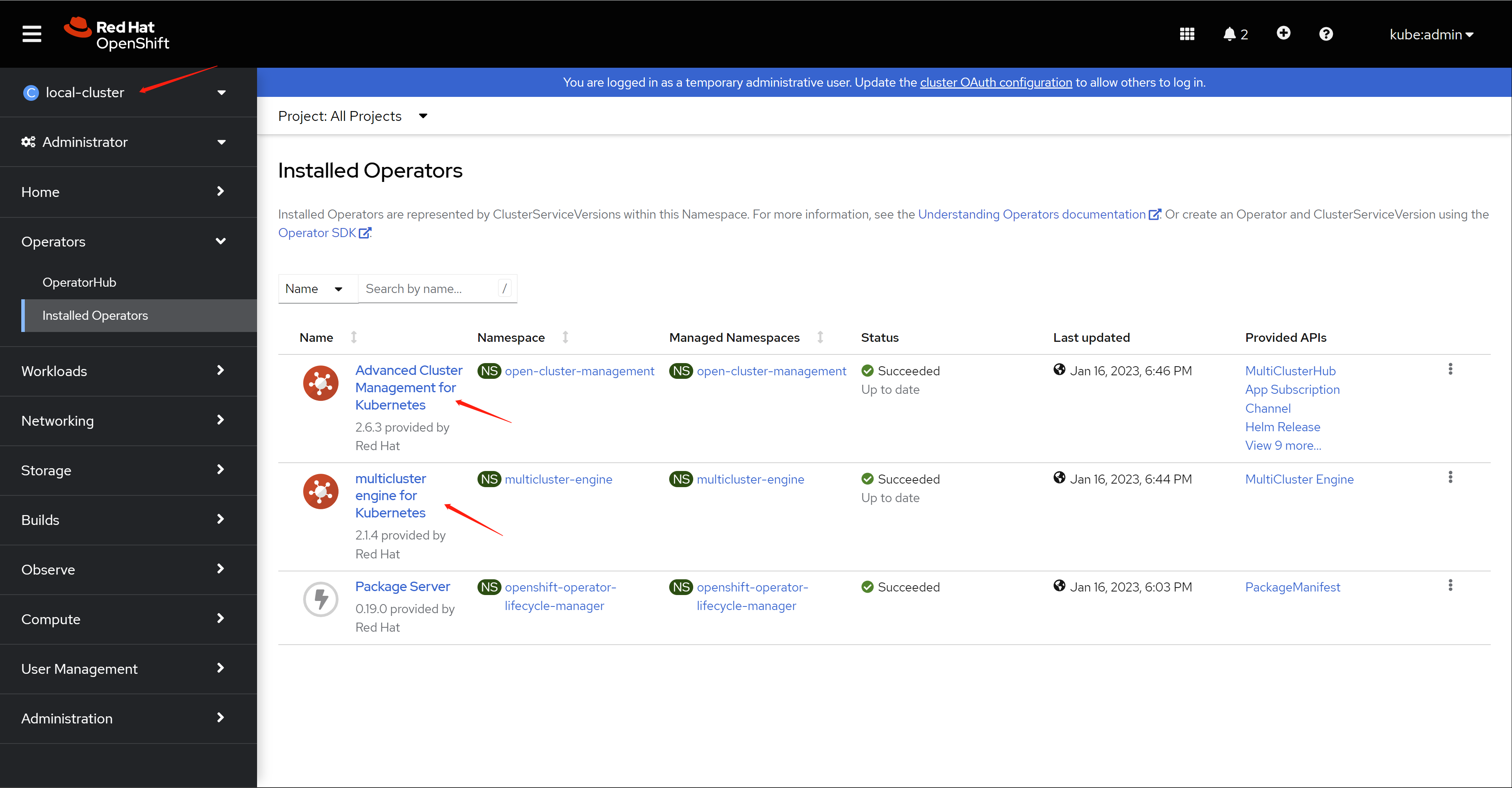
装好了是这样,我们能看到装了2个operator, ACM和MCE
This is how it is installed, we can see that 2 operators, ACM and MCE are installed
我们可以通过webUI访问ACM:
We can access ACM through webUI:
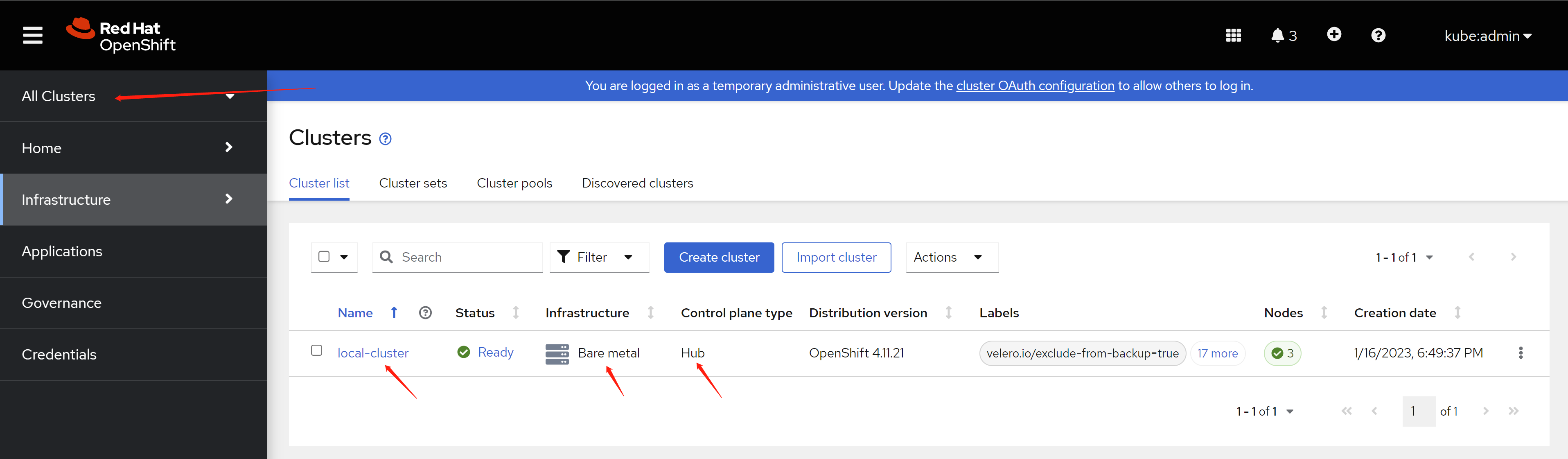
https://console-openshift-console.apps.factory.wzhlab.top/multicloud/infrastructure/clusters/managed
可以看到,默认有一个local-cluster,类型是hub,这个就是我们这个装了ACM的集群。
As you can see, there is a local-cluster by default, the type is hub, and this is our cluster with ACM installed.
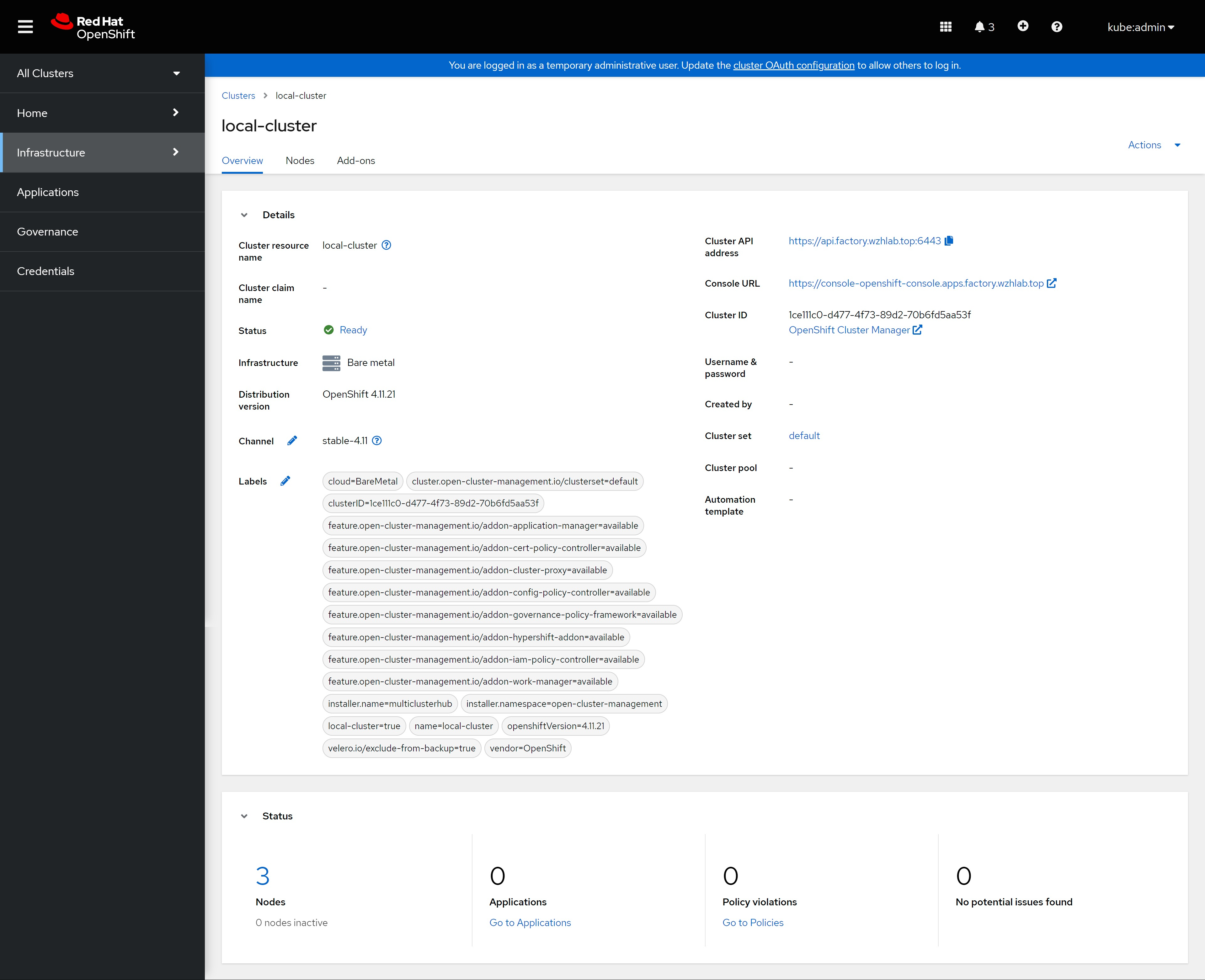
点击进去,就能看到这个cluster的详细信息。
Click into it, you can see the detailed information of this cluster.
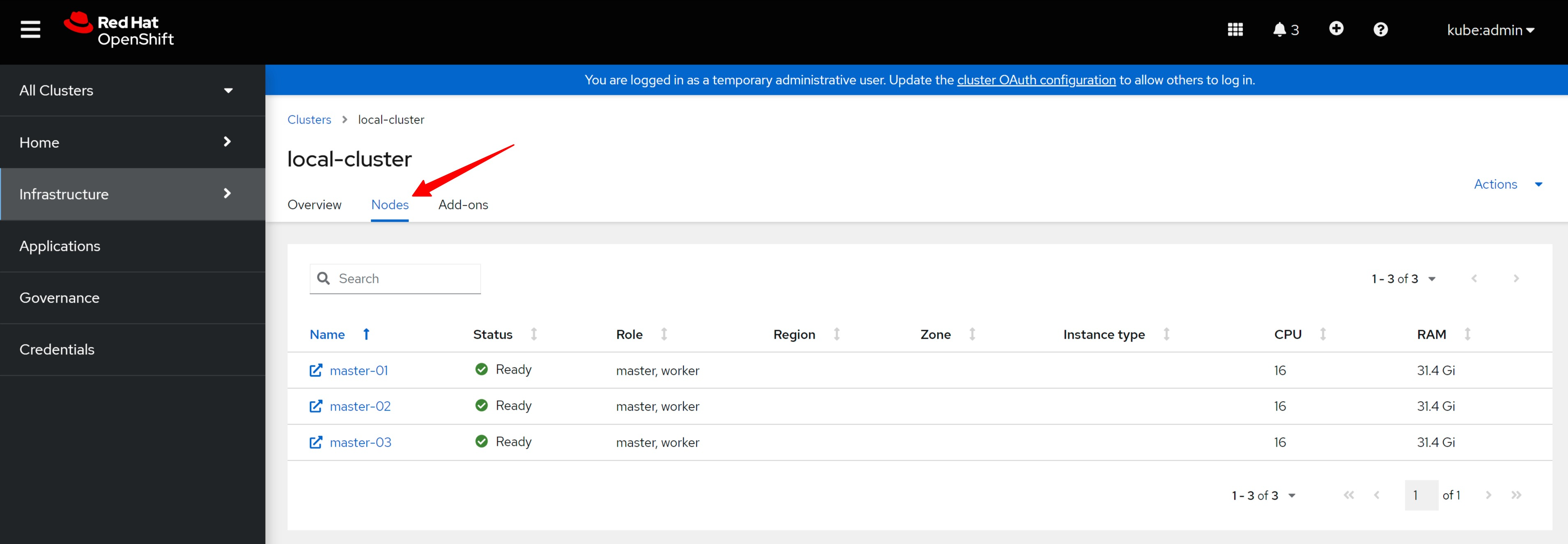
以及这个cluster包含的节点。
And the nodes contained in this cluster.
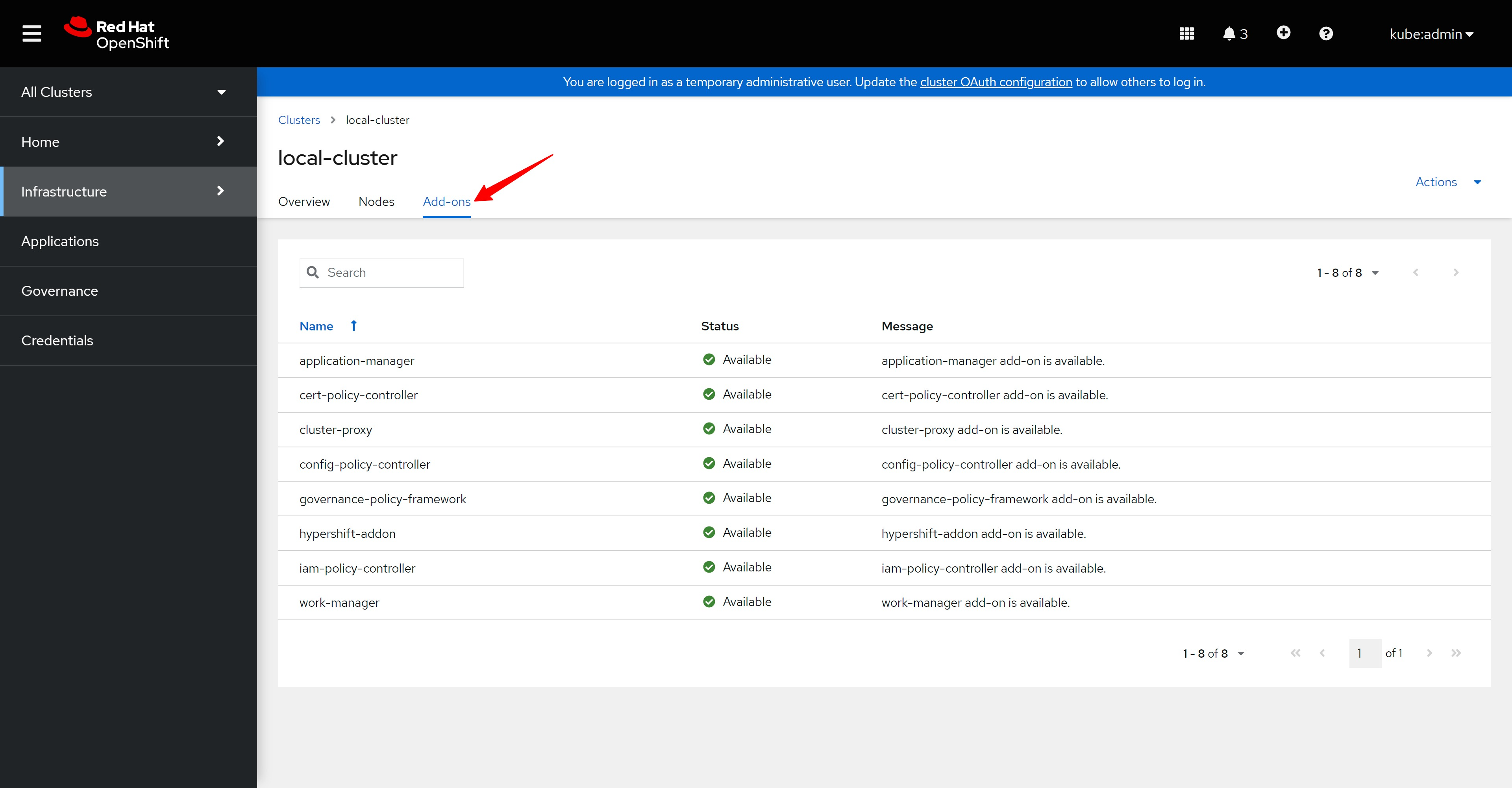
这个集群装的ACM插件。
The ACM addon installed in this cluster.
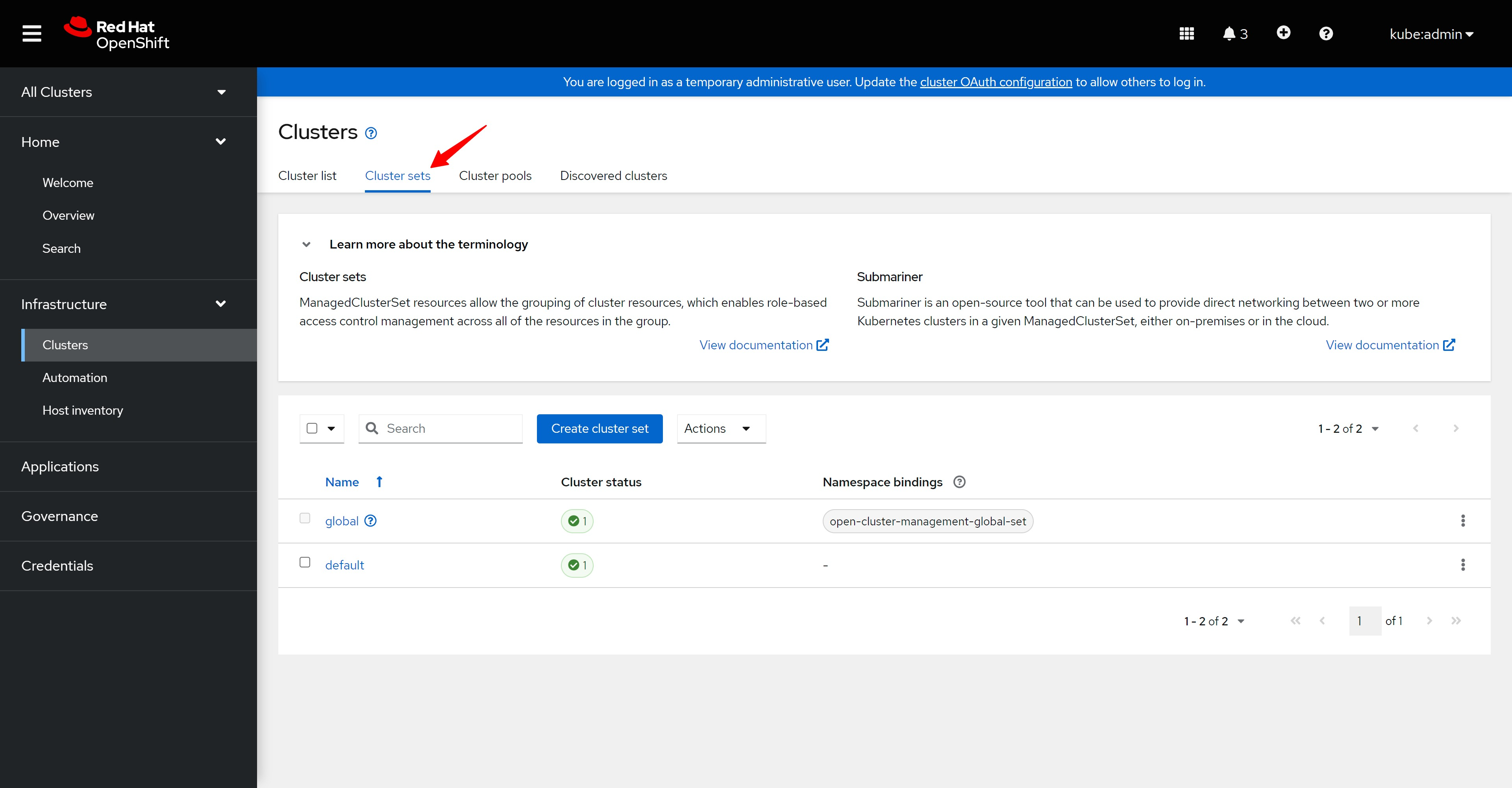
新版本的ACM还有一个cluster set的概念,用来分类cluster.
The new version of ACM also has a concept of cluster set, which is used to classify clusters.
在ACM概览页面,能看到这个ACM管理的多云环境。
On the ACM overview page, you can see the multi-cloud environment managed by this ACM.
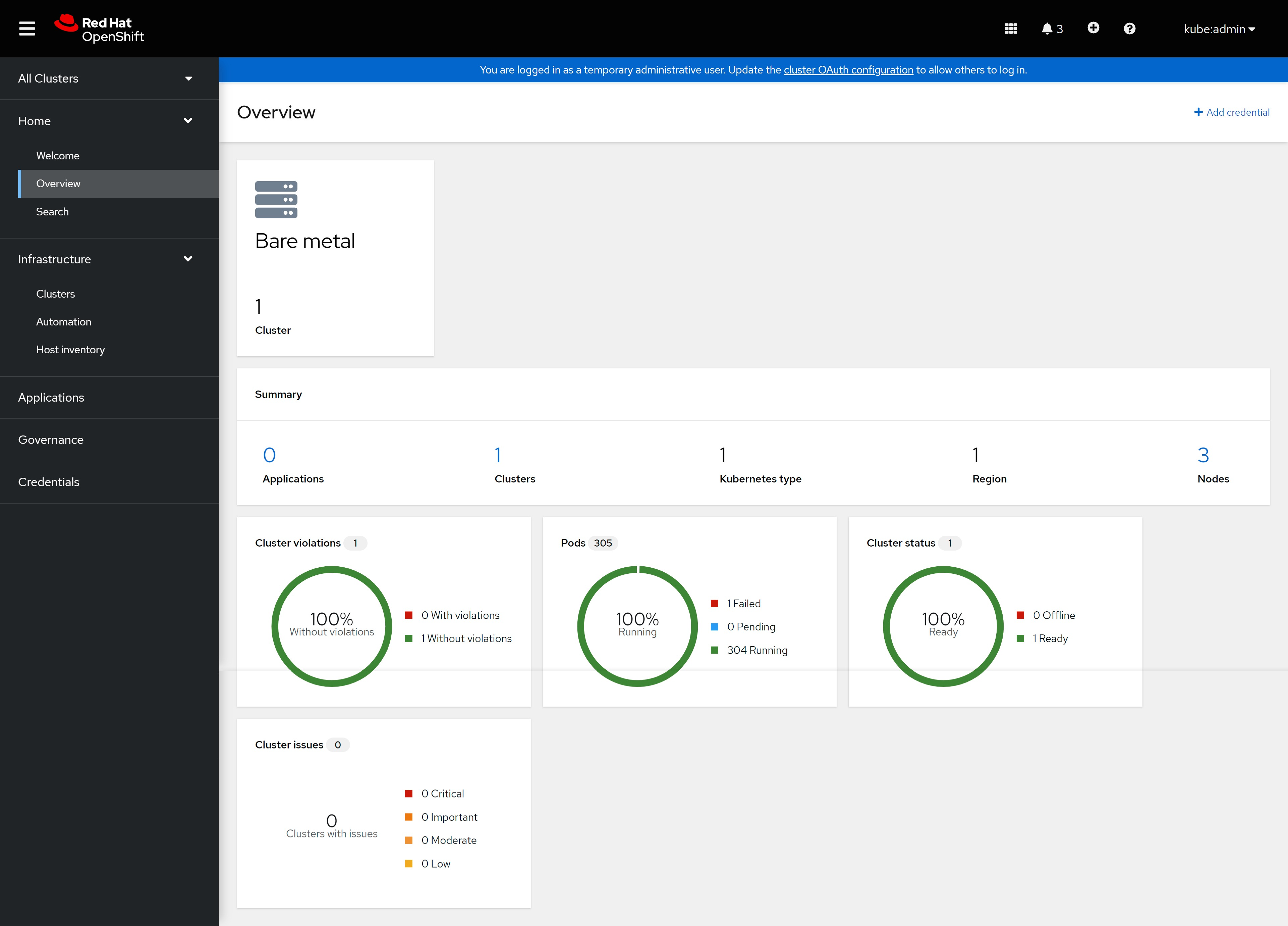
其他的链接,都没有内容,页面是空的。
Other links have no content and the page is empty.
用hypershift模式部署集群 / Deploy the cluster using hypershift
有过部署assisted install service,并通过AIS来部署SNO的经验,那么通过ACM,用hypershift的模式来部署,就容易理解了,整个过程一样,都是配置ACM里面的assisted install service,然后定义infr env,调用BMC API,来直接挂载iso,并启动主机。不同的地方,以前的实验,之后是定义一个 ClusterDeployment, 现在要定义一个 HostedCluster,这个hosted cluster会帮助我们创建 cluster deployment 。
Having deployed assisted install service and deploying SNO through AIS, it is easy to understand through ACM and deploying in hypershift mode. The whole process is the same as that of configuring assisted install service in ACM, and then defining infr env , call the BMC API to directly mount the iso and start the host. The difference is that in the previous experiment, after above steps, we define a ClusterDeployment, now we need to define a HostedCluster. This hosted cluster will help us create a cluster deployment.
setup ACM for agent service
ACM 2.6 UI 是完全支持hypershift的,但是,我们现在的实验,是为了项目上能定制,所以有些配置要用命令行完成。
ACM 2.6 UI fully supports hypershift, but our current experiment is for project customization, so some configurations need to be done using the command line.
本文就是手动创建yaml,然后一步一步的做,更深入的理解一下hypershift的过程。
This article is to manually create yaml, and then do it step by step to understand the process of hypershift more deeply.
oc project open-cluster-management

oc get hiveconfig hive -n multicluster-engine -o yaml
# ......
# spec: {}
# status:
#   aggregatorClientCAHash: b30ffa769079a2ac0e37e40172084089
#   conditions:
#   - lastProbeTime: "2023-01-13T09:10:10Z"
#     lastTransitionTime: "2023-01-13T09:10:10Z"
#     message: Hive is deployed successfully
#     reason: DeploymentSuccess
#     status: "True"
#     type: Ready
#   configApplied: true
#   observedGeneration: 1

oc patch provisioning provisioning-configuration --type merge -p '{"spec":{"watchAllNamespaces": true }}'

oc get provisioning provisioning-configuration -o yaml
# ......
# spec:
#   preProvisioningOSDownloadURLs: {}
#   provisioningMacAddresses:
#   - 52:54:00:20:a1:01
#   - 52:54:00:20:a1:02
#   - 52:54:00:20:a1:03
#   provisioningNetwork: Disabled
#   provisioningOSDownloadURL: http://192.168.77.11:8080/rhcos-openstack.x86_64.qcow2.gz?sha256=506bb66f8cb407c74061a8201f13e7b1edd44000d944be85eb7a4df7058dcb79
#   watchAllNamespaces: true
# ......

cat << EOF > ${BASE_DIR}/data/install/acm.ocp.release.yaml
apiVersion: hive.openshift.io/v1
kind: ClusterImageSet
metadata:
  name: openshift-v4.11.21
  namespace: multicluster-engine
spec:
  releaseImage: ${INSTALL_IMAGE_REGISTRY}/openshift/release-images:4.11.21-x86_64
EOF
oc create -f ${BASE_DIR}/data/install/acm.ocp.release.yaml
# oc delete -f ${BASE_DIR}/data/install/acm.ocp.release.yaml

oc get ClusterImageSet
# NAME                 RELEASE
# openshift-v4.11.21   quaylab.infra.wzhlab.top:8443/openshift/release-images:4.11.21-x86_64

cat << EOF > ${BASE_DIR}/data/install/acm.cm.asc.yaml
apiVersion: v1
kind: ConfigMap
metadata:
  name: assisted-service-config
  namespace: multicluster-engine
  labels:
    app: assisted-service
data:
  LOG_LEVEL: "debug"
EOF
oc create -f ${BASE_DIR}/data/install/acm.cm.asc.yaml
# oc delete -f ${BASE_DIR}/data/install/acm.cm.asc.yaml

openshift-install version
# openshift-install 4.11.21
# built from commit d3fb15afdbf1558344ea88a1e134c8e9a011440f
# release image quay.io/openshift-release-dev/ocp-release@sha256:860cc37824074671c4cf76e02d224d243e670d2298e6dab8923ee391fbd0ae1c
# release architecture amd64

openshift-install coreos print-stream-json | jq .architectures.x86_64.artifacts.metal.release -r
# 411.86.202210041459-0

VAR_COREOS_VERSION=`openshift-install coreos print-stream-json | jq .architectures.x86_64.artifacts.metal.release -r`

# the config of CA is important here.
# assisted service will not use cluster's CA config
cat << EOF > ${BASE_DIR}/data/install/acm.mirror.yaml
apiVersion: v1
kind: ConfigMap
metadata:
  name: hyper1-mirror-config
  namespace: multicluster-engine
  labels:
    app: assisted-service
data:
  ca-bundle.crt: |
$( cat /etc/crts/infra.wzhlab.top.crt | sed 's/^/    /g' )
  registries.conf: |
    unqualified-search-registries = ["registry.access.redhat.com", "docker.io"]

    [[registry]]
      prefix = ""
      location = "quay.io/openshift-release-dev/ocp-release"
      mirror-by-digest-only = true

      [[registry.mirror]]
        location = "${INSTALL_IMAGE_REGISTRY}/openshift/release-images"

    [[registry]]
      prefix = ""
      location = "quay.io/openshift-release-dev/ocp-v4.0-art-dev"
      mirror-by-digest-only = true

      [[registry.mirror]]
        location = "${INSTALL_IMAGE_REGISTRY}/openshift/release"

---
EOF
oc create -f ${BASE_DIR}/data/install/acm.mirror.yaml
# oc delete -f ${BASE_DIR}/data/install/acm.mirror.yaml

cat << EOF > ${BASE_DIR}/data/install/acm.agentservicecofnig.yaml
apiVersion: agent-install.openshift.io/v1beta1
kind: AgentServiceConfig
metadata:
  name: agent
  namespace: multicluster-engine
  ### This is the annotation that injects modifications in the Assisted Service pod
  annotations:
    unsupported.agent-install.openshift.io/assisted-service-configmap: "assisted-service-config"
###
spec:
  databaseStorage:
    accessModes:
      - ReadWriteOnce
    resources:
      requests:
        storage: 40Gi
  filesystemStorage:
    accessModes:
      - ReadWriteOnce
    resources:
      requests:
        storage: 40Gi
  ### This is a ConfigMap that only will make sense on Disconnected environments
  mirrorRegistryRef:
    name: "hyper1-mirror-config"
  ###
  osImages:
    - openshiftVersion: "4.11"
      version: "$VAR_COREOS_VERSION"
      url: "http://192.168.77.11:8080/rhcos-live.x86_64.iso"
      rootFSUrl: "http://192.168.77.11:8080/rhcos-live-rootfs.x86_64.img"
      cpuArchitecture: x86_64
EOF
oc create -f ${BASE_DIR}/data/install/acm.agentservicecofnig.yaml
# oc delete -f ${BASE_DIR}/data/install/acm.agentservicecofnig.yaml

# oc get pod -n multicluster-engine -o json | jq .items[].metadata.name -r | xargs -I DEMO oc logs -n multicluster-engine --prefix=true DEMO | grep 'failed to add release image '

# wait here to see all the status is True
oc get AgentServiceConfig/agent -n multicluster-engine -o yaml
# ......
# status:
#   conditions:
#   - lastTransitionTime: "2023-01-13T01:38:25Z"
#     message: AgentServiceConfig reconcile completed without error.
#     reason: ReconcileSucceeded
#     status: "True"
#     type: ReconcileCompleted
#   - lastTransitionTime: "2023-01-13T01:40:25Z"
#     message: All the deployments managed by Infrastructure-operator are healthy.
#     reason: DeploymentSucceeded
#     status: "True"
#     type: DeploymentsHealthy

# stop here, and wait the assisted-service pod run into ok status
oc get pod -n multicluster-engine | grep assisted
# assisted-image-service-0                               1/1     Running   0               4m38s
# assisted-service-764cd98cf7-2r2db                      2/2     Running   1 (2m59s ago)   4m40s
create the infra env
infra env这个概念比较古怪,他的意思是,一组相同的主机共享的配置,共享什么配置呢?主要是网络参数配置,启动盘ISO的定制化配置等等。
The concept of infra env is rather weird. What it means is that a group of identical hosts share configurations. What configurations are shared? Mainly network parameter configuration, customized configuration of boot disk ISO, etc.
oc create ns ${ACM_DEMO_CLUSTER}
oc project ${ACM_DEMO_CLUSTER}


cat << EOF > ${BASE_DIR}/data/install/acm.managed.secret.yaml
apiVersion: v1
kind: Secret
metadata:
  name: assisted-deployment-pull-secret
  namespace: ${ACM_DEMO_CLUSTER}
stringData:
  .dockerconfigjson: '$PULL_SECRET'
EOF
oc create -f ${BASE_DIR}/data/install/acm.managed.secret.yaml
# oc delete -f ${BASE_DIR}/data/install/acm.managed.secret.yaml


cat << EOF > ${BASE_DIR}/data/install/acm.nmsc.yaml
apiVersion: agent-install.openshift.io/v1beta1
kind: NMStateConfig
metadata:
 name: ${ACM_DEMO_CLUSTER}
 namespace: ${ACM_DEMO_CLUSTER}
 labels:
   nmstate-conf-cluster-name: ${ACM_DEMO_CLUSTER}
spec:
 config:
   interfaces:
     - name: ${SNO_IF}
       type: ethernet
       state: up
       ipv4:
         enabled: true
         address:
           - ip: ${SNO_IP}
             prefix-length: ${SNO_NETMAST_S}
         dhcp: false
   dns-resolver:
     config:
       server:
         - ${SNO_DNS}
   routes:
     config:
       - destination: 0.0.0.0/0
         next-hop-address: ${SNO_GW}
         next-hop-interface: ${SNO_IF}
         table-id: 254
 interfaces:
   - name: "${SNO_IF}"
     macAddress: ${SNO_IF_MAC}
EOF
oc create -f ${BASE_DIR}/data/install/acm.nmsc.yaml
# oc delete -f ${BASE_DIR}/data/install/acm.nmsc.yaml

oc get NMStateConfig/${ACM_DEMO_CLUSTER} -n ${ACM_DEMO_CLUSTER}
# NAME     AGE
# edge01   3h30m


cat << EOF > ${BASE_DIR}/data/install/acm.infraenv.yaml
apiVersion: agent-install.openshift.io/v1beta1
kind: InfraEnv
metadata:
  name: ${ACM_DEMO_CLUSTER}
  namespace: ${ACM_DEMO_CLUSTER}
  labels:
    agentclusterinstalls.extensions.hive.openshift.io/location: ${ACM_DEMO_CLUSTER}
    networkType: static
spec:
  agentLabels:
    'agentclusterinstalls.extensions.hive.openshift.io/location': ${ACM_DEMO_CLUSTER}
  additionalNTPSources:
    - 192.168.77.11
  # clusterRef:
  #   name: ${ACM_DEMO_CLUSTER}
  #   namespace: ${ACM_DEMO_CLUSTER}-${ACM_DEMO_CLUSTER}
  sshAuthorizedKey: "$(< ~/.ssh/id_rsa.pub)"
  pullSecretRef:
    name: assisted-deployment-pull-secret
  # ignitionConfigOverride: '${VAR_IGNITION}'
  nmStateConfigLabelSelector:
    matchLabels:
      nmstate-conf-cluster-name: ${ACM_DEMO_CLUSTER}
  # imageType: "full-iso"
EOF
oc create -f ${BASE_DIR}/data/install/acm.infraenv.yaml
# oc delete -f ${BASE_DIR}/data/install/acm.infraenv.yaml

oc get infraenv/${ACM_DEMO_CLUSTER} -n ${ACM_DEMO_CLUSTER} -o yaml
# additionalNTPSources:
#   - 192.168.77.11
# agentLabels:
#   agentclusterinstalls.extensions.hive.openshift.io/location: edge01
# cpuArchitecture: x86_64
# ipxeScriptType: DiscoveryImageAlways
# nmStateConfigLabelSelector:
#   matchLabels:
#     infraenvs.agent-install.openshift.io: edge01
# pullSecretRef:
#   name: pullsecret-edge01
# sshAuthorizedKey: ssh-rsa .....

oc get infraenv/${ACM_DEMO_CLUSTER} -n ${ACM_DEMO_CLUSTER} -o json | jq .status
# {
#   "agentLabelSelector": {
#     "matchLabels": {
#       "infraenvs.agent-install.openshift.io": "edge01"
#     }
#   },
#   "bootArtifacts": {
#     "initrd": "https://assisted-image-service-multicluster-engine.apps.factory.wzhlab.top/images/c70485f3-0b12-437f-9efe-85b17f0c627f/pxe-initrd?api_key=eyJhbGciOiJFUzI1NiIsInR5cCI6IkpXVCJ9.eyJpbmZyYV9lbnZfaWQiOiJjNzA0ODVmMy0wYjEyLTQzN2YtOWVmZS04NWIxN2YwYzYyN2YifQ.rrkRFxLVcMjEw16W3brxl_YCxHtJtUu-h0KMHcvj3DO701_ZPUM6cDg765Q02CviGSNcSTmu0ic5g06AkU0Zzg&arch=x86_64&version=4.11",
#     "ipxeScript": "https://assisted-service-multicluster-engine.apps.factory.wzhlab.top/api/assisted-install/v2/infra-envs/c70485f3-0b12-437f-9efe-85b17f0c627f/downloads/files?api_key=eyJhbGciOiJFUzI1NiIsInR5cCI6IkpXVCJ9.eyJpbmZyYV9lbnZfaWQiOiJjNzA0ODVmMy0wYjEyLTQzN2YtOWVmZS04NWIxN2YwYzYyN2YifQ.3j_oKrmfOVQn85v2S3laLojUKaCTRqgkv_aSBPo-z_7k8-n2swb2m9aNT3uPr3CEstV4UVurkYwShtawFed0Cg&file_name=ipxe-script",
#     "kernel": "https://assisted-image-service-multicluster-engine.apps.factory.wzhlab.top/boot-artifacts/kernel?arch=x86_64&version=4.11",
#     "rootfs": "https://assisted-image-service-multicluster-engine.apps.factory.wzhlab.top/boot-artifacts/rootfs?arch=x86_64&version=4.11"
#   },
#   "conditions": [
#     {
#       "lastTransitionTime": "2023-01-13T03:15:17Z",
#       "message": "Image has been created",
#       "reason": "ImageCreated",
#       "status": "True",
#       "type": "ImageCreated"
#     }
#   ],
#   "createdTime": "2023-01-13T03:15:16Z",
#   "debugInfo": {
#     "eventsURL": "https://assisted-service-multicluster-engine.apps.factory.wzhlab.top/api/assisted-install/v2/events?api_key=eyJhbGciOiJFUzI1NiIsInR5cCI6IkpXVCJ9.eyJpbmZyYV9lbnZfaWQiOiJjNzA0ODVmMy0wYjEyLTQzN2YtOWVmZS04NWIxN2YwYzYyN2YifQ.W_KCQgx4SwgbErK6eiyh7EmxPb9L8KKawXLOWPgBoPxVPH79QXq5wb-X5DT48b6qBlk3xk-F7MCT_bEG1f30Ww&infra_env_id=c70485f3-0b12-437f-9efe-85b17f0c627f"
#   },
#   "isoDownloadURL": "https://assisted-image-service-multicluster-engine.apps.factory.wzhlab.top/images/c70485f3-0b12-437f-9efe-85b17f0c627f?api_key=eyJhbGciOiJFUzI1NiIsInR5cCI6IkpXVCJ9.eyJpbmZyYV9lbnZfaWQiOiJjNzA0ODVmMy0wYjEyLTQzN2YtOWVmZS04NWIxN2YwYzYyN2YifQ.4FqFWSqfYijmGGWAKopqHIiKghDZBZ2NAqTY1hmUhwNfTzuKlFLZ2pDZAevAxtmf7aN96-6UCeNewIfqoLzPVQ&arch=x86_64&type=minimal-iso&version=4.11"
# }

# VAR_ISO=`oc get infraenv ${ACM_DEMO_CLUSTER} -n ${ACM_DEMO_CLUSTER} -o jsonpath={.status.isoDownloadURL}`

# cd /data/install/
# wget --no-check-certificate -O acm.demo1.iso $VAR_ISO
定义好了infra env,我们就能在ACM的web界面上看到啦。
After defining the infra env, we can see it on the ACM web interface.
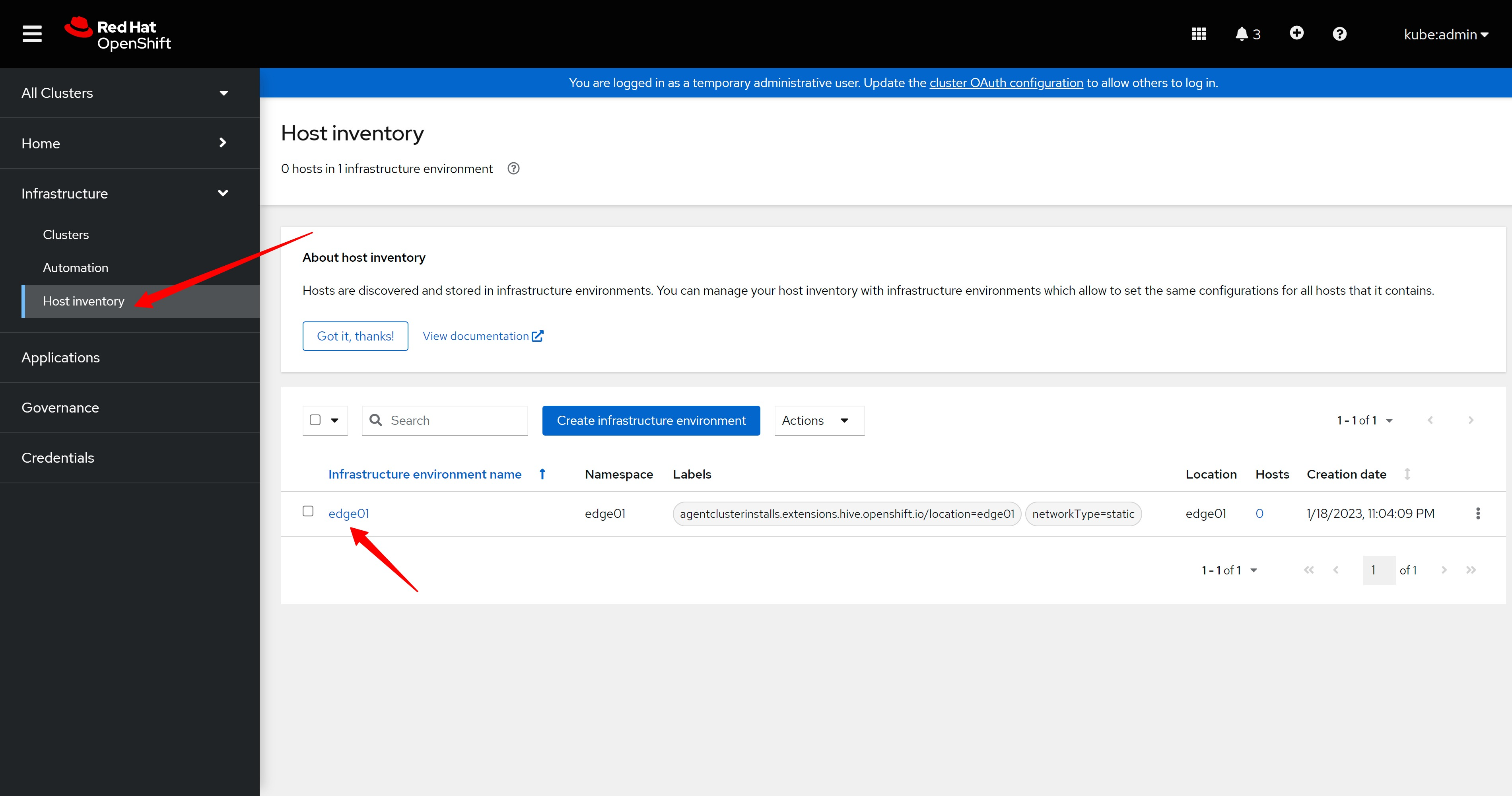
infra env的详细信息,似乎没什么有用的,就是一些普通的配置。
The details of infra env seem to be of little use, just some common configurations.
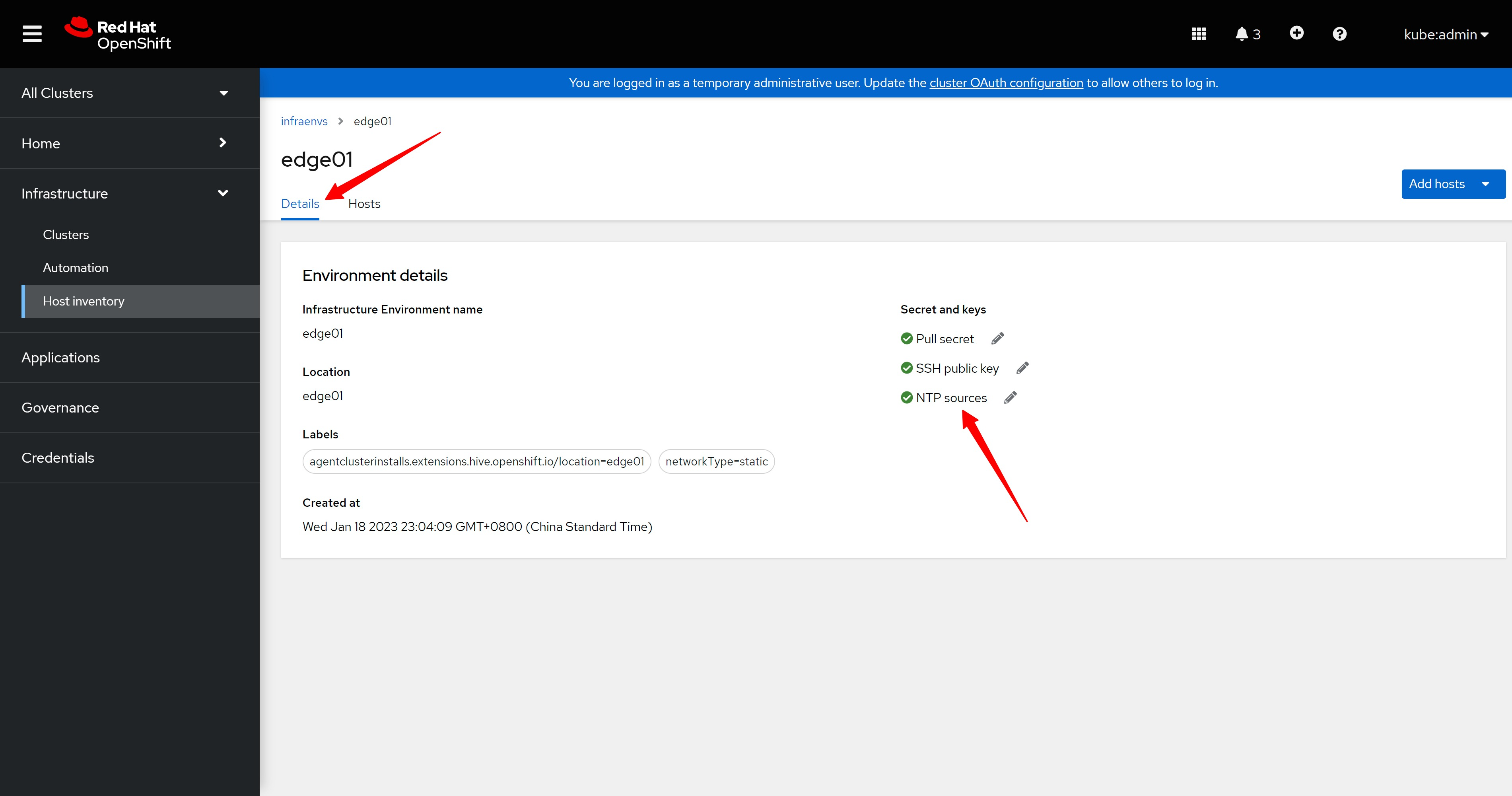
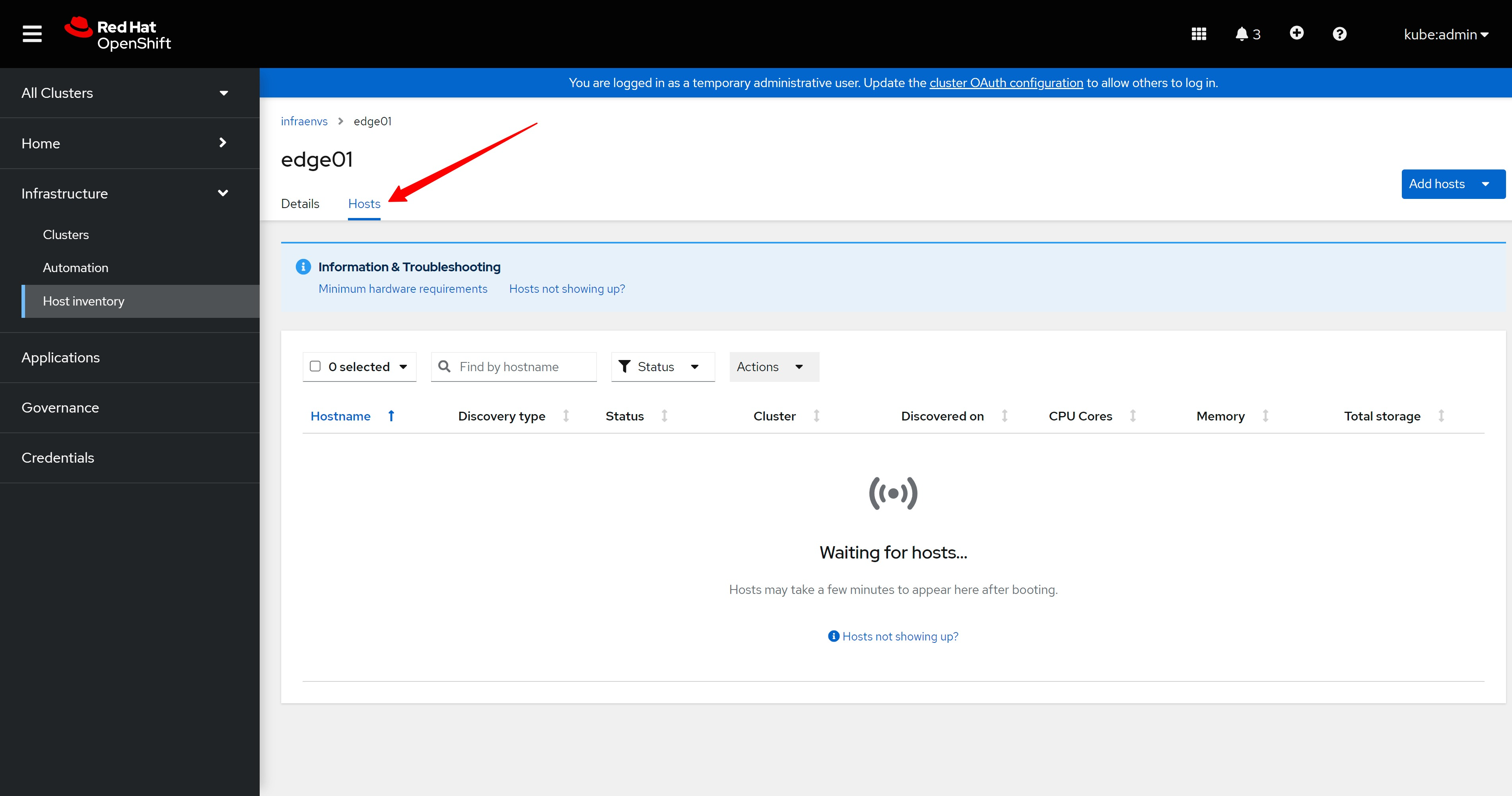
在infra env的host配置里面,我们看到,现在还没有一个主机添加进来。
In the host configuration of infra env, we see that no host has been added yet.
add host to infra env
我们接下来要做的,就是给infra env添加主机,从web界面上看,大概有3种添加方法,一个是手动挂载discovery ISO,然后在infra env里面自动发现,一个是通过web界面,配置BMC等参数,来添加host,最后一种,是通过上传yaml配置文件来完成导入host的操作。
The next thing we need to do is to add hosts to the infra env. From the web interface, there are about 3 ways to add them. One is to manually mount the discovery ISO, and then automatically discover it in the infra env. The other is to configure it through the web interface, by adding BMC and other parameters to add the host, and the last one is to complete the operation of importing the host by uploading the yaml configuration file.
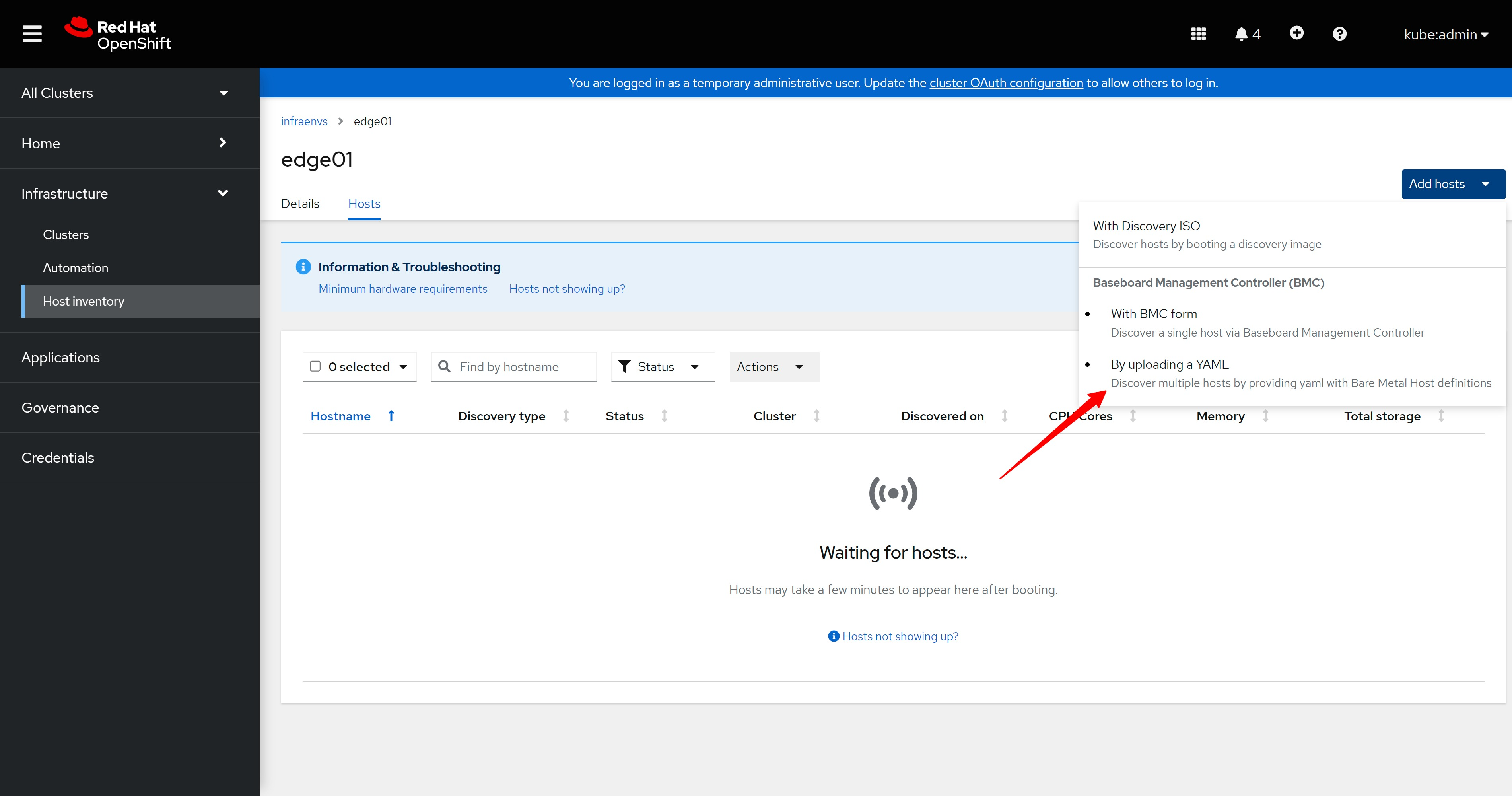
本文是通过命令行的方式来添加,那么就类似界面上最后一种,通过上传yaml的方式来导入host。
This article is added through the command line, so it is similar to the last one on the web interface, importing host by uploading yaml.
# lets confirm that the metal3 component is ready
# then we can use ocp to manage the baremetal
oc get pod -A | grep metal3
# openshift-machine-api                              metal3-8666f4cf4d-2bkfb                                           5/5     Running     5               12h
# openshift-machine-api                              metal3-image-cache-8jhtr                                          1/1     Running     1               13h
# openshift-machine-api                              metal3-image-cache-9jfs7                                          1/1     Running     1               13h
# openshift-machine-api                              metal3-image-cache-fl545                                          1/1     Running     1               13h
# openshift-machine-api                              metal3-image-customization-868d87999b-x2mnw                       1/1     Running     1               13h


cat << EOF > ${BASE_DIR}/data/install/acm.demo.secret.bmc.yaml
apiVersion: v1
kind: Secret
metadata:
  name: ${ACM_DEMO_CLUSTER}-bmc-master-01
  namespace: ${ACM_DEMO_CLUSTER}
data:
  password: $(echo password | base64)
  username: $(echo admin | base64)
type: Opaque
EOF
oc create -f ${BASE_DIR}/data/install/acm.demo.secret.bmc.yaml
# oc delete -f ${BASE_DIR}/data/install/acm.demo.secret.bmc.yaml

cat << EOF > ${BASE_DIR}/data/install/acm.demo.bmh.master.yaml
apiVersion: metal3.io/v1alpha1
kind: BareMetalHost
metadata:
  name: ${ACM_DEMO_CLUSTER}-${SNO_HOSTNAME}
  namespace: ${ACM_DEMO_CLUSTER}
  labels:
    infraenvs.agent-install.openshift.io: "${ACM_DEMO_CLUSTER}"
  annotations:
    ## Disable the Introspection
    inspect.metal3.io: disabled
    ## Set Static Hostname
    bmac.agent-install.openshift.io/hostname: "${SNO_HOSTNAME}"
    ## Set Static Role, auto-assign?
    bmac.agent-install.openshift.io/role: "worker"
spec:
  online: true
  bmc:
    address: redfish-virtualmedia://192.168.77.101:8000/redfish/v1/Systems/$(cat /data/install/vm.list.* | grep ocp4-ipi-edge-master-01 | awk '{print $1}')
    credentialsName: ${ACM_DEMO_CLUSTER}-bmc-master-01
    disableCertificateVerification: true
  bootMACAddress: $(cat /data/install/mac.list.* | grep ocp4-ipi-edge-master-01 | awk '{print $2}')
  automatedCleaningMode: disabled
EOF
oc create -f ${BASE_DIR}/data/install/acm.demo.bmh.master.yaml
# oc delete -f ${BASE_DIR}/data/install/acm.demo.bmh.master.yaml

oc get BareMetalHost/${ACM_DEMO_CLUSTER}-${SNO_HOSTNAME} -n ${ACM_DEMO_CLUSTER} -o yaml
# ......
# metadata:
#   annotations:
#     bmac.agent-install.openshift.io/hostname: edge-worker-01
#     bmac.agent-install.openshift.io/role: worker
#     inspect.metal3.io: disabled
#   creationTimestamp: "2023-01-18T15:08:22Z"
#   finalizers:
#   - baremetalhost.metal3.io
#   generation: 2
#   labels:
#     infraenvs.agent-install.openshift.io: edge01
#   name: edge01-edge-worker-01
#   namespace: edge01
#   resourceVersion: "111945"
#   uid: b21c5b31-c28c-4b43-b8c1-a0ba80581e60
# spec:
#   automatedCleaningMode: disabled
#   bmc:
#     address: redfish-virtualmedia://192.168.77.101:8000/redfish/v1/Systems/a176e428-fea7-43ff-95c7-a927514227ed
#     credentialsName: edge01-bmc-master-01
#     disableCertificateVerification: true
#   bootMACAddress: 52:54:00:20:a2:01
#   image:
#     format: live-iso
#     url: https://assisted-image-service-multicluster-engine.apps.factory.wzhlab.top/images/2e9fa857-17c6-493f-8030-b4cb2b736fd1?api_key=eyJhbGciOiJFUzI1NiIsInR5cCI6IkpXVCJ9.eyJpbmZyYV9lbnZfaWQiOiIyZTlmYTg1Ny0xN2M2LTQ5M2YtODAzMC1iNGNiMmI3MzZmZDEifQ.yF_UwtoDKWdc6dYUkcYpNDOWzLt_jVS1ZSqU-SLzZq4QZwt6v7x5Hl8azM3S9THX0xi0K-ert3gqVLbNV62s9Q&arch=x86_64&type=minimal-iso&version=4.11
#   online: true
# ......
配置完成以后,在web界面上,就能看到这个主机啦,其实在openshift的界面里面,也能看到这个baremetal,我们看到系统正在试图配置这个主机。
After the configuration is complete, you can see this host on the web interface. In fact, you can also see this baremetal in the openshift interface. We can see that the system is trying to configure this host.
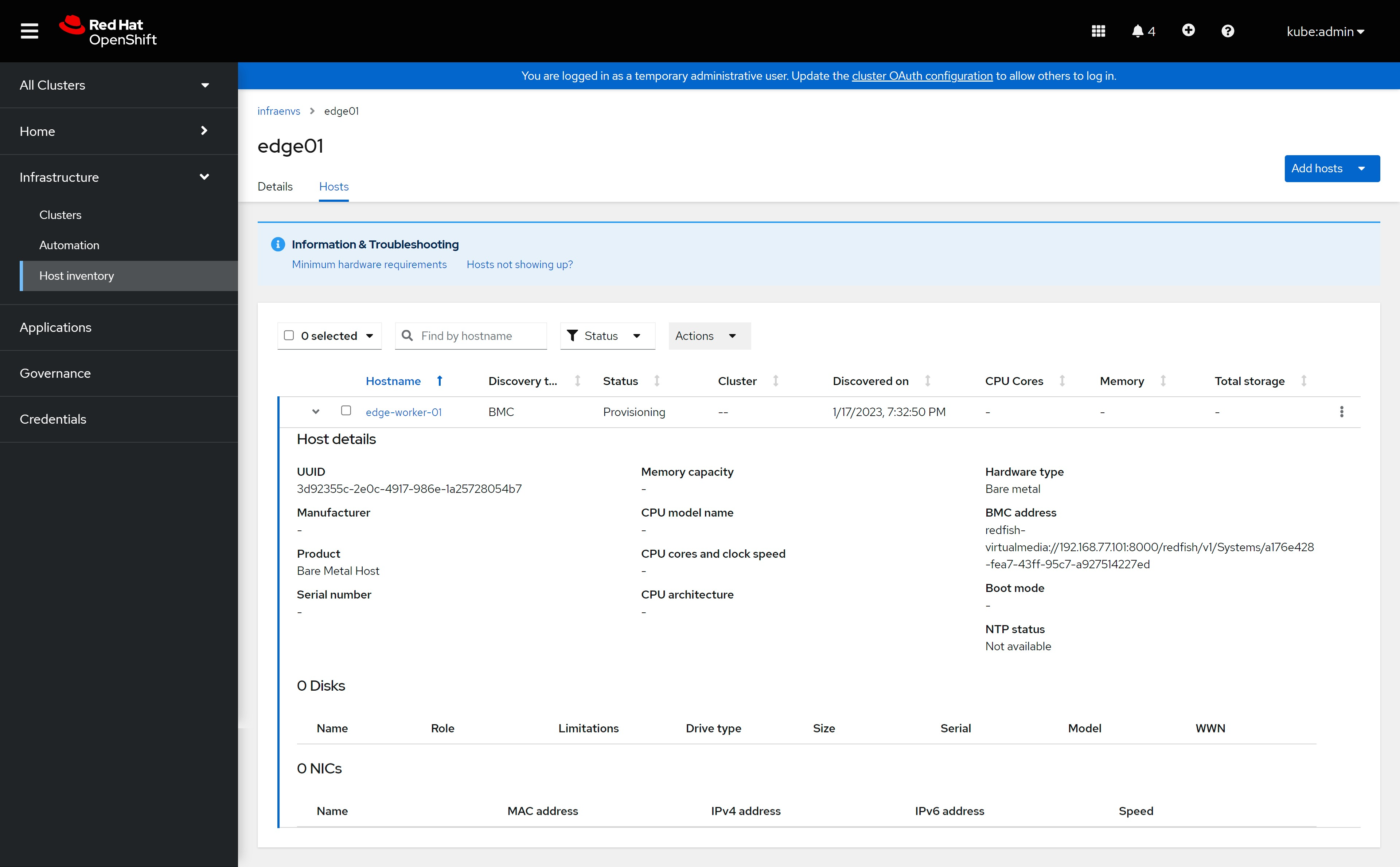
其实在目标kvm上,是启动了一个定制的coreos live cd,启动了以后,运行了一个服务,他会搜集本机的信息,然后上报,上述操作顺利的话,我们就能在界面上看到主机信息更新了。
In fact, on the target kvm, a customized coreos live cd is started. After starting, a service is run, which will collect the information of the machine and then report it. If the above operations are successful, we can see the host on the interface. The information has been updated.
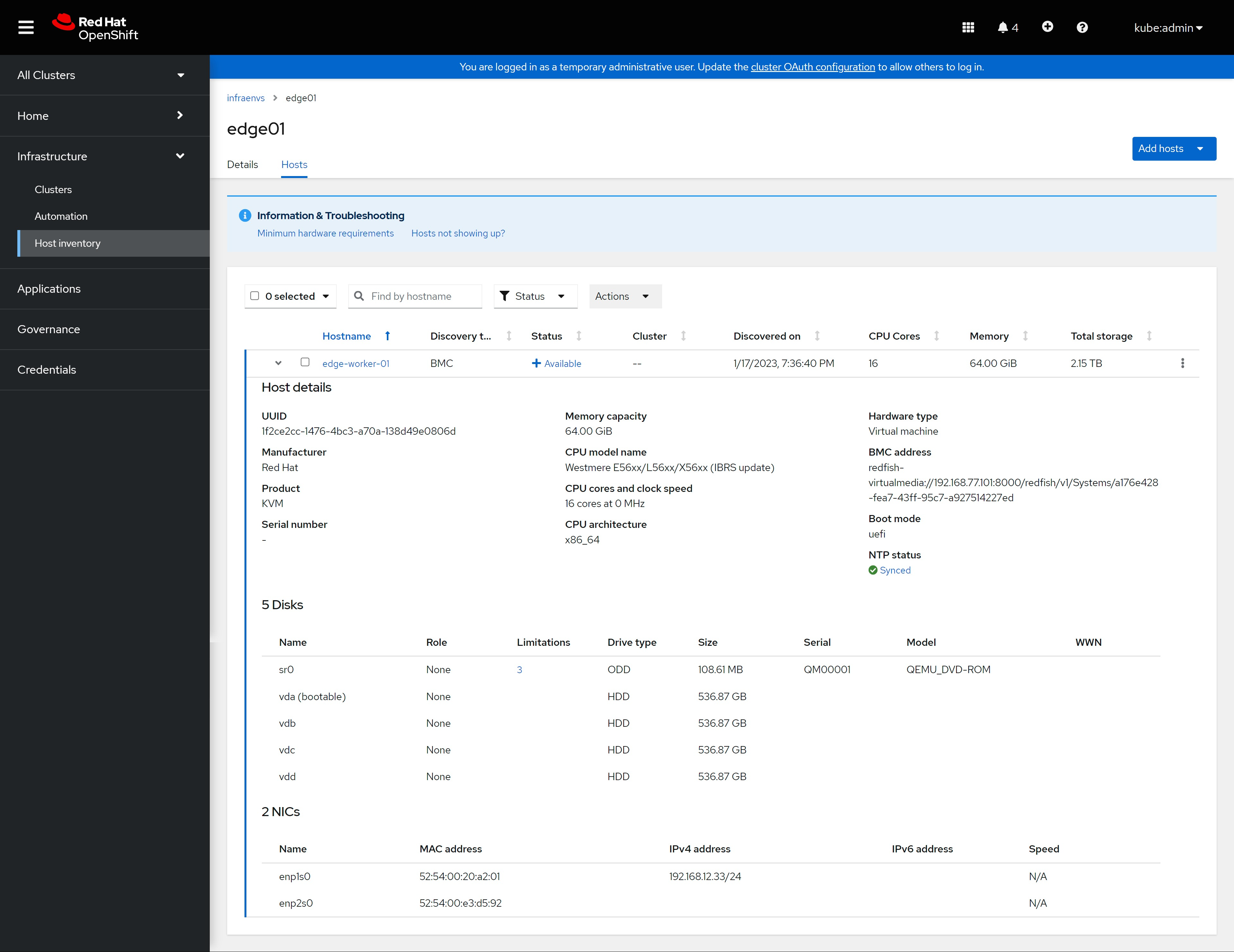
这里面的host,在后台对应的是agent的配置,我们可以通过命令行查看agent对应的详细信息。
The host here corresponds to the configuration of the agent CR in the background, and we can view the detailed information corresponding to the agent through the command line.
oc get agent -n ${ACM_DEMO_CLUSTER}
# NAME                                   CLUSTER   APPROVED   ROLE     STAGE
# a176e428-fea7-43ff-95c7-a927514227ed             true       worker

oc get agent/a176e428-fea7-43ff-95c7-a927514227ed -n ${ACM_DEMO_CLUSTER} -o yaml
# ......
# metadata:
#   annotations:
#     inventory.agent-install.openshift.io/version: "0.1"
#   creationTimestamp: "2023-01-18T15:11:47Z"
#   finalizers:
#   - agent.agent-install.openshift.io/ai-deprovision
#   generation: 2
#   labels:
#     agent-install.openshift.io/bmh: edge01-edge-worker-01
#     agent-install.openshift.io/clusterdeployment-namespace: ""
#     agentclusterinstalls.extensions.hive.openshift.io/location: edge01
#     infraenvs.agent-install.openshift.io: edge01
#     inventory.agent-install.openshift.io/cpu-architecture: x86_64
#     inventory.agent-install.openshift.io/cpu-virtenabled: "false"
#     inventory.agent-install.openshift.io/host-isvirtual: "true"
#     inventory.agent-install.openshift.io/host-manufacturer: RedHat
#     inventory.agent-install.openshift.io/host-productname: KVM
#     inventory.agent-install.openshift.io/storage-hasnonrotationaldisk: "false"
#   name: a176e428-fea7-43ff-95c7-a927514227ed
#   namespace: edge01
#   resourceVersion: "117085"
#   uid: c410d01b-1bdb-4ade-b5e6-630aadf634b3
# spec:
#   approved: true
#   hostname: edge-worker-01
#   role: worker
# ......
begin to create new cluster - control plan
准备工作都做好了,我们开始创建一个hypershift管理的,托管控制面的新集群。
With everything in place, we started creating a new hypershift-managed cluster hosting the control plane.
cat << EOF > ${BASE_DIR}/data/install/capi-role-${ACM_DEMO_CLUSTER}.yaml
apiVersion: rbac.authorization.k8s.io/v1
kind: Role
metadata:
  name: capi-provider-role
  namespace: ${ACM_DEMO_CLUSTER}
rules:
- apiGroups:
  - agent-install.openshift.io
  resources:
  - agents
  verbs:
  - '*'
EOF
oc create --save-config -f ${BASE_DIR}/data/install/capi-role-${ACM_DEMO_CLUSTER}.yaml

# nodepool -> config -> config map -> machine config
# we have container image cache, so we add customize config through machine config
cat << EOF > ${BASE_DIR}/data/install/hyper.mirror.yaml
apiVersion: v1
kind: ConfigMap
metadata:
  name: hyper-mirror-config
  namespace: ${ACM_DEMO_CLUSTER}
data:
  config: |
$( cat /data/ocp4/99-worker-container-registries.yaml | sed 's/^/    /g' )

---
EOF
oc create -f ${BASE_DIR}/data/install/hyper.mirror.yaml
# oc delete -f ${BASE_DIR}/data/install/hyper.mirror.yaml


cat << EOF > ${BASE_DIR}/data/sno/install.images.bu
variant: openshift
version: 4.9.0
metadata:
  labels:
    machineconfiguration.openshift.io/role: master
  name: 99-zzz-master-install-images
storage:
  files:
    - path: /etc/containers/registries.conf.d/base.registries.conf
      overwrite: true
      contents:
        inline: |
          unqualified-search-registries = ["registry.access.redhat.com", "docker.io"]
          short-name-mode = ""

          [[registry]]
            prefix = ""
            location = "quay.io/openshift-release-dev/ocp-release"
            mirror-by-digest-only = true

            [[registry.mirror]]
              location = "${INSTALL_IMAGE_REGISTRY}/openshift/release-images"

          [[registry]]
            prefix = ""
            location = "quay.io/openshift-release-dev/ocp-v4.0-art-dev"
            mirror-by-digest-only = true

            [[registry.mirror]]
              location = "${INSTALL_IMAGE_REGISTRY}/openshift/release"

EOF
butane ${BASE_DIR}/data/sno/install.images.bu > ${BASE_DIR}/data/sno/disconnected/99-zzz-master-install-images.yaml

cat << EOF > ${BASE_DIR}/data/install/hyper.mirror.main.yaml
apiVersion: v1
kind: ConfigMap
metadata:
  name: hyper-mirror-main-config
  namespace: ${ACM_DEMO_CLUSTER}
data:
  config: |
$( cat ${BASE_DIR}/data/sno/disconnected/99-zzz-master-install-images.yaml | sed 's/^/    /g' )

---
EOF
oc create -f ${BASE_DIR}/data/install/hyper.mirror.main.yaml


cat << EOF > ${BASE_DIR}/data/install/hosted-cluster-${ACM_DEMO_CLUSTER}.yaml
---
apiVersion: hypershift.openshift.io/v1alpha1
kind: HostedCluster
metadata:
  name: ${ACM_DEMO_CLUSTER}
  namespace: ${ACM_DEMO_CLUSTER}
  labels:
    "cluster.open-cluster-management.io/clusterset": 'default'
spec:
  release:
    image: ${INSTALL_IMAGE_REGISTRY}/openshift/release-images:4.11.21-x86_64
  pullSecret:
    name: pullsecret-cluster-${ACM_DEMO_CLUSTER}
  sshKey:
    name: sshkey-cluster-${ACM_DEMO_CLUSTER}
  networking:
    podCIDR: 10.132.0.0/14
    serviceCIDR: 172.31.0.0/16
    machineCIDR: 192.168.12.0/24
    networkType: OpenShiftSDN
  platform:
    type: Agent
    agent:
      agentNamespace: ${ACM_DEMO_CLUSTER}
  infraID: ${ACM_DEMO_CLUSTER}
  dns:
    baseDomain: '$SNO_BASE_DOMAIN'
  services:
  - service: APIServer
    servicePublishingStrategy:
        nodePort:
          address: 192.168.12.23
          port: 30000
        type: NodePort
  - service: OAuthServer
    servicePublishingStrategy:
      type: Route
  - service: OIDC
    servicePublishingStrategy:
      type: Route
  - service: Konnectivity
    servicePublishingStrategy:
      type: Route
  - service: Ignition
    servicePublishingStrategy:
      type: Route
---
apiVersion: v1
kind: Secret
metadata:
  name: pullsecret-cluster-${ACM_DEMO_CLUSTER}
  namespace: ${ACM_DEMO_CLUSTER}
stringData:
  '.dockerconfigjson': '$PULL_SECRET'
type: kubernetes.io/dockerconfigjson
---
apiVersion: v1
kind: Secret
metadata:
  name: sshkey-cluster-${ACM_DEMO_CLUSTER}
  namespace: ${ACM_DEMO_CLUSTER}
stringData:
  id_rsa.pub: '$(< ~/.ssh/id_rsa.pub)'
---
apiVersion: hypershift.openshift.io/v1alpha1
kind: NodePool
metadata:
  name: 'nodepool-${ACM_DEMO_CLUSTER}-01'
  namespace: ${ACM_DEMO_CLUSTER}
spec:
  clusterName: ${ACM_DEMO_CLUSTER}
  config:
    - name: hyper-mirror-config
    - name: hyper-mirror-main-config
  replicas: 1
  management:
    autoRepair: false
    upgradeType: InPlace
  platform:
    type: Agent
    agent:
      agentLabelSelector:
        matchLabels: {}
  release:
    image: ${INSTALL_IMAGE_REGISTRY}/openshift/release-images:4.11.21-x86_64
---
apiVersion: cluster.open-cluster-management.io/v1
kind: ManagedCluster
metadata:
  labels:
    cloud: hypershift
    name: ${ACM_DEMO_CLUSTER}
    cluster.open-cluster-management.io/clusterset: 'default'
  name: ${ACM_DEMO_CLUSTER}
spec:
  hubAcceptsClient: true
---
apiVersion: agent.open-cluster-management.io/v1
kind: KlusterletAddonConfig
metadata:
  name: ${ACM_DEMO_CLUSTER}
  namespace: ${ACM_DEMO_CLUSTER}
spec:
  clusterName: ${ACM_DEMO_CLUSTER}
  clusterNamespace: ${ACM_DEMO_CLUSTER}
  clusterLabels:
    cloud: ai-hypershift
  applicationManager:
    enabled: true
  policyController:
    enabled: true
  searchCollector:
    enabled: true
  certPolicyController:
    enabled: true
  iamPolicyController:
    enabled: true
EOF

oc create --save-config -f ${BASE_DIR}/data/install/hosted-cluster-${ACM_DEMO_CLUSTER}.yaml
# oc delete -f ${BASE_DIR}/data/install/hosted-cluster-${ACM_DEMO_CLUSTER}.yaml

oc get HostedCluster -A
# NAMESPACE   NAME     VERSION   KUBECONFIG                PROGRESS   AVAILABLE   PROGRESSING   MESSAGE
# edge01      edge01             edge01-admin-kubeconfig   Partial    True        False         The hosted control plane is available

oc get HostedCluster/${ACM_DEMO_CLUSTER} -n ${ACM_DEMO_CLUSTER} -o yaml | yq .spec
# autoscaling: {}
# clusterID: 8c0fb18c-22dd-4fb9-a2a6-420ee19d9f8a
# controllerAvailabilityPolicy: SingleReplica
# dns:
#   baseDomain: wzhlab.top
# etcd:
#   managed:
#     storage:
#       persistentVolume:
#         size: 4Gi
#       type: PersistentVolume
#   managementType: Managed
# fips: false
# infraID: edge01
# infrastructureAvailabilityPolicy: SingleReplica
# issuerURL: https://kubernetes.default.svc
# networking:
#   clusterNetwork:
#     - cidr: 10.132.0.0/14
#   machineNetwork:
#     - cidr: 192.168.12.0/24
#   networkType: OVNKubernetes
#   serviceNetwork:
#     - cidr: 172.31.0.0/16
# olmCatalogPlacement: management
# platform:
#   agent:
#     agentNamespace: edge01
#   type: Agent
# pullSecret:
#   name: pullsecret-cluster-edge01
# release:
#   image: quaylab.infra.wzhlab.top:8443/openshift/release-images:4.11.21-x86_64
# services:
#   - service: APIServer
#     servicePublishingStrategy:
#       nodePort:
#         address: 192.168.12.23
#         port: 30000
#       type: NodePort
#   - service: OAuthServer
#     servicePublishingStrategy:
#       type: Route
#   - service: OIDC
#     servicePublishingStrategy:
#       type: Route
#   - service: Konnectivity
#     servicePublishingStrategy:
#       type: Route
#   - service: Ignition
#     servicePublishingStrategy:
#       type: Route
# sshKey:
#   name: sshkey-cluster-edge01

oc get clusterdeployment -A
# NAMESPACE       NAME     INFRAID                                PLATFORM          REGION   VERSION   CLUSTERTYPE   PROVISIONSTATUS   POWERSTATE   AGE
# edge01-edge01   edge01   39d863f0-57f8-4ff4-a2b5-61e3e654c4db   agent-baremetal            4.11.21                 Provisioned                    122m

oc get clusterdeployment/${ACM_DEMO_CLUSTER} -n ${ACM_DEMO_CLUSTER}-${ACM_DEMO_CLUSTER} -o yaml | yq .spec
# baseDomain: wzhlab.top
# clusterInstallRef:
#   group: extensions.hive.openshift.io
#   kind: AgentClusterInstall
#   name: edge01
#   version: v1beta1
# clusterMetadata:
#   adminKubeconfigSecretRef:
#     name: admin-kubeconfig
#   clusterID: 28c54029-b032-4c48-8486-deb1dabe8ea8
#   infraID: 28c54029-b032-4c48-8486-deb1dabe8ea8
# clusterName: edge01
# controlPlaneConfig:
#   servingCertificates: {}
# installed: true
# platform:
#   agentBareMetal:
#     agentSelector: {}
# pullSecretRef:
#   name: pull-secret

oc get AgentClusterInstall -A
# NAMESPACE       NAME     CLUSTER   STATE
# edge01-edge01   edge01   edge01    adding-hosts

oc get AgentClusterInstall/${ACM_DEMO_CLUSTER} -n ${ACM_DEMO_CLUSTER}-${ACM_DEMO_CLUSTER} -o yaml | yq .spec
# clusterDeploymentRef:
#   name: edge01
# ignitionEndpoint:
#   caCertificateReference:
#     name: ignition-server-ca-cert
#     namespace: edge01-edge01
#   url: https://ignition-server-edge01-edge01.apps.factory.wzhlab.top
# networking:
#   userManagedNetworking: true
# provisionRequirements:
#   controlPlaneAgents: 3

oc get agent -n ${ACM_DEMO_CLUSTER}
# NAME                                   CLUSTER   APPROVED   ROLE     STAGE
# a176e428-fea7-43ff-95c7-a927514227ed             true       worker

oc get agent/a176e428-fea7-43ff-95c7-a927514227ed -n ${ACM_DEMO_CLUSTER} -o yaml | yq .spec
# approved: true
# clusterDeploymentName:
#   name: edge01
#   namespace: edge01-edge01
# hostname: edge-worker-01
# ignitionEndpointTokenReference:
#   name: agent-user-data-nodepool-edge01-01-e3fdfbf8
#   namespace: edge01-edge01
# machineConfigPool: ignition
# role: worker


# wait here, and check the control plan creation.
oc get pod -n ${ACM_DEMO_CLUSTER}-${ACM_DEMO_CLUSTER}
# NAME                                             READY   STATUS    RESTARTS   AGE
# capi-provider-87b88465c-zgrx2                    1/1     Running   0          10m
# catalog-operator-7dcf86576f-vffl6                2/2     Running   0          7m33s
# certified-operators-catalog-7b4bdcb679-25gls     1/1     Running   0          7m39s
# cluster-api-5984dc678b-46ms7                     1/1     Running   0          10m
# cluster-autoscaler-5cd6b96d55-nzw4x              1/1     Running   0          9m33s
# cluster-network-operator-547f6988f4-6q2f2        1/1     Running   0          7m49s
# cluster-policy-controller-857bf8594f-9dhhj       1/1     Running   0          7m56s
# cluster-version-operator-85f5fd968f-rhchm        1/1     Running   0          7m55s
# community-operators-catalog-f6d797bc-87f9k       1/1     Running   0          7m38s
# control-plane-operator-65444fdff8-fzhvb          1/1     Running   0          10m
# etcd-0                                           1/1     Running   0          9m36s
# hosted-cluster-config-operator-cb8bd76f7-wvtfl   1/1     Running   0          7m41s
# ignition-server-57fbf98b8b-wvkv2                 1/1     Running   0          9m26s
# ingress-operator-594bdd5d6d-2t6kw                2/2     Running   0          7m46s
# konnectivity-agent-67bd878b88-bwxcp              1/1     Running   0          9m35s
# konnectivity-server-764ffdb8fd-xgxqq             1/1     Running   0          9m36s
# kube-apiserver-7f85bd5d7f-cvd7r                  3/3     Running   0          9m34s
# kube-controller-manager-7bd7ff884f-2c4jr         1/1     Running   0          6m35s
# kube-scheduler-68858b678d-jlpmx                  1/1     Running   0          8m30s
# machine-approver-c6b6f6ff8-jh445                 1/1     Running   0          9m33s
# oauth-openshift-5bb59d5596-55mtw                 2/2     Running   0          6m15s
# olm-operator-949f6f76b-r8kkz                     2/2     Running   0          7m32s
# openshift-apiserver-5ddbbd9847-n2824             2/2     Running   0          6m35s
# openshift-controller-manager-7cdd5bcc7b-p7kfb    1/1     Running   0          7m56s
# openshift-oauth-apiserver-8c76cb9b9-t9nts        1/1     Running   0          7m58s
# packageserver-58d5b997b9-wdn58                   2/2     Running   0          7m32s
# redhat-marketplace-catalog-85748dc79-tl8sr       1/1     Running   0          7m38s
# redhat-operators-catalog-74849cb9d6-9bg49        1/1     Running   0          7m38s


oc get pod -n ${ACM_DEMO_CLUSTER}-${ACM_DEMO_CLUSTER} | tail -n +2 | wc -l
# 28
配置导入以后,我们就能看到多了一个集群edge01, 类型是hosted.
After the configuration is imported, we can see that there is an additional cluster edge01, the type is hosted.
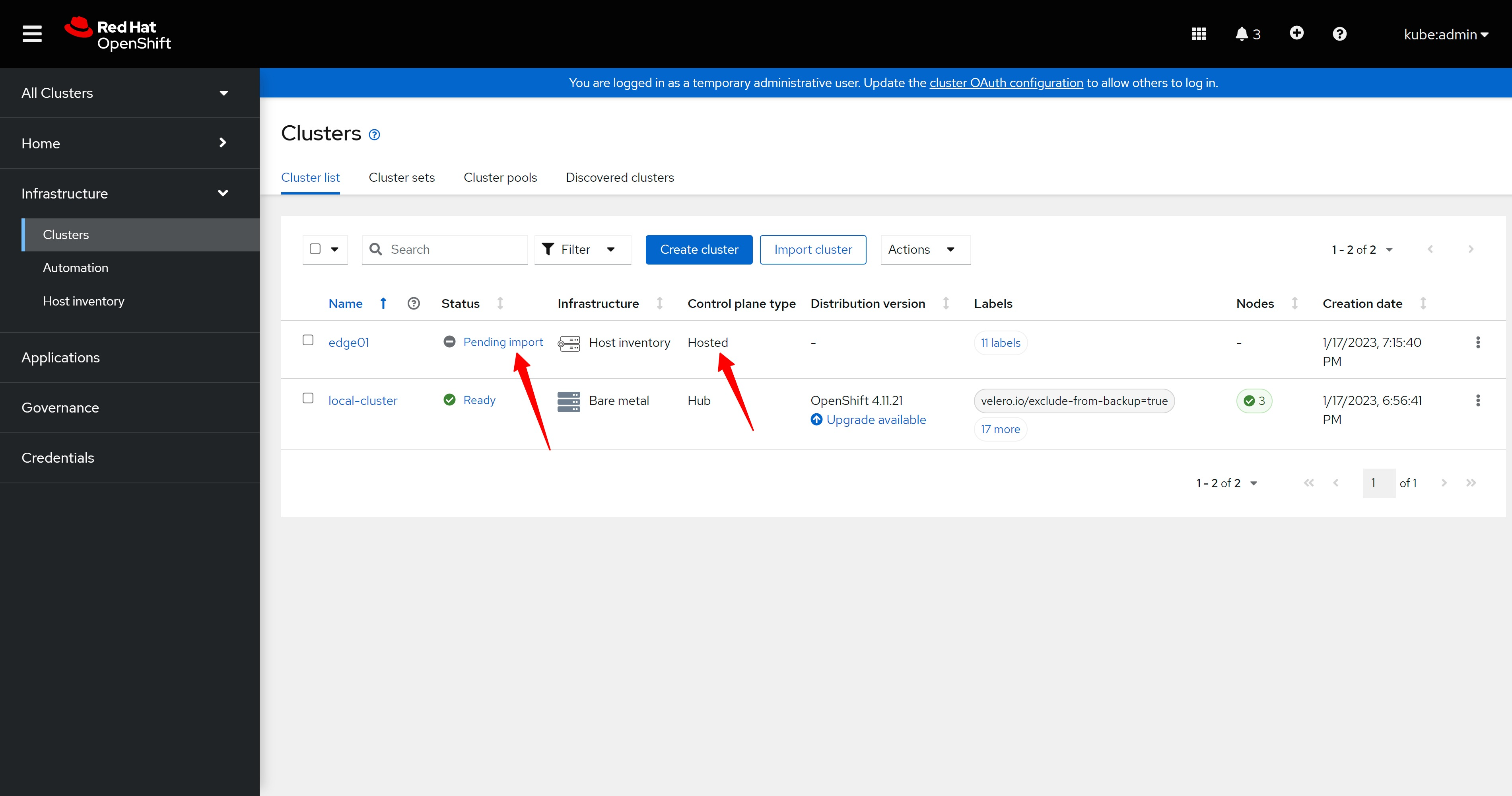
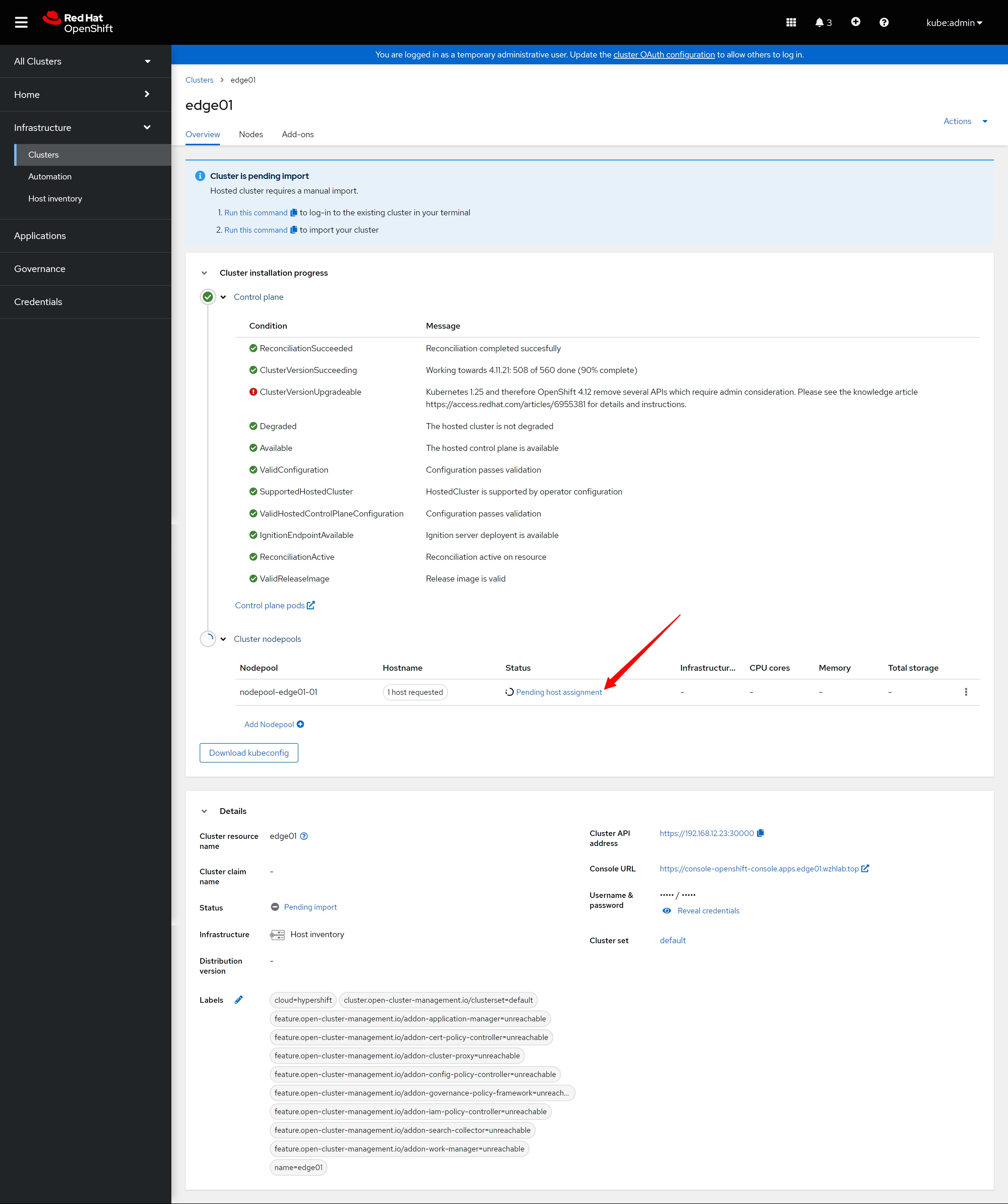
安装过程稍微有一点时间,期间,我们能看到集群状态,nodepool状态有所变化。
The installation process takes a little while. During this period, we can see the status of the cluster and the status of the nodepool has changed.
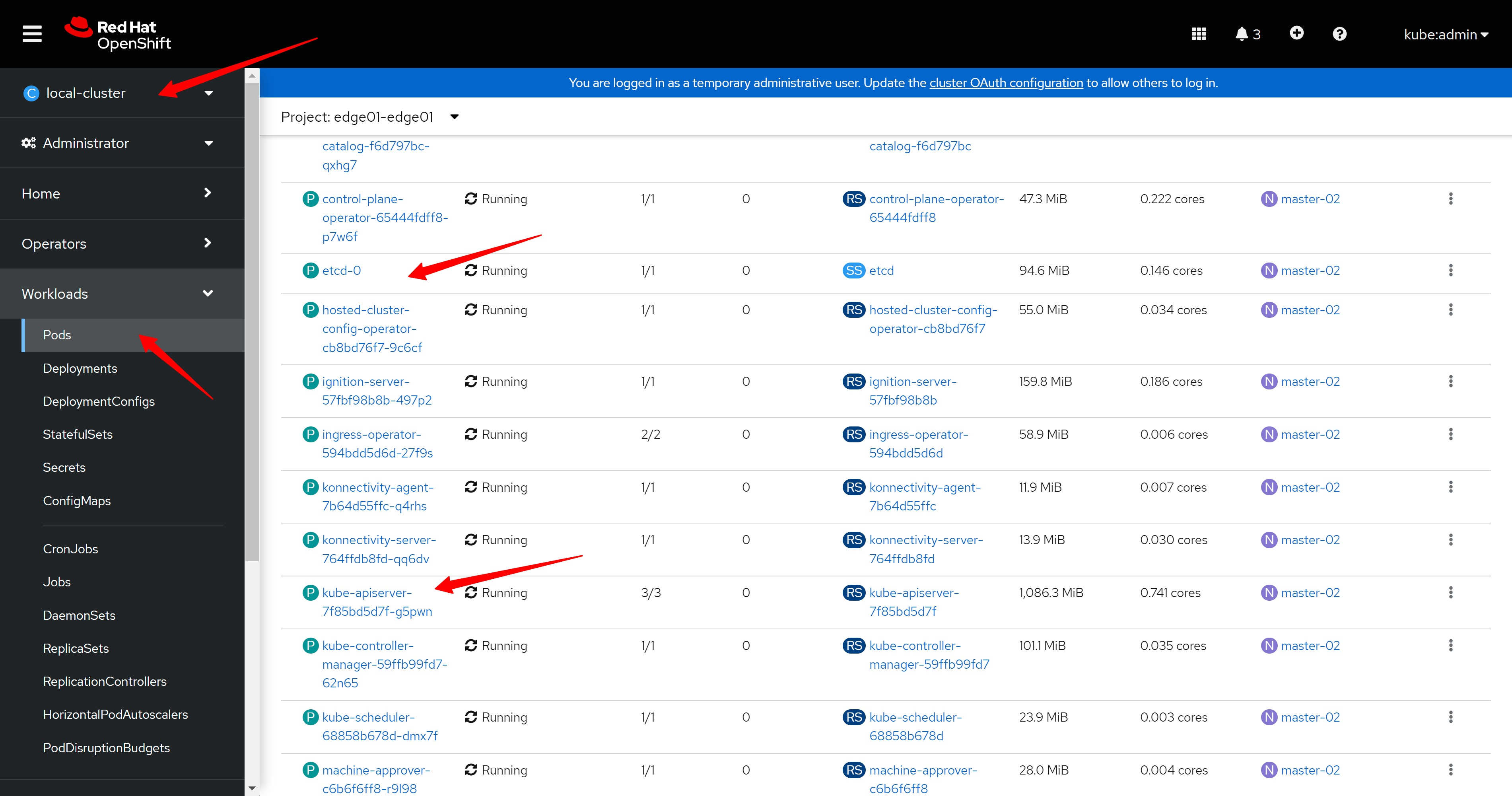
我们还能看到hub集群上,有了一个edge01-edge01的namespace,里面有集群控制面的pod,其中就有我们熟悉的etcd, api-server
We can also see that on the hub cluster, there is an edge01-edge01 namespace, which contains the pods of the cluster control plane, including the familiar etcd and api-server
import the hosted cluster
经过一段时间,新集群就安装成功了,但是页面上提示,需要手动导入。我们复制页面上的命令,并到helper上,运行这2个命令,他们是登录到hosted control plan,然后配置一些CR进去
After a period of time, the new cluster is installed successfully, but the page prompts that it needs to be imported manually. We copy the commands on the page, and run these two commands on the helper node, they log in to the hosted control plan, and then configure some CR/CRD into it
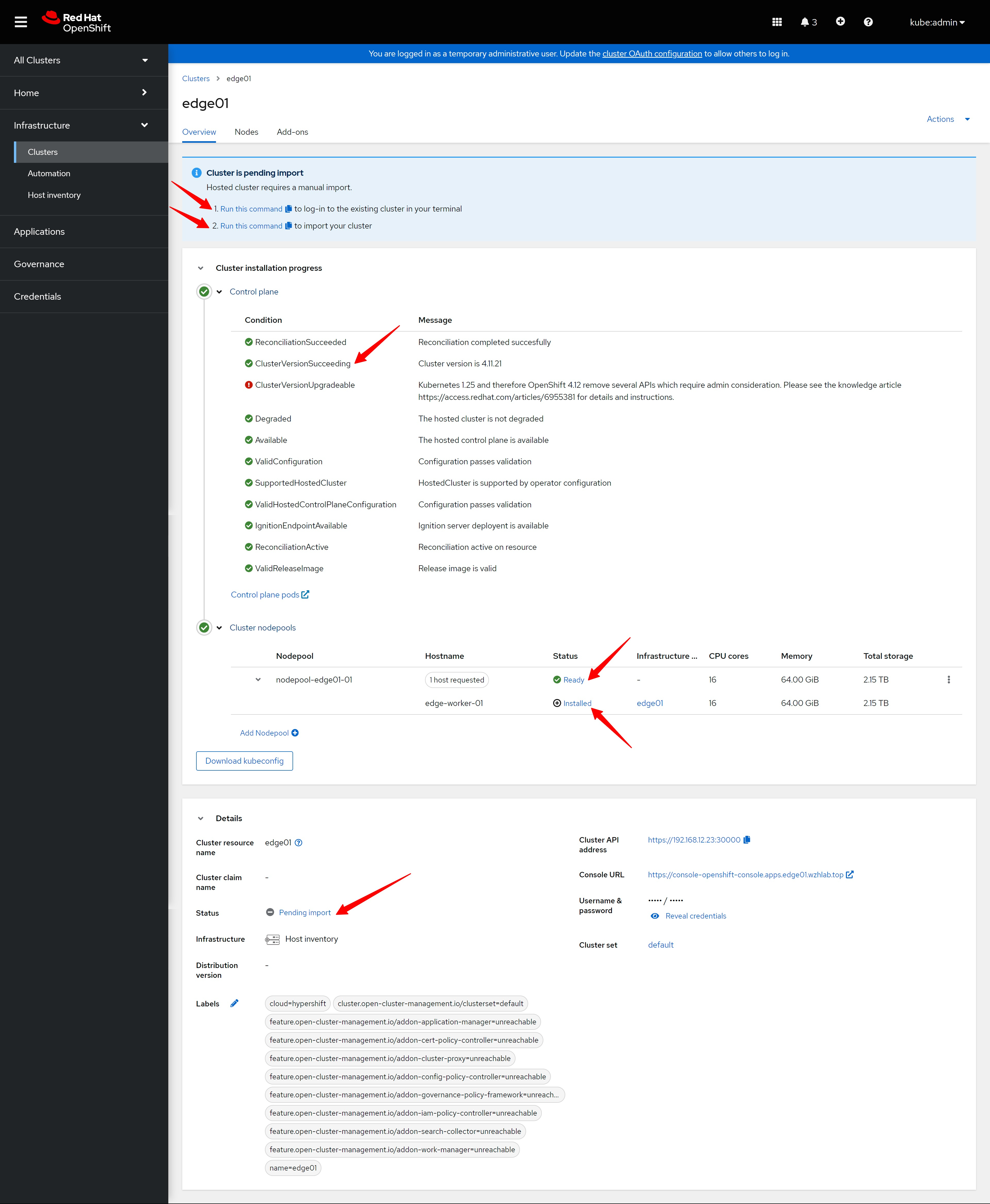
# on helper

# copy past the 1st command
oc login https://192.168.12.23:30000 -u kubeadmin -p z2I9i-BZF8L-sYvUC-47c7x

# copy past the 2nd command
# it is too large, we will omit most of them
echo "Ci0tLQphc............" | base64 -d | oc create -f - || test $? -eq 0 && sleep 2 && echo "Ci0tLQphcGlWZ............" | base64 -d | oc apply -f - || echo "VGhlIGNsdXN..............." | base64 -d
# namespace/open-cluster-management-agent created
# serviceaccount/klusterlet created
# clusterrole.rbac.authorization.k8s.io/klusterlet created
# clusterrole.rbac.authorization.k8s.io/open-cluster-management:klusterlet-admin-aggregate-clusterrole created
# clusterrolebinding.rbac.authorization.k8s.io/klusterlet created
# Warning: would violate PodSecurity "restricted:latest": allowPrivilegeEscalation != false (container "klusterlet" must set securityContext.allowPrivilegeEscalation=false), unrestricted capabilities (container "klusterlet" must set securityContext.capabilities.drop=["ALL"]), runAsNonRoot != true (pod or container "klusterlet" must set securityContext.runAsNonRoot=true), seccompProfile (pod or container "klusterlet" must set securityContext.seccompProfile.type to "RuntimeDefault" or "Localhost")
# deployment.apps/klusterlet created
# secret/bootstrap-hub-kubeconfig created
# klusterlet.operator.open-cluster-management.io/klusterlet created

# lets decode the first 2 base64 content, the 3rd one is just a message.
我们很好奇到底导入了什么东西,那让我们解码看看。第一个导入hosted control plan的yaml是一个CRD。
We are curious about what is being imported, so let’s decode it. The first yaml imported into the hosted control plan is a CRD.
---
apiVersion: apiextensions.k8s.io/v1
kind: CustomResourceDefinition
metadata:
  name: klusterlets.operator.open-cluster-management.io
spec:
  conversion:
    strategy: None
  group: operator.open-cluster-management.io
  names:
    kind: Klusterlet
    listKind: KlusterletList
    plural: klusterlets
    singular: klusterlet
  scope: Cluster
  preserveUnknownFields: false
  versions:
    - name: v1
      schema:
        openAPIV3Schema:
          description: Klusterlet represents controllers to install the resources for a managed cluster. When configured, the Klusterlet requires a secret named bootstrap-hub-kubeconfig in the agent namespace to allow API requests to the hub for the registration protocol. In Hosted mode, the Klusterlet requires an additional secret named external-managed-kubeconfig in the agent namespace to allow API requests to the managed cluster for resources installation.
          type: object
          properties:
            apiVersion:
              description: 'APIVersion defines the versioned schema of this representation of an object. Servers should convert recognized schemas to the latest internal value, and may reject unrecognized values. More info: https://git.k8s.io/community/contributors/devel/sig-architecture/api-conventions.md#resources'
              type: string
            kind:
              description: 'Kind is a string value representing the REST resource this object represents. Servers may infer this from the endpoint the client submits requests to. Cannot be updated. In CamelCase. More info: https://git.k8s.io/community/contributors/devel/sig-architecture/api-conventions.md#types-kinds'
              type: string
            metadata:
              type: object
            spec:
              description: Spec represents the desired deployment configuration of Klusterlet agent.
              type: object
              properties:
                clusterName:
                  description: ClusterName is the name of the managed cluster to be created on hub. The Klusterlet agent generates a random name if it is not set, or discovers the appropriate cluster name on OpenShift.
                  type: string
                deployOption:
                  description: DeployOption contains the options of deploying a klusterlet
                  type: object
                  properties:
                    mode:
                      description: 'Mode can be Default or Hosted. It is Default mode if not specified In Default mode, all klusterlet related resources are deployed on the managed cluster. In Hosted mode, only crd and configurations are installed on the spoke/managed cluster. Controllers run in another cluster (defined as management-cluster) and connect to the mangaged cluster with the kubeconfig in secret of "external-managed-kubeconfig"(a kubeconfig of managed-cluster with cluster-admin permission). Note: Do not modify the Mode field once it''s applied.'
                      type: string
                externalServerURLs:
                  description: ExternalServerURLs represents the a list of apiserver urls and ca bundles that is accessible externally If it is set empty, managed cluster has no externally accessible url that hub cluster can visit.
                  type: array
                  items:
                    description: ServerURL represents the apiserver url and ca bundle that is accessible externally
                    type: object
                    properties:
                      caBundle:
                        description: CABundle is the ca bundle to connect to apiserver of the managed cluster. System certs are used if it is not set.
                        type: string
                        format: byte
                      url:
                        description: URL is the url of apiserver endpoint of the managed cluster.
                        type: string
                namespace:
                  description: 'Namespace is the namespace to deploy the agent. The namespace must have a prefix of "open-cluster-management-", and if it is not set, the namespace of "open-cluster-management-agent" is used to deploy agent. Note: in Detach mode, this field will be **ignored**, the agent will be deployed to the namespace with the same name as klusterlet.'
                  type: string
                nodePlacement:
                  description: NodePlacement enables explicit control over the scheduling of the deployed pods.
                  type: object
                  properties:
                    nodeSelector:
                      description: NodeSelector defines which Nodes the Pods are scheduled on. The default is an empty list.
                      type: object
                      additionalProperties:
                        type: string
                    tolerations:
                      description: Tolerations is attached by pods to tolerate any taint that matches the triple <key,value,effect> using the matching operator <operator>. The default is an empty list.
                      type: array
                      items:
                        description: The pod this Toleration is attached to tolerates any taint that matches the triple <key,value,effect> using the matching operator <operator>.
                        type: object
                        properties:
                          effect:
                            description: Effect indicates the taint effect to match. Empty means match all taint effects. When specified, allowed values are NoSchedule, PreferNoSchedule and NoExecute.
                            type: string
                          key:
                            description: Key is the taint key that the toleration applies to. Empty means match all taint keys. If the key is empty, operator must be Exists; this combination means to match all values and all keys.
                            type: string
                          operator:
                            description: Operator represents a key's relationship to the value. Valid operators are Exists and Equal. Defaults to Equal. Exists is equivalent to wildcard for value, so that a pod can tolerate all taints of a particular category.
                            type: string
                          tolerationSeconds:
                            description: TolerationSeconds represents the period of time the toleration (which must be of effect NoExecute, otherwise this field is ignored) tolerates the taint. By default, it is not set, which means tolerate the taint forever (do not evict). Zero and negative values will be treated as 0 (evict immediately) by the system.
                            type: integer
                            format: int64
                          value:
                            description: Value is the taint value the toleration matches to. If the operator is Exists, the value should be empty, otherwise just a regular string.
                            type: string
                registrationImagePullSpec:
                  description: RegistrationImagePullSpec represents the desired image configuration of registration agent. quay.io/open-cluster-management.io/registration:latest will be used if unspecified.
                  type: string
                workImagePullSpec:
                  description: WorkImagePullSpec represents the desired image configuration of work agent. quay.io/open-cluster-management.io/work:latest will be used if unspecified.
                  type: string
            status:
              description: Status represents the current status of Klusterlet agent.
              type: object
              properties:
                conditions:
                  description: 'Conditions contain the different condition statuses for this Klusterlet. Valid condition types are: Applied: Components have been applied in the managed cluster. Available: Components in the managed cluster are available and ready to serve. Progressing: Components in the managed cluster are in a transitioning state. Degraded: Components in the managed cluster do not match the desired configuration and only provide degraded service.'
                  type: array
                  items:
                    description: "Condition contains details for one aspect of the current state of this API Resource. --- This struct is intended for direct use as an array at the field path .status.conditions.  For example, type FooStatus struct{     // Represents the observations of a foo's current state.     // Known .status.conditions.type are: \"Available\", \"Progressing\", and \"Degraded\"     // +patchMergeKey=type     // +patchStrategy=merge     // +listType=map     // +listMapKey=type     Conditions []metav1.Condition `json:\"conditions,omitempty\" patchStrategy:\"merge\" patchMergeKey:\"type\" protobuf:\"bytes,1,rep,name=conditions\"` \n     // other fields }"
                    type: object
                    required:
                      - lastTransitionTime
                      - message
                      - reason
                      - status
                      - type
                    properties:
                      lastTransitionTime:
                        description: lastTransitionTime is the last time the condition transitioned from one status to another. This should be when the underlying condition changed.  If that is not known, then using the time when the API field changed is acceptable.
                        type: string
                        format: date-time
                      message:
                        description: message is a human readable message indicating details about the transition. This may be an empty string.
                        type: string
                        maxLength: 32768
                      observedGeneration:
                        description: observedGeneration represents the .metadata.generation that the condition was set based upon. For instance, if .metadata.generation is currently 12, but the .status.conditions[x].observedGeneration is 9, the condition is out of date with respect to the current state of the instance.
                        type: integer
                        format: int64
                        minimum: 0
                      reason:
                        description: reason contains a programmatic identifier indicating the reason for the condition's last transition. Producers of specific condition types may define expected values and meanings for this field, and whether the values are considered a guaranteed API. The value should be a CamelCase string. This field may not be empty.
                        type: string
                        maxLength: 1024
                        minLength: 1
                        pattern: ^[A-Za-z]([A-Za-z0-9_,:]*[A-Za-z0-9_])?$
                      status:
                        description: status of the condition, one of True, False, Unknown.
                        type: string
                        enum:
                          - "True"
                          - "False"
                          - Unknown
                      type:
                        description: type of condition in CamelCase or in foo.example.com/CamelCase. --- Many .condition.type values are consistent across resources like Available, but because arbitrary conditions can be useful (see .node.status.conditions), the ability to deconflict is important. The regex it matches is (dns1123SubdomainFmt/)?(qualifiedNameFmt)
                        type: string
                        maxLength: 316
                        pattern: ^([a-z0-9]([-a-z0-9]*[a-z0-9])?(\.[a-z0-9]([-a-z0-9]*[a-z0-9])?)*/)?(([A-Za-z0-9][-A-Za-z0-9_.]*)?[A-Za-z0-9])$
                generations:
                  description: Generations are used to determine when an item needs to be reconciled or has changed in a way that needs a reaction.
                  type: array
                  items:
                    description: GenerationStatus keeps track of the generation for a given resource so that decisions about forced updates can be made. The definition matches the GenerationStatus defined in github.com/openshift/api/v1
                    type: object
                    properties:
                      group:
                        description: group is the group of the resource that you're tracking
                        type: string
                      lastGeneration:
                        description: lastGeneration is the last generation of the resource that controller applies
                        type: integer
                        format: int64
                      name:
                        description: name is the name of the resource that you're tracking
                        type: string
                      namespace:
                        description: namespace is where the resource that you're tracking is
                        type: string
                      resource:
                        description: resource is the resource type of the resource that you're tracking
                        type: string
                      version:
                        description: version is the version of the resource that you're tracking
                        type: string
                observedGeneration:
                  description: ObservedGeneration is the last generation change you've dealt with
                  type: integer
                  format: int64
                relatedResources:
                  description: RelatedResources are used to track the resources that are related to this Klusterlet.
                  type: array
                  items:
                    description: RelatedResourceMeta represents the resource that is managed by an operator
                    type: object
                    properties:
                      group:
                        description: group is the group of the resource that you're tracking
                        type: string
                      name:
                        description: name is the name of the resource that you're tracking
                        type: string
                      namespace:
                        description: namespace is where the thing you're tracking is
                        type: string
                      resource:
                        description: resource is the resource type of the resource that you're tracking
                        type: string
                      version:
                        description: version is the version of the thing you're tracking
                        type: string
      served: true
      storage: true
      subresources:
        status: {}
status:
  acceptedNames:
    kind: ""
    plural: ""
  conditions: []
  storedVersions: []
第二个yaml是这样的,这个是配置了一个新的namespace,然后部署了一个klusterlet应用和配置,这个到底是啥,作者暂时也说不出。
The second yaml is like this. This is to configure a new namespace, and then deploy a klusterlet application and configuration. What exactly is this, the author can’t say for the time being.
---
apiVersion: v1
kind: Namespace
metadata:
  annotations:
    workload.openshift.io/allowed: "management"
  name: "open-cluster-management-agent"

---
apiVersion: v1
kind: ServiceAccount
metadata:
  name: klusterlet
  namespace: "open-cluster-management-agent"

---
apiVersion: rbac.authorization.k8s.io/v1
kind: ClusterRole
metadata:
  name: klusterlet
rules:
- apiGroups: [""]
  resources: ["secrets", "configmaps", "serviceaccounts"]
  verbs: ["create", "get", "list", "update", "watch", "patch", "delete"]
- apiGroups: ["coordination.k8s.io"]
  resources: ["leases"]
  verbs: ["create", "get", "list", "update", "watch", "patch"]
- apiGroups: ["authorization.k8s.io"]
  resources: ["subjectaccessreviews"]
  verbs: ["create"]
- apiGroups: [""]
  resources: ["namespaces"]
  verbs: ["create", "get", "list", "watch","delete"]
- apiGroups: [""]
  resources: ["nodes"]
  verbs: ["get", "list", "watch"]
- apiGroups: ["", "events.k8s.io"]
  resources: ["events"]
  verbs: ["create", "patch", "update"]
- apiGroups: ["apps"]
  resources: ["deployments"]
  verbs: ["create", "get", "list", "update", "watch", "patch", "delete"]
- apiGroups: ["rbac.authorization.k8s.io"]
  resources: ["clusterrolebindings", "rolebindings"]
  verbs: ["create", "get", "list", "update", "watch", "patch", "delete"]
- apiGroups: ["rbac.authorization.k8s.io"]
  resources: ["clusterroles", "roles"]
  verbs: ["create", "get", "list", "update", "watch", "patch", "delete", "escalate", "bind"]
- apiGroups: ["apiextensions.k8s.io"]
  resources: ["customresourcedefinitions"]
  verbs: ["create", "get", "list", "update", "watch", "patch", "delete"]
- apiGroups: ["operator.open-cluster-management.io"]
  resources: ["klusterlets"]
  verbs: ["get", "list", "watch", "update", "patch", "delete"]
- apiGroups: ["operator.open-cluster-management.io"]
  resources: ["klusterlets/status"]
  verbs: ["update", "patch"]
- apiGroups: ["work.open-cluster-management.io"]
  resources: ["appliedmanifestworks"]
  verbs: ["list", "update", "patch"]

---
apiVersion: rbac.authorization.k8s.io/v1
kind: ClusterRole
metadata:
  name: open-cluster-management:klusterlet-admin-aggregate-clusterrole
  labels:
    rbac.authorization.k8s.io/aggregate-to-admin: "true"
rules:
- apiGroups: ["operator.open-cluster-management.io"]
  resources: ["klusterlets"]
  verbs: ["get", "list", "watch", "create", "update", "patch", "delete"]
---
apiVersion: rbac.authorization.k8s.io/v1
kind: ClusterRoleBinding
metadata:
  name: klusterlet
roleRef:
  apiGroup: rbac.authorization.k8s.io
  kind: ClusterRole
  name: klusterlet
subjects:
- kind: ServiceAccount
  name: klusterlet
  namespace: "open-cluster-management-agent"

---
kind: Deployment
apiVersion: apps/v1
metadata:
  name: klusterlet
  namespace: "open-cluster-management-agent"
  labels:
    app: klusterlet
spec:
  replicas: 1
  selector:
    matchLabels:
      app: klusterlet
  template:
    metadata:
      annotations:
        target.workload.openshift.io/management: '{"effect": "PreferredDuringScheduling"}'
      labels:
        app: klusterlet
    spec:
      serviceAccountName: klusterlet
      tolerations:
      - key: "node-role.kubernetes.io/infra"
        value: ""
        effect: "NoSchedule"
        operator: "Exists"
      containers:
      - name: klusterlet
        image: registry.redhat.io/multicluster-engine/registration-operator-rhel8@sha256:183dc28f1991ad2aa2fcb987d217fc63863909497ae9291b14a96079640463d3
        imagePullPolicy: IfNotPresent
        args:
          - "/registration-operator"
          - "klusterlet"
          - "--disable-leader-election"
        livenessProbe:
          httpGet:
            path: /healthz
            scheme: HTTPS
            port: 8443
          initialDelaySeconds: 2
          periodSeconds: 10
        readinessProbe:
          httpGet:
            path: /healthz
            scheme: HTTPS
            port: 8443
          initialDelaySeconds: 2

---
apiVersion: v1
kind: Secret
metadata:
  name: "bootstrap-hub-kubeconfig"

  namespace: "open-cluster-management-agent"

type: Opaque
data:
  kubeconfig: "YXBpVmVyc2............"

---
apiVersion: operator.open-cluster-management.io/v1
kind: Klusterlet
metadata:
  name: klusterlet
spec:
  deployOption:
    mode: Default
  registrationImagePullSpec: "registry.redhat.io/multicluster-engine/registration-rhel8@sha256:52efbbbd9deef8517ea2c96b1d4756c154ebf342a6331603c6942cf0a64ee133"
  workImagePullSpec: "registry.redhat.io/multicluster-engine/work-rhel8@sha256:3e1a592361dc8176dae1eb5d2bc82bd3aabb6e370add47ae84325ddeb00d661c"
  clusterName: "edge01"
  namespace: "open-cluster-management-agent"
  nodePlacement:
    tolerations:
    - key: "node-role.kubernetes.io/infra"
      value: ""
      effect: "NoSchedule"
      operator: "Exists"
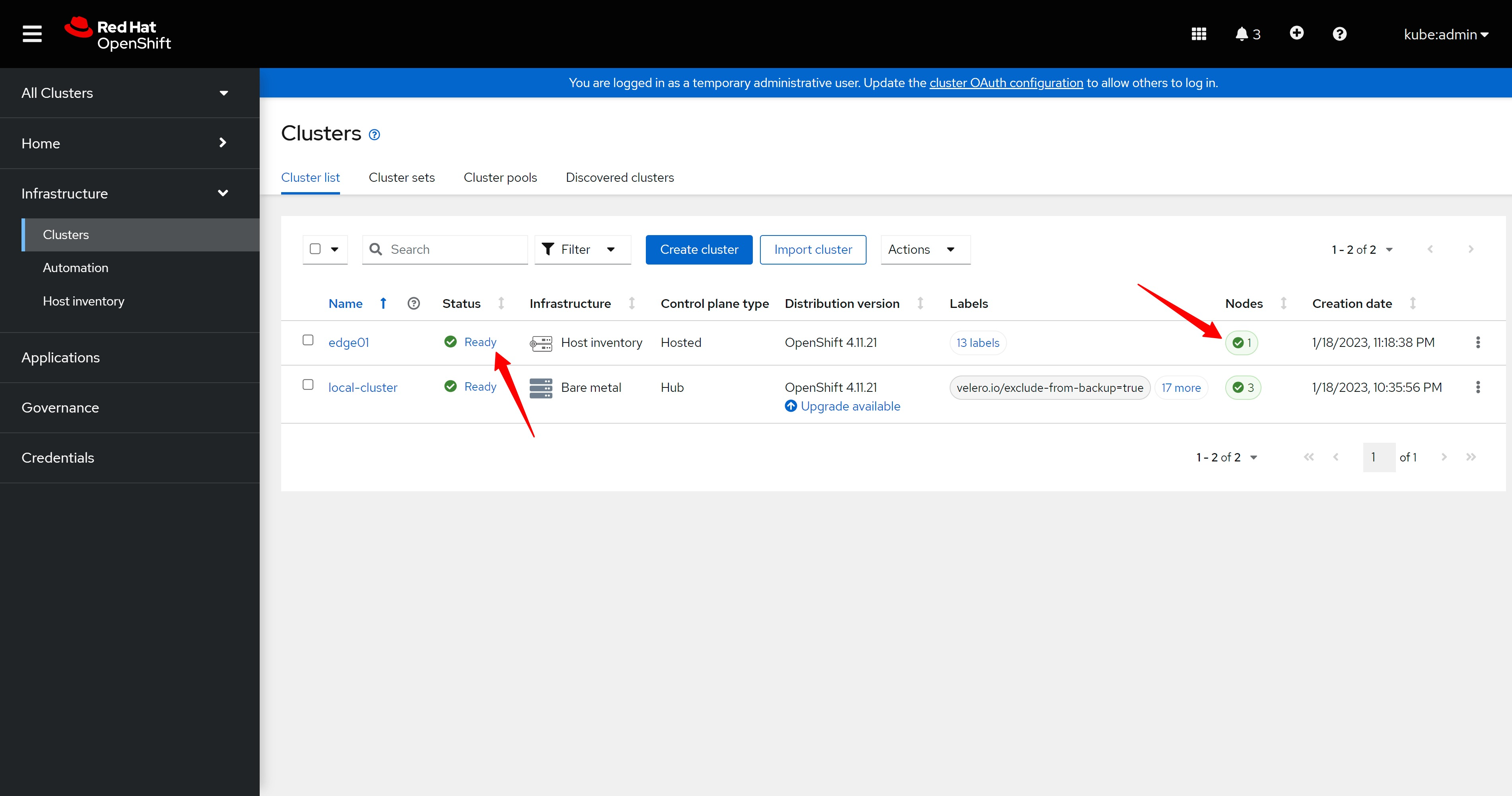
导入配置以后,我们就能看到集群导入成功啦。
After importing the configuration, we can see that the cluster was imported successfully.
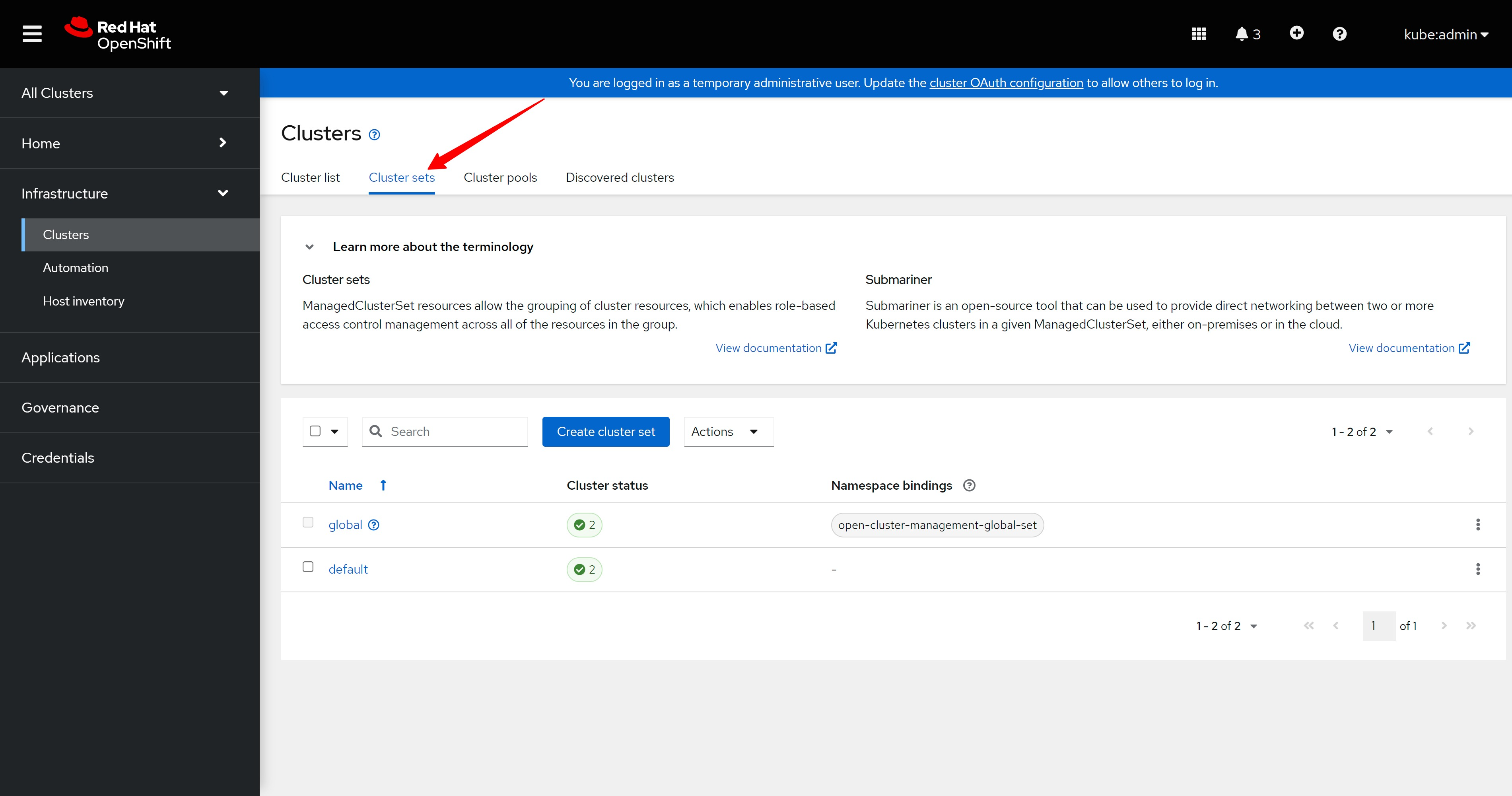
cluster set页面上也都是正常的标志。
There are also normal signs on the cluster set page.
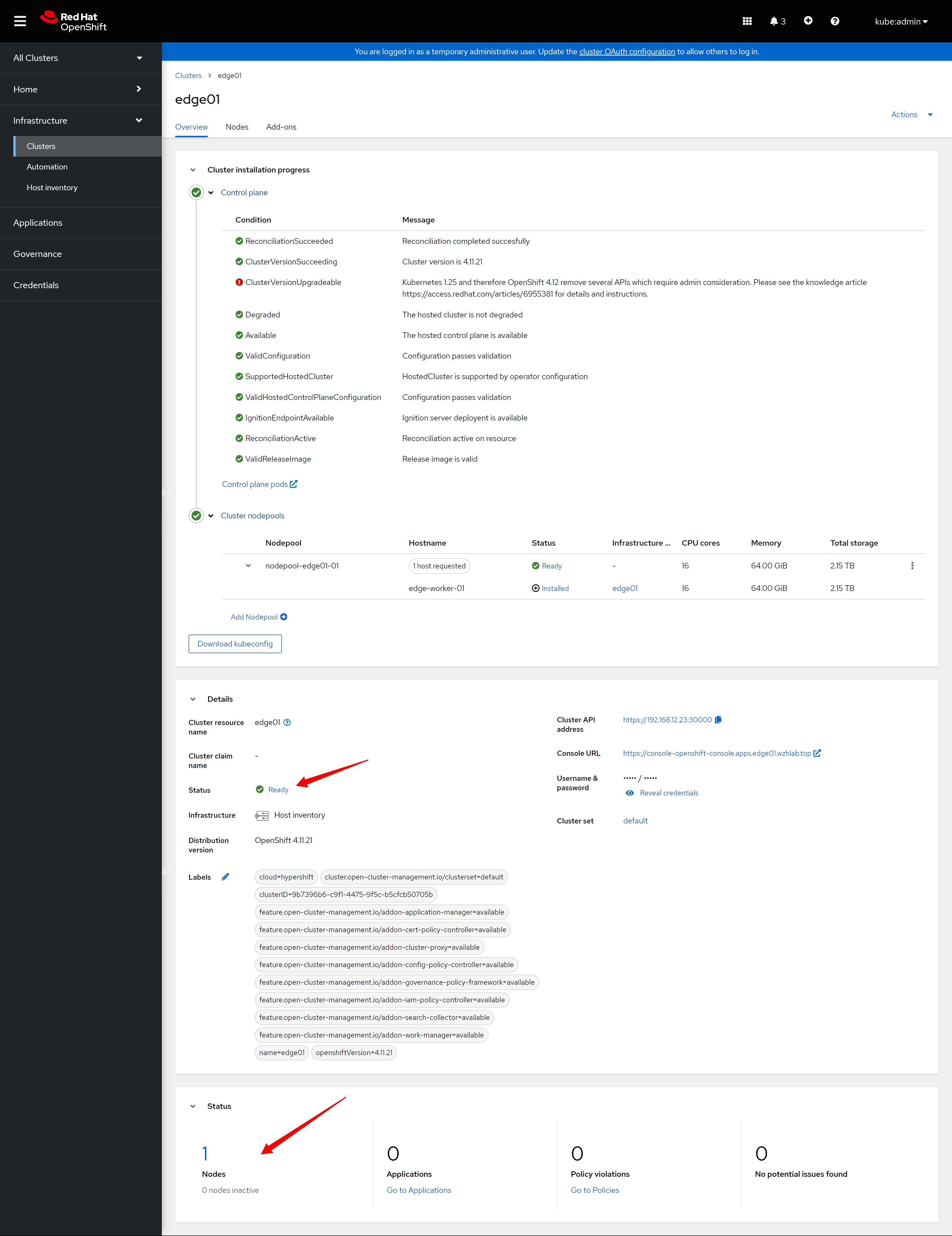
集群详细页面上也都是正常的标志。
The cluster details page is also full of normal signs.
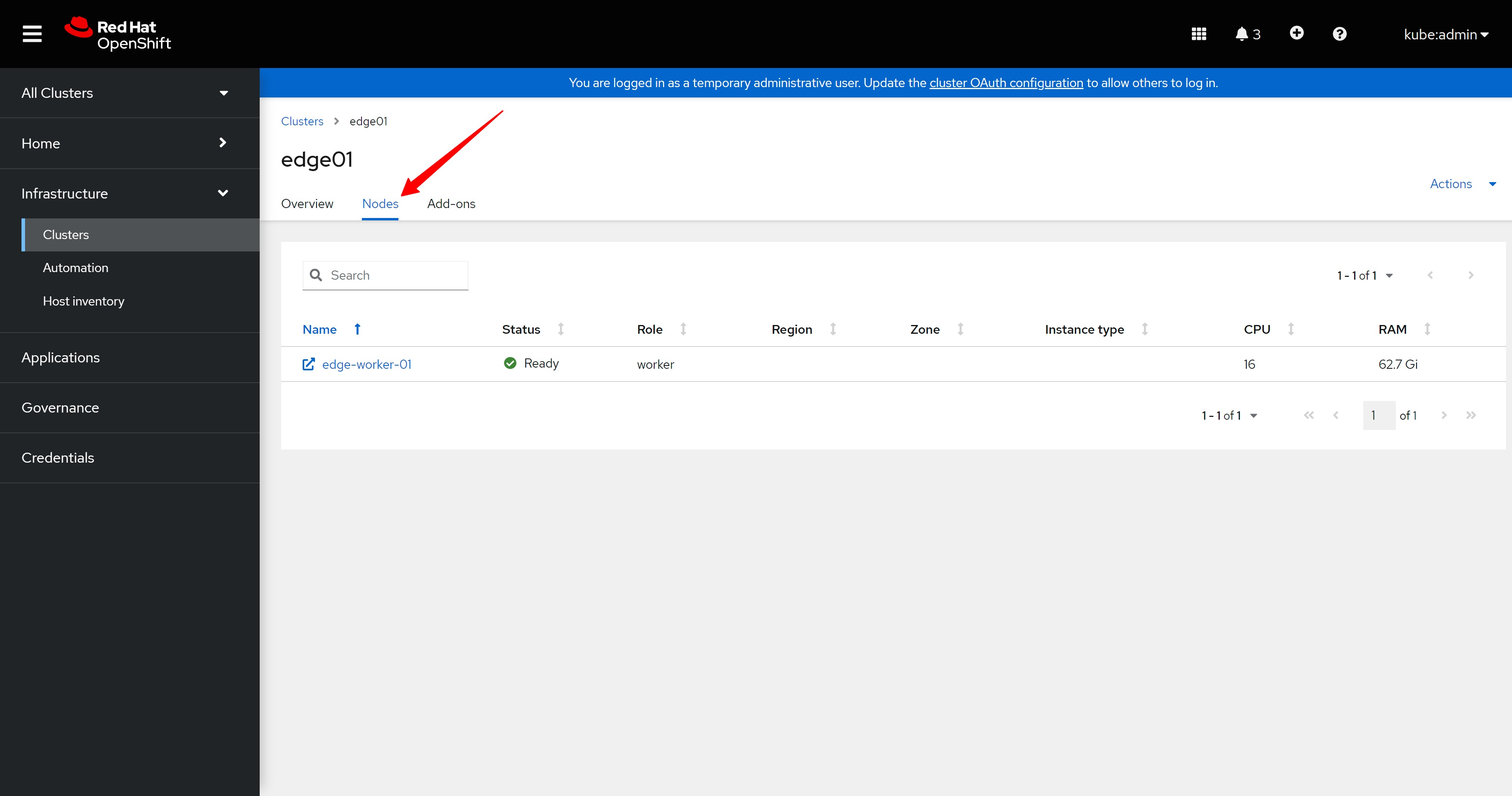
新集群的host页面,也有了一个新的worker节点。
The host page of the new cluster also has a new worker node.
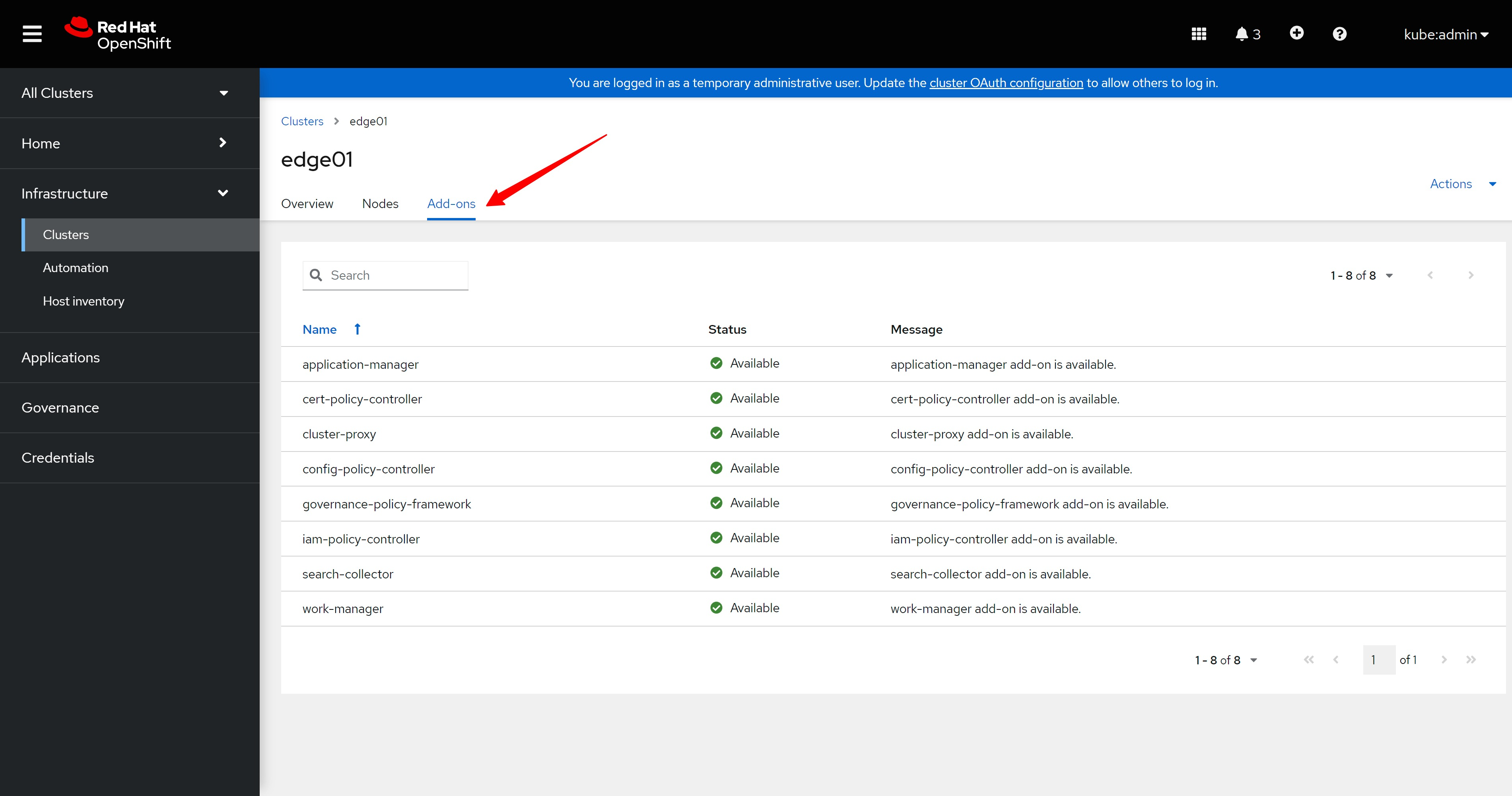
集群详细信息的插件页面上,也都是正常的标志。
On the addon page of the cluster details, there are also normal signs.
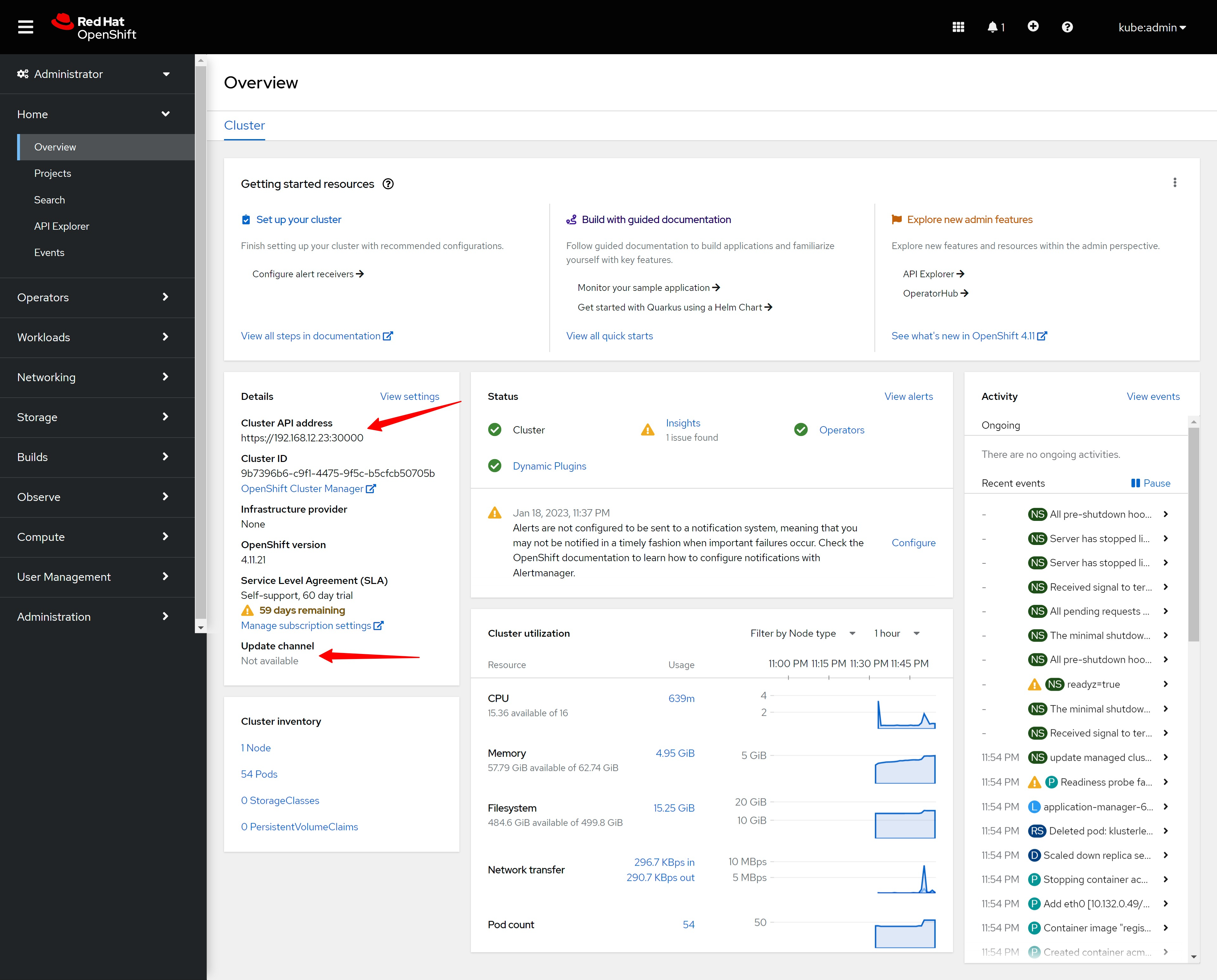
我们登录到新装的edge01集群的管理页面看看。
Let’s log in to the management page of the newly installed edge01 cluster to see.
新的edge01集群,是不能自行升级的,提示这是一个特殊的hosted集群。
The new edge01 cluster cannot be upgraded by itself, suggesting that this is a special hosted cluster.
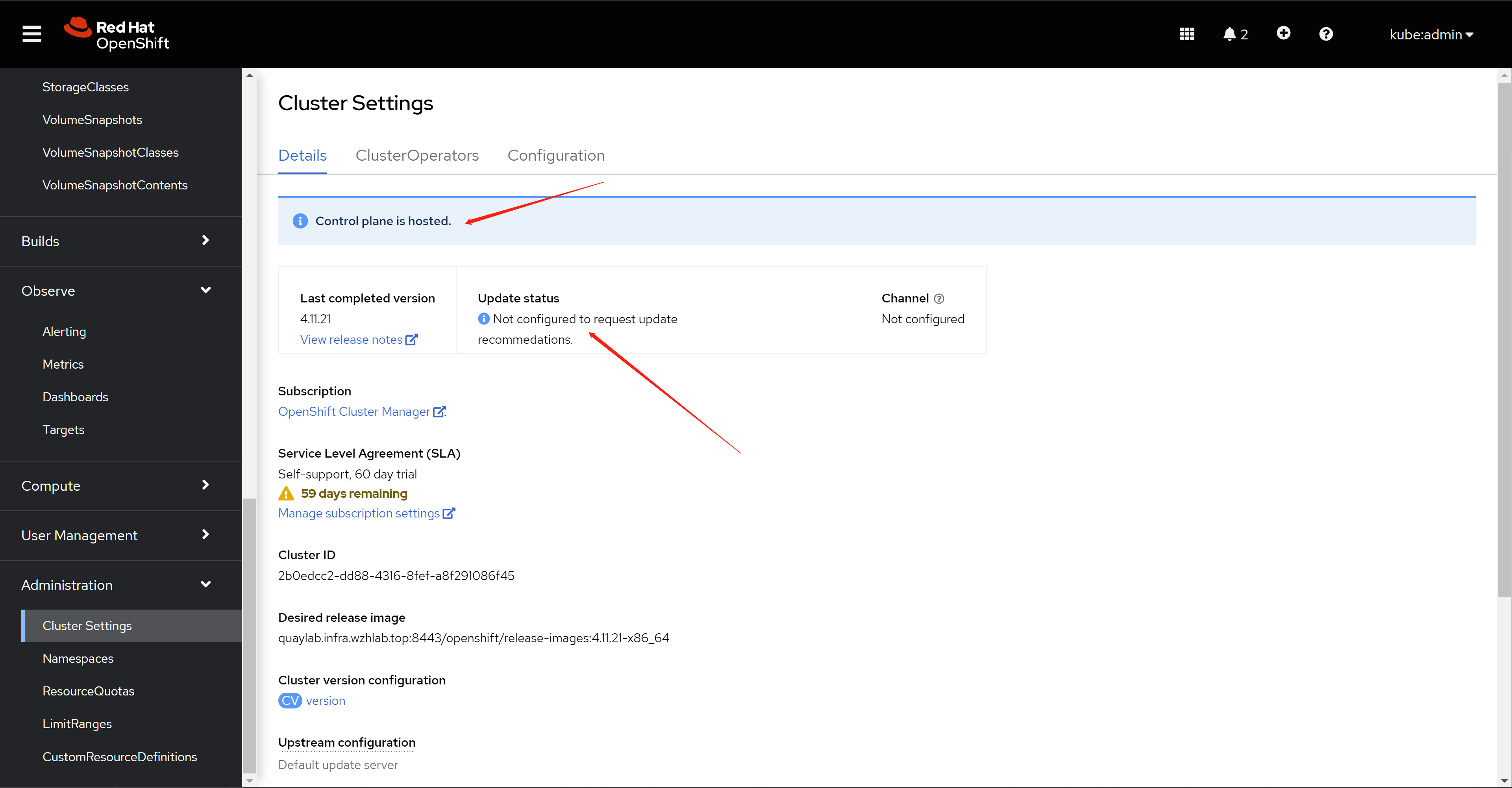
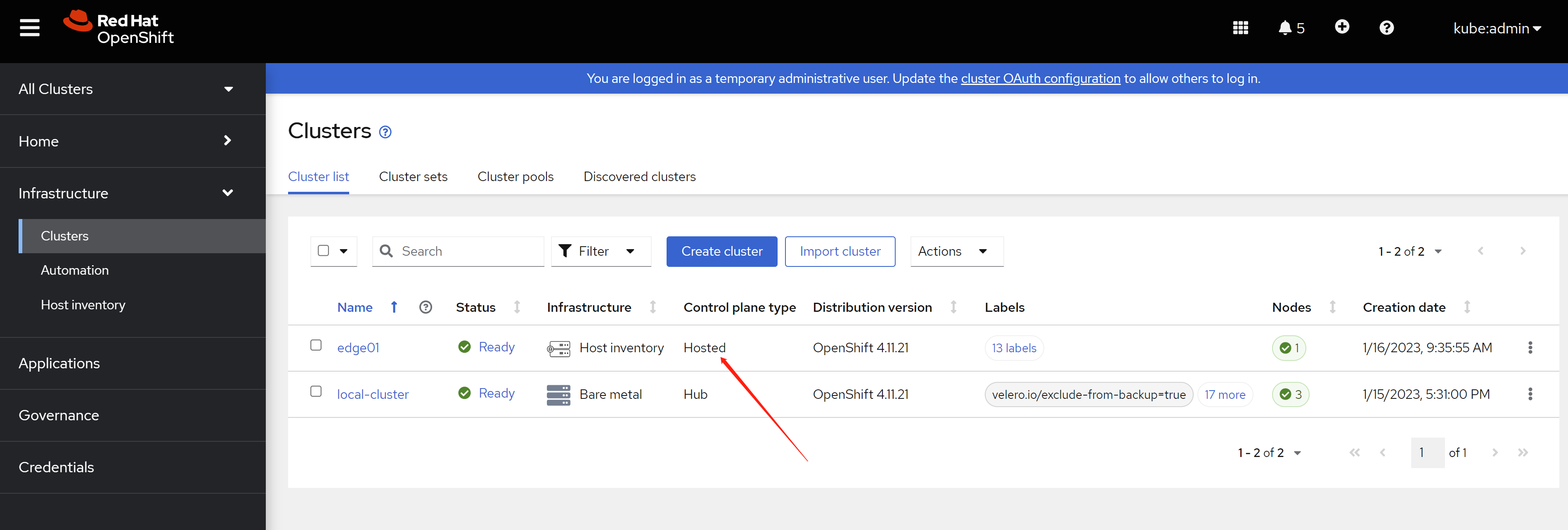
回想一下,在ACM界面里面,edge01是hosted类型。
Recall that in the ACM interface, edge01 is a hosted type.
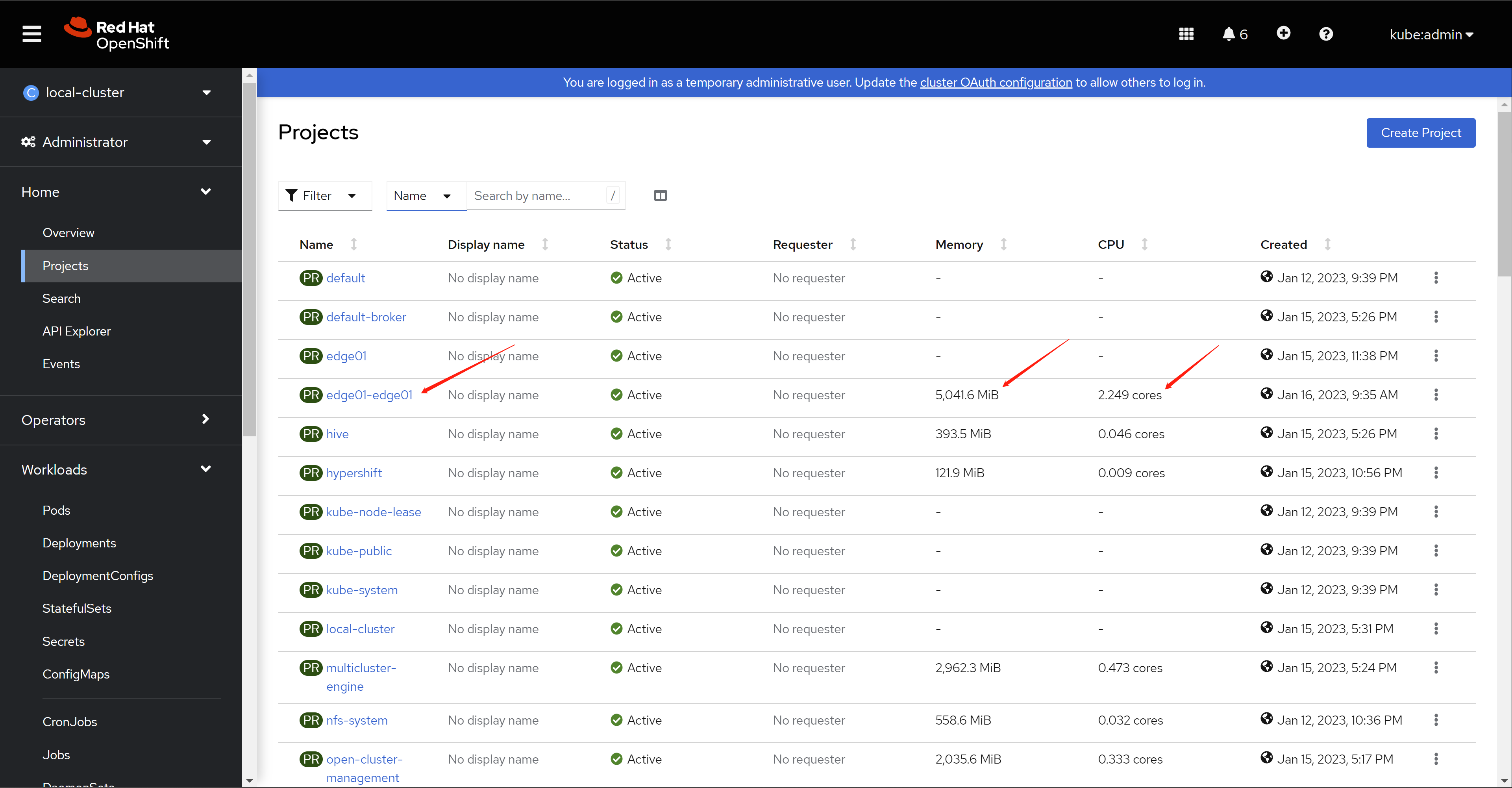
我们简单的看看,这个hosted control plan的资源消耗。
Let’s take a brief look at the resource consumption of this hosted control plan.
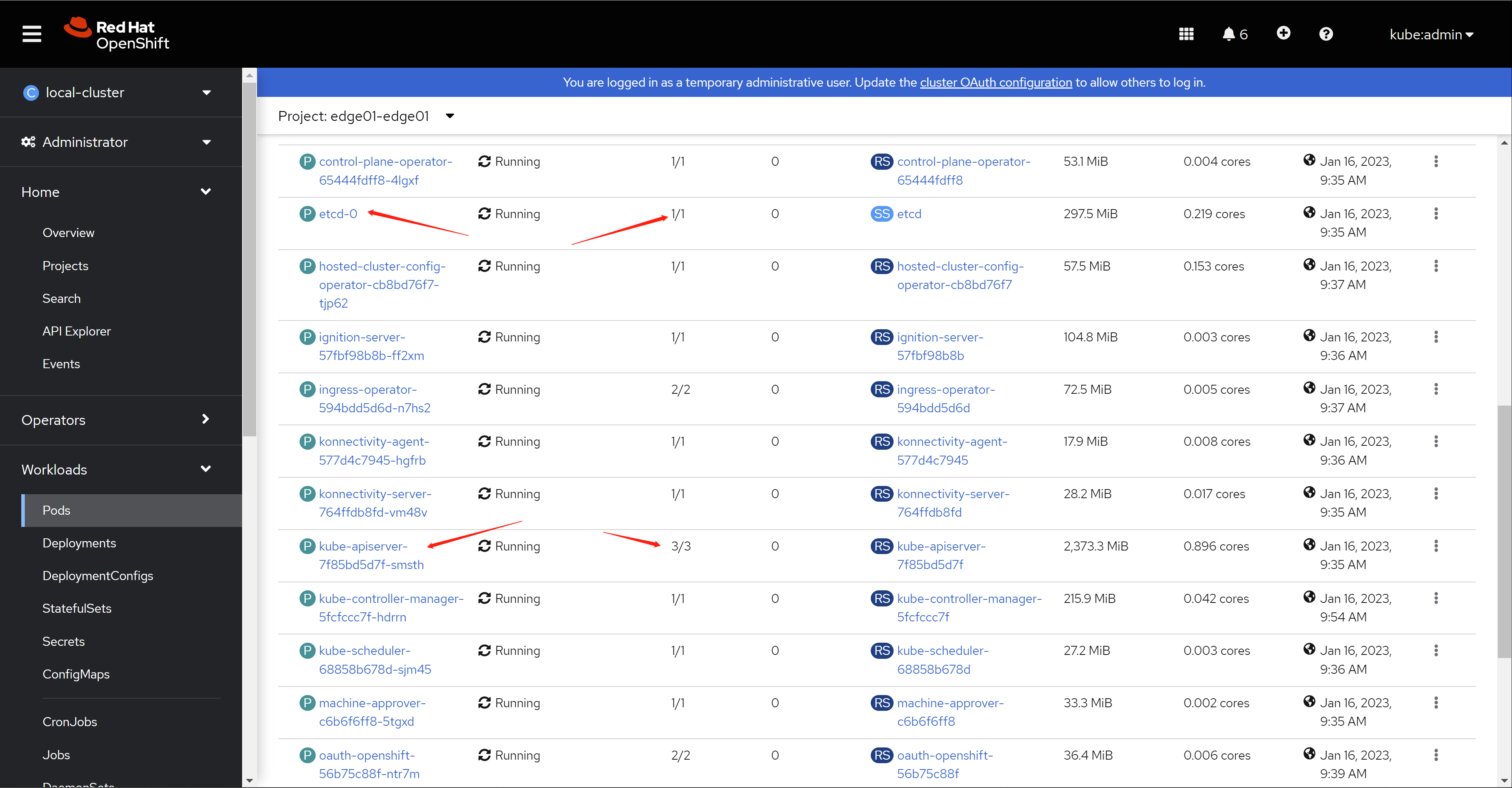
我们看一下这个control plan里面都些什么pod。
Let’s take a look at what pods are in this control plan.
cli login into the hosted cluster
接下来,我们通过命令行来登录到新的edge01集群,看看命令行上,这个新的集群有什么特殊的地方。
Next, we log in to the new edge01 cluster through the command line, and see what is special about this new cluster on the command line.
oc extract -n ${ACM_DEMO_CLUSTER} secret/${ACM_DEMO_CLUSTER}-admin-kubeconfig --to=- > ${BASE_DIR}/data/install/kubeconfig-${ACM_DEMO_CLUSTER}

# approve the worker node, if the node can't import
# under normal situation, this is no needed.
oc --kubeconfig=${BASE_DIR}/data/install/kubeconfig-${ACM_DEMO_CLUSTER} get csr | grep -v Approved
oc --kubeconfig=${BASE_DIR}/data/install/kubeconfig-${ACM_DEMO_CLUSTER} get csr -ojson | jq -r '.items[] | select(.status == {} ) | .metadata.name' | xargs oc --kubeconfig=${BASE_DIR}/data/install/kubeconfig-${ACM_DEMO_CLUSTER} adm certificate approve


oc --kubeconfig=${BASE_DIR}/data/install/kubeconfig-${ACM_DEMO_CLUSTER} get co
# NAME                                       VERSION   AVAILABLE   PROGRESSING   DEGRADED   SINCE   MESSAGE
# console                                    4.11.21   True        False         False      6h22m
# csi-snapshot-controller                    4.11.21   True        False         False      6h24m
# dns                                        4.11.21   True        False         False      6h23m
# image-registry                             4.11.21   True        False         False      6h23m
# ingress                                    4.11.21   True        False         False      6h39m
# insights                                   4.11.21   True        False         False      6h25m
# kube-apiserver                             4.11.21   True        False         False      6h40m
# kube-controller-manager                    4.11.21   True        False         False      6h40m
# kube-scheduler                             4.11.21   True        False         False      6h40m
# kube-storage-version-migrator              4.11.21   True        False         False      6h24m
# monitoring                                 4.11.21   True        False         False      6h20m
# network                                    4.11.21   True        False         False      6h24m
# openshift-apiserver                        4.11.21   True        False         False      6h40m
# openshift-controller-manager               4.11.21   True        False         False      6h40m
# openshift-samples                          4.11.21   True        False         False      6h23m
# operator-lifecycle-manager                 4.11.21   True        False         False      6h40m
# operator-lifecycle-manager-catalog         4.11.21   True        False         False      6h40m
# operator-lifecycle-manager-packageserver   4.11.21   True        False         False      6h40m
# service-ca                                 4.11.21   True        False         False      6h25m
# storage                                    4.11.21   True        False         False      6h25m

oc --kubeconfig=${BASE_DIR}/data/install/kubeconfig-${ACM_DEMO_CLUSTER} get node
# NAME             STATUS   ROLES    AGE   VERSION
# edge-worker-01   Ready    worker   17h   v1.24.6+5658434

oc --kubeconfig=${BASE_DIR}/data/install/kubeconfig-${ACM_DEMO_CLUSTER} get mcp
# error: the server doesn't have a resource type "mcp"

oc --kubeconfig=${BASE_DIR}/data/install/kubeconfig-${ACM_DEMO_CLUSTER} get mc
# error: the server doesn't have a resource type "mc"

oc --kubeconfig=${BASE_DIR}/data/install/kubeconfig-${ACM_DEMO_CLUSTER} get all -o wide -n openshift-ingress
# NAME                                 READY   STATUS    RESTARTS   AGE     IP              NODE             NOMINATED NODE   READINESS GATES
# pod/router-default-bb569f544-cknjw   1/1     Running   0          6h41m   192.168.12.33   edge-master-01   <none>           <none>

# NAME                              TYPE        CLUSTER-IP       EXTERNAL-IP   PORT(S)                   AGE     SELECTOR
# service/router-internal-default   ClusterIP   172.31.152.115   <none>        80/TCP,443/TCP,1936/TCP   6h41m   ingresscontroller.operator.openshift.io/deployment-ingresscontroller=default

# NAME                             READY   UP-TO-DATE   AVAILABLE   AGE     CONTAINERS   IMAGES                                                                                                                   SELECTOR
# deployment.apps/router-default   1/1     1            1           6h41m   router       quay.io/openshift-release-dev/ocp-v4.0-art-dev@sha256:e0dc935b7825a800e32eac69fafa2d238e1d6eb2f344cdf29345cb1123c26a22   ingresscontroller.operator.openshift.io/deployment-ingresscontroller=default

# NAME                                       DESIRED   CURRENT   READY   AGE     CONTAINERS   IMAGES                                                                                                                   SELECTOR
# replicaset.apps/router-default-bb569f544   1         1         1       6h41m   router       quay.io/openshift-release-dev/ocp-v4.0-art-dev@sha256:e0dc935b7825a800e32eac69fafa2d238e1d6eb2f344cdf29345cb1123c26a22   ingresscontroller.operator.openshift.io/deployment-ingresscontroller=default,pod-template-hash=bb569f544


oc --kubeconfig=${BASE_DIR}/data/install/kubeconfig-${ACM_DEMO_CLUSTER} get pod -A | wc -l
# 56

oc --kubeconfig=${BASE_DIR}/data/install/kubeconfig-${ACM_DEMO_CLUSTER} get clusterversion
# NAME      VERSION   AVAILABLE   PROGRESSING   SINCE   STATUS
# version   4.11.21   True        False         6h35m   Cluster version is 4.11.21
post operation
装完了,我们为了方便做实验,我们对集群节点做点配置。虽然减低了集群的安全性,但是做实验吗,无所谓了。
After the installation is complete, we will configure the cluster nodes for the convenience of experiments. Although the security of the cluster is reduced, it doesn’t matter if you only do the experiment.
# on helper

# VAR_CLUSTER=edge01
# oc get secret/$VAR_CLUSTER-keypair -n $VAR_CLUSTER --template='{{index .data "id_rsa.key" | base64decode}}' > ${BASE_DIR}/data/install/edge.key

# chmod 600 ${BASE_DIR}/data/install/edge.key

# ssh -i ${BASE_DIR}/data/install/edge.key core@192.168.12.33

cat > ${BASE_DIR}/data/install/crack.txt << EOF

echo redhat | sudo passwd --stdin root

sudo sed -i "s|^PasswordAuthentication no$|PasswordAuthentication yes|g" /etc/ssh/sshd_config
sudo sed -i "s|^PermitRootLogin no$|PermitRootLogin yes|g" /etc/ssh/sshd_config
sudo sed -i "s|^#ClientAliveInterval 180$|ClientAliveInterval 1800|g" /etc/ssh/sshd_config

sudo systemctl restart sshd

sudo sh -c 'echo "export KUBECONFIG=/etc/kubernetes/static-pod-resources/kube-apiserver-certs/secrets/node-kubeconfigs/localhost.kubeconfig" >> /root/.bashrc'

sudo sh -c 'echo "RET=\\\`oc config use-context system:admin\\\`" >> /root/.bashrc'

EOF

for i in 33
do
  ssh core@192.168.12.$i < ${BASE_DIR}/data/install/crack.txt
done


for i in 33
do
  sshpass -p 'redhat' ssh-copy-id root@192.168.12.$i
done


ssh root@192.168.12.33