openshift 4.16 integration with Azure SSO without group sync operator
OpenShift support integration with Azure SSO through OpenID. In this article, we will show you how to integrate OpenShift 4.16 with Azure SSO.
azure portal setting
In your Azure portal, go to Azure Active Directory -> App registrations -> New registration
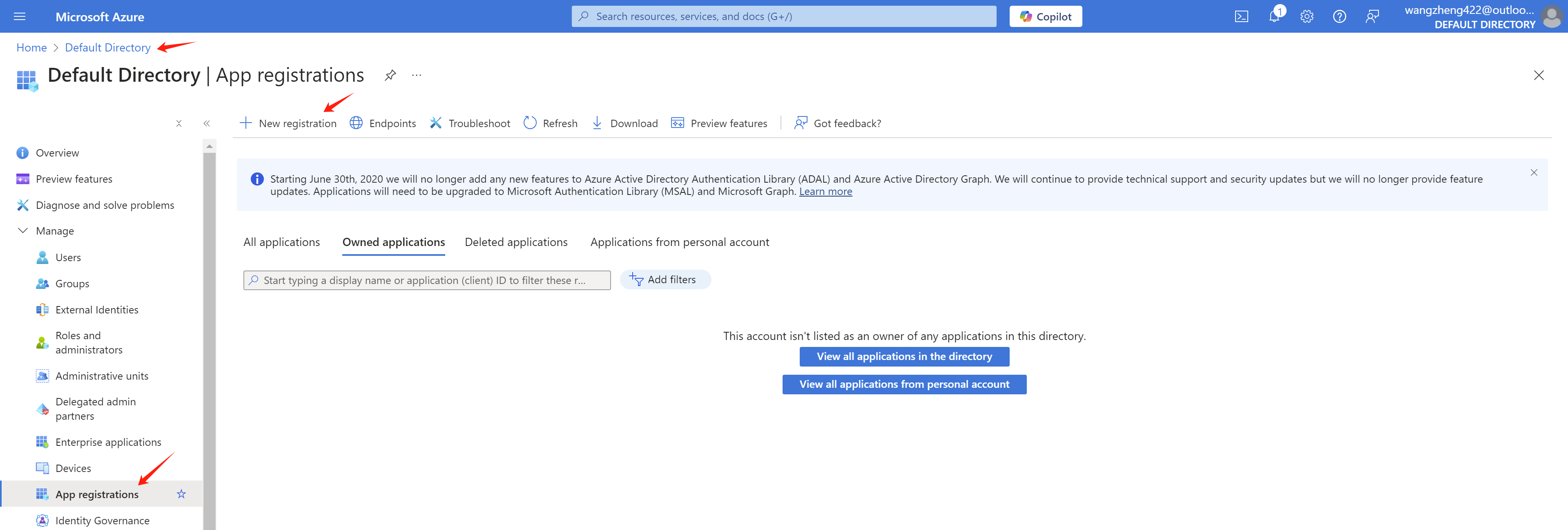
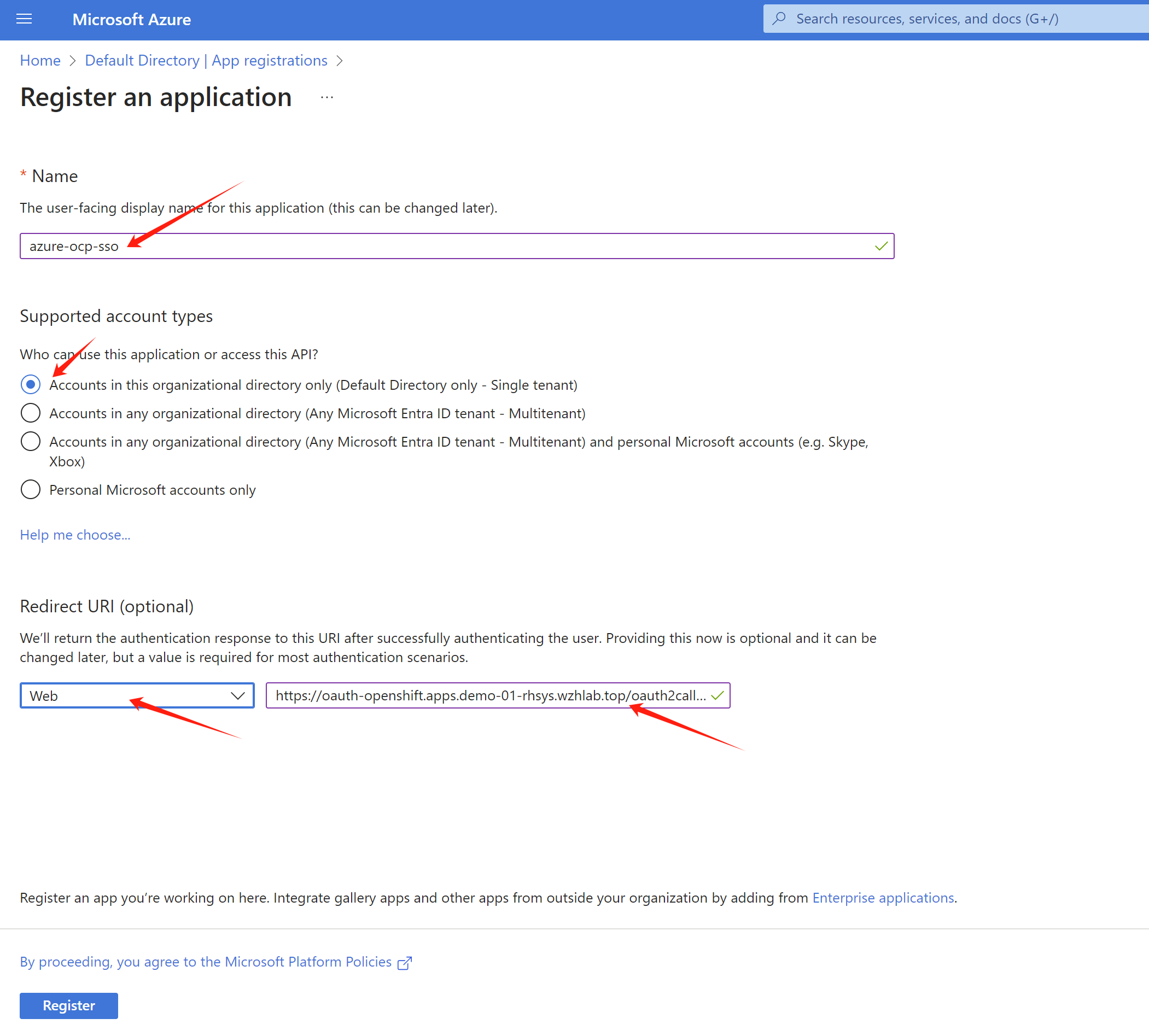
As you can see, we will create a
app registration azure-ocp-sso. Let us
find the redirect url for the openshift sso.
Get openshift sso callback host from openshift cli:
oc get route -n openshift-authentication
# NAME              HOST/PORT                                       PATH   SERVICES          PORT   TERMINATION            WILDCARD
# oauth-openshift   oauth-openshift.apps.demo-01-rhsys.wzhlab.top          oauth-openshift   6443   passthrough/Redirect   None
So the redirect url is
https://oauth-openshift.apps.demo-01-rhsys.wzhlab.top/oauth2callback/azure-ocp-sso
. Now we can create the app registration in Azure
portal.
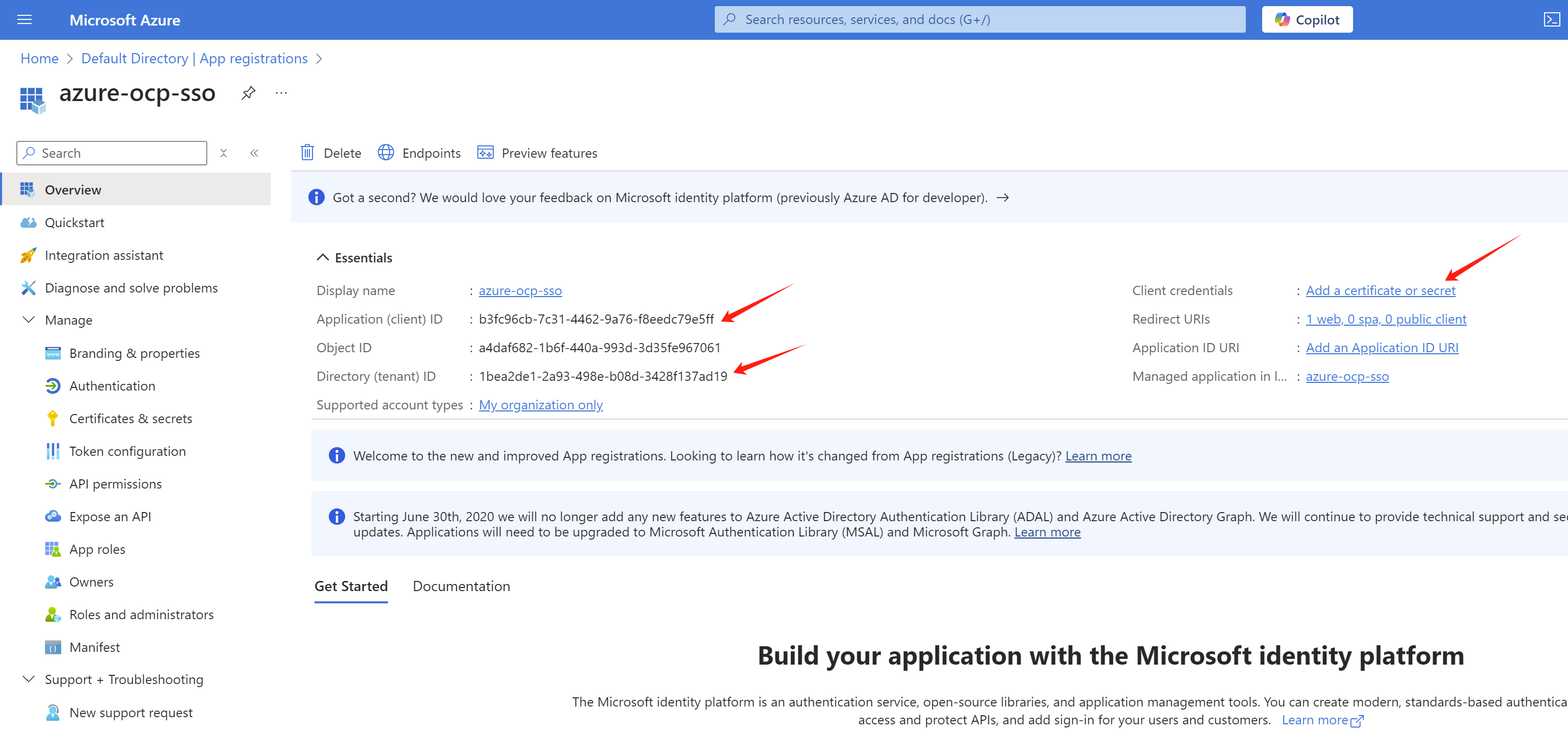
After the app registration is created, we can get the
tenant id and client id from the
Overview page. Write it down for later use.
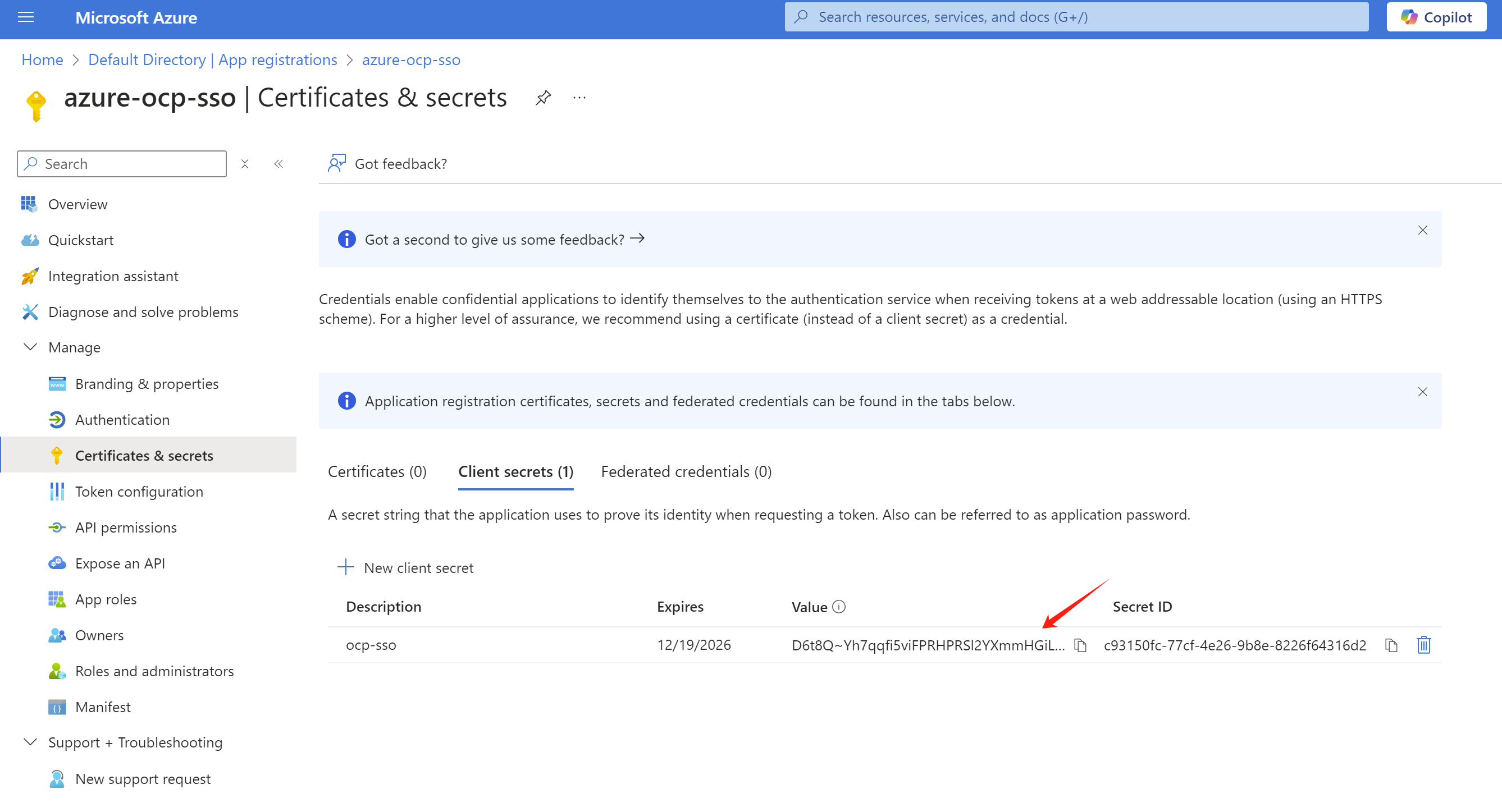
And create a client secret in the
Certificates & secrets page.
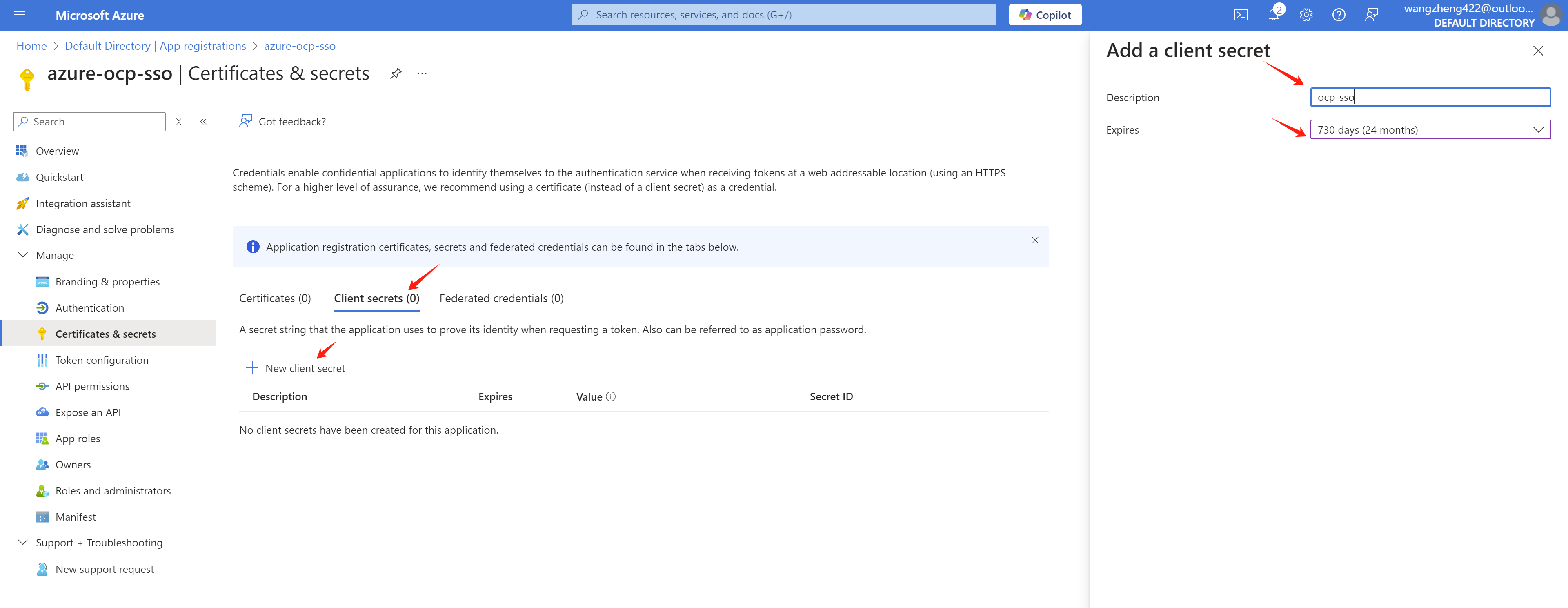
Write it down for later use.
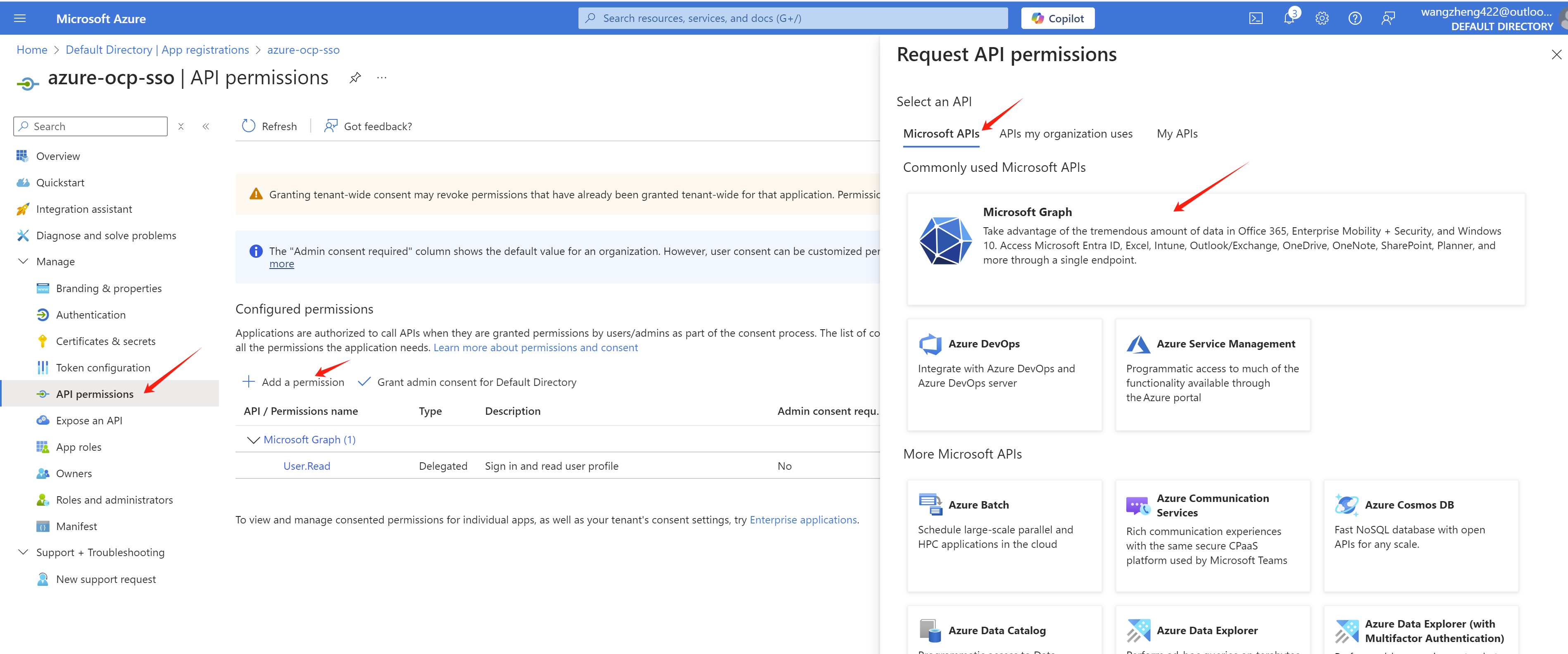
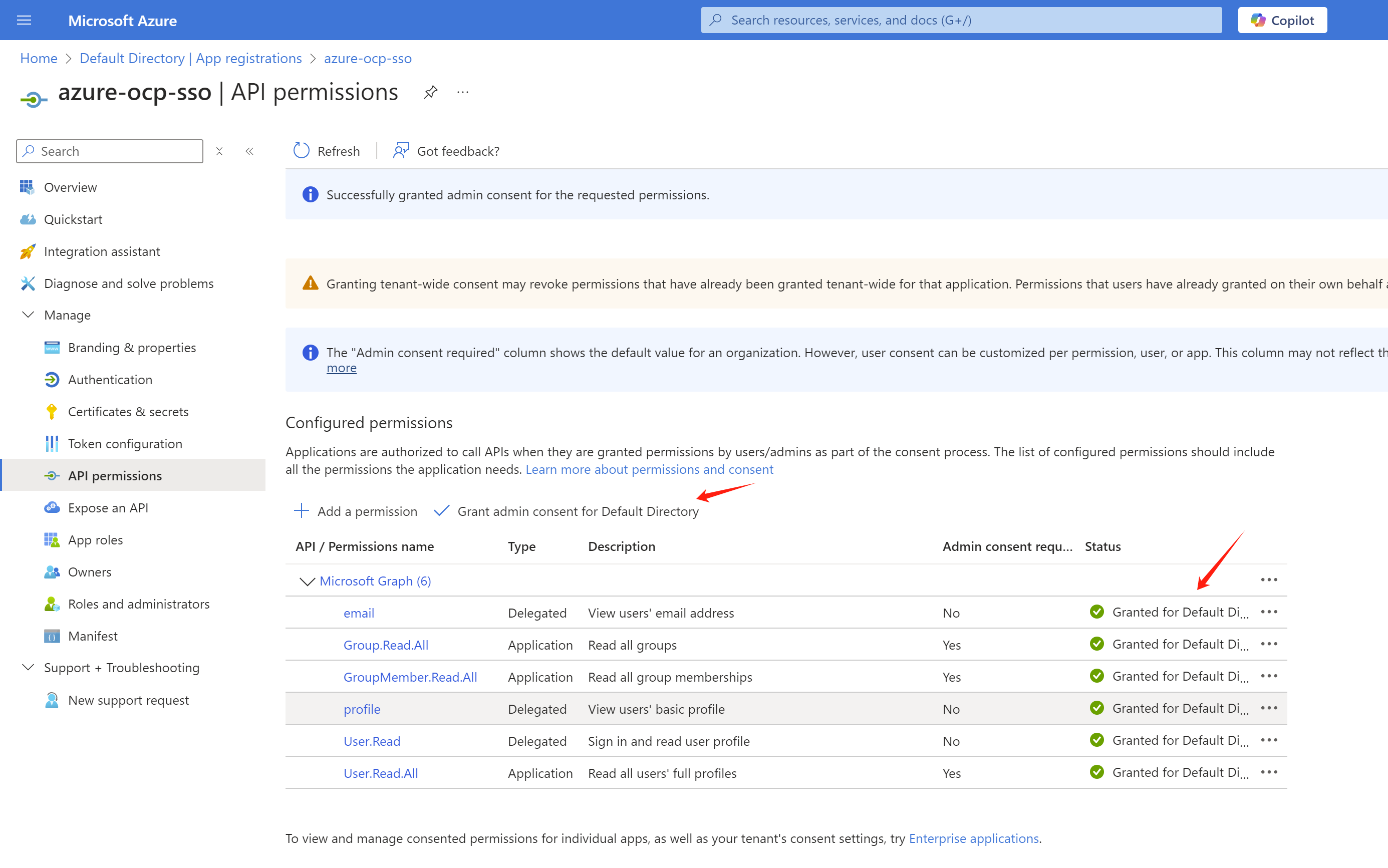
Now, we need go add some permissions to the app registration.
Go to API permissions page, click
Add a permission.
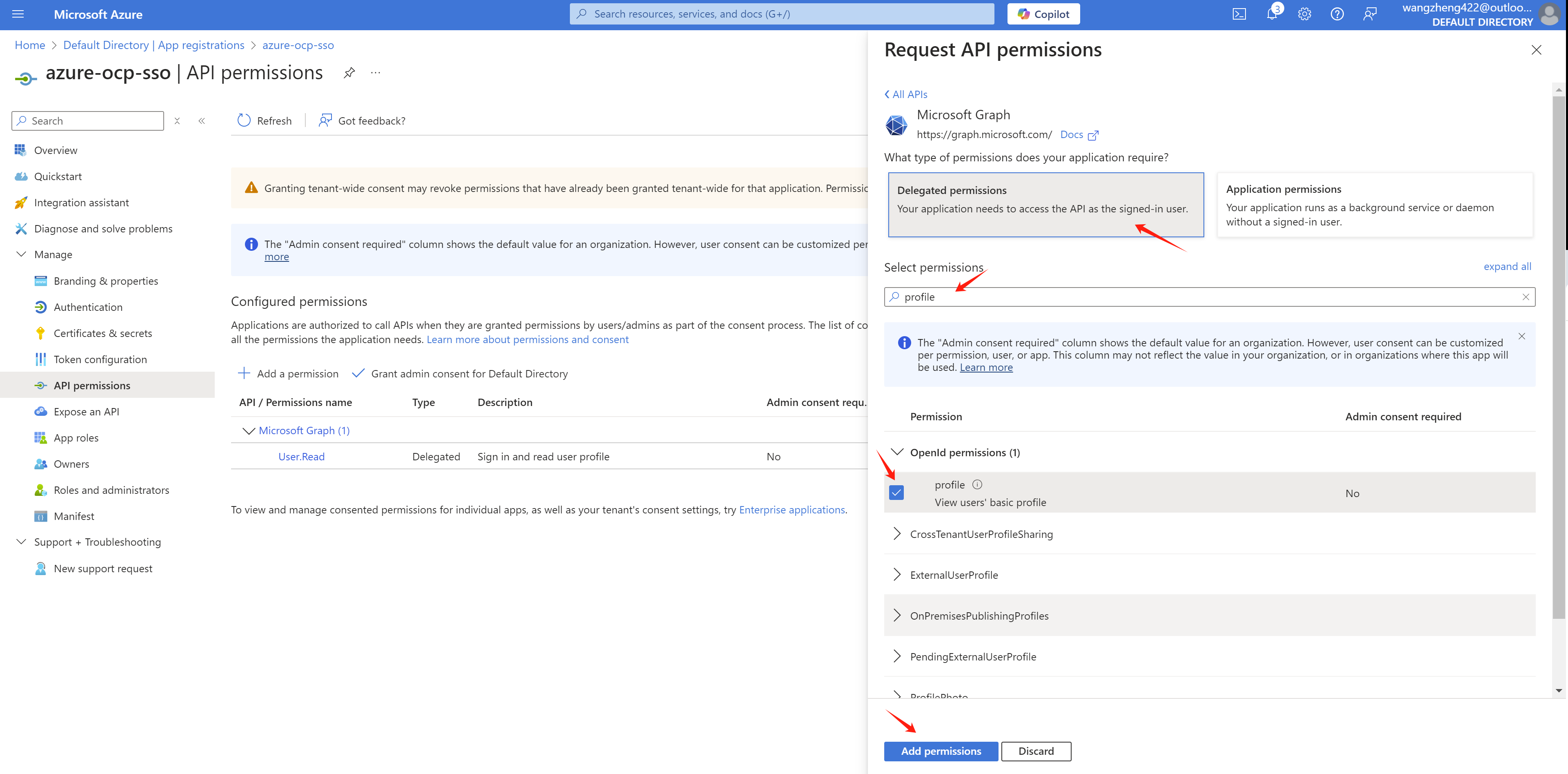
Add profile and email permissions
with Delegated permissions.
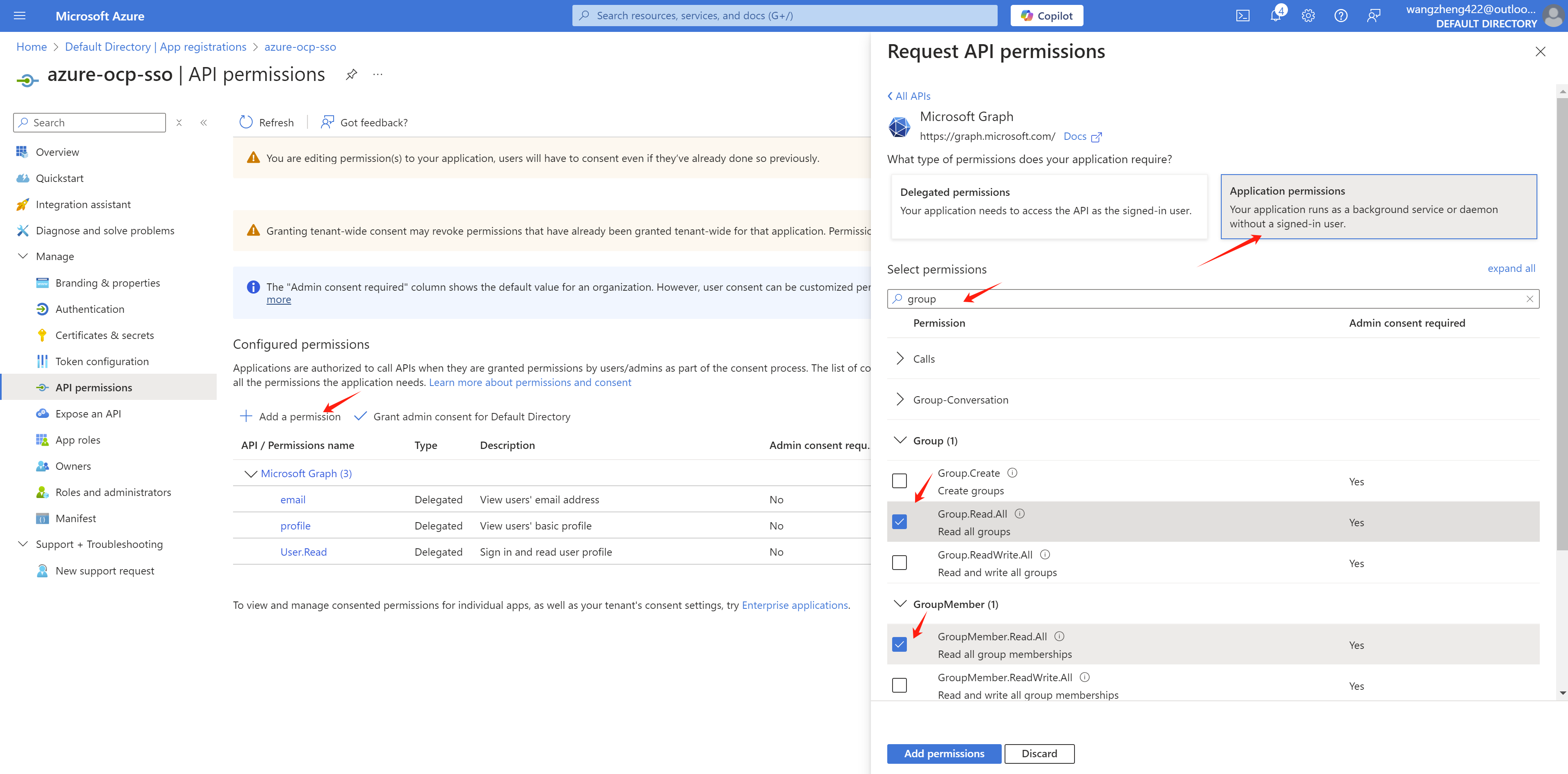
For group sync, we need to add
Directory.Read.All
GroupMember.Read.All User.Read.All
permission with Application permissions.
After the permissions are added, we need to grant admin consent for the permissions.
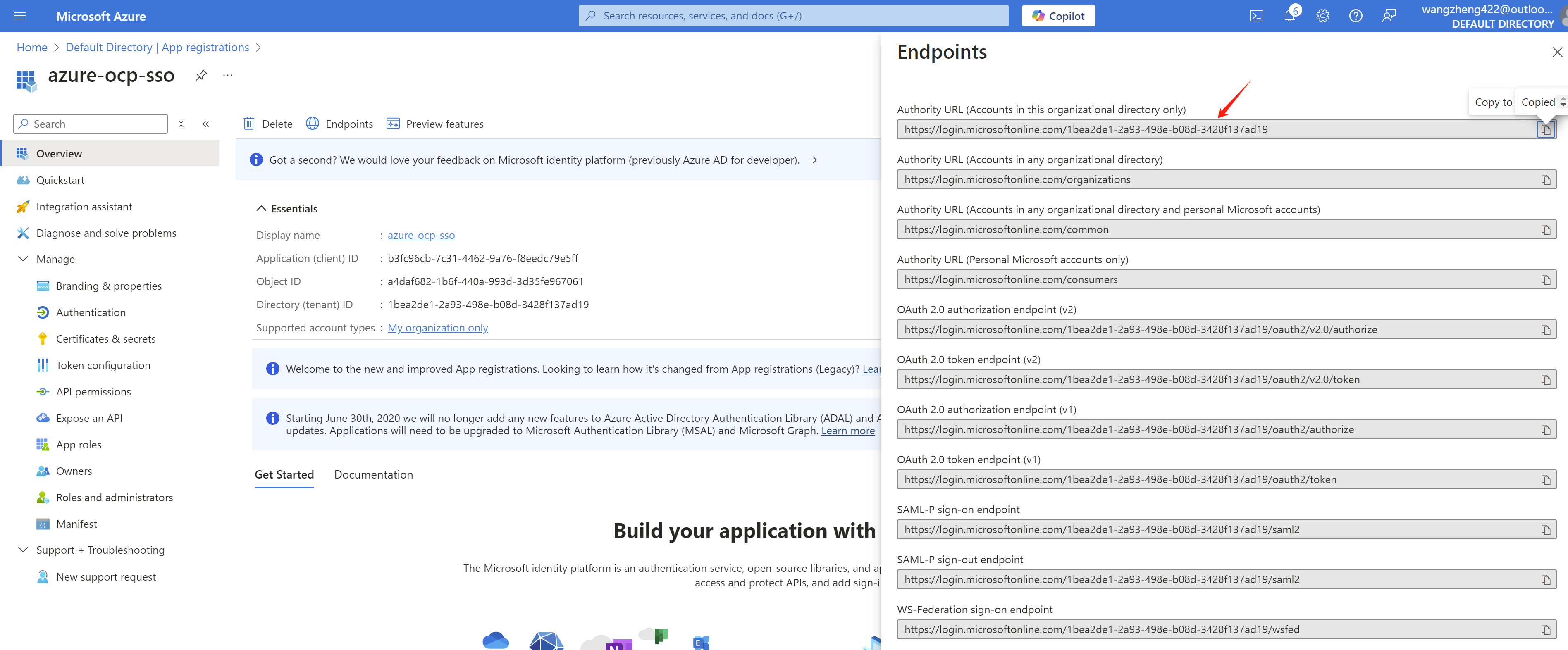
And get the endpoint of azure, write it down.
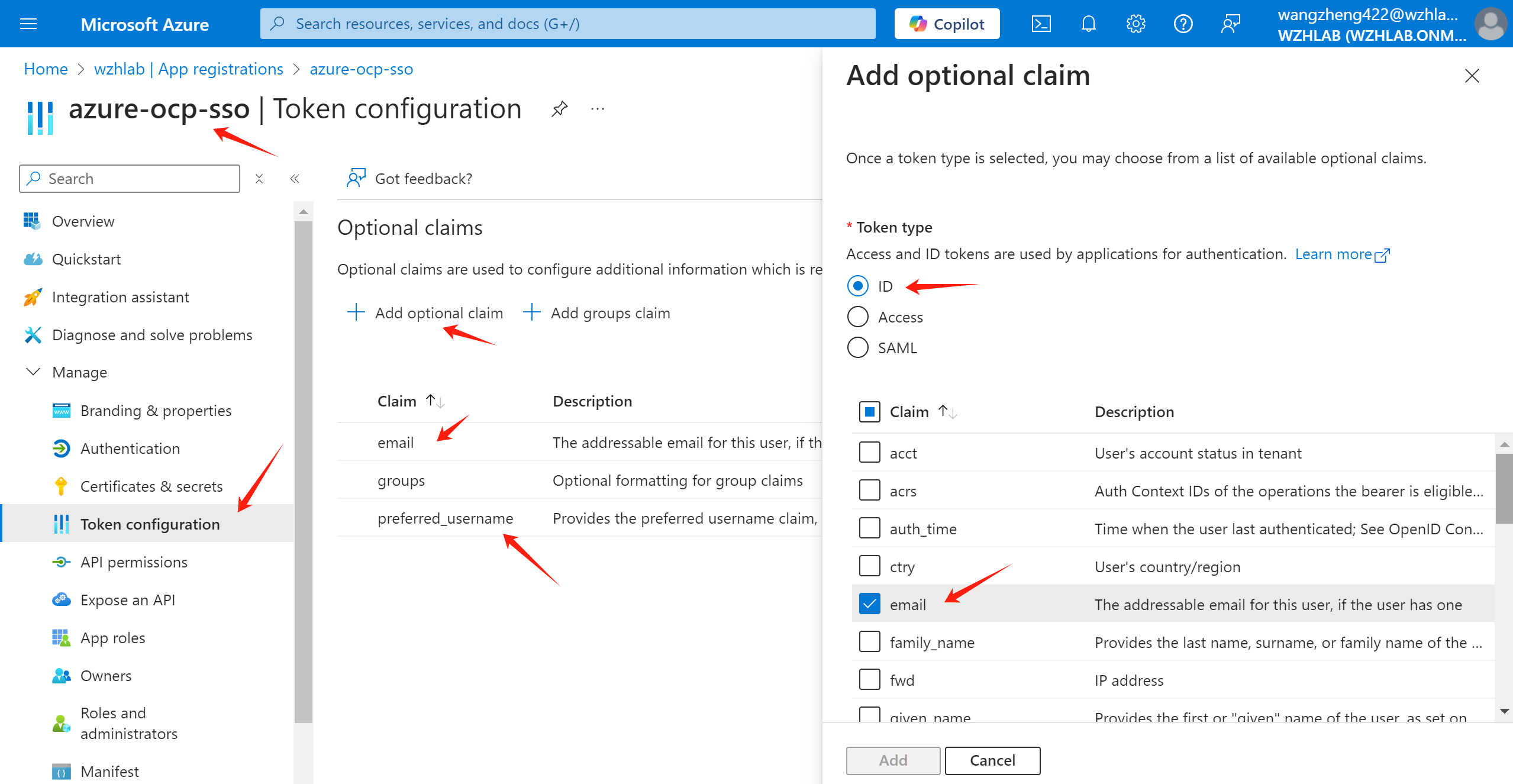
Add optional claim for email and
preferred_username.
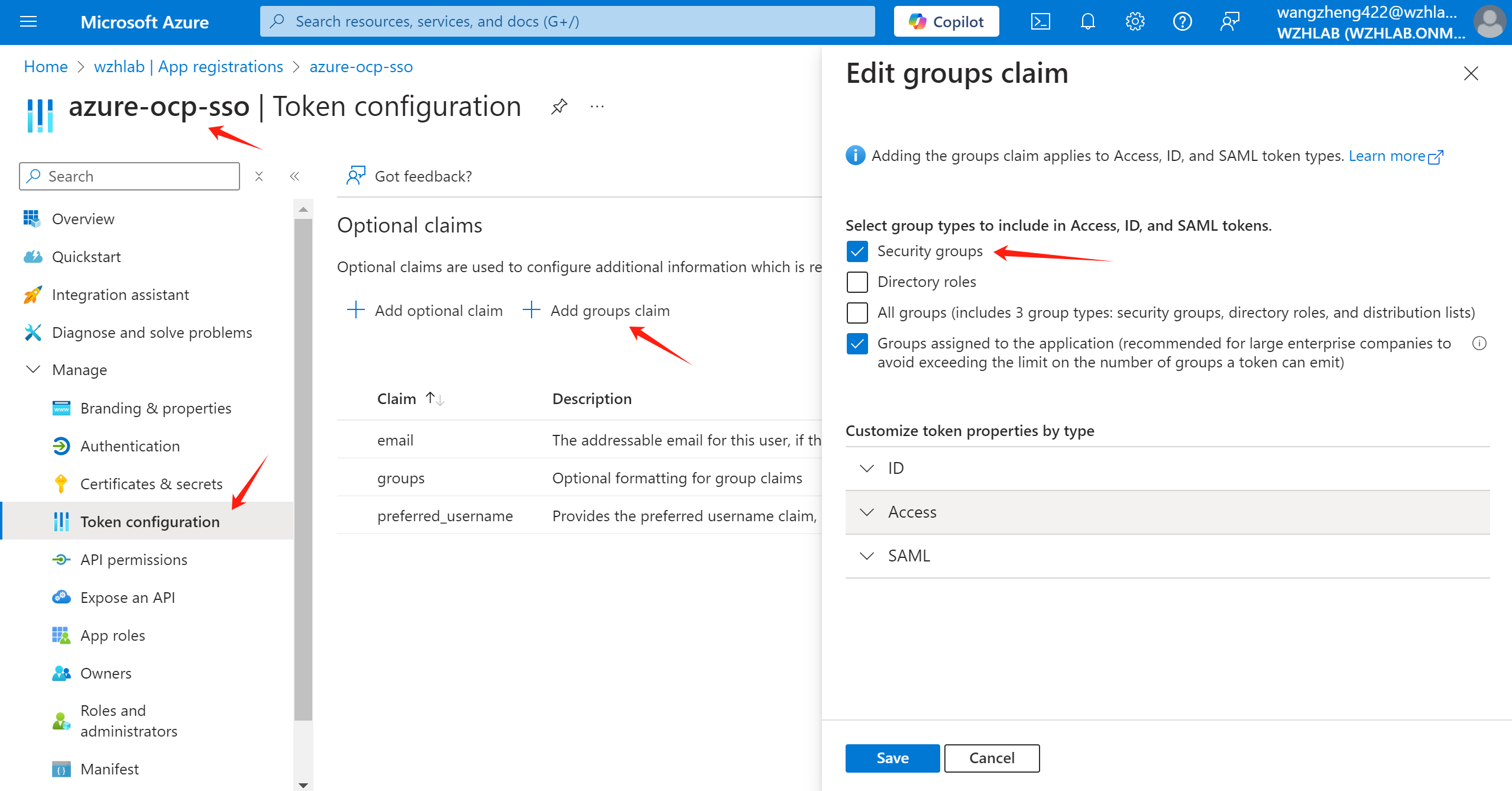
Add group claim. Official document also mentioned how to add group claim.
We also create some groups and add some users to the groups.
- L1Support(group)
- l1.u01(user)
- l1.u02(user)
- L2Support(group)
- l2.u01(user)
- l2.u02(user)
- L3Support(group)
- l3.u01(user)
- l3.u02(user)
- RetalixSupport(group)
- ret.u01(user)
- ret.u02(user)
- l1.u01(user)
- POSIMViewer(group)
- pos.v01(user)
- pos.v02(user)
- POSIMSupport(group)
- pos.s01(user)
- pos.s02(user)
- POSIMAdmin(group)
- pos.a01(user)
- pos.a02(user)
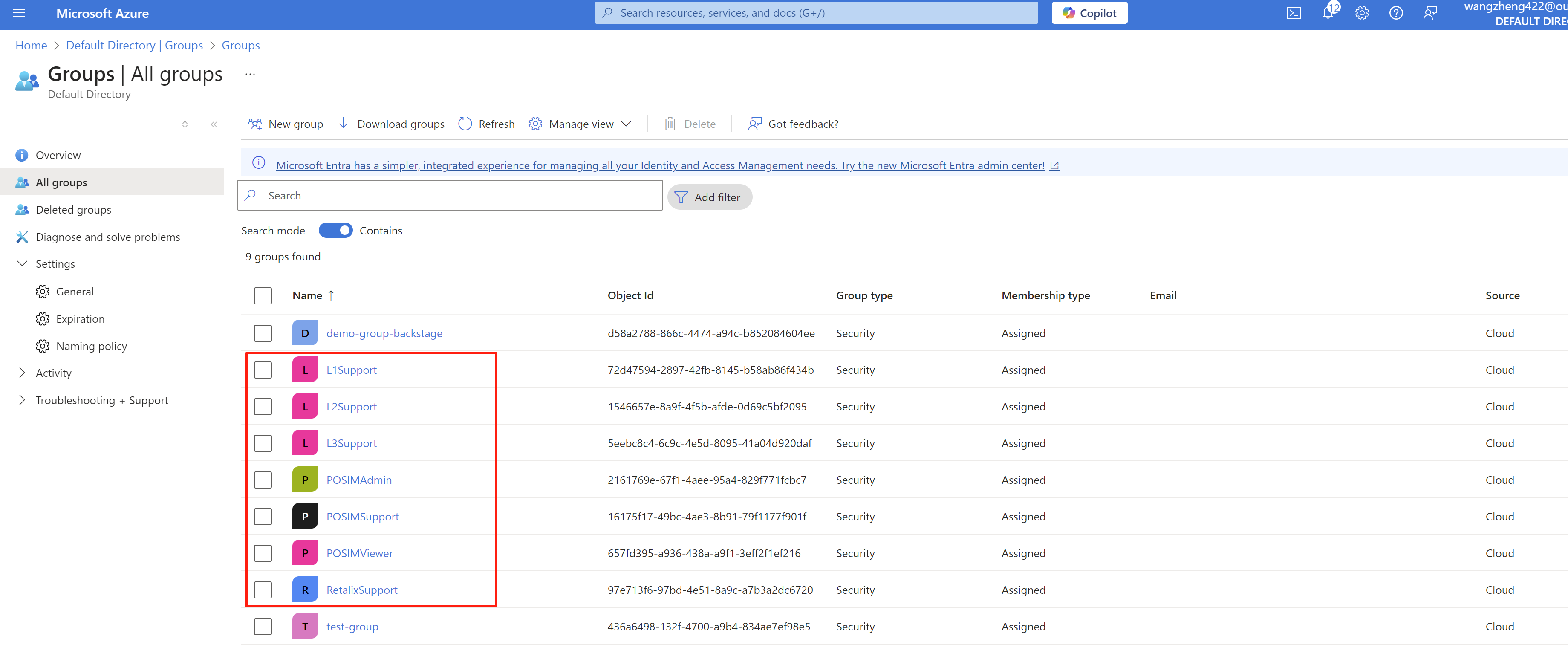
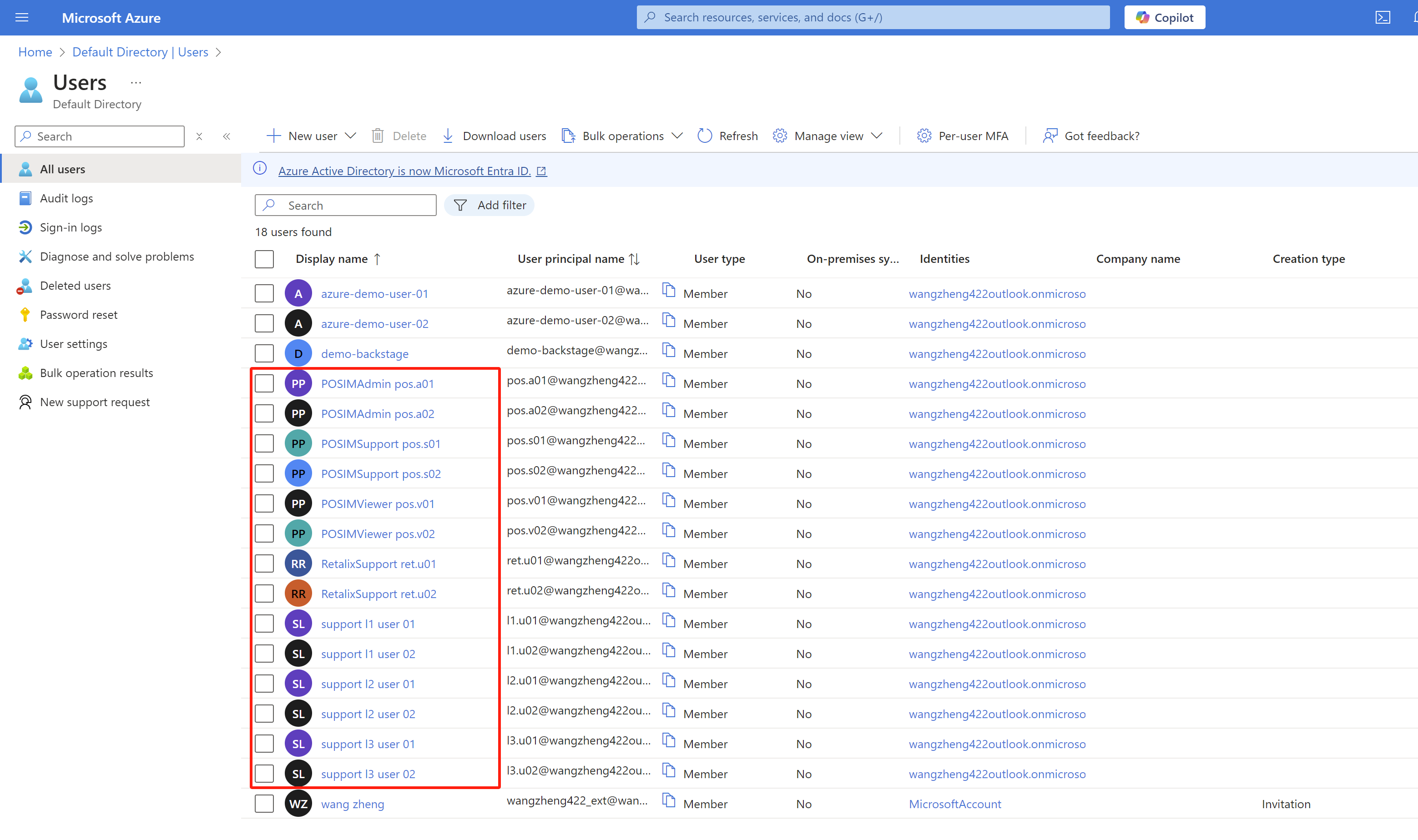
To sync the group information, we need to add groups to the
app registration in Azure portal.
Reference:
- https://learn.microsoft.com/en-us/entra/identity/enterprise-apps/assign-user-or-group-access-portal?pivots=portal
- https://cloud.redhat.com/experts/idp/entra-id-with-group-names/
Go to Enterprise applications
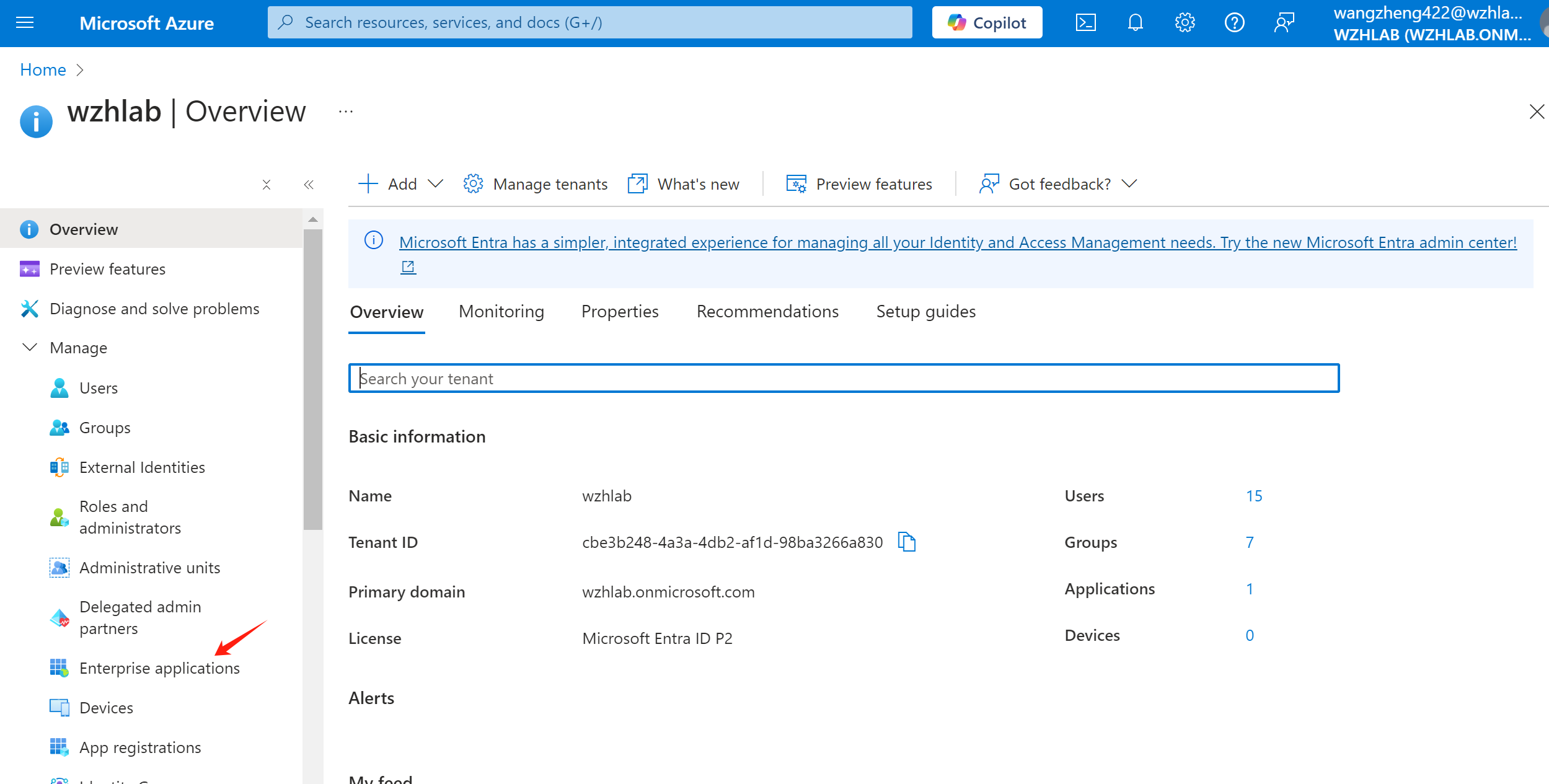
Select the app registration we created
before.
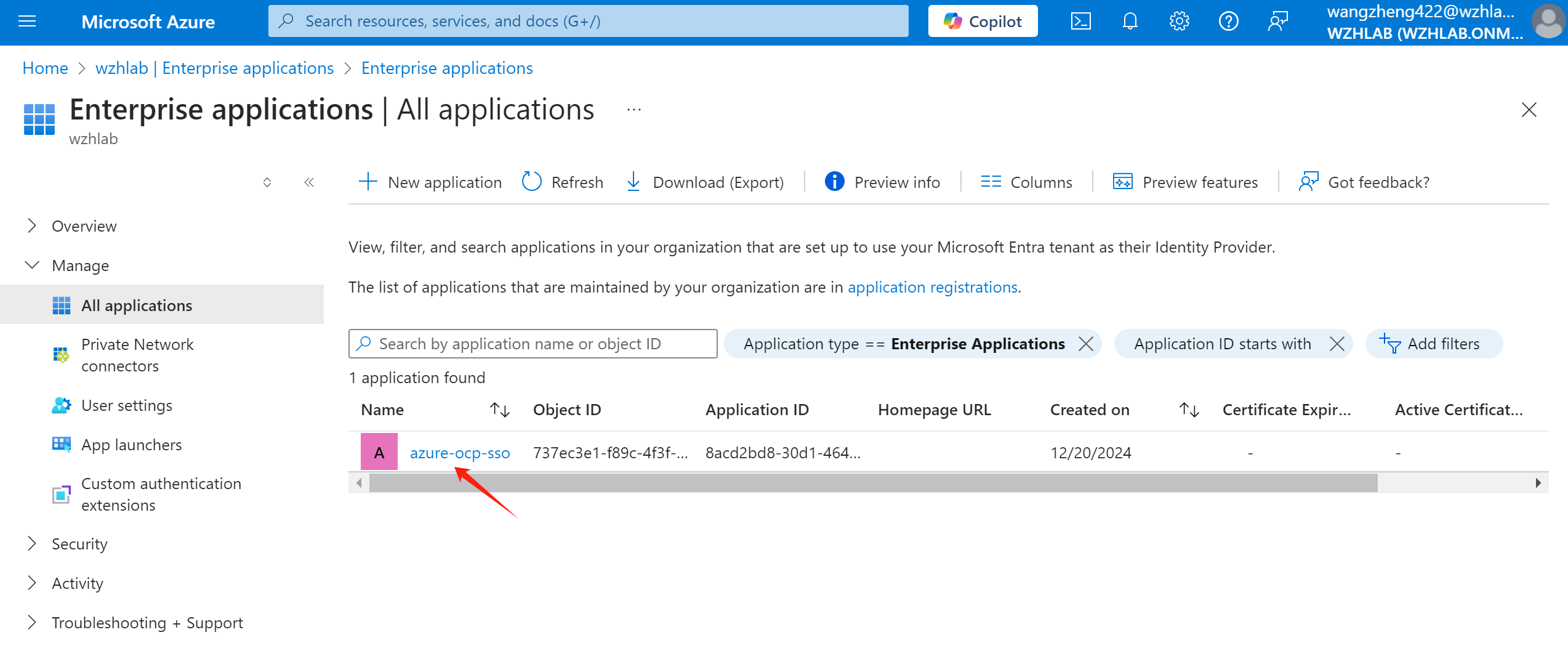
Select Users and groups ->
Add user/group
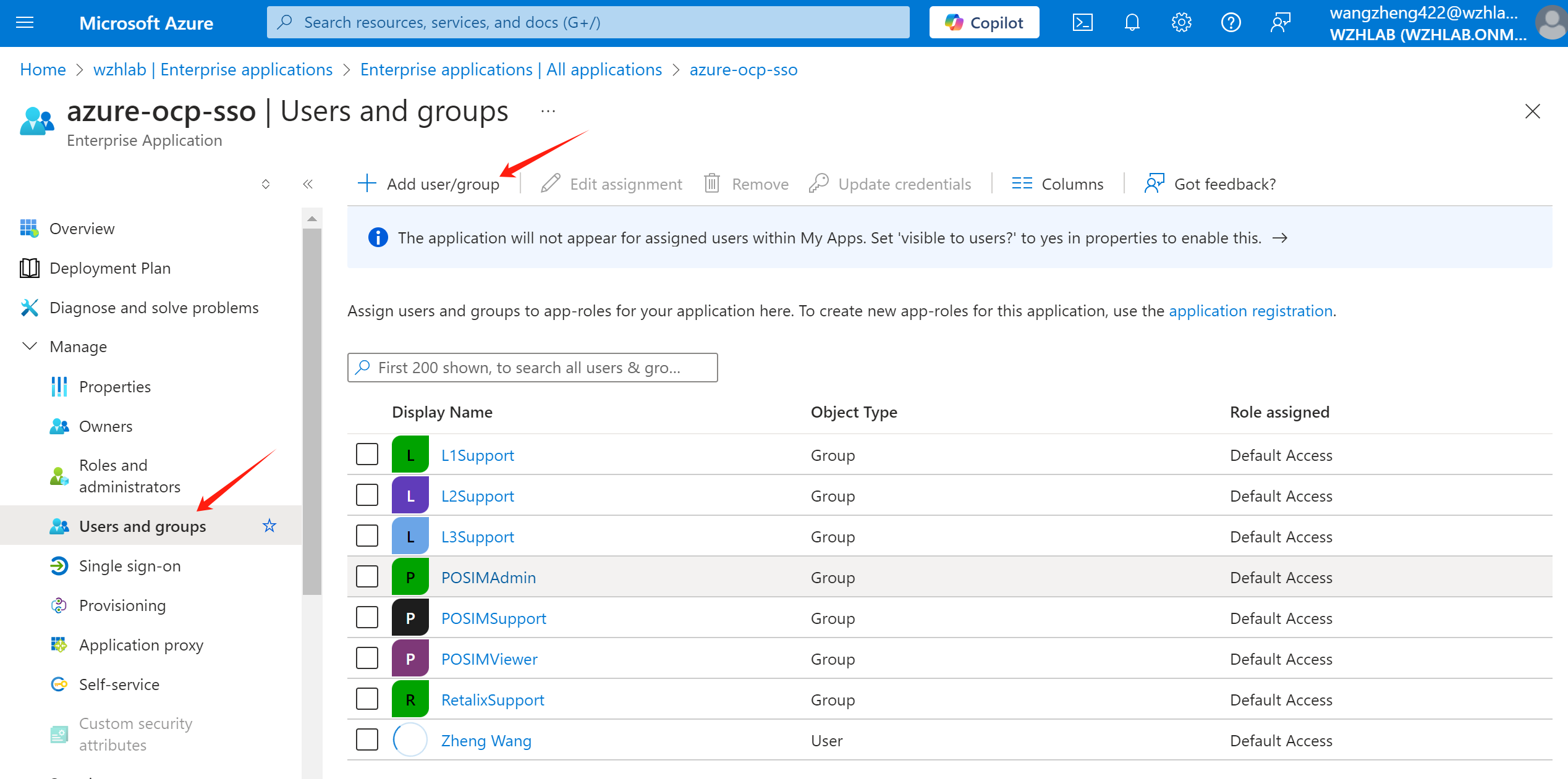
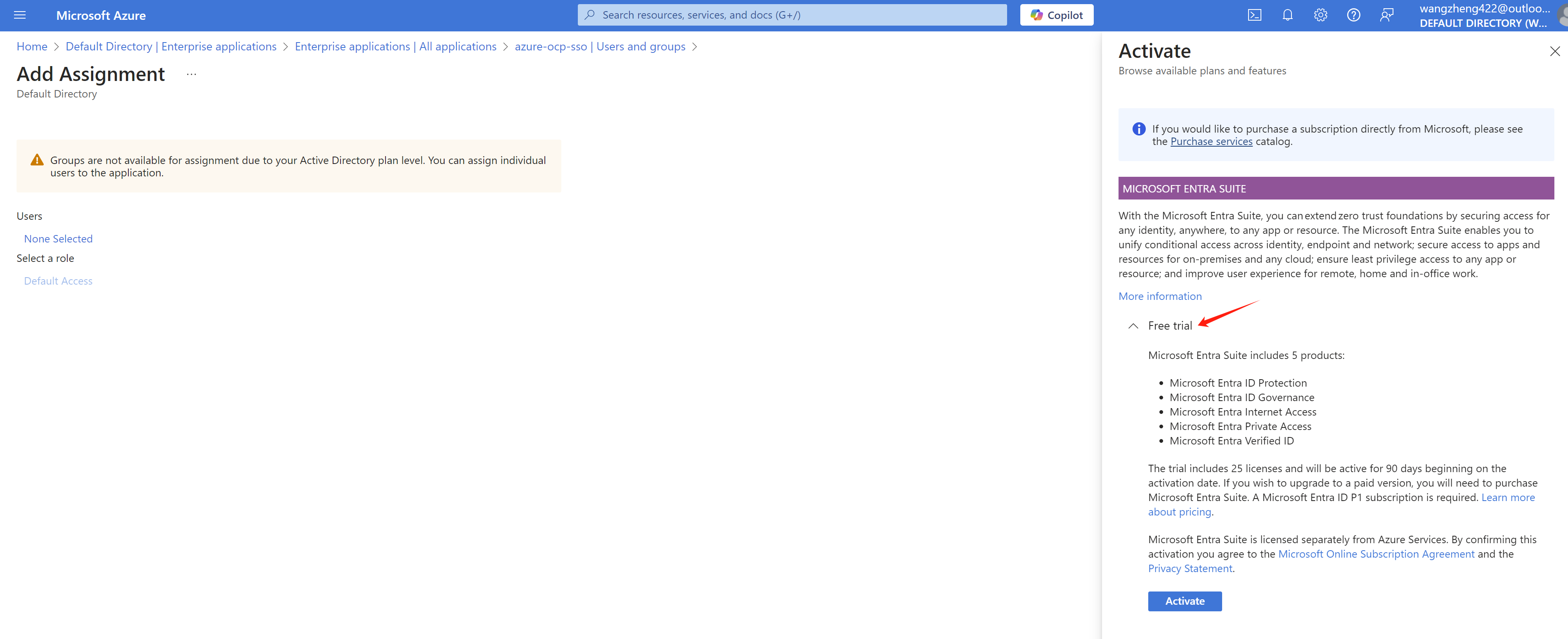
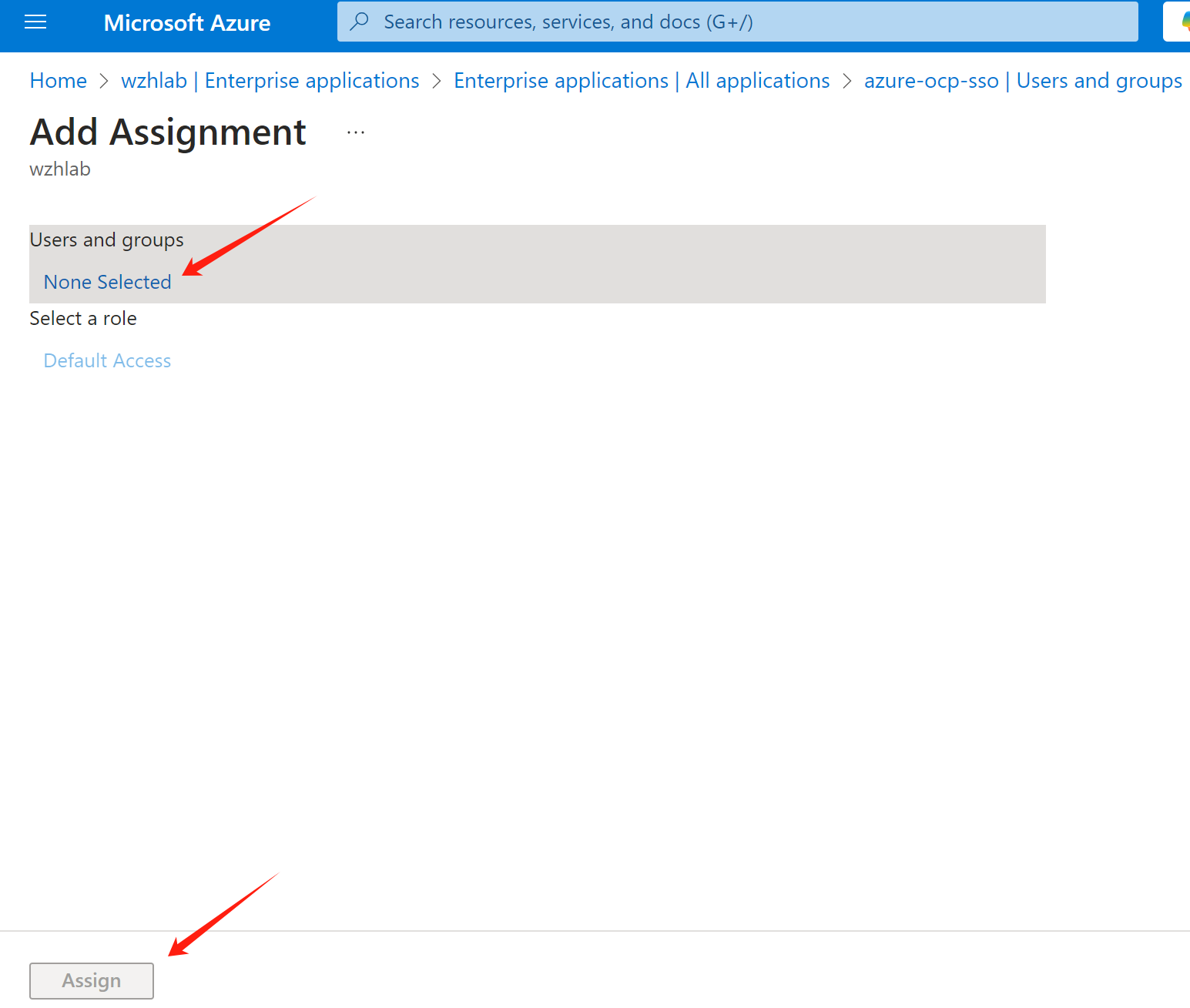
Select the groups you want to sync. Here you may need to
active azure entra subscription. A free trail is
available for 30 days and 25 users.
Then, go to app registration ->
manifest, backup existed manifest, and make some
changes.
[!NOTE] remember to backup the manifest before you make any changes.
Reference:
- https://github.com/MicrosoftDocs/entra-docs/blob/main/docs/identity/hybrid/connect/how-to-connect-fed-group-claims.md#configure-the-microsoft-entra-application-registration-for-group-attributes
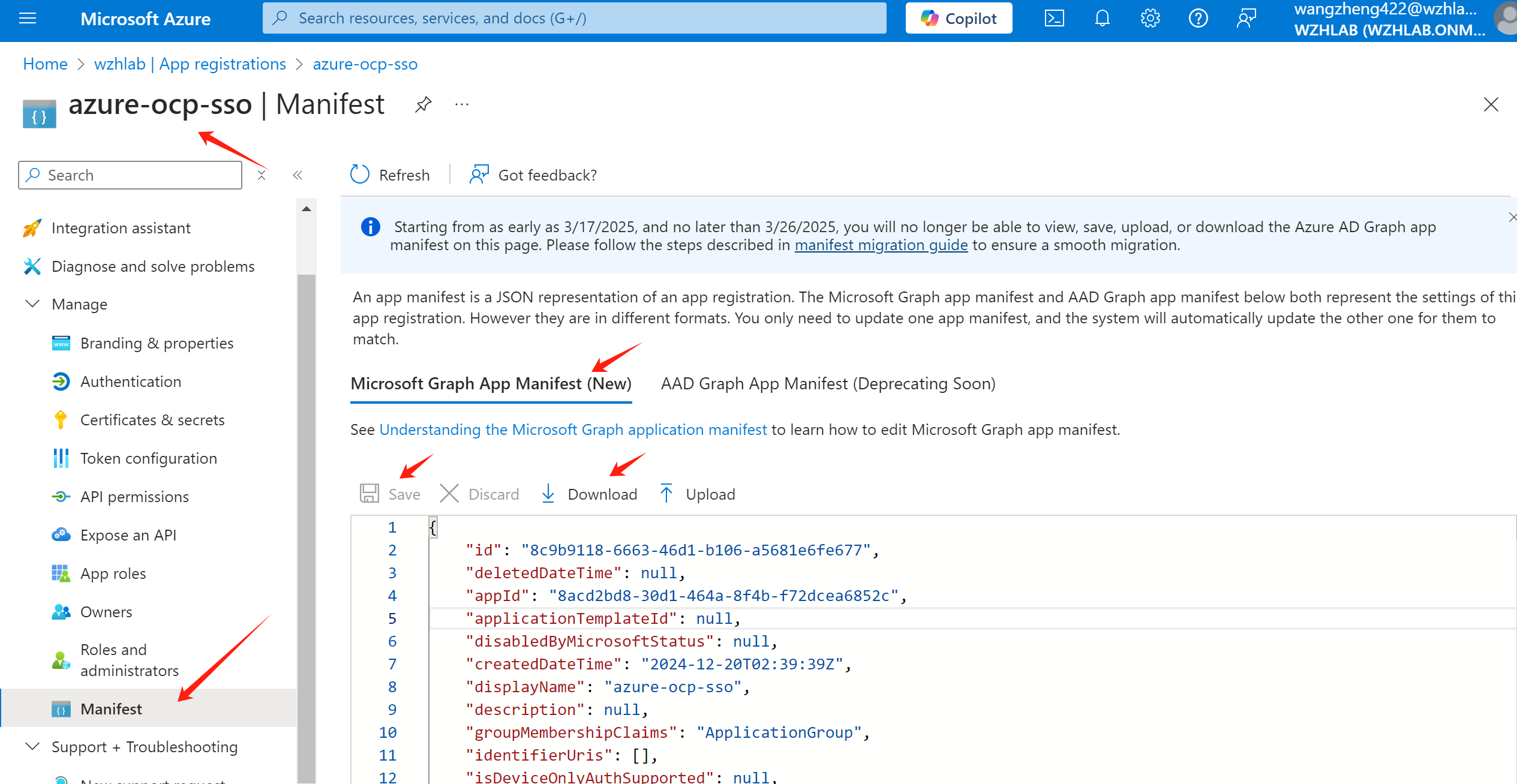
change value of “groupMembershipClaims” to “ApplicationGroup”, the result look like:
"groupMembershipClaims": "ApplicationGroup",change “optionalClaims” -> “idToken” -> “name”: “groups” -> “additionalProperties” to
"additionalProperties": [
  "sam_account_name",
  "cloud_displayname"
],
The result look like:
    "optionalClaims": {
        ......
        "idToken": [
      .......
            {
                "additionalProperties": [
                    "sam_account_name",
                    "cloud_displayname"
                ],
                "essential": false,
                "name": "groups",
                "source": null
            }
        ],
Save the manifest changes. Now you finished the azure portal setting.
openshift sso setting
We will create a oauth object in openshift to
integrate with Azure SSO. Here is an example, we add 2 identity
providers, htpasswd and azure-ocp-sso.
The htpasswd is for local user, and
azure-ocp-sso is for Azure SSO. You can change it
based on your requirement, for example, remove
htpasswd if you don’t need it.
# set the environment variables
# here is the example, you need to change the value based on your own setting
export AZURE_TENANT_ID='xxxxxxxx-xxxx-xxxx-xxxx-xxxxxxxxxxxx'
export AZURE_CLIENT_ID='yyyyyyyy-yyyy-yyyy-yyyy-yyyyyyyyyyyy'
export AZURE_CLIENT_SECRET='XXXXXXXXXXXXXXXXXXXXXXXXXXXXXXXXXXXXXXXX'
export AZURE_ENDPOINT='https://login.microsoftonline.com/xxxxxxxx-xxxx-xxxx-xxxx-xxxxxxxxxxxx/v2.0'


# import the secret from the client secret var
oc create secret generic openid-client-secret-azure \
--from-literal=clientSecret=$AZURE_CLIENT_SECRET \
-n openshift-config

cat << EOF > ${BASE_DIR}/data/install/oauth.yaml
spec:
  identityProviders:
  - name: htpasswd
    mappingMethod: claim
    type: HTPasswd
    htpasswd:
      fileData:
        name: htpass-secret
  - mappingMethod: claim
    name: azure-ocp-sso
    openID:
      claims:
        email:
        - email
        groups:
        - groups
        name:
        - name
        preferredUsername:
        - preferred_username
      clientID: $AZURE_CLIENT_ID
      clientSecret:
        name: openid-client-secret-azure
      extraScopes:
      - email
      - profile
      issuer: $AZURE_ENDPOINT
    type: OpenID
EOF
oc patch oauth/cluster --type merge --patch-file=${BASE_DIR}/data/install/oauth.yaml
If you make something wrong, and want to change the config,
you can edit the oauth object in openshift.
oc edit oauth/clusterIf you want to remove a user, remember to delete the user and identity in openshift.
oc delete user <username>

oc delete identity <user-identity>
openshift role and rolebinding
Now, user can login, and group information is synced. We need to create role and rolebinding for the groups. So after user login, it has the correct permission.
Now, we create role for different groups. Below is an example for the roles. You can create your own roles based on your requirement.
# create namespace for demo
oc create ns retalix

oc create ns posim

# define the roles, change the rules based on your requirement
cat << EOF > ${BASE_DIR}/data/install/demo.role.yaml
---
apiVersion: rbac.authorization.k8s.io/v1
kind: ClusterRole
metadata:
  name: l1-support-role
rules:
- apiGroups: [""]
  resources: ["pods", "services", "events", "namespaces"]
  verbs: ["get", "list", "watch"]
- apiGroups: ["apps"]
  resources: ["deployments", "replicasets"]
  verbs: ["get", "list", "watch"]

---
apiVersion: rbac.authorization.k8s.io/v1
kind: ClusterRole
metadata:
  name: l2-support-role
rules:
- apiGroups: [""]
  resources: ["pods", "services", "events", "namespaces", "configmaps", "endpoints"]
  verbs: ["get", "list", "watch", "update"]
- apiGroups: ["apps"]
  resources: ["deployments", "replicasets", "daemonsets", "statefulsets"]
  verbs: ["get", "list", "watch", "update"]
- apiGroups: [""]
  resources: ["pods/log", "pods/exec"]
  verbs: ["get", "list", "create"]

---
apiVersion: rbac.authorization.k8s.io/v1
kind: ClusterRole
metadata:
  name: l3-support-role
rules:
- apiGroups: ["*"]
  resources: ["*"]
  verbs: ["get", "list", "watch", "create", "update", "patch", "delete"]
- apiGroups: [""]
  resources: ["pods/exec", "pods/log"]
  verbs: ["create", "get", "list"]
- apiGroups: ["security.openshift.io"]
  resources: ["securitycontextconstraints"]
  verbs: ["get", "list", "watch"]

---
apiVersion: rbac.authorization.k8s.io/v1
kind: Role
metadata:
  name: retalix-support-role
  namespace: retalix
rules:
- apiGroups: [""]
  resources: ["pods", "pods/log", "pods/exec", "services", "endpoints", "persistentvolumeclaims", "configmaps", "secrets", "events", "namespaces"]
  verbs: ["get", "list", "watch", "create", "update", "patch"]
- apiGroups: ["apps"]
  resources: ["deployments", "daemonsets", "replicasets", "statefulsets"]
  verbs: ["get", "list", "watch", "create", "update", "patch"]
- apiGroups: ["batch"]
  resources: ["jobs", "cronjobs"]
  verbs: ["get", "list", "watch", "create", "update", "patch"]
- apiGroups: ["networking.k8s.io"]
  resources: ["ingresses"]
  verbs: ["get", "list", "watch"]
- apiGroups: ["route.openshift.io"]
  resources: ["routes"]
  verbs: ["get", "list", "watch"]

---
apiVersion: rbac.authorization.k8s.io/v1
kind: Role
metadata:
  name: posim-viewer-role
  namespace: posim
rules:
- apiGroups: ["*"]
  resources: ["*"]
  verbs: ["get", "list", "watch"]

---
apiVersion: rbac.authorization.k8s.io/v1
kind: Role
metadata:
  name: posim-support-role
  namespace: posim
rules:
- apiGroups: [""]
  resources: ["pods", "pods/log", "pods/exec", "services", "endpoints", "configmaps", "events", "namespaces"]
  verbs: ["get", "list", "watch", "create", "update", "patch"]
- apiGroups: ["apps"]
  resources: ["deployments", "replicasets", "statefulsets"]
  verbs: ["get", "list", "watch", "update", "patch"]
- apiGroups: ["batch"]
  resources: ["jobs"]
  verbs: ["get", "list", "watch", "create"]

---
apiVersion: rbac.authorization.k8s.io/v1
kind: Role
metadata:
  name: posim-admin-role
  namespace: posim
rules:
- apiGroups: ["*"]
  resources: ["*"]
  verbs: ["*"]

---
apiVersion: rbac.authorization.k8s.io/v1
kind: ClusterRoleBinding
metadata:
  name: l1-support-binding
subjects:
- kind: Group
  name: L1Support
  apiGroup: rbac.authorization.k8s.io
roleRef:
  kind: ClusterRole
  name: l1-support-role
  apiGroup: rbac.authorization.k8s.io

---
apiVersion: rbac.authorization.k8s.io/v1
kind: ClusterRoleBinding
metadata:
  name: l2-support-binding
subjects:
- kind: Group
  name: L2Support
  apiGroup: rbac.authorization.k8s.io
roleRef:
  kind: ClusterRole
  name: l2-support-role
  apiGroup: rbac.authorization.k8s.io

---
apiVersion: rbac.authorization.k8s.io/v1
kind: ClusterRoleBinding
metadata:
  name: l3-support-binding
subjects:
- kind: Group
  name: L3Support
  apiGroup: rbac.authorization.k8s.io
roleRef:
  kind: ClusterRole
  name: l3-support-role
  apiGroup: rbac.authorization.k8s.io

---
apiVersion: rbac.authorization.k8s.io/v1
kind: RoleBinding
metadata:
  name: retalix-support-binding
  namespace: retalix
subjects:
- kind: Group
  name: RetalixSupport
  apiGroup: rbac.authorization.k8s.io
roleRef:
  kind: Role
  name: retalix-support-role
  apiGroup: rbac.authorization.k8s.io

---
apiVersion: rbac.authorization.k8s.io/v1
kind: RoleBinding
metadata:
  name: posim-viewer-binding
  namespace: posim
subjects:
- kind: Group
  name: POSIMViewer
  apiGroup: rbac.authorization.k8s.io
roleRef:
  kind: Role
  name: posim-viewer-role
  apiGroup: rbac.authorization.k8s.io

---
apiVersion: rbac.authorization.k8s.io/v1
kind: RoleBinding
metadata:
  name: posim-support-binding
  namespace: posim
subjects:
- kind: Group
  name: POSIMSupport
  apiGroup: rbac.authorization.k8s.io
roleRef:
  kind: Role
  name: posim-support-role
  apiGroup: rbac.authorization.k8s.io

---
apiVersion: rbac.authorization.k8s.io/v1
kind: RoleBinding
metadata:
  name: posim-admin-binding
  namespace: posim
subjects:
- kind: Group
  name: POSIMAdmin
  apiGroup: rbac.authorization.k8s.io
roleRef:
  kind: Role
  name: posim-admin-role
  apiGroup: rbac.authorization.k8s.io
EOF

oc apply -f ${BASE_DIR}/data/install/demo.role.yaml

# oc delete -f ${BASE_DIR}/data/install/demo.role.yaml
test with login
First, we try to login as l1.u01 user, which is
in L1Support group.
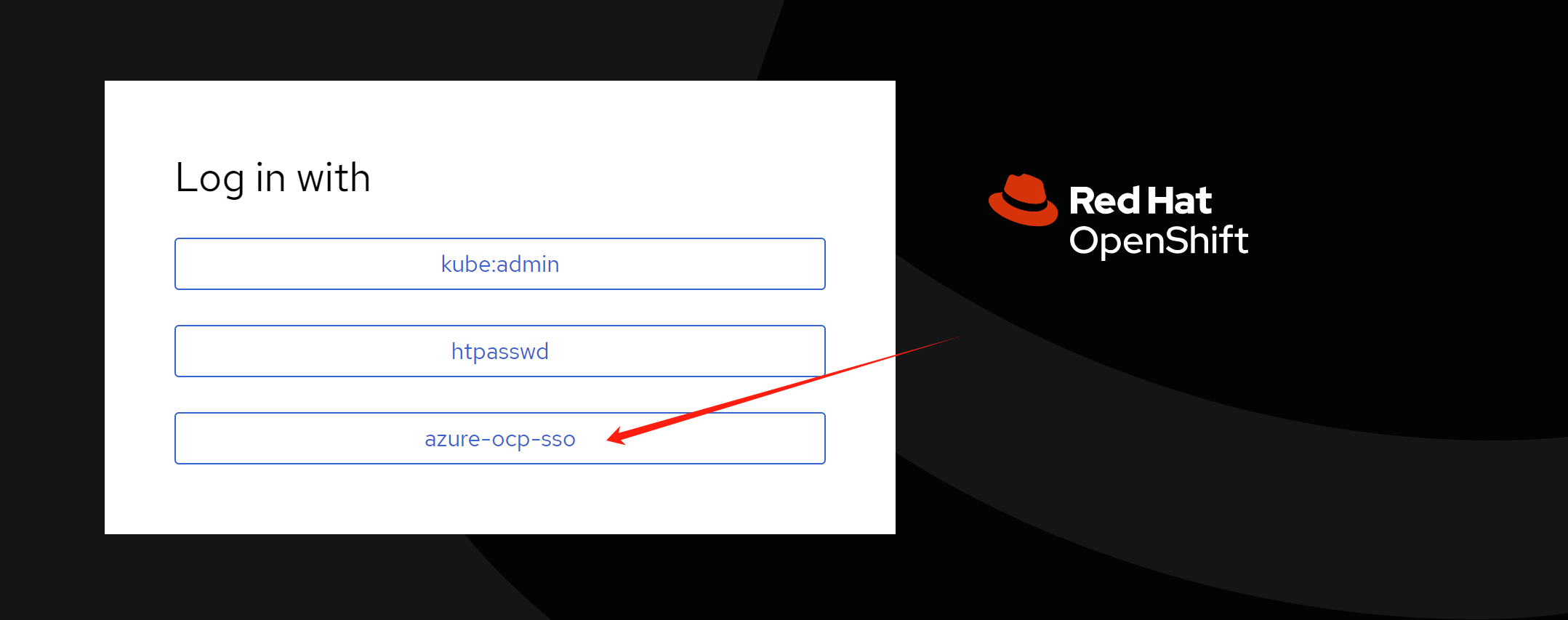
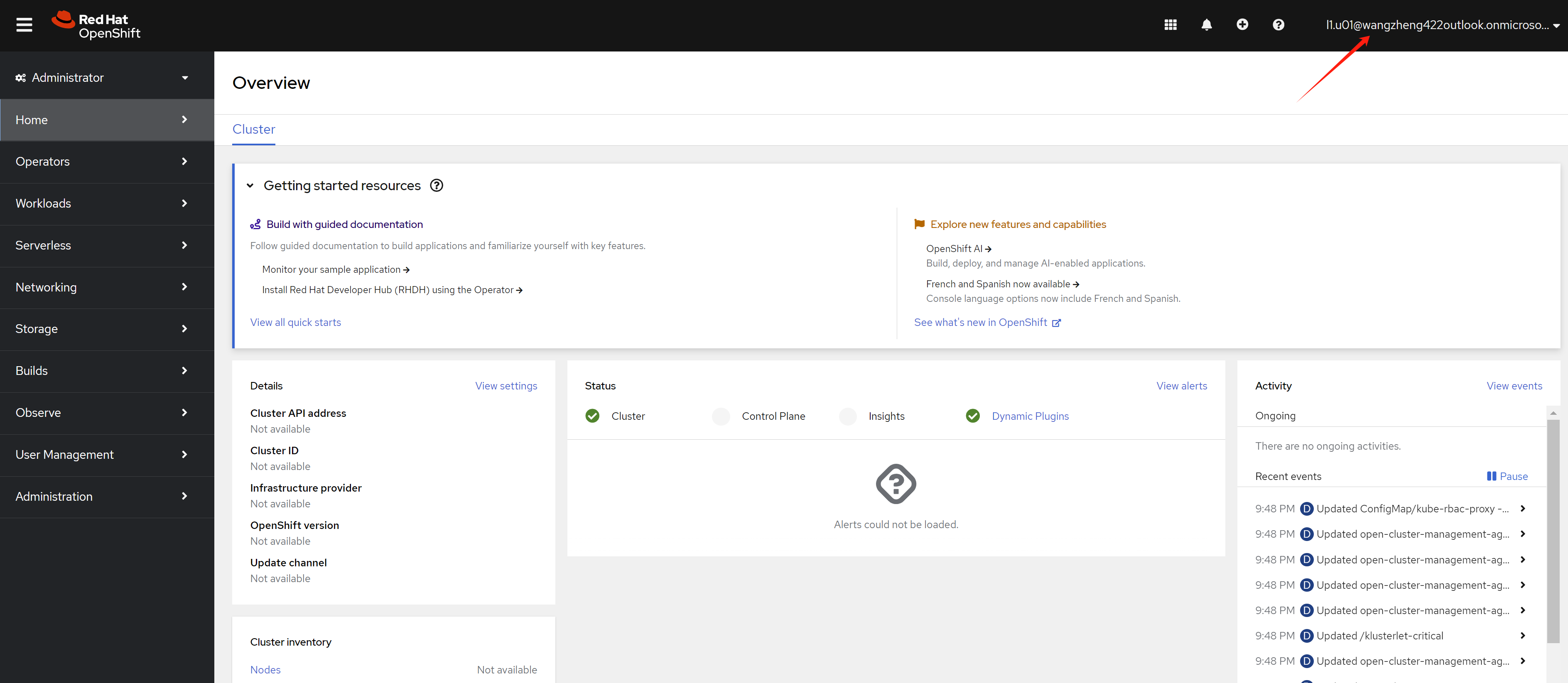
Login with l1.u01 user’s
user principal name and password. You can see the
web console.
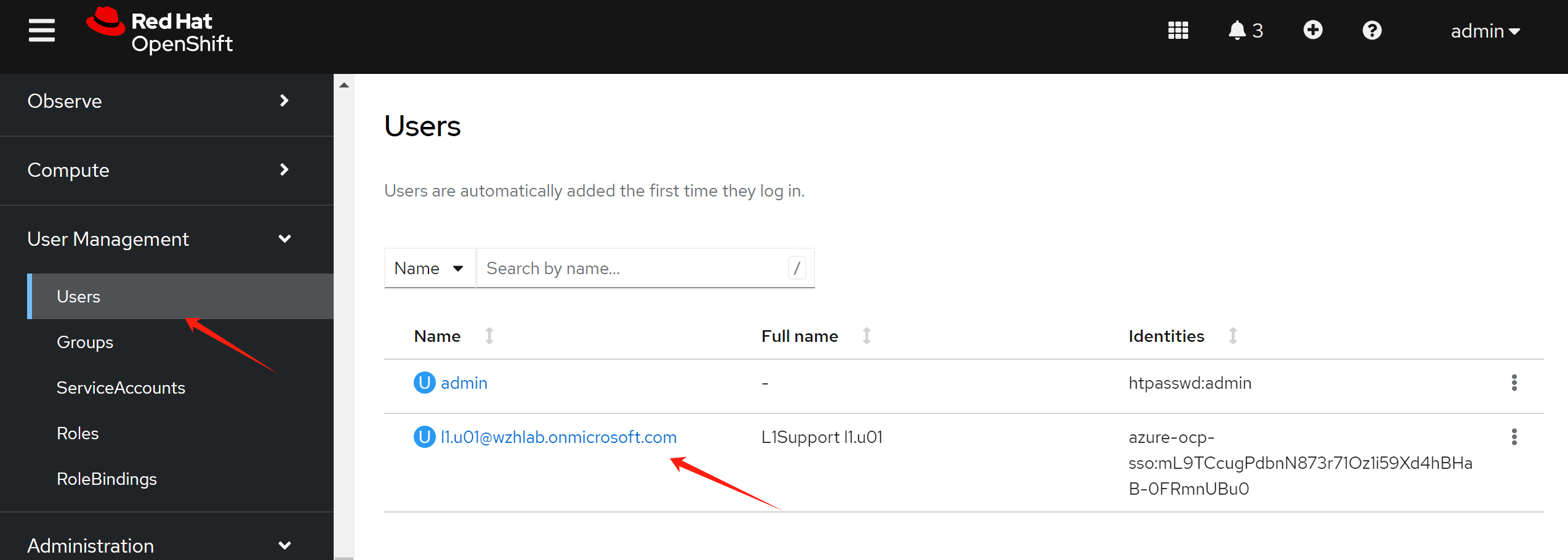
After user login, you can see the user in the
User page from an administrator account.
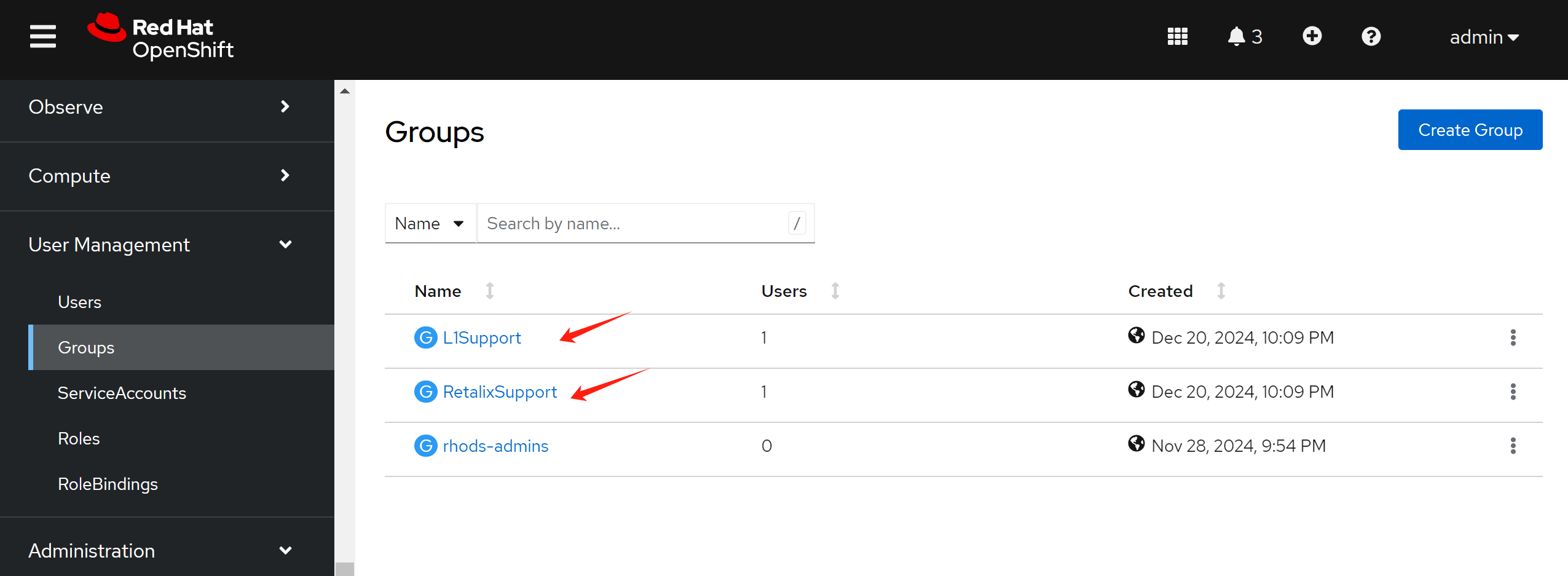
You can see 2 groups synced, which is l1.u01 belongs to.
show me the code
In openshift oauth-server code, we can see openid related code
- https://github.com/openshift/oauth-server/blob/release-4.16/pkg/oauth/external/openid/openid.go
......
type Config struct {
    ClientID     string
    ClientSecret string

    Scopes []string

    ExtraAuthorizeParameters map[string]string

    AuthorizeURL string
    TokenURL     string
    UserInfoURL  string

    IDClaims                []string
    PreferredUsernameClaims []string
    EmailClaims             []string
    NameClaims              []string
    GroupClaims             []string

    IDTokenValidator TokenValidator
}
......