[!WARNING] This is a work in progress.
RHDH 1.4 with Conditional Policy Permission
Currently, the newest RHDH version 1.4 has a GUI for permission management. It also supports conditional policy. However, it has some bugs. This document demonstrates how it works and provides a workaround to add conditional policy permission to RHDH 1.4.
Install RHSSO/Keycloak
We will use Keycloak to manage users and use it as the OAuth2 provider for RHDH.
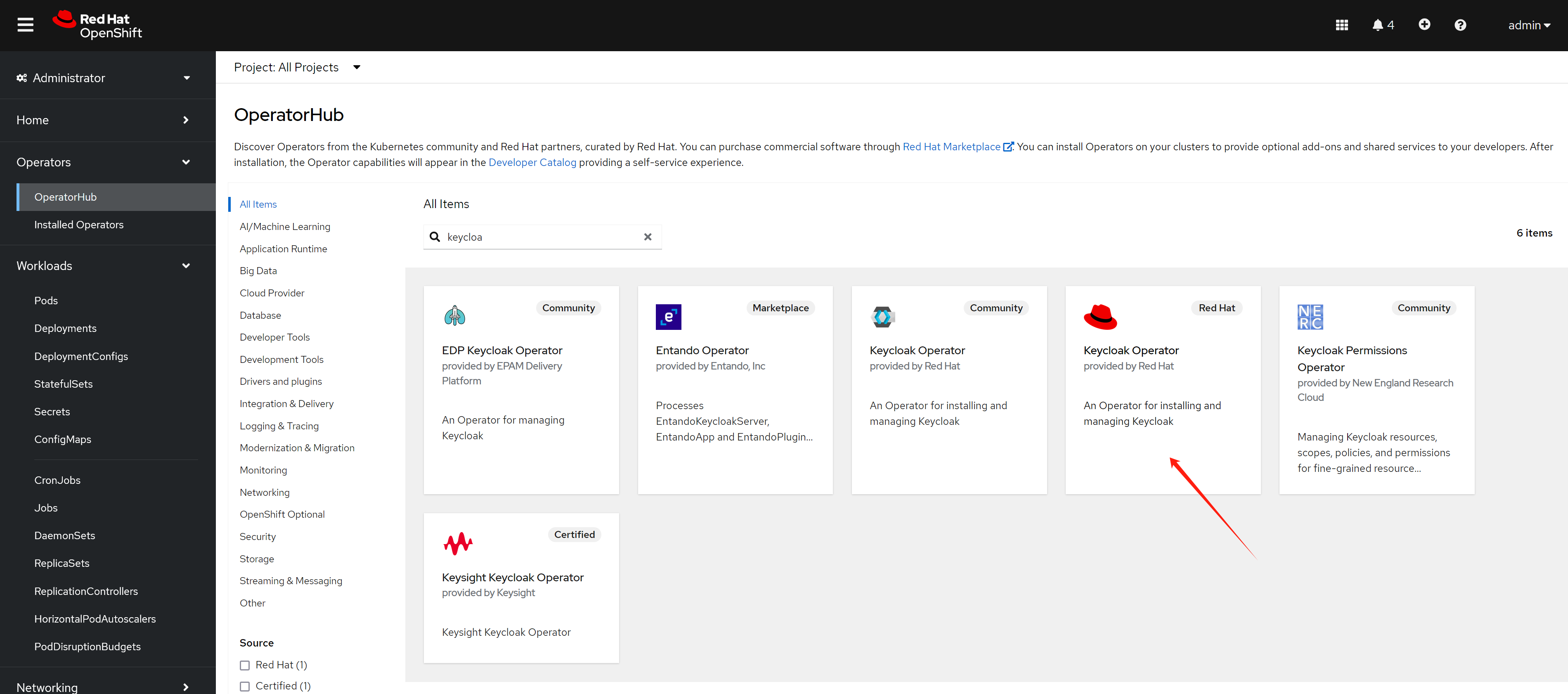
oc new-project demo-keycloak


oc delete -f ${BASE_DIR}/data/install/keycloak-db-pvc.yaml -n demo-keycloak

cat << EOF > ${BASE_DIR}/data/install/keycloak-db-pvc.yaml
apiVersion: v1
kind: PersistentVolumeClaim
metadata:
  name: postgresql-db-pvc
spec:
  accessModes:
    - ReadWriteOnce
  resources:
    requests:
      storage: 1Gi
EOF

oc create -f ${BASE_DIR}/data/install/keycloak-db-pvc.yaml -n demo-keycloak


oc delete -f ${BASE_DIR}/data/install/keycloak-db.yaml -n demo-keycloak

cat << EOF > ${BASE_DIR}/data/install/keycloak-db.yaml
---
apiVersion: apps/v1
kind: StatefulSet
metadata:
  name: postgresql-db
spec:
  serviceName: postgresql-db-service
  selector:
    matchLabels:
      app: postgresql-db
  replicas: 1
  template:
    metadata:
      labels:
        app: postgresql-db
    spec:
      containers:
        - name: postgresql-db
          image: postgres:15
          args: ["-c", "max_connections=1000"]
          volumeMounts:
            - mountPath: /data
              name: cache-volume
          env:
            - name: POSTGRES_USER
              value: testuser
            - name: POSTGRES_PASSWORD
              value: testpassword
            - name: PGDATA
              value: /data/pgdata
            - name: POSTGRES_DB
              value: keycloak
      volumes:
        - name: cache-volume
          persistentVolumeClaim:
            claimName: postgresql-db-pvc
---
apiVersion: v1
kind: Service
metadata:
  name: postgres-db
spec:
  selector:
    app: postgresql-db
  type: LoadBalancer
  ports:
  - port: 5432
    targetPort: 5432

EOF

oc create -f ${BASE_DIR}/data/install/keycloak-db.yaml -n demo-keycloak


RHSSO_HOST="keycloak-demo-keycloak.apps.demo-01-rhsys.wzhlab.top"

cd ${BASE_DIR}/data/install/

openssl req -subj "/CN=$RHSSO_HOST/O=Test Keycloak./C=US" -newkey rsa:2048 -nodes -keyout key.pem -x509 -days 365 -out certificate.pem

oc delete secret example-tls-secret -n demo-keycloak
oc create secret tls example-tls-secret --cert certificate.pem --key key.pem -n demo-keycloak


oc delete secret keycloak-db-secret -n demo-keycloak
oc create secret generic keycloak-db-secret -n demo-keycloak \
  --from-literal=username=testuser \
  --from-literal=password=testpassword


oc delete -f ${BASE_DIR}/data/install/keycloak.yaml -n demo-keycloak

cat << EOF > ${BASE_DIR}/data/install/keycloak.yaml
apiVersion: k8s.keycloak.org/v2alpha1
kind: Keycloak
metadata:
  name: example-kc
spec:
  instances: 1
  db:
    vendor: postgres
    host: postgres-db
    usernameSecret:
      name: keycloak-db-secret
      key: username
    passwordSecret:
      name: keycloak-db-secret
      key: password
  http:
    tlsSecret: example-tls-secret
  # ingress:
  #   className: openshift-default
  hostname:
    hostname: $RHSSO_HOST
  proxy:
    headers: xforwarded
EOF

oc create -f ${BASE_DIR}/data/install/keycloak.yaml -n demo-keycloak

# get the keycloak initial admin user and password
oc get secret example-kc-initial-admin -n demo-keycloak -o jsonpath='{.data.username}' | base64 --decode && echo
# temp-admin

oc get secret example-kc-initial-admin -n demo-keycloak -o jsonpath='{.data.password}' | base64 --decode && echo
# ef8636f3ba314481bf173e5ca2ac79a7


# in postgresql pod terminal
psql -U testuser -d keycloak
# Type "help" for help.

# keycloak=# SHOW max_connections;
#  max_connections
# -----------------
#  1000
# (1 row)
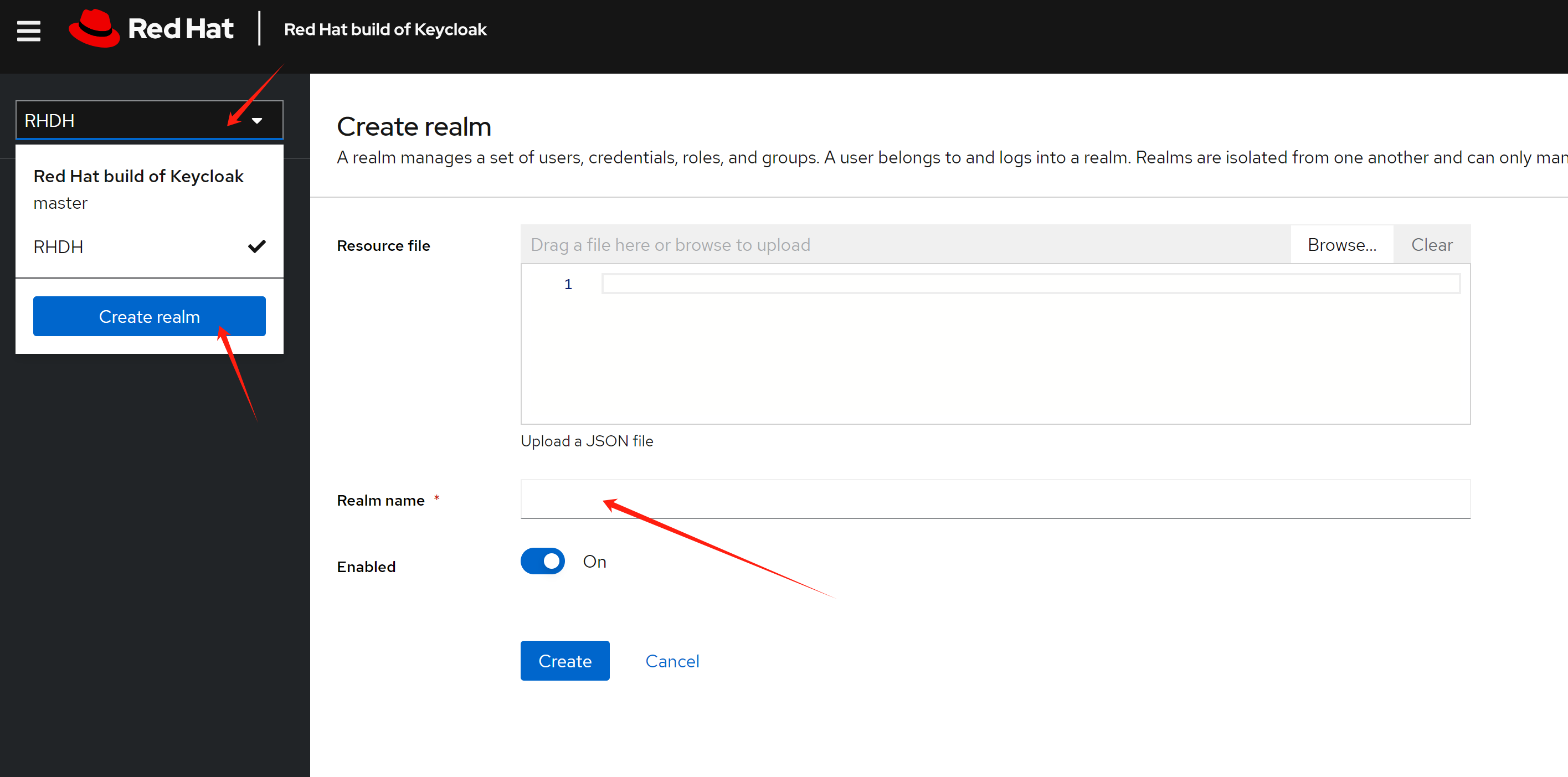
Based on the demo requirements, we need to create a realm
named RHDH, which will be used for RHDH later.
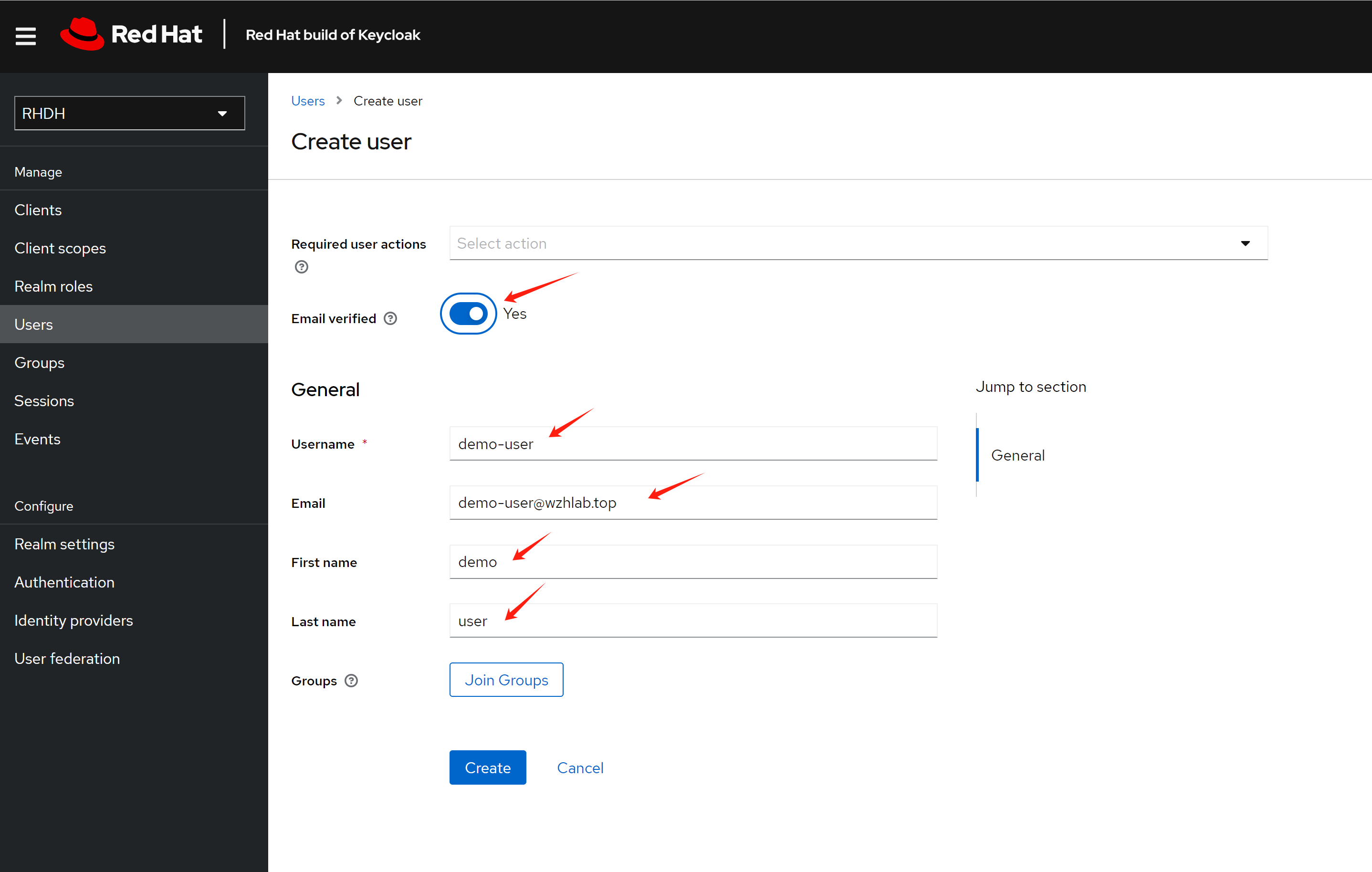
Create a test user demo-user
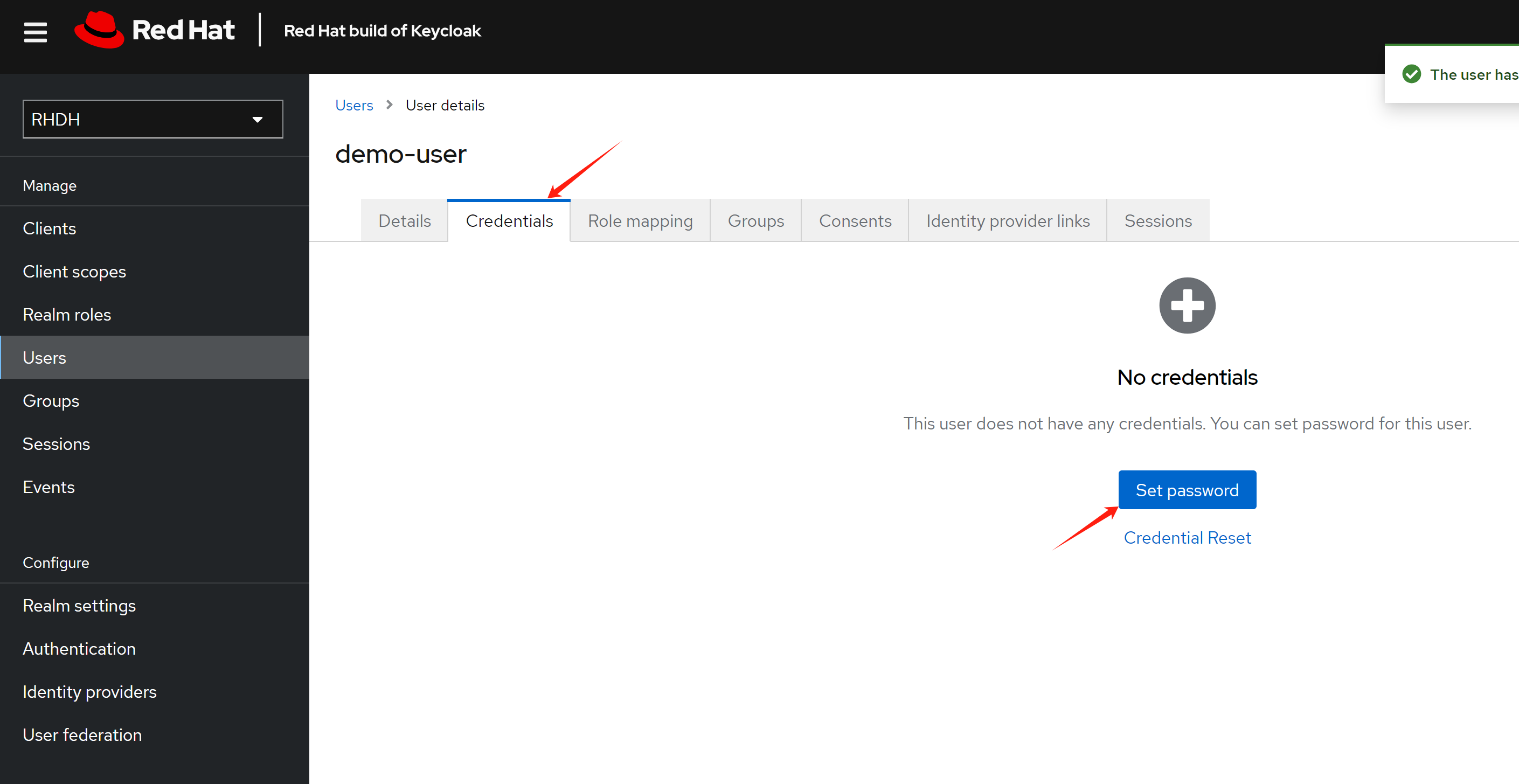
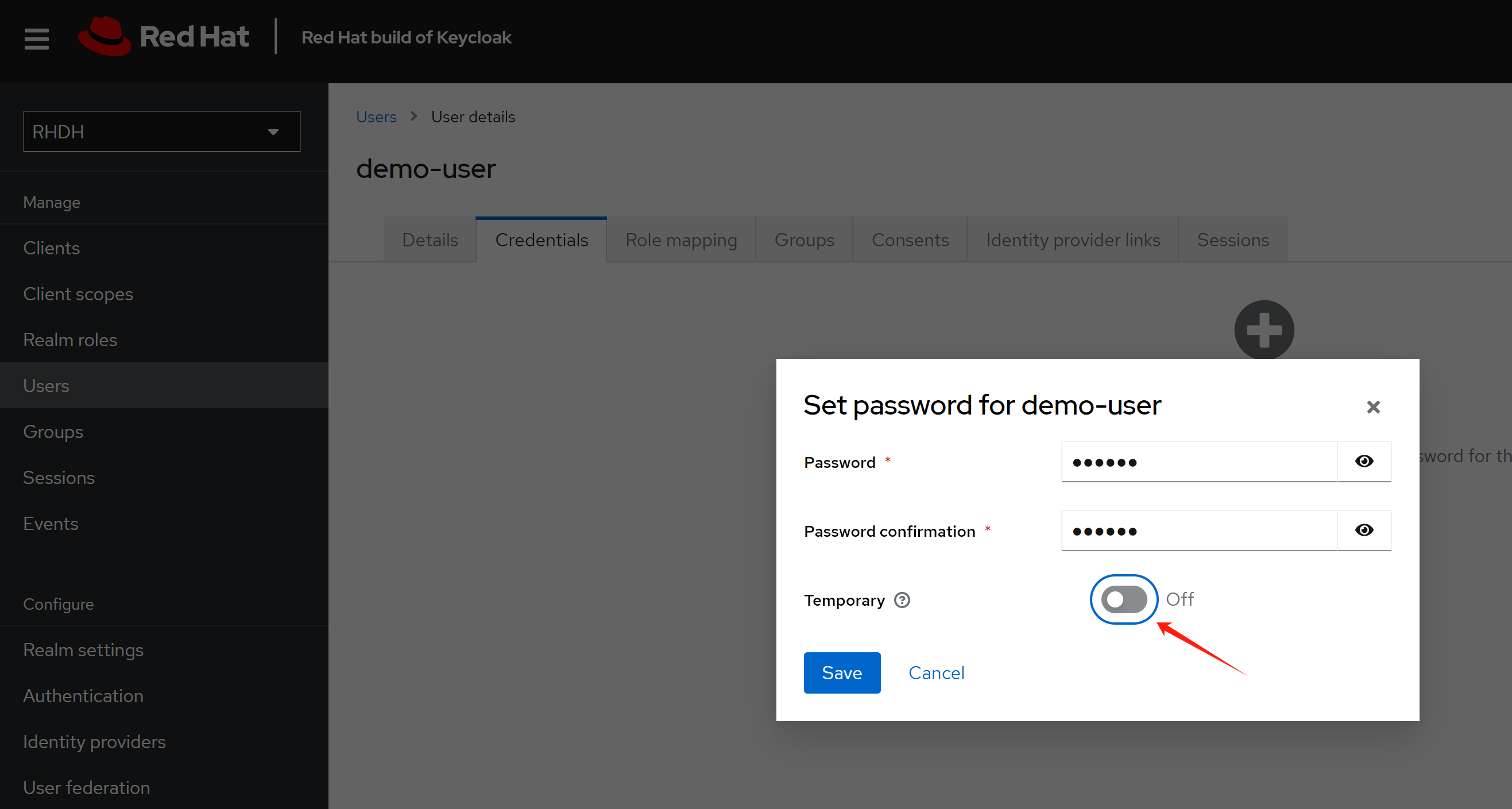
Set password for the user
Make the password not expire.
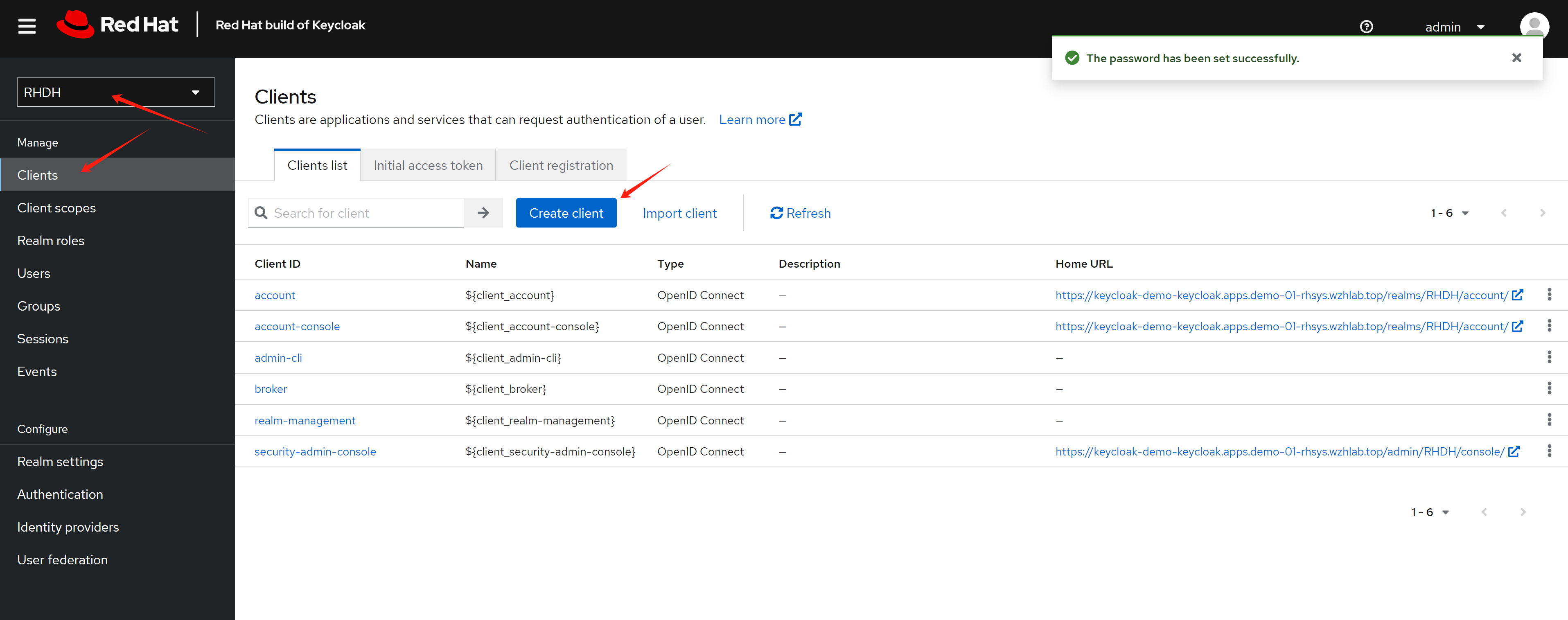
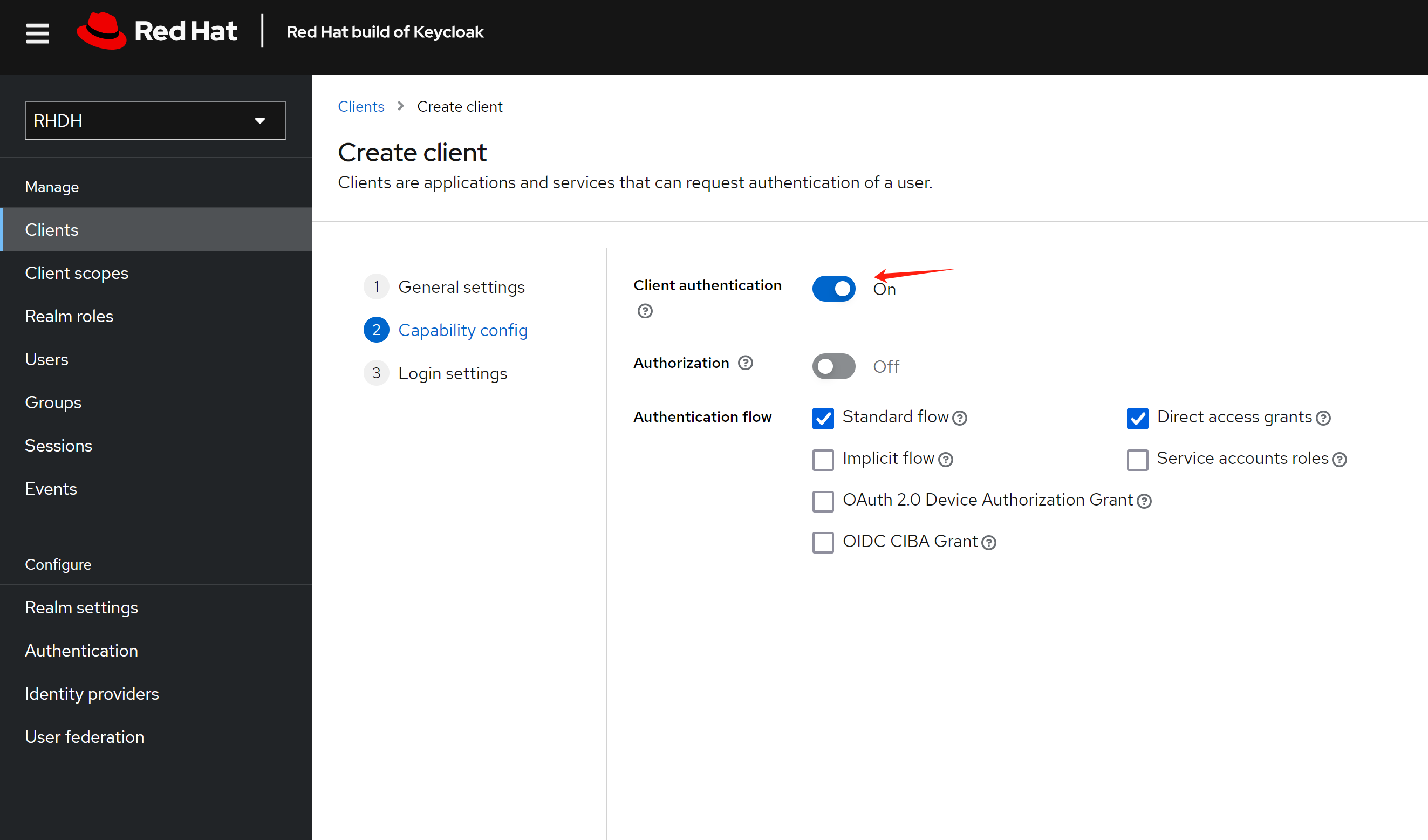
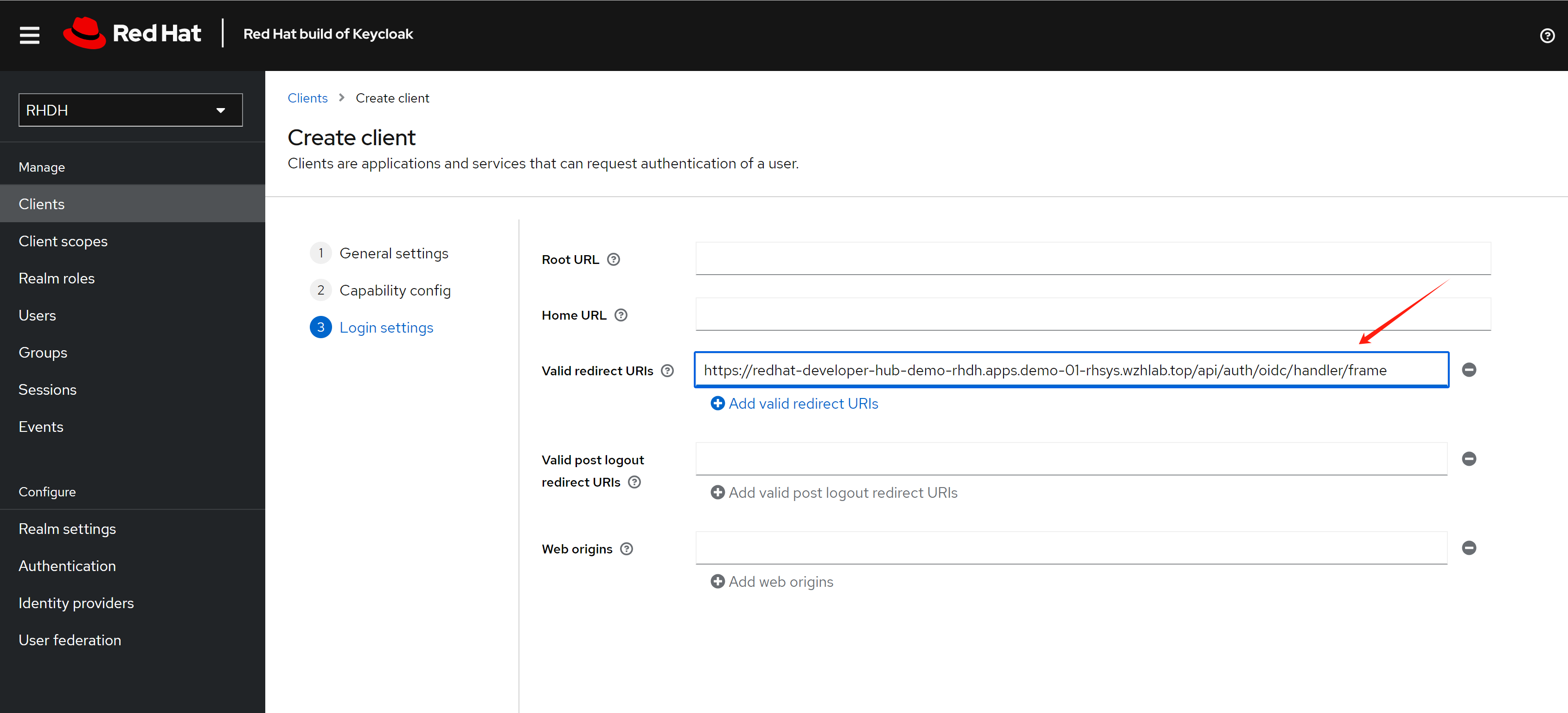
Create a client for the RHDH, and set the redirect URL.
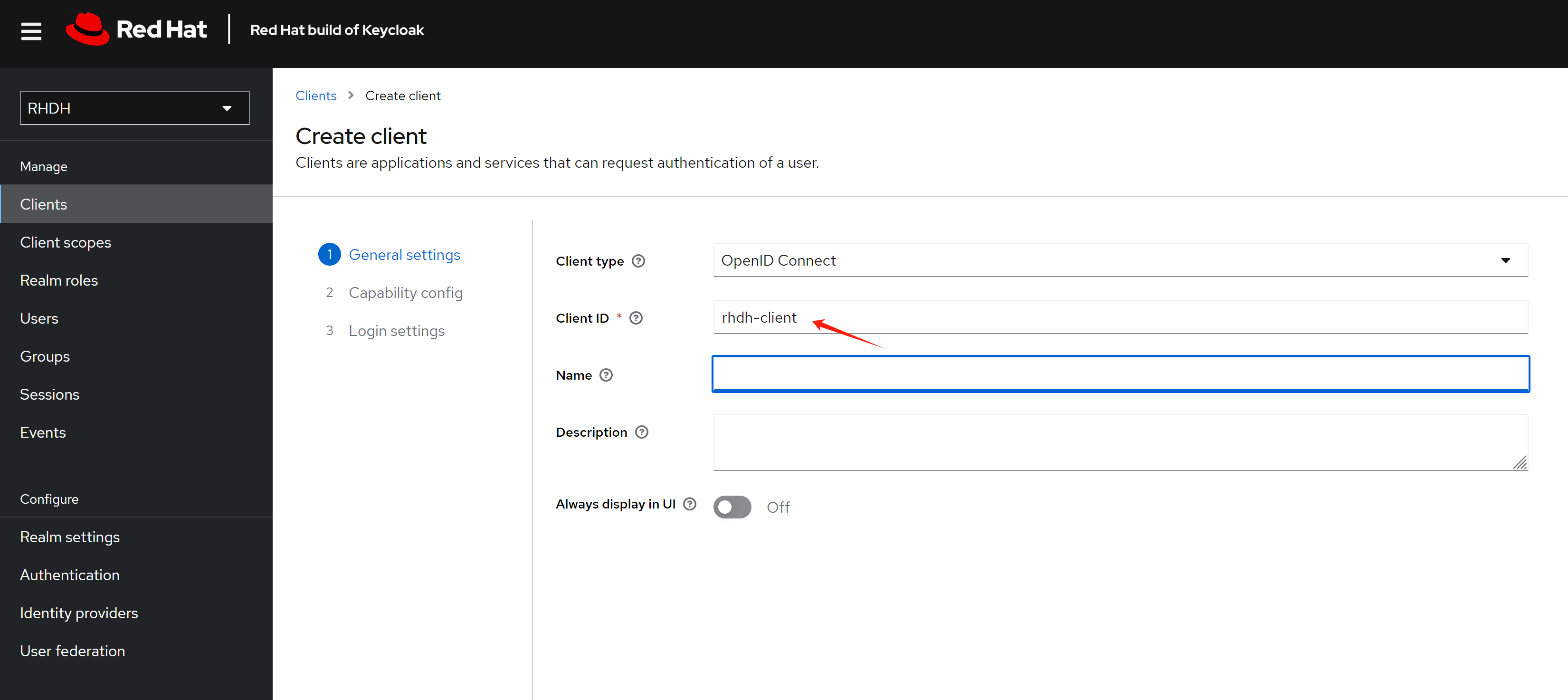
The redirect URL looks like this:
https://<RHDH_URL>/api/auth/oidc/handler/frame
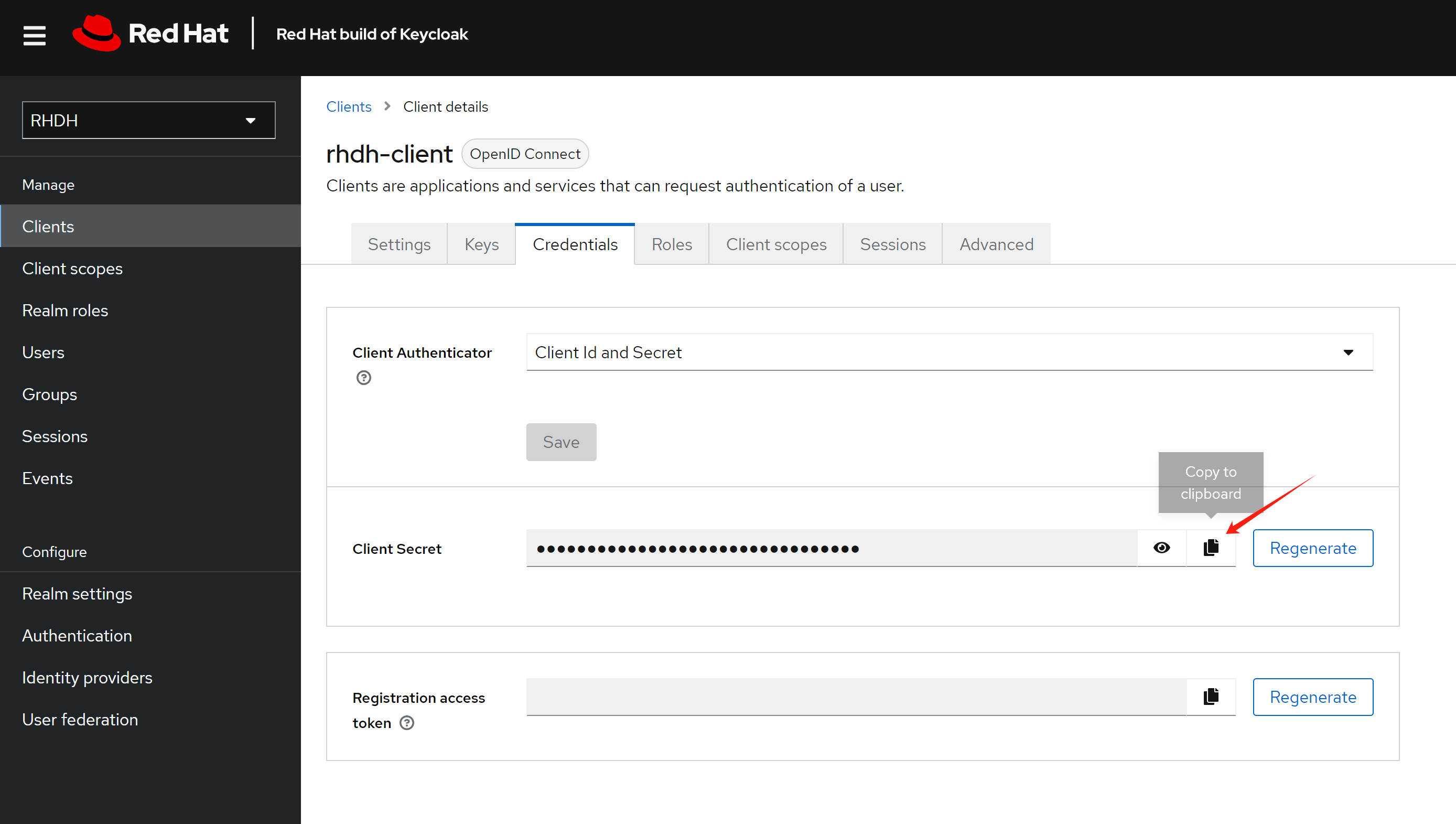
Copy the client secret, as it will be used later.
For RHDH 1.4, based on the official documentation:
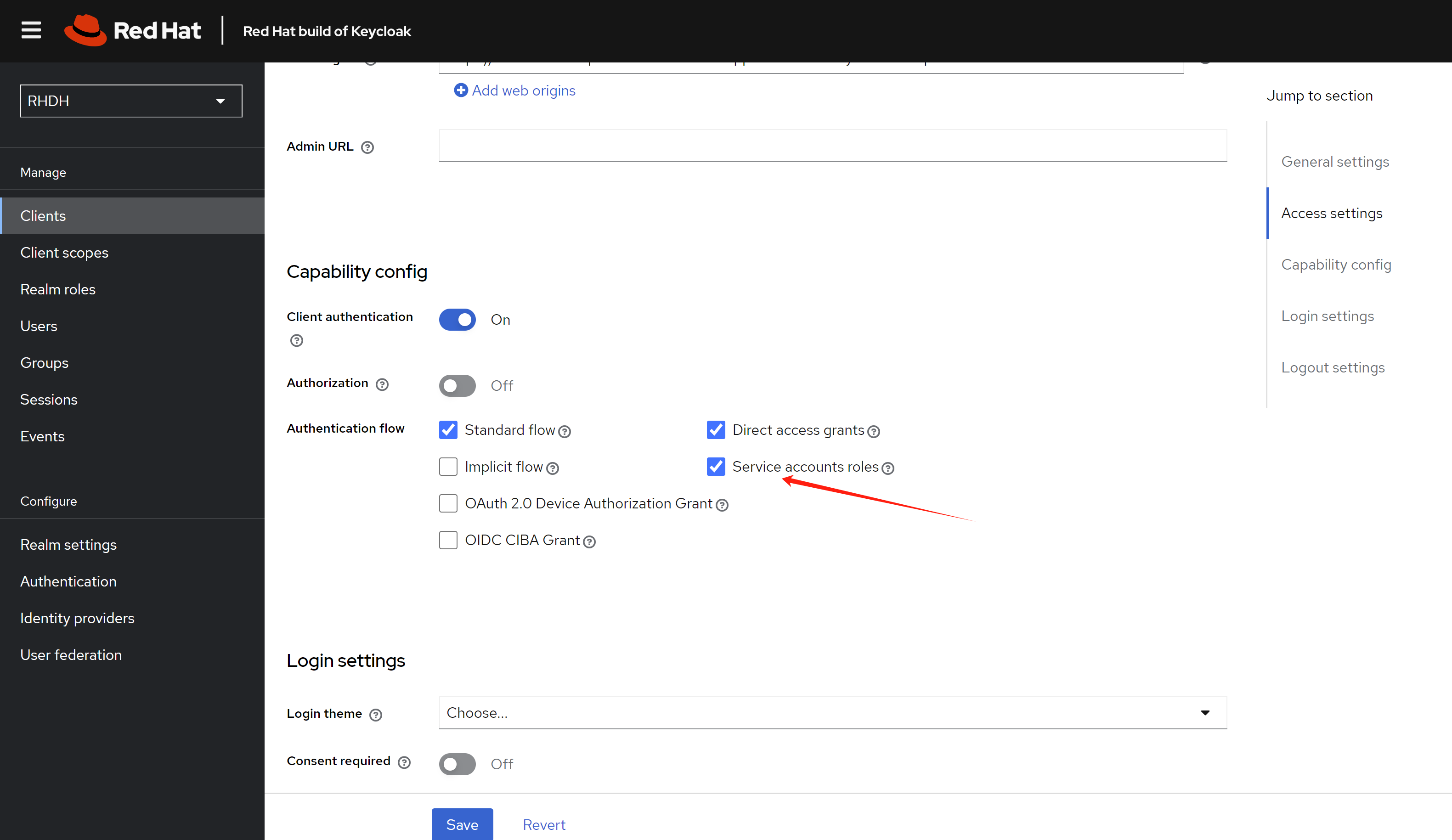
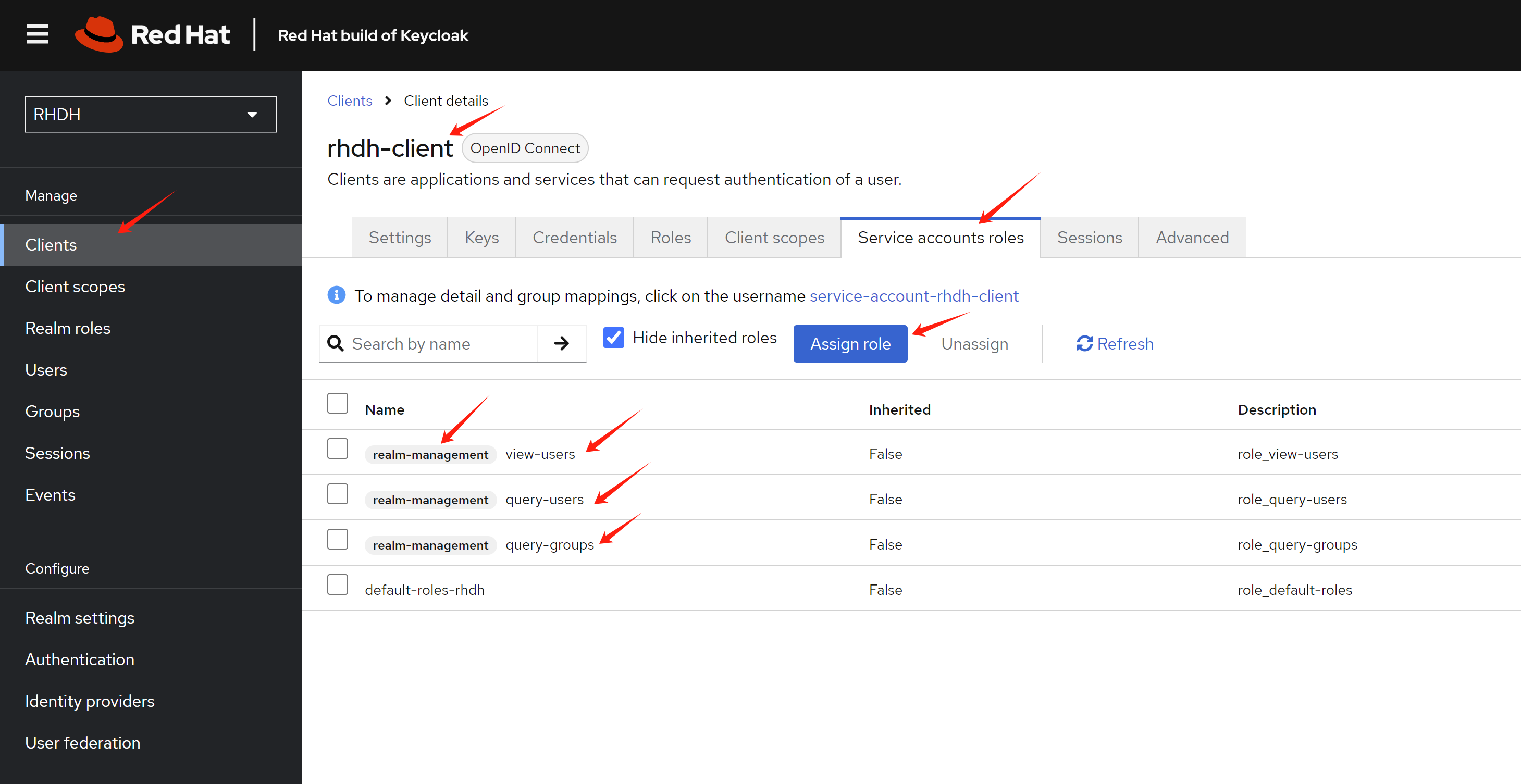
When using client credentials, the access type must be set to confidential and service accounts must be enabled. You must also add the following roles from the realm-management client role:
query-groups query-users view-users
If you want to sync users and groups using the client, you
need to configure the rhdh-client with these
additional steps:
- Enable service account roles
- Add service account roles
Install RHDH
Create a new namespace for the RHDH deployment.
oc new-project demo-rhdhThere are currently two ways to install RHDH: using the operator or using a Helm chart. In this demonstration, we’ll use the Helm chart.
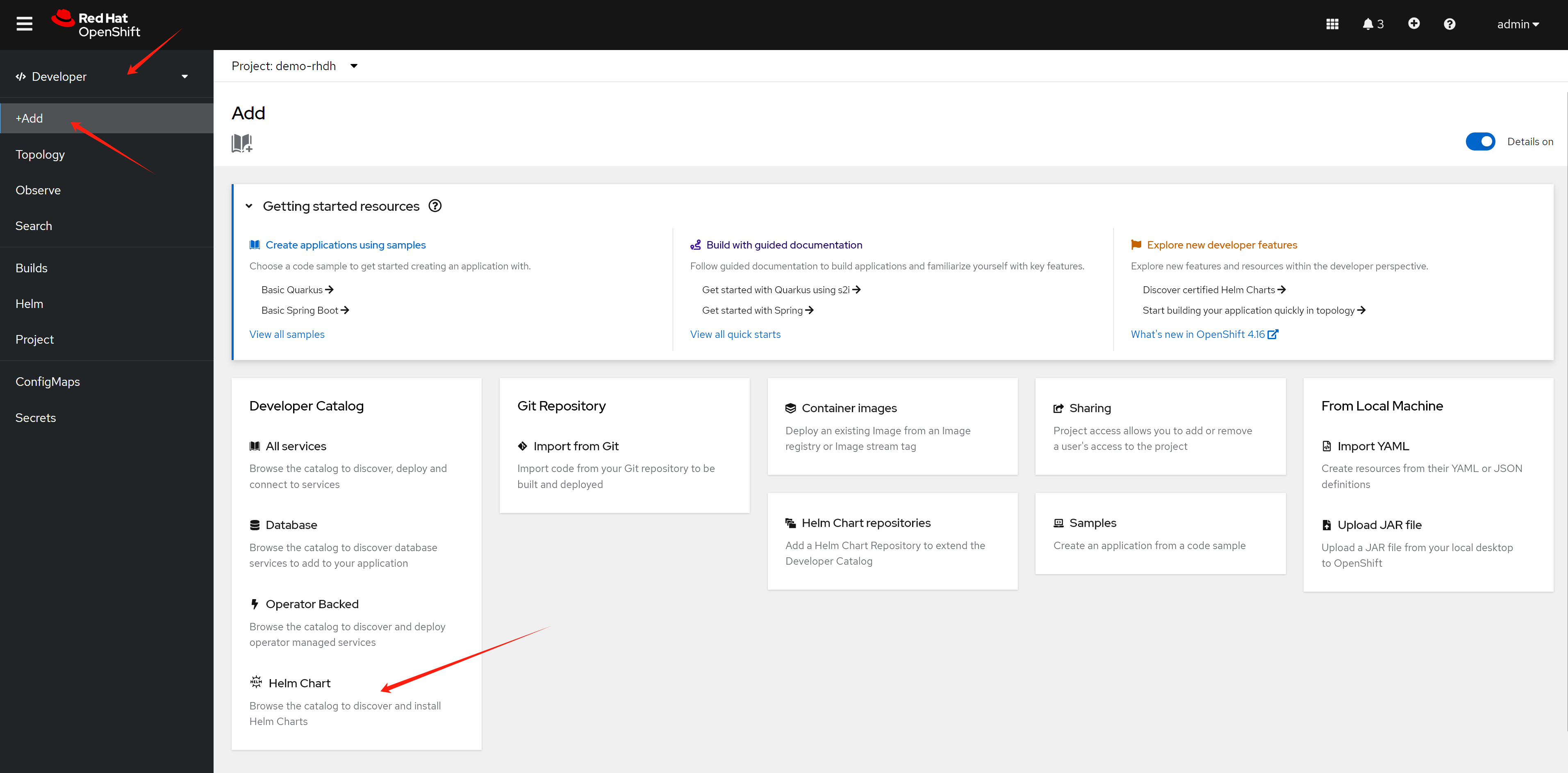
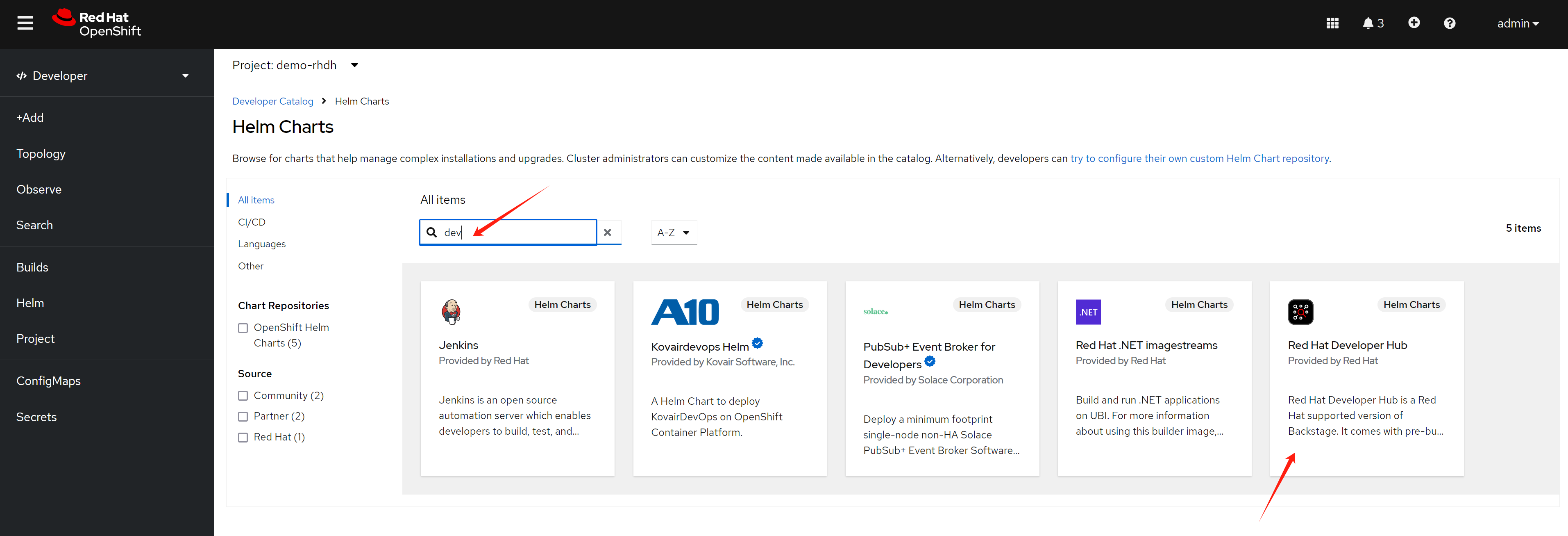
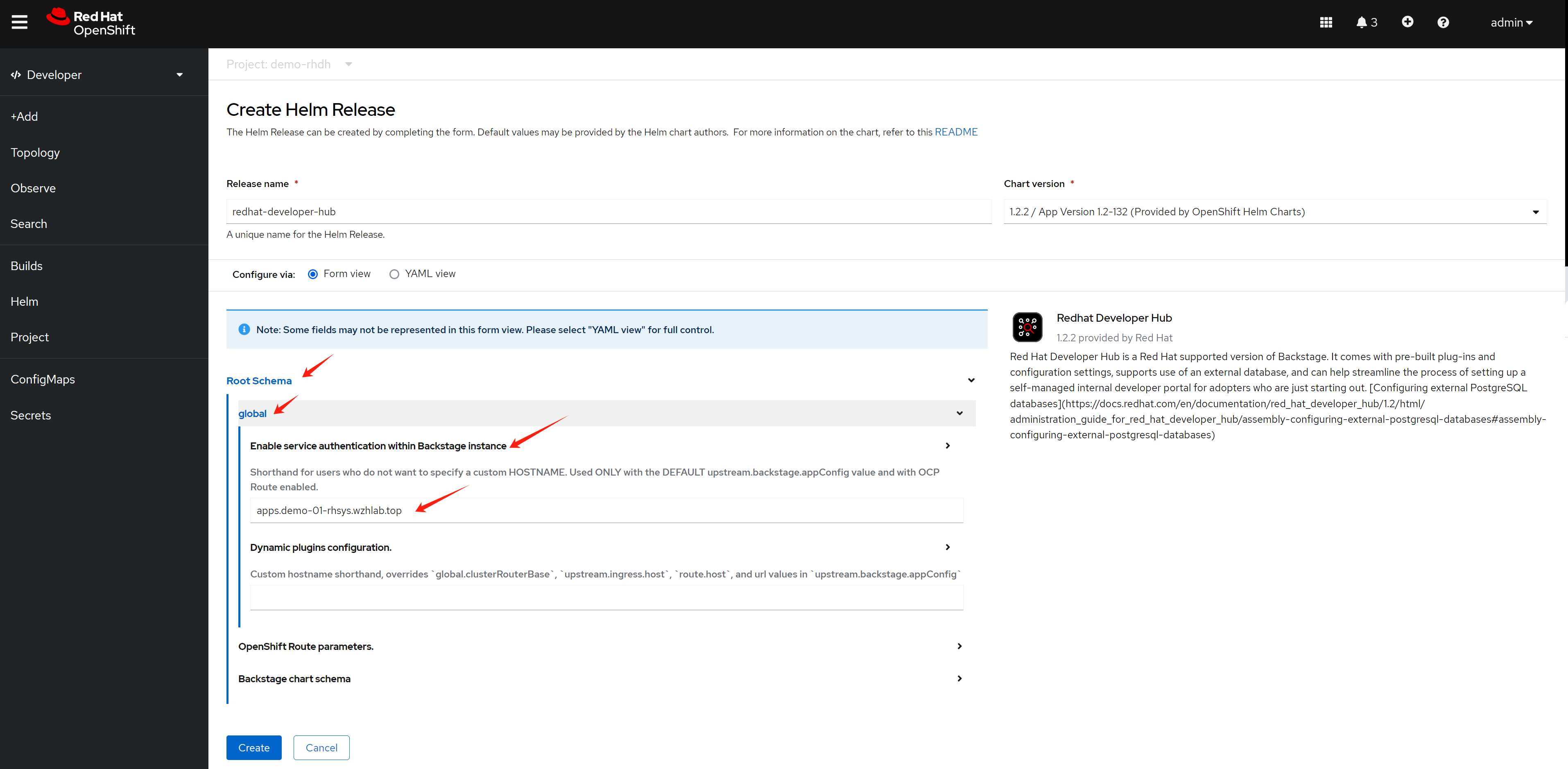
Configure RHDH
For Keycloak:
- Use Chrome to access the web UI
- Get the metadata URL from the realm
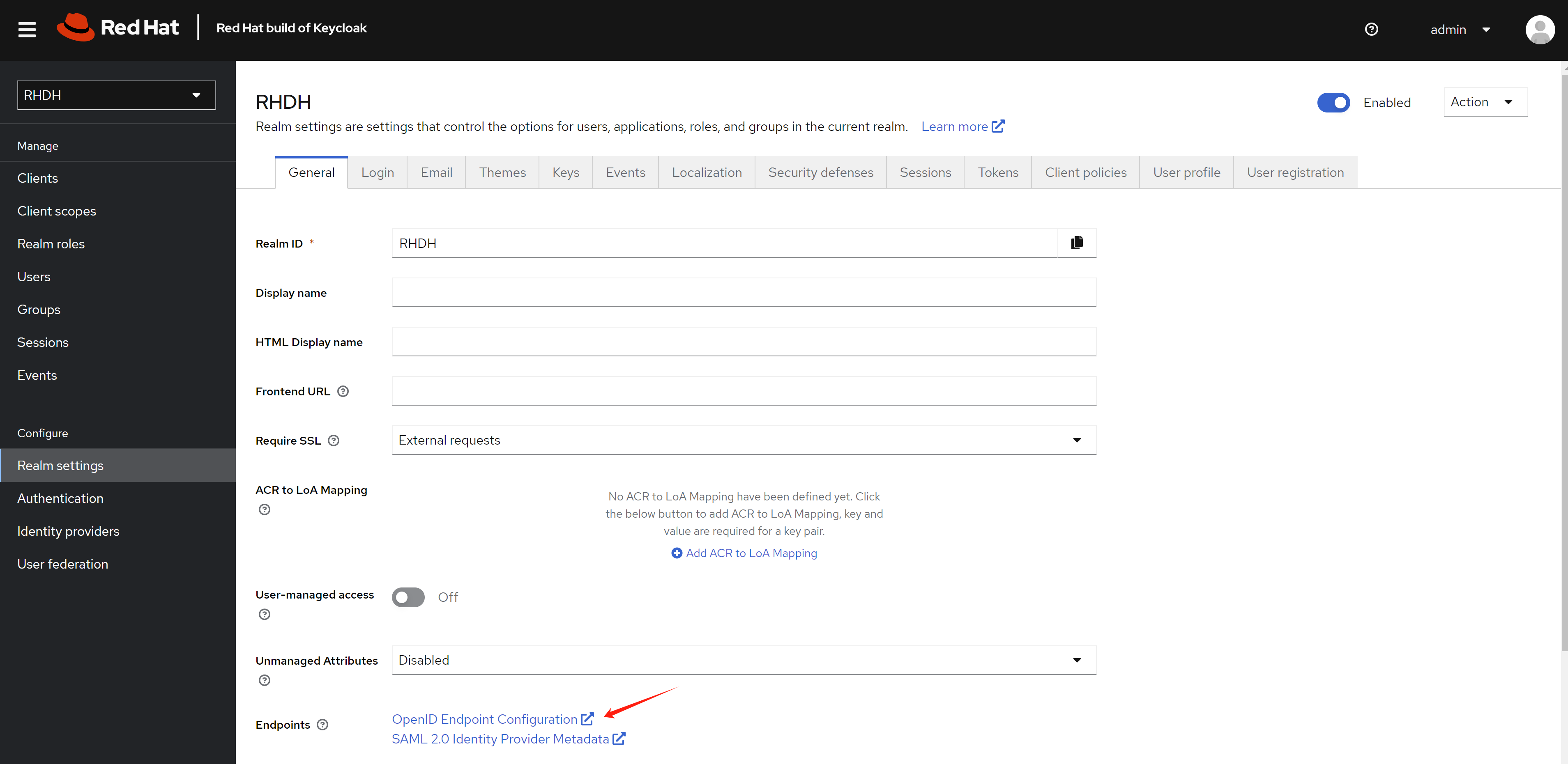
Now we’ll begin configuring RHDH using the CLI.
# for k8s plugin
# let the plugin access k8s resources
oc delete -f ${BASE_DIR}/data/install/role-rhdh.yaml

cat << EOF > ${BASE_DIR}/data/install/role-rhdh.yaml
apiVersion: rbac.authorization.k8s.io/v1
kind: ClusterRole
metadata:
  name: backstage-read-only
rules:
  - apiGroups:
      - '*'
    resources:
      - pods
      - configmaps
      - services
      - deployments
      - replicasets
      - horizontalpodautoscalers
      - ingresses
      - statefulsets
      - limitranges
      - resourcequotas
      - daemonsets
      - pipelineruns
      - taskruns
      - routes
    verbs:
      - get
      - list
      - watch
  - apiGroups:
      - batch
    resources:
      - jobs
      - cronjobs
    verbs:
      - get
      - list
      - watch
  - apiGroups:
      - metrics.k8s.io
    resources:
      - pods
    verbs:
      - get
      - list
EOF
oc apply -f ${BASE_DIR}/data/install/role-rhdh.yaml


NAMESPACES="demo-rhdh"

oc delete -f ${BASE_DIR}/data/install/sa-rhdh.yaml
cat << EOF > ${BASE_DIR}/data/install/sa-rhdh.yaml
---
apiVersion: v1
kind: ServiceAccount
metadata:
  name: backstage-read-only-sa
  namespace: $NAMESPACES  # Replace with the appropriate namespace

---
apiVersion: rbac.authorization.k8s.io/v1
kind: ClusterRoleBinding
metadata:
  name: backstage-read-only-binding
subjects:
  - kind: ServiceAccount
    name: backstage-read-only-sa
    namespace: $NAMESPACES  # Replace with the appropriate namespace
roleRef:
  kind: ClusterRole
  name: backstage-read-only
  apiGroup: rbac.authorization.k8s.io

EOF
oc create -f ${BASE_DIR}/data/install/sa-rhdh.yaml -n $NAMESPACES


# create pvc for rhdh plugin
oc delete -f ${BASE_DIR}/data/install/pvc-rhdh.yaml

cat << EOF > ${BASE_DIR}/data/install/pvc-rhdh.yaml
kind: PersistentVolumeClaim
apiVersion: v1
metadata:
  name: rhdh-plugin
spec:
  accessModes:
    - ReadWriteOnce
  resources:
    requests:
      storage: 10Gi
  # storageClassName: lvms-vg1
  volumeMode: Filesystem
EOF

oc apply -f ${BASE_DIR}/data/install/pvc-rhdh.yaml -n $NAMESPACES


# create token of the sa, and save to variable, expire date is 100 years
SA_TOKEN=`oc create token backstage-read-only-sa --duration=876000h -n $NAMESPACES`

# SECRET_NAME=$(oc get sa backstage-read-only-sa -n $NAMESPACES -o jsonpath='{.secrets[0].name}' )
# SA_TOKEN=$(oc get secret $SECRET_NAME -n $NAMESPACES -o jsonpath='{.data.token}'  | base64 --decode)
echo $SA_TOKEN

# check the expire date of the token
echo $SA_TOKEN | cut -d '.' -f2 | base64 -d | jq -r '.exp' | xargs -I {} date -d @{}
# Sun Jul 23 10:57:39 AM CST 2124

# get env variable for backstage
OCP_NAME="demo-01-rhsys"
OCP_BASE_URL="demo-01-rhsys.wzhlab.top"
OCP_API="https://api.$OCP_BASE_URL:6443"

# GITLAB_BASE_HOST="gitlab-demo-gitlab.apps.$OCP_BASE_URL"
# GITLAB_BASE_URL="https://gitlab-demo-gitlab.apps.$OCP_BASE_URL"
# GITLAB_PAT="<your gitlab personal access token>"
# AUTH_GITLAB_CLIENT_ID="you gitlab client id"
# AUTH_GITLAB_CLIENT_SECRET="you gitlab client secret"

AUTH_KEYCLOAK_CLIENT_ID="rhdh-client"
AUTH_KEYCLOAK_CLIENT_SECRET="<your keycloak client secret>"
KEYCLOAK_BASE_URL="https://keycloak-demo-keycloak.apps.$OCP_BASE_URL"
KEYCLOAK_REALM="RHDH"
KEYCLOAK_PROMPT="auto"

SESSION_SECRET=`openssl rand -hex 32`
# GITHUB_TOKEN="<your github personal access token>"

# ARGOCD_NS="demo-gitops"
# ARGOCD_INSTANCE_NAME="argocd"
# # no ending "/"
# ARGOCD_URL="https://$ARGOCD_INSTANCE_NAME-$ARGOCD_NS.apps.$OCP_BASE_URL"
# # ARGOCD_SECRET="$ARGOCD_INSTANCE_NAME-cluster"
# # ARGOCD_PASSWORD=`oc get secret $ARGOCD_SECRET -n $ARGOCD_NS -o jsonpath='{.data.admin\.password}' | base64 --decode`
# ARGOCD_USER="alice"
# ARGOCD_PASSWORD="redhadocp"
# ARGOCD_TOKEN="<your argocd token>"

# JFROG_URL="http://192.168.50.17:8082"
# JFROG_TOKEN="<your jfrog token>"


# create secret based on env variable
oc delete secret wzh-rhdh-credentials -n $NAMESPACES
oc create secret generic wzh-rhdh-credentials -n $NAMESPACES \
--from-literal=OCP_NAME=$OCP_NAME \
--from-literal=OCP_BASE_URL=$OCP_BASE_URL \
--from-literal=OCP_API=$OCP_API \
--from-literal=AUTH_KEYCLOAK_CLIENT_ID=$AUTH_KEYCLOAK_CLIENT_ID \
--from-literal=AUTH_KEYCLOAK_CLIENT_SECRET=$AUTH_KEYCLOAK_CLIENT_SECRET \
--from-literal=KEYCLOAK_BASE_URL=$KEYCLOAK_BASE_URL \
--from-literal=KEYCLOAK_REALM=$KEYCLOAK_REALM \
--from-literal=KEYCLOAK_PROMPT=$KEYCLOAK_PROMPT \
--from-literal=SESSION_SECRET=$SESSION_SECRET \
--from-literal=SA_TOKEN=$SA_TOKEN


# create app config
oc delete configmap app-config-rhdh -n $NAMESPACES

cat << EOF > ${BASE_DIR}/data/install/app-config-rhdh.yaml
---
kind: ConfigMap
apiVersion: v1
metadata:
  name: app-config-rhdh
data:
  app-config-rhdh.yaml: |
    app:
      title: WZH Developer Hub

    auth:
      # environment: production
      # using development, will give you guest login options :)
      environment: development
      session:
        secret: \${SESSION_SECRET}
      providers:
        oidc:
          # production:
          development:
            clientId: \${AUTH_KEYCLOAK_CLIENT_ID}
            clientSecret: \${AUTH_KEYCLOAK_CLIENT_SECRET}
            metadataUrl: \${KEYCLOAK_BASE_URL}/realms/\${KEYCLOAK_REALM}/.well-known/openid-configuration
            prompt: \${KEYCLOAK_PROMPT} # recommended to use auto
            # Uncomment for additional configuration options
            # callbackUrl: \${KEYCLOAK_CALLBACK_URL}
            # tokenEndpointAuthMethod: \${KEYCLOAK_TOKEN_ENDPOINT_METHOD}
            # tokenSignedResponseAlg: \${KEYCLOAK_SIGNED_RESPONSE_ALG}
            # scope: \${KEYCLOAK_SCOPE}
            # If you are using the keycloak-backend plugin, use the preferredUsernameMatchingUserEntityName resolver to avoid a login error.
            signIn:
              resolvers:
                - resolver: preferredUsernameMatchingUserEntityName
        guest:
          dangerouslyAllowOutsideDevelopment: true
          userEntityRef: user:default/static-demo-admin

    signInPage: oidc

    catalog:
      rules:
        - allow: [Component, System, API, Resource, Location, Template]

      locations:
        - target: https://github.com/wangzheng422/docker_env/blob/dev/redhat/ocp4/4.16/files/org.yaml
          type: url
          rules:
            - allow: [Group, User]
        - target: https://github.com/nepdemo/rhdh-book1-templates/blob/wzh/quarkus-with-angular/template.yaml
          type: url
          rules:
            - allow: [Template]
        - target: https://github.com/nepdemo/rhdh-book1-templates/blob/wzh/nestjs-with-postgres/template.yaml
          type: url
          rules:
            - allow: [Template]

      providers:
        keycloakOrg:
          default:
            baseUrl: \${KEYCLOAK_BASE_URL}
            loginRealm: \${KEYCLOAK_REALM}
            realm: \${KEYCLOAK_REALM}
            clientId: \${AUTH_KEYCLOAK_CLIENT_ID}
            clientSecret: \${AUTH_KEYCLOAK_CLIENT_SECRET}
            schedule: # optional; same options as in TaskScheduleDefinition
              # supports cron, ISO duration, "human duration" as used in code
              frequency: { minutes: 1 }
              # supports ISO duration, "human duration" as used in code
              timeout: { minutes: 1 }
              initialDelay: { seconds: 15 }

    kubernetes:
      serviceLocatorMethod:
        type: "multiTenant"
      clusterLocatorMethods:
        - type: "config"
          clusters:
            - name: \${OCP_NAME}
              url: \${OCP_API}
              authProvider: "serviceAccount"
              skipTLSVerify: true
              serviceAccountToken: \${SA_TOKEN}
      customResources:
        - group: 'tekton.dev'
          apiVersion: 'v1'
          plural: 'pipelineruns'
        - group: 'tekton.dev'
          apiVersion: 'v1'
          plural: 'taskruns'
        - group: 'route.openshift.io'
          apiVersion: 'v1'
          plural: 'routes'

    permission:
      enabled: true
      rbac:
        admin:
          users:
            - name: user:default/static-demo-admin
        pluginsWithPermission:
          - catalog
          - scaffolder
          - permission
          - topology
          - kubernetes

    enabled:
      kubernetes: true
      # techdocs: true
      # argocd: true
      # sonarqube: false
      keycloak: true
      keycloakOrg: true
      # ocm: true
      # github: false
      # githubOrg: false
      # gitlab: true
      # jenkins: false
      permission: true
EOF

oc create -f ${BASE_DIR}/data/install/app-config-rhdh.yaml -n $NAMESPACES


oc scale deployment redhat-developer-hub --replicas=0 -n $NAMESPACES

oc scale deployment redhat-developer-hub --replicas=1 -n $NAMESPACES
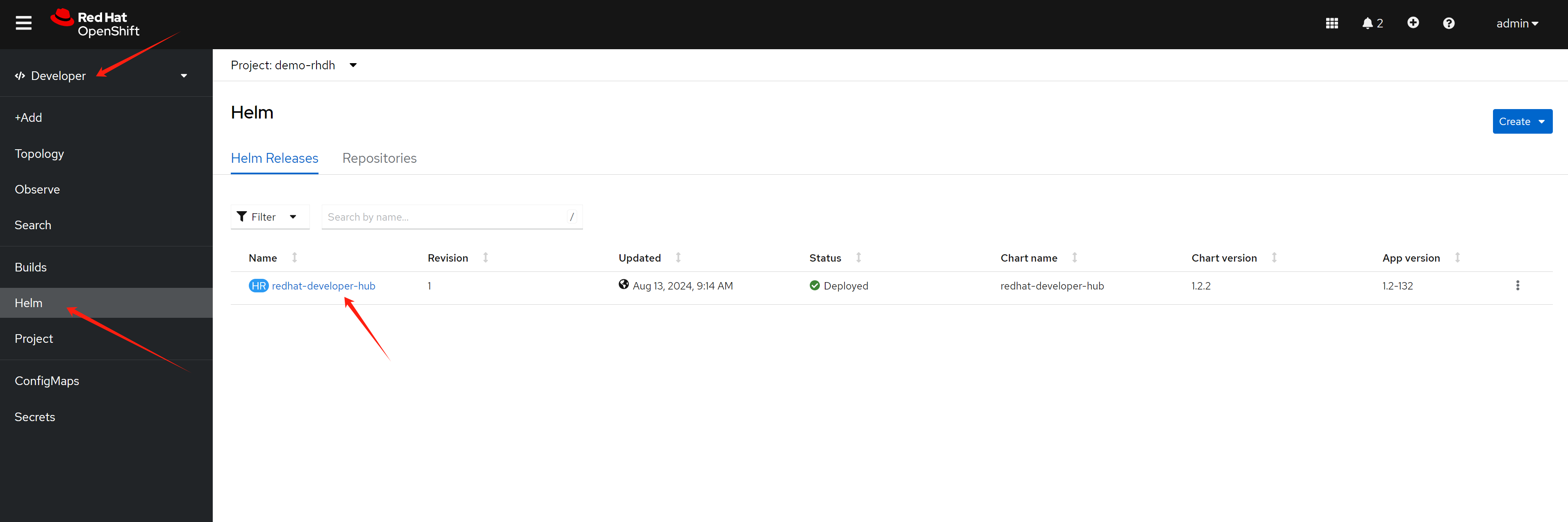
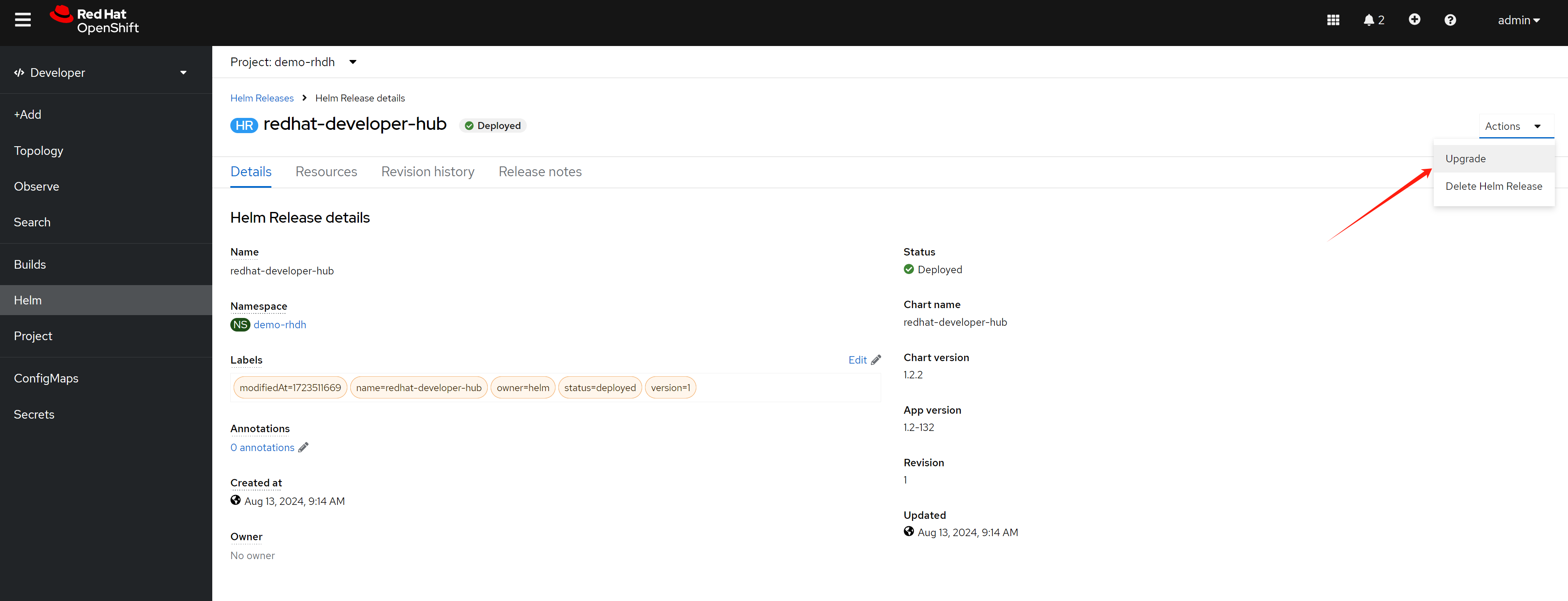
Expand Root Schema → Backstage chart schema → Backstage parameters → Extra app configuration files to inline into command arguments
upstream:
  backstage:
    extraAppConfig:
      - configMapRef: app-config-rhdh
        filename: app-config-rhdh.yaml
    # ... other Red Hat Developer Hub Hel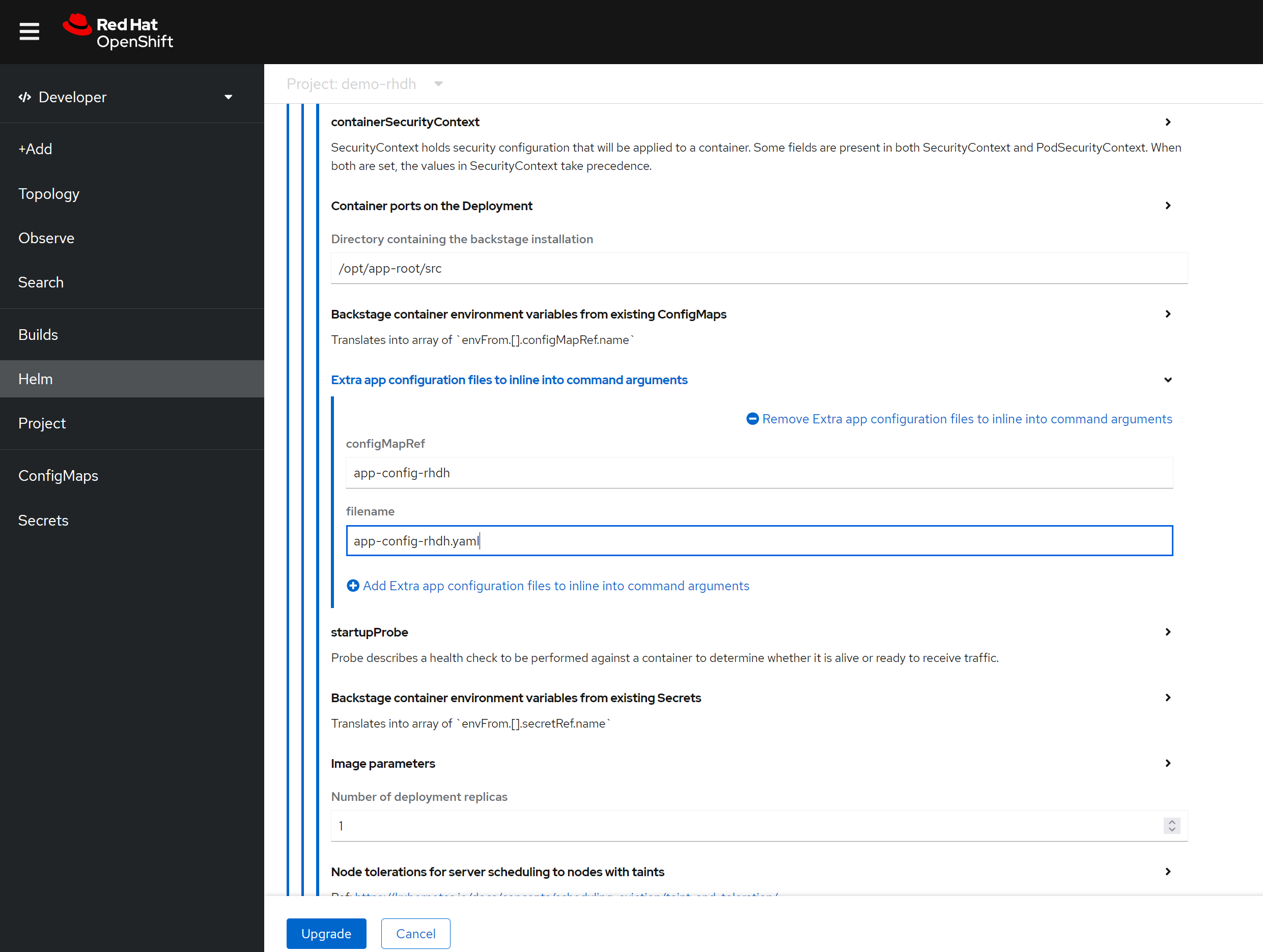
In addition to the above configuration, you can enable built-in plugins (which are disabled by default) by adding the following to the Helm config. Simply switch to YAML view.
First, get the digest of the plugin:
npm view @wangzheng422/backstage-plugin-scaffolder-backend-module-wzh-custom-actions-dynamic@0.1.9 dist.integrity
# sha512-qglFOgfep5ACQwjVmB3m+GeiOixz5JcrF/0MBiAWTbCGdp0XKIG03owGn+MDo2uxSJLSGmmRYipCQv10Um1/lA==


npm view @wangzheng422/backstage-plugin-scaffolder-backend-module-dummy-wzh-actions-dynamic@0.1.1 dist.integrity
# sha512-d8SGXRkjJExz2mQbzg8+gF3yOIUrgeYgX8+AJ0RR7eaQ46fvYKqiyRLdKjRGwjLVTdkX0PK8NU6C344VyamVUw==
global:
  dynamic:
    plugins:
      # rbac
      - package: ./dynamic-plugins/dist/backstage-community-plugin-rbac
        disabled: false

      # keycloak
      - package: ./dynamic-plugins/dist/backstage-community-plugin-catalog-backend-module-keycloak-dynamic
        disabled: false

      # for teckton
      - package: ./dynamic-plugins/dist/backstage-community-plugin-tekton
        disabled: false

      # for k8s
      - package: ./dynamic-plugins/dist/backstage-plugin-kubernetes-backend-dynamic
        disabled: false

      # for topology, which integrate ocp webui
      # https://janus-idp.io/plugins/topology/
      - package: ./dynamic-plugins/dist/backstage-community-plugin-topology
        disabled: false

      # for custom actions demo, wrap with dynamic plugin
      # custom action demo ok
      # - package: "@wangzheng422/backstage-plugin-scaffolder-backend-module-wzh-custom-actions-dynamic@0.1.9"
      #   disabled: false
      #   integrity: sha512-qglFOgfep5ACQwjVmB3m+GeiOixz5JcrF/0MBiAWTbCGdp0XKIG03owGn+MDo2uxSJLSGmmRYipCQv10Um1/lA==
In summary, you can patch the Helm config like this:
global:
  dynamic:
    plugins:
      ......
  # patch the base url
  clusterRouterBase: apps.demo-01-rhsys.wzhlab.top
upstream:
  backstage:
    # patch for app config
    extraAppConfig:
      - configMapRef: app-config-rhdh
        filename: app-config-rhdh.yaml
    # patch for secrets
    extraEnvVarsSecrets:
      - wzh-rhdh-credentials
    extraEnvVars:
      # for https self certificate
      - name: NODE_TLS_REJECT_UNAUTHORIZED
        value: '0'
      # enable debug output
      - name: LOG_LEVEL
        value: debug
    # extraVolumes:
    #   # patch for static pvc
    #   - name: dynamic-plugins-root
    #     persistentVolumeClaim:
    #       claimName: rhdh-plugin
Testing with Conditional Policy
User and Group Requirements and Workaround
Currently, there are bugs in RHDH 1.4 where conditional policy doesn’t work if a user doesn’t belong to a group. For example, catalog entities won’t display if conditional policy is configured.
To work around this issue, we need to set up several users and assign them to groups.
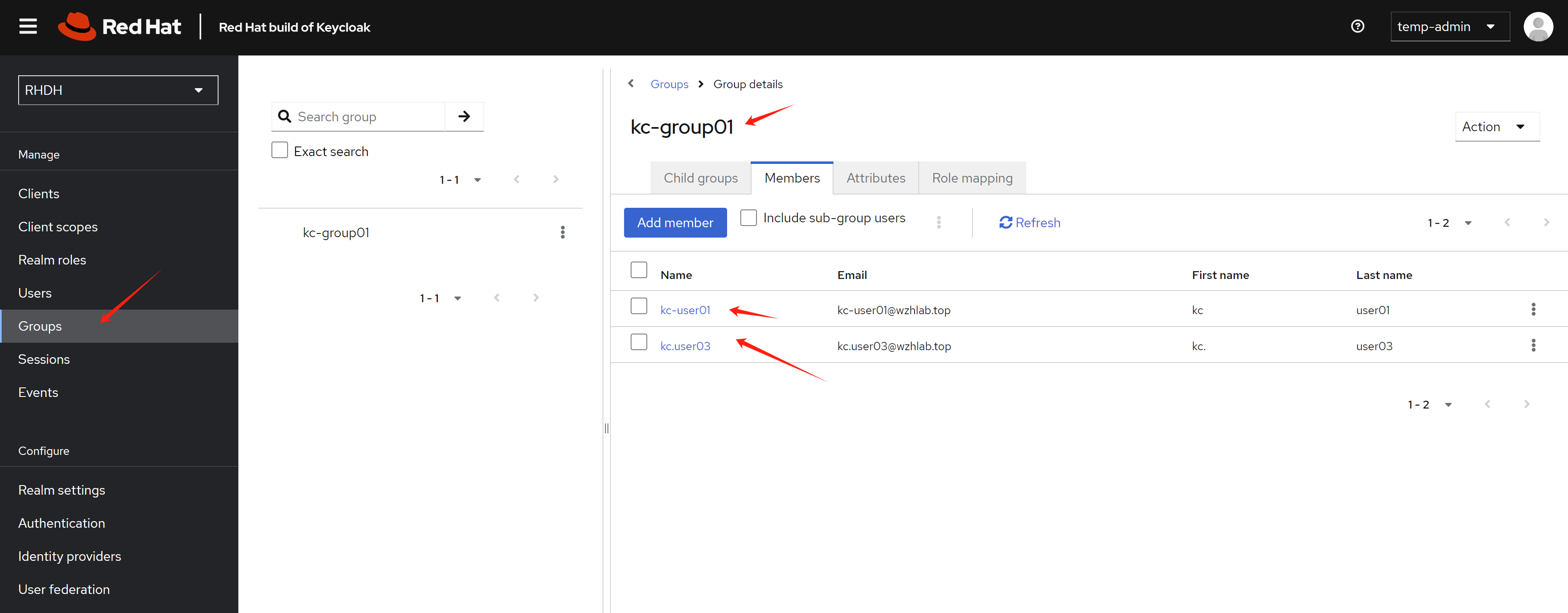
Conditional Policy
- During login, you’ll see two login options as configured. One option (guest) is for testing admin access - you can log in without any password, which is ideal when something is broken and you need to access the system to troubleshoot. The other option is for normal user login testing. After initial configuration, the guest login should be removed.
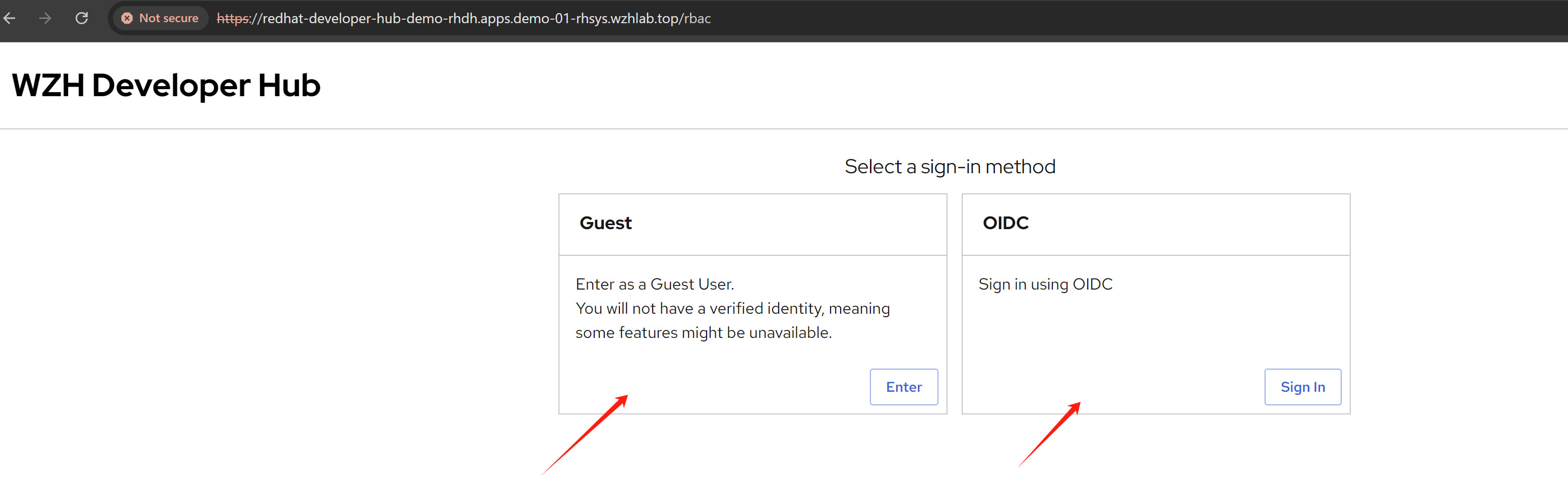
- We log in using the
guestoption, which is linked to the admin user and role. In the policy section, we can see that a built-in policy has already been created and it is not editable.
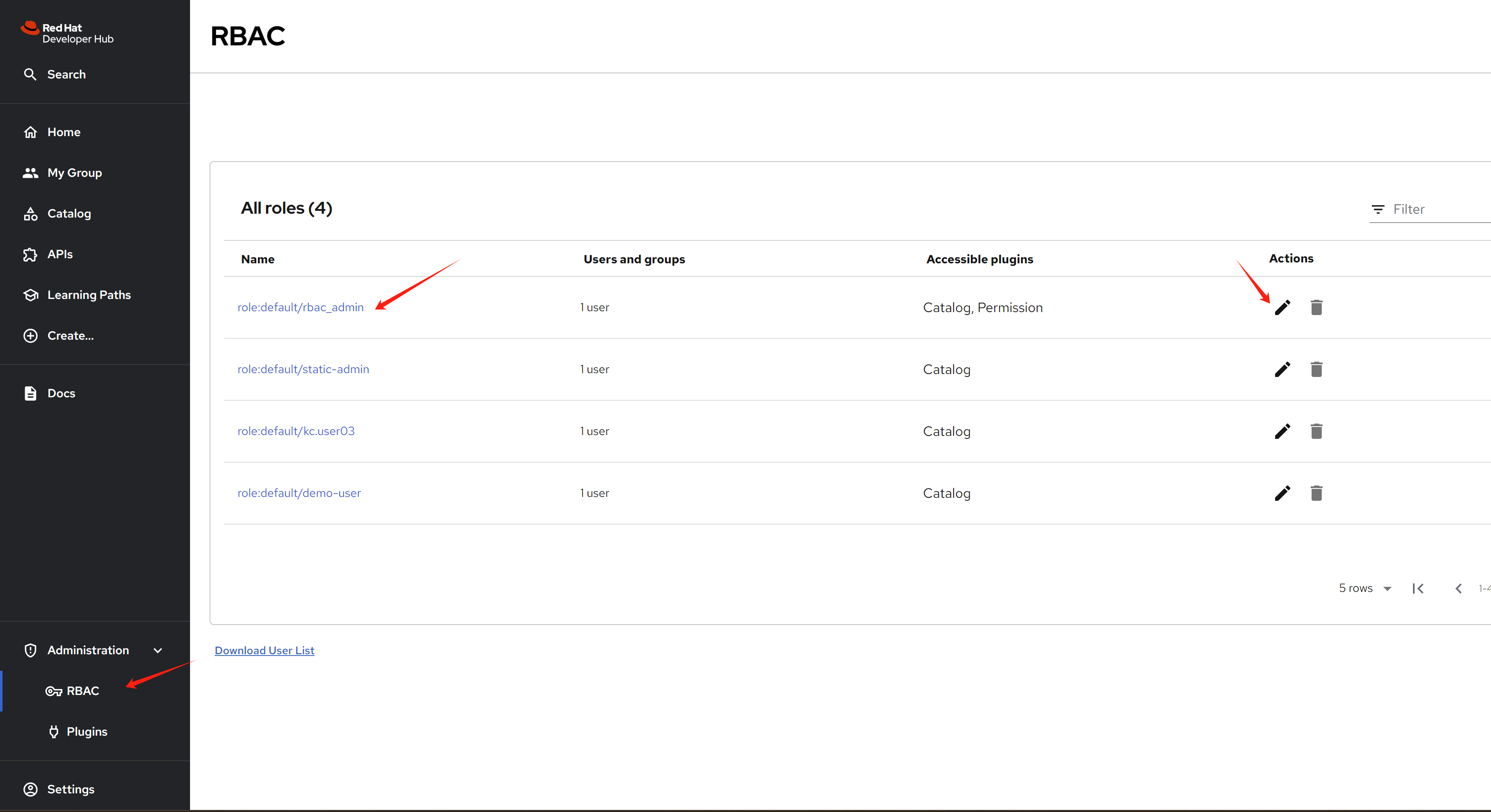
You can see the two policies that have been created.
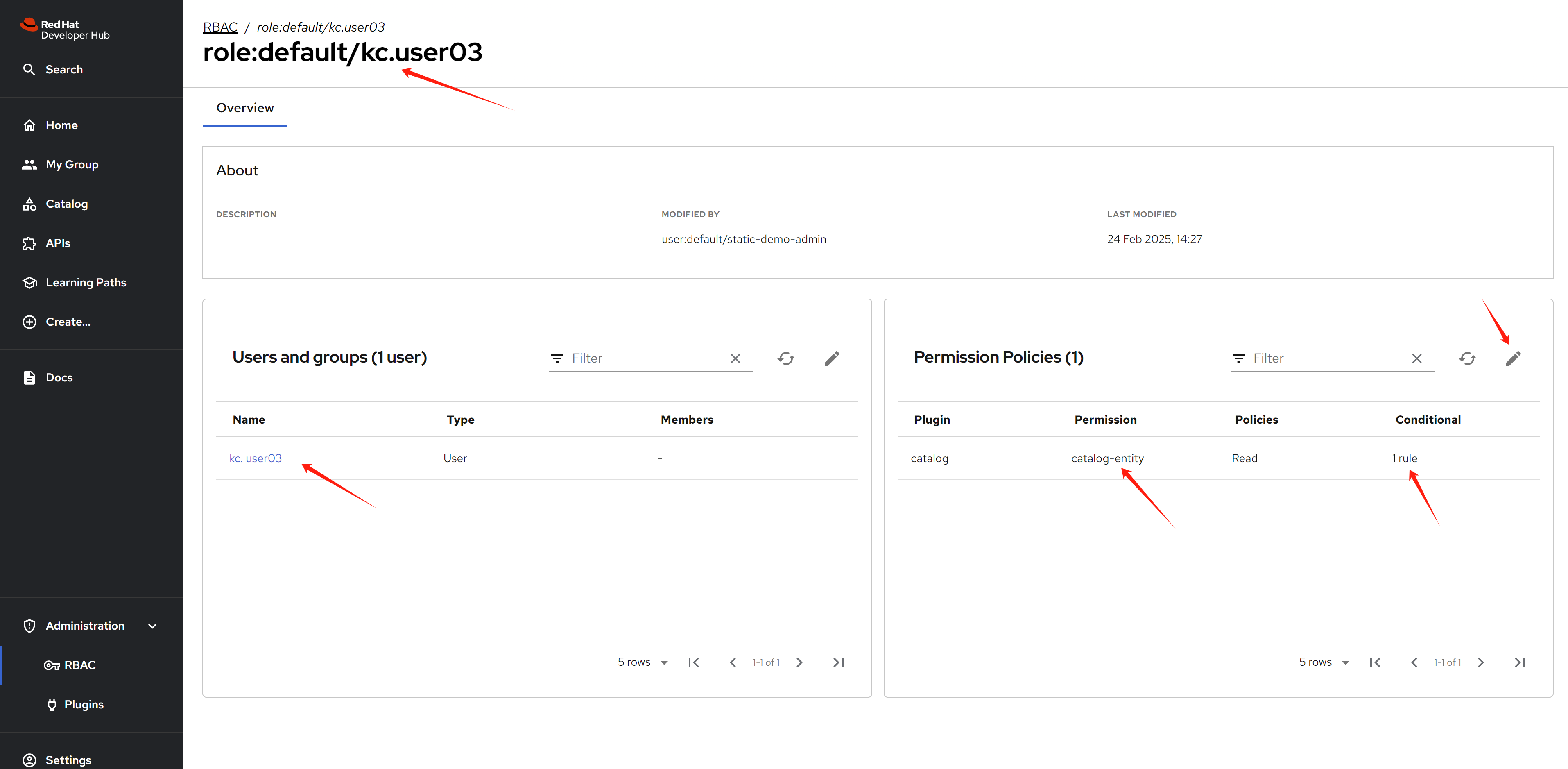
- We can create additional policies with access rules. When opening a rule, we can see it contains name, description, user/group, and permission settings.
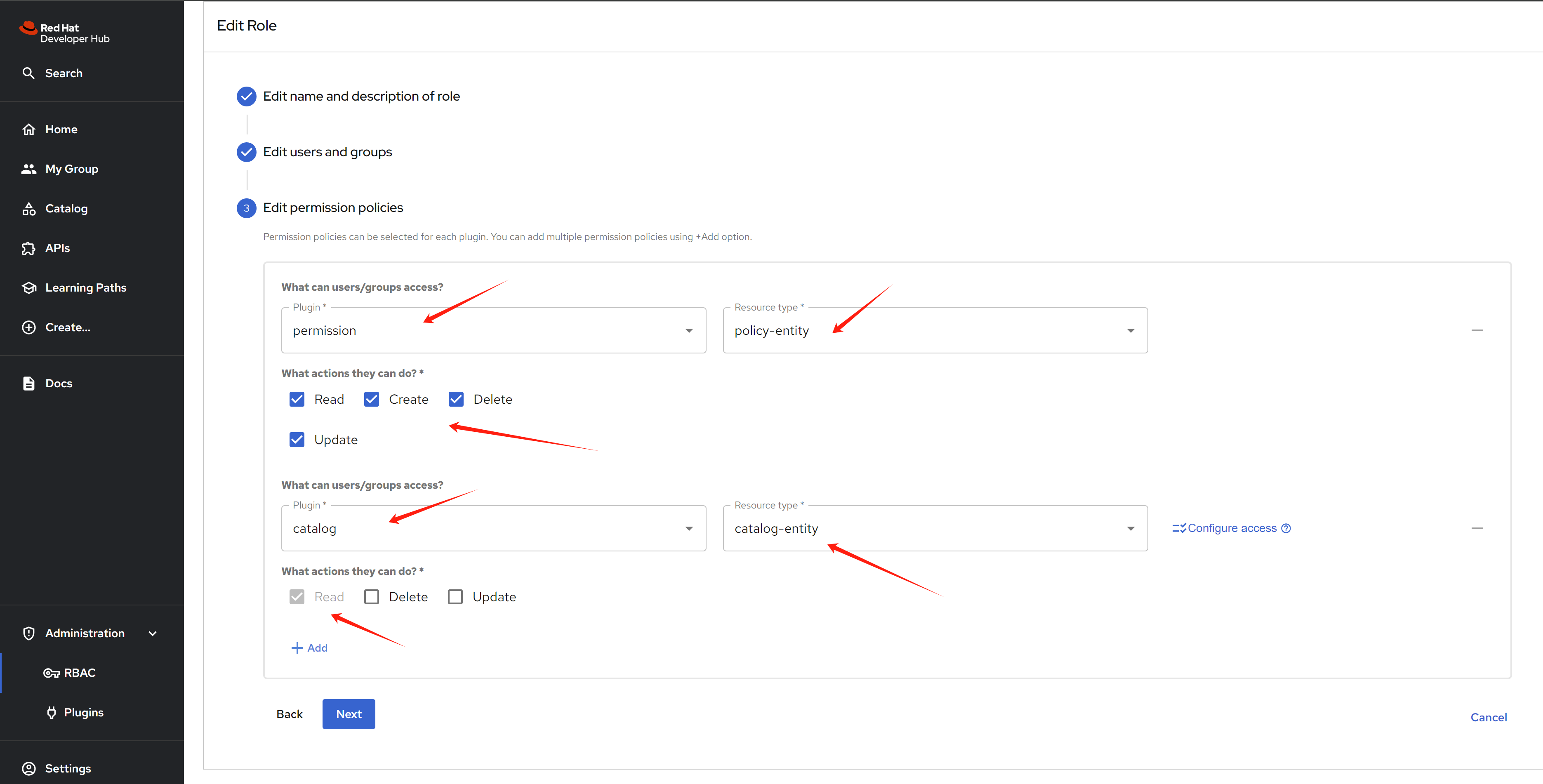
When editing the permission, you can select which target plugin resources to control and what kinds of actions users can perform.
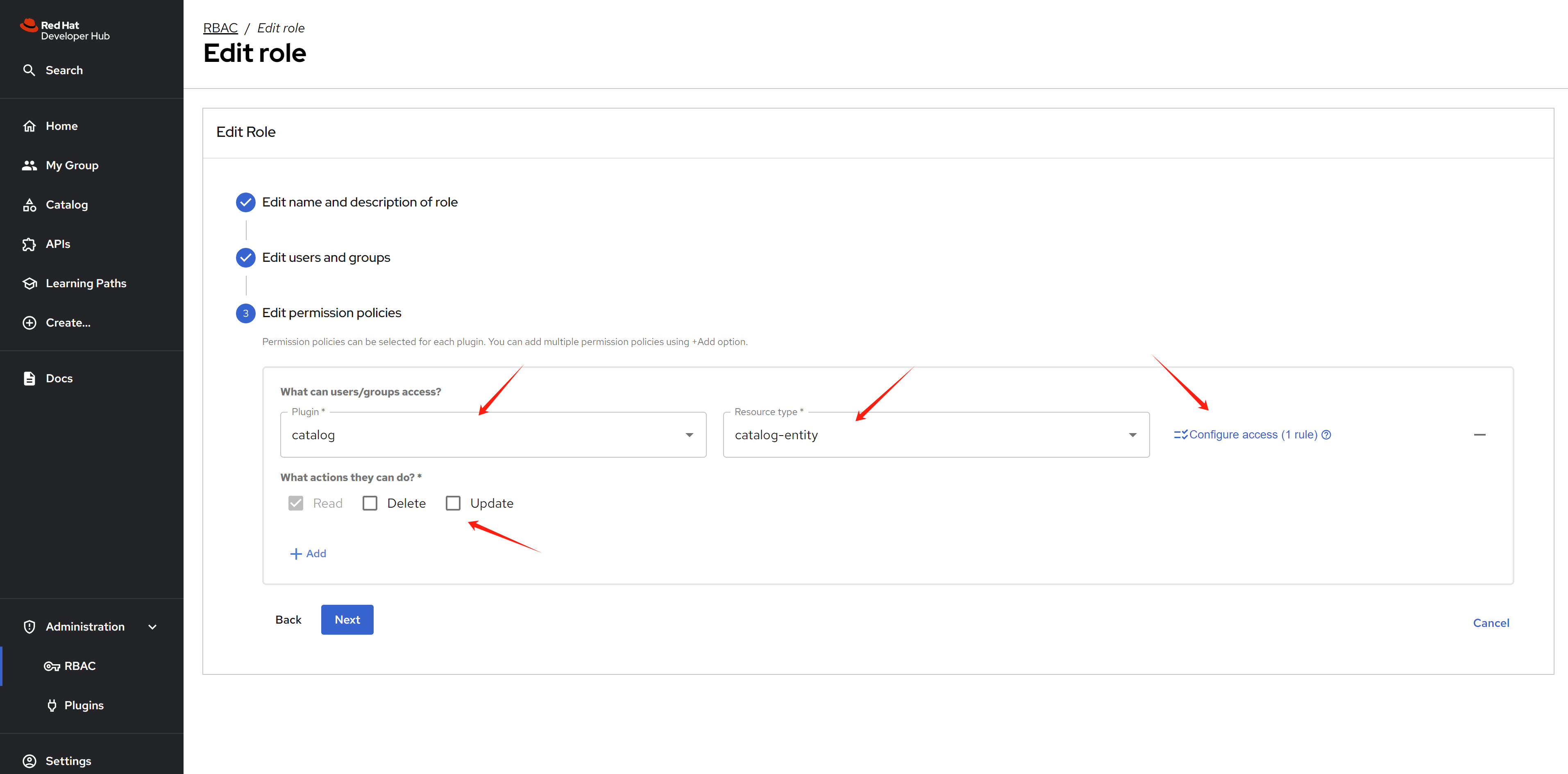
For conditions, you can control which specific resources users or groups can access.
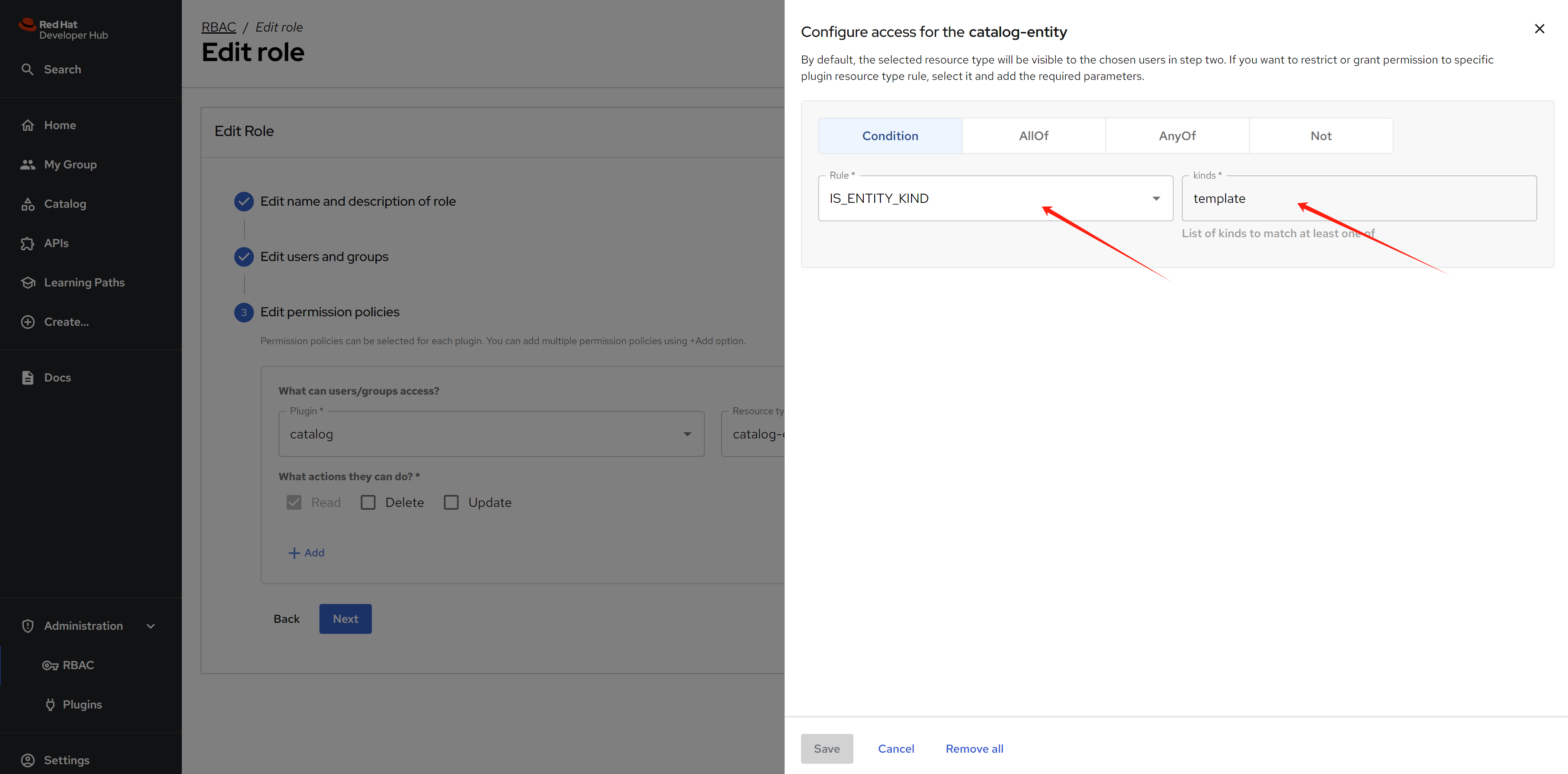
Results
After permissions are granted, users will be able to see (or not see) resources in the catalog based on the configured policies.