[!NOTE] Work in progress
with the help of Google Gemini 2.5 pro
NFS File Permissions on OpenShift/Kubernetes
We frequently encounter NFS file permission issues on OpenShift/Kubernetes. This document will simulate such a problem and demonstrate how to resolve it.
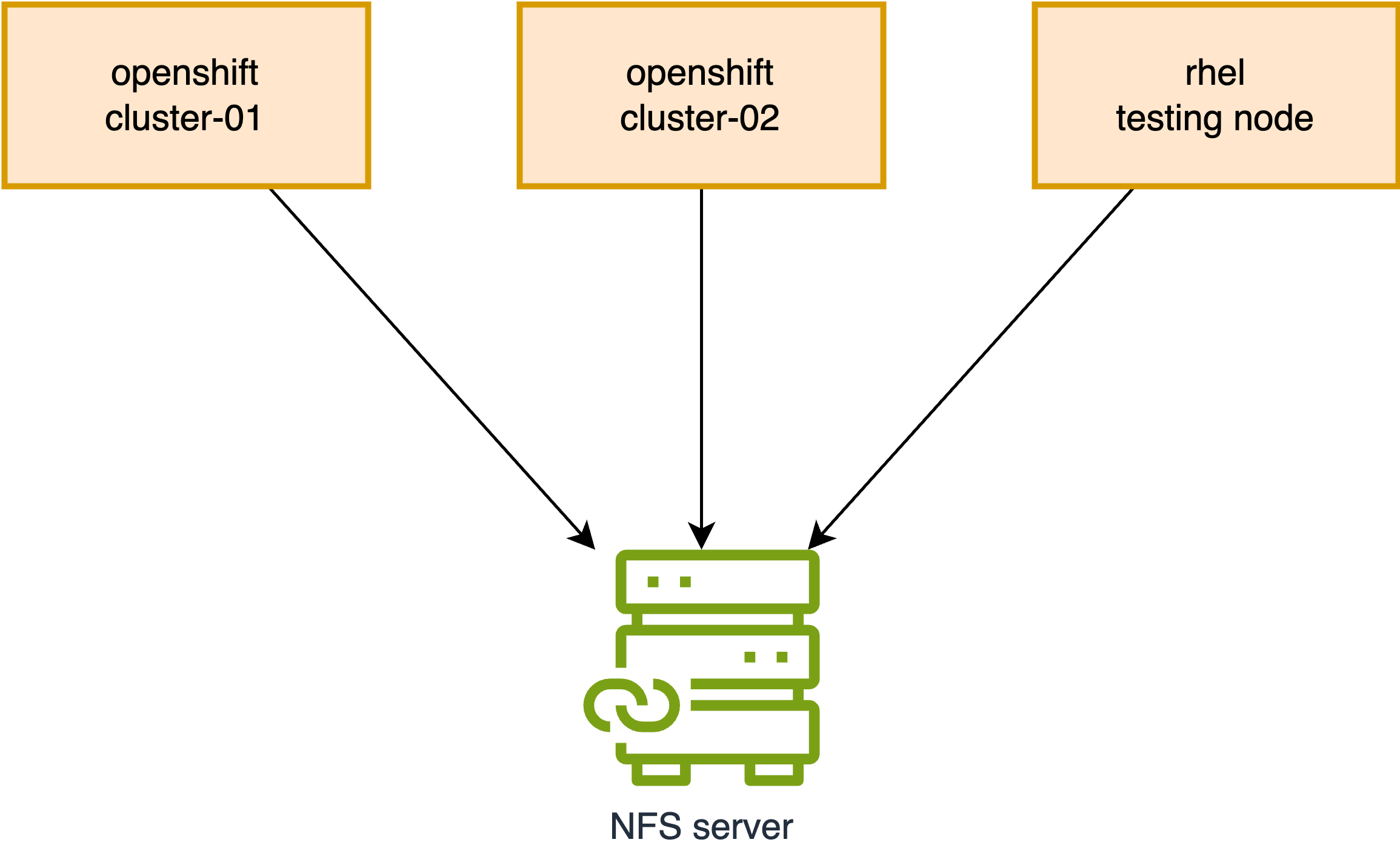
Reproducing the Problem
First, let’s reproduce the permission issue. We will create a new folder on the NFS server, which will serve as our target NFS directory for testing.
# Execute on the NFS Server
sudo mkdir -p /srv/nfs/static/pv-01
sudo chmod 777 /srv/nfs/static/pv-01
sudo chown nobody:nobody /srv/nfs/static/pv-01
On Cluster-01
Next, we will create a Persistent Volume (PV), Persistent Volume Claim (PVC), and a Pod on Cluster-01 to write data to the NFS folder.
oc new-project demo

# Optional: Uncomment to enforce or remove pod security enforcement
# oc label namespace demo pod-security.kubernetes.io/enforce=restricted --overwrite
# oc label namespace demo pod-security.kubernetes.io/enforce-


# Delete existing local-sc.yaml if it exists
# oc delete -f $BASE_DIR/data/install/local-sc.yaml
cat << EOF > ${BASE_DIR}/data/install/local-sc.yaml
kind: StorageClass
apiVersion: storage.k8s.io/v1
metadata:
  name: free-volume
provisioner: kubernetes.io/no-provisioner
volumeBindingMode: Immediate # WaitForFirstConsumer
reclaimPolicy: Retain
EOF
oc apply -f ${BASE_DIR}/data/install/local-sc.yaml


# Delete existing nfs-pv.yaml if it exists
# oc delete -f $BASE_DIR/data/install/nfs-pv.yaml
cat << EOF > $BASE_DIR/data/install/nfs-pv.yaml
apiVersion: v1
kind: PersistentVolume
metadata:
  name: nfs-shared-pv
spec:
  capacity:
    storage: 1Gi
  accessModes:
    - ReadWriteMany
  persistentVolumeReclaimPolicy: Retain
  nfs:
    server: "192.168.99.1"
    path: "/srv/nfs/static/pv-01"
  storageClassName: "free-volume"
EOF

oc apply -f $BASE_DIR/data/install/nfs-pv.yaml


# Delete existing nfs-pvc.yaml if it exists
# oc delete -n demo -f $BASE_DIR/data/install/nfs-pvc.yaml
cat << EOF > $BASE_DIR/data/install/nfs-pvc.yaml
apiVersion: v1
kind: PersistentVolumeClaim
metadata:
  name: primary-site-pvc
spec:
  accessModes:
    - ReadWriteMany
  resources:
    requests:
      storage: 1Gi
  volumeName: nfs-shared-pv
  storageClassName: "free-volume"
EOF

oc apply -n demo -f $BASE_DIR/data/install/nfs-pvc.yaml


# Delete existing nfs-primary-pod.yaml if it exists
# oc delete -n demo -f $BASE_DIR/data/install/nfs-primary-pod.yaml
cat << 'EOF' > $BASE_DIR/data/install/nfs-primary-pod.yaml
apiVersion: v1
kind: Pod
metadata:
  name: primary-pod
spec:
  containers:
  - name: primary-container
    image: registry.access.redhat.com/ubi8/ubi-minimal # Using a non-root UBI image
    command: ["/bin/sh", "-c"]
    args:
      - |
        echo "Primary pod is running. Current user ID is $(id -u)."
        echo "Creating file from primary site..."
        touch /data/testfile.txt
        echo "Hello from Primary Site" > /data/testfile.txt
        echo "File created. Checking ownership (numeric ID)..."
        ls -ln /data/testfile.txt
        echo "Primary pod has finished its work and is now sleeping."
        sleep 3600
    securityContext:
      seccompProfile:
        type: RuntimeDefault
    volumeMounts:
    - name: nfs-storage
      mountPath: /data
  volumes:
  - name: nfs-storage
    persistentVolumeClaim:
      claimName: primary-site-pvc
EOF

oc apply -n demo -f $BASE_DIR/data/install/nfs-primary-pod.yaml

oc logs primary-pod -n demo
# Expected Output:
# Primary pod is running. Current user ID is 1000800000.
# Creating file from primary site...
# File created. Checking ownership (numeric ID)...
# -rw-r--r--. 1 1000800000 0 24 Jul 30 15:43 /data/testfile.txt
# Primary pod has finished its work and is now sleeping.

oc delete pod primary-pod -n demo
oc delete pvc primary-site-pvc -n demo
As observed, the pod runs with UID 1000800000,
and the file is successfully written.
Now, let’s verify this on the NFS server:
ls -ln /srv/nfs/static/pv-01/
# Expected Output:
# -rw-r--r--. 1 1000800000 0 24 Jul 30 15:43 testfile.txt
On Cluster-02
Next, we will create a PV, PVC, and a Pod on Cluster-02 to attempt writing to the same NFS folder.
oc new-project demo

# Optional: Uncomment to enforce or remove pod security enforcement
# oc label namespace demo pod-security.kubernetes.io/enforce=restricted --overwrite
# oc label namespace demo pod-security.kubernetes.io/enforce-


# Delete existing local-sc.yaml if it exists
# oc delete -f $BASE_DIR/data/install/local-sc.yaml
cat << EOF > ${BASE_DIR}/data/install/local-sc.yaml
kind: StorageClass
apiVersion: storage.k8s.io/v1
metadata:
  name: free-volume
provisioner: kubernetes.io/no-provisioner
volumeBindingMode: Immediate # WaitForFirstConsumer
reclaimPolicy: Retain
EOF
oc apply -f ${BASE_DIR}/data/install/local-sc.yaml


# Delete existing nfs-pv.yaml if it exists
# oc delete -f $BASE_DIR/data/install/nfs-pv.yaml
cat << EOF > $BASE_DIR/data/install/nfs-pv.yaml
apiVersion: v1
kind: PersistentVolume
metadata:
  name: nfs-shared-pv
spec:
  capacity:
    storage: 1Gi
  accessModes:
    - ReadWriteMany
  persistentVolumeReclaimPolicy: Retain
  nfs:
    server: "192.168.99.1"
    path: "/srv/nfs/static/pv-01"
  storageClassName: "free-volume"
EOF

oc apply -f $BASE_DIR/data/install/nfs-pv.yaml


# Delete existing nfs-pvc.yaml if it exists
# oc delete -n demo -f $BASE_DIR/data/install/nfs-pvc.yaml
cat << EOF > $BASE_DIR/data/install/nfs-pvc.yaml
apiVersion: v1
kind: PersistentVolumeClaim
metadata:
  name: dr-site-pvc
  namespace: demo
spec:
  accessModes:
    - ReadWriteMany
  resources:
    requests:
      storage: 1Gi
  volumeName: nfs-shared-pv
  storageClassName: "free-volume"
EOF

oc apply -n demo -f $BASE_DIR/data/install/nfs-pvc.yaml


# Delete existing nfs-primary-pod.yaml if it exists
# oc delete -n demo -f $BASE_DIR/data/install/nfs-primary-pod.yaml
cat << 'EOF' > $BASE_DIR/data/install/nfs-primary-pod.yaml
apiVersion: v1
kind: Pod
metadata:
  name: dr-pod
  namespace: demo
spec:
  containers:
  - name: dr-container
    image: registry.access.redhat.com/ubi8/ubi-minimal # Also using a UBI image
    command: ["/bin/sh", "-c"]
    args:
      - |
        echo "DR pod is running. Current user ID is $(id -u)."
        echo "Checking original file ownership..."
        ls -ln /data/testfile.txt
        echo "Attempting to append data to testfile.txt..."
        # Use sh -c to correctly handle redirection and error capture
        sh -c "echo 'Data from DR Site' >> /data/testfile.txt"
        if [ $? -eq 0 ]; then
          echo "✅ SUCCESS: Write completed. This should not happen."
        else
          echo "❌ FAILURE: Permission denied as expected."
        fi
        sleep 3600
    securityContext:
      seccompProfile:
        type: RuntimeDefault
    volumeMounts:
    - name: nfs-storage
      mountPath: /data
  volumes:
  - name: nfs-storage
    persistentVolumeClaim:
      claimName: dr-site-pvc
EOF

oc apply -n demo -f $BASE_DIR/data/install/nfs-primary-pod.yaml

oc logs dr-pod -n demo
# Expected Output:
# DR pod is running. Current user ID is 1000790000.
# Checking original file ownership...
# -rw-r--r--. 1 1000800000 0 42 Jul 30 15:49 /data/testfile.txt
# Attempting to append data to testfile.txt...
# sh: /data/testfile.txt: Permission denied
# ❌ FAILURE: Permission denied as expected.
Here, the pod runs with UID 1000790000, and the
file write operation fails as expected due to permission
issues.
Verifying on the NFS server:
ls -ln /srv/nfs/static/pv-01/
# Expected Output:
# -rw-r--r--. 1 1000800000 0 42 Jul 30 15:49 testfile.txt
Fixing the Issue on OpenShift
Now that we have reproduced the problem, let’s fix it on OpenShift.
We will use the securityContext settings
runAsUser and runAsGroup to precisely
control the user and group IDs of the process running inside the
container. To manage shared storage permissions, we will also
set the fsGroup. This setting ensures that the
Kubernetes runtime makes the volume’s contents readable and
writable by the specified group ID.
[!NOTE] Using
fsGroupon a volume with a large number of files (millions) can significantly delay pod startup. When a volume is mounted, Kubernetes recursively changes the ownership of every file and directory to match thefsGroupGID. This process can be time-consuming for large volumes.https://access.redhat.com/solutions/6221251
First, we will create another folder on the NFS server. This time, we will set more restrictive permissions.
# Execute on the NFS Server
mkdir -p /srv/nfs/static/pv-02

sudo chown 1001:2002 /srv/nfs/static/
sudo chmod 770 /srv/nfs/static/

sudo chown 1001:2002 /srv/nfs/static/pv-02
sudo chmod 770 /srv/nfs/static/pv-02
On Cluster-01 (with fix)
Next, on Cluster-01, we will create the PV, PVC, and Pod again, incorporating the fix.
oc new-project demo

# Optional: Uncomment to enforce or remove pod security enforcement
# oc label namespace demo pod-security.kubernetes.io/enforce=restricted --overwrite
# oc label namespace demo pod-security.kubernetes.io/enforce-


# Delete existing local-sc.yaml if it exists
# oc delete -f $BASE_DIR/data/install/local-sc.yaml
cat << EOF > ${BASE_DIR}/data/install/local-sc.yaml
kind: StorageClass
apiVersion: storage.k8s.io/v1
metadata:
  name: free-volume
provisioner: kubernetes.io/no-provisioner
volumeBindingMode: Immediate # WaitForFirstConsumer
reclaimPolicy: Retain
EOF
oc apply -f ${BASE_DIR}/data/install/local-sc.yaml


# Delete existing nfs-pv.yaml if it exists
# oc delete -f $BASE_DIR/data/install/nfs-pv.yaml
cat << EOF > $BASE_DIR/data/install/nfs-pv.yaml
apiVersion: v1
kind: PersistentVolume
metadata:
  name: nfs-shared-pv
spec:
  capacity:
    storage: 1Gi
  accessModes:
    - ReadWriteMany
  persistentVolumeReclaimPolicy: Retain
  nfs:
    server: "192.168.99.1"
    path: "/srv/nfs/static/pv-02"
  storageClassName: "free-volume"
EOF

oc apply -f $BASE_DIR/data/install/nfs-pv.yaml


# Delete existing nfs-pvc.yaml if it exists
# oc delete -n demo -f $BASE_DIR/data/install/nfs-pvc.yaml
cat << EOF > $BASE_DIR/data/install/nfs-pvc.yaml
apiVersion: v1
kind: PersistentVolumeClaim
metadata:
  name: primary-site-pvc
spec:
  accessModes:
    - ReadWriteMany
  resources:
    requests:
      storage: 1Gi
  volumeName: nfs-shared-pv
  storageClassName: "free-volume"
EOF

oc apply -n demo -f $BASE_DIR/data/install/nfs-pvc.yaml


# Delete existing nfs-primary-pod.yaml if it exists
# oc delete -n demo -f $BASE_DIR/data/install/nfs-primary-pod.yaml
cat << 'EOF' > $BASE_DIR/data/install/nfs-primary-pod.yaml
apiVersion: v1
kind: Pod
metadata:
  name: primary-pod
spec:
  securityContext:
    fsGroup: 2002
    seccompProfile:
      type: RuntimeDefault
  containers:
  - name: primary-container
    image: registry.access.redhat.com/ubi8/ubi-minimal # Using a non-root UBI image
    command: ["/bin/sh", "-c"]
    args:
      - |
        echo "Primary pod is running. Current user ID is $(id -u)."
        echo "Creating file from primary site..."
        touch /data/testfile.txt
        echo "Hello from Primary Site" > /data/testfile.txt
        echo "File created. Checking ownership (numeric ID)..."
        ls -ln /data/testfile.txt
        echo "Primary pod has finished its work and is now sleeping."
        sleep 3600
    securityContext:
      runAsUser: 1001
      runAsGroup: 2002
      # fsGroup: 2002 # Ensure fsGroup matches GID
    volumeMounts:
    - name: nfs-storage
      mountPath: /data
  volumes:
  - name: nfs-storage
    persistentVolumeClaim:
      claimName: primary-site-pvc
EOF

oc apply -n demo -f $BASE_DIR/data/install/nfs-primary-pod.yaml

oc logs primary-pod -n demo
# Expected Output:
# Primary pod is running. Current user ID is 1001.
# Creating file from primary site...
# File created. Checking ownership (numeric ID)...
# -rw-r--r--. 1 1001 2002 24 Jul 31 03:46 /data/testfile.txt
# Primary pod has finished its work and is now sleeping.
We can see that the pod is now running with UID
1001, and the file is successfully written.
Now, let’s check on the NFS server:
ls -hln /srv/nfs/static/pv-02
# Expected Output:
# total 4.0K
# -rw-r--r--. 1 1001 2002 24 Jul 31 03:46 testfile.txt

ls -hln /srv/nfs/static
# Expected Output:
# drwxrwx---. 2  1001  2002 26 Jul 31 03:46 pv-02
The file on NFS now has UID 1001 and GID
2002, aligning with the
securityContext settings.
On Cluster-02 (with fix)
Next, on Cluster-02, we will create the PV, PVC, and Pod again, using the corrected configuration.
oc new-project demo

# Optional: Uncomment to enforce or remove pod security enforcement
# oc label namespace demo pod-security.kubernetes.io/enforce=restricted --overwrite
# oc label namespace demo pod-security.kubernetes.io/enforce-


# Delete existing local-sc.yaml if it exists
# oc delete -f $BASE_DIR/data/install/local-sc.yaml
cat << EOF > ${BASE_DIR}/data/install/local-sc.yaml
kind: StorageClass
apiVersion: storage.k8s.io/v1
metadata:
  name: free-volume
provisioner: kubernetes.io/no-provisioner
volumeBindingMode: Immediate # WaitForFirstConsumer
reclaimPolicy: Retain
EOF
oc apply -f ${BASE_DIR}/data/install/local-sc.yaml


# Delete existing nfs-pv.yaml if it exists
# oc delete -f $BASE_DIR/data/install/nfs-pv.yaml
cat << EOF > $BASE_DIR/data/install/nfs-pv.yaml
apiVersion: v1
kind: PersistentVolume
metadata:
  name: nfs-shared-pv
spec:
  capacity:
    storage: 1Gi
  accessModes:
    - ReadWriteMany
  persistentVolumeReclaimPolicy: Retain
  nfs:
    server: "192.168.99.1"
    path: "/srv/nfs/static/pv-02"
  storageClassName: "free-volume"
EOF

oc apply -f $BASE_DIR/data/install/nfs-pv.yaml


# Delete existing nfs-pvc.yaml if it exists
# oc delete -n demo -f $BASE_DIR/data/install/nfs-pvc.yaml
cat << EOF > $BASE_DIR/data/install/nfs-pvc.yaml
apiVersion: v1
kind: PersistentVolumeClaim
metadata:
  name: dr-site-pvc
  namespace: demo
spec:
  accessModes:
    - ReadWriteMany
  resources:
    requests:
      storage: 1Gi
  volumeName: nfs-shared-pv
  storageClassName: "free-volume"
EOF

oc apply -n demo -f $BASE_DIR/data/install/nfs-pvc.yaml


# Delete existing nfs-primary-pod.yaml if it exists
# oc delete -n demo -f $BASE_DIR/data/install/nfs-primary-pod.yaml
cat << 'EOF' > $BASE_DIR/data/install/nfs-primary-pod.yaml
apiVersion: v1
kind: Pod
metadata:
  name: dr-pod
  namespace: demo
spec:
  securityContext:
    fsGroup: 2002
    seccompProfile:
      type: RuntimeDefault
  containers:
  - name: dr-container
    image: registry.access.redhat.com/ubi8/ubi-minimal # Also using a UBI image
    command: ["/bin/sh", "-c"]
    args:
      - |
        echo "DR pod is running. Current user ID is $(id -u)."
        echo "Checking original file ownership..."
        ls -ln /data/testfile.txt
        echo "Attempting to append data to testfile.txt..."
        # Use sh -c to correctly handle redirection and error capture
        sh -c "echo 'Data from DR Site' >> /data/testfile.txt"
        if [ $? -eq 0 ]; then
          echo "✅ SUCCESS: Write completed. This should not happen."
        else
          echo "❌ FAILURE: Permission denied as expected."
        fi
        sleep 3600
    securityContext:
      runAsUser: 1001
      runAsGroup: 2002
      # fsGroup: 2002 # Ensure fsGroup matches GID
    volumeMounts:
    - name: nfs-storage
      mountPath: /data
  volumes:
  - name: nfs-storage
    persistentVolumeClaim:
      claimName: dr-site-pvc
EOF

oc apply -n demo -f $BASE_DIR/data/install/nfs-primary-pod.yaml

oc logs dr-pod -n demo
# Expected Output:
# DR pod is running. Current user ID is 1001.
# Checking original file ownership...
# -rw-r--r--. 1 1001 2002 24 Jul 31 03:46 /data/testfile.txt
# Attempting to append data to testfile.txt...
# ✅ SUCCESS: Write completed. This should not happen.
This time, the write operation from the DR site is successful.
Mounting on a RHEL Node
We have addressed the issue on OpenShift, but what if the NFS folder is shared with a RHEL node? Let’s test this scenario.
# Prepare the RHEL Node (Install NFS Utilities)
sudo dnf install -y nfs-utils

# Create a Local Mount Point
sudo mkdir /mnt/ocp_nfs_share

# Mount the NFS Share
sudo mount -t nfs 192.168.99.1:/srv/nfs/static/pv-02 /mnt/ocp_nfs_share

# Verify that the mount was successful:
df -h | grep ocp_nfs_share
# Expected Output:
# 192.168.99.1:/srv/nfs/static/pv-02  500G  3.6G  497G   1% /mnt/ocp_nfs_share


# Create a group with GID 2002
sudo groupadd -g 2002 ocp_nfs_group

# Create a user with UID 1001 and assign it to the new group
sudo useradd -u 1001 -g 2002 ocp_nfs_user


# Switch to the ocp_nfs_user
sudo su - ocp_nfs_user

# You can now list the files
ls -l /mnt/ocp_nfs_share/
# Expected Output:
# -rw-r--r--. 1 ocp_nfs_user ocp_nfs_group 42 Jul 31 14:14 testfile.txt

# Read the file content
cat /mnt/ocp_nfs_share/testfile.txt
# Expected Output:
# Hello from Primary Site
# Data from DR Site

# Append new content to the file (this will succeed)
echo "This was written from the RHEL node" >> /mnt/ocp_nfs_share/testfile.txt

# Verify the new content
cat /mnt/ocp_nfs_share/testfile.txt
# Expected Output:
# Hello from Primary Site
# Data from DR Site
# This was written from the RHEL node

# Exit from the user's shell
exit

# Optional: Uncomment to unmount the NFS share
# sudo umount /mnt/ocp_nfs_share
Let’s try with another user in the same group.
# Create a new user with a different UID, e.g., 1005
sudo useradd -u 1005 -g 2002 another_nfs_user

# Switch to the new user
sudo su - another_nfs_user


# 1. Reading the file (This will SUCCEED) ✅
cat /mnt/ocp_nfs_share/testfile.txt
# Expected Output:
# Hello from Primary Site
# Data from DR Site
# This was written from the RHEL node

# 2. Modifying the file (This will FAIL) ❌
echo "Trying to write" >> /mnt/ocp_nfs_share/testfile.txt
# Expected Output: bash: /mnt/ocp_nfs_share/testfile.txt: Permission denied

# 3. Creating a new file in the directory (This will SUCCEED) ✅
touch /mnt/ocp_nfs_share/new_file_from_another_user.txt

ls -ln /mnt/ocp_nfs_share/
# Expected Output:
# -rw-r--r--. 1 1005 2002  0 Jul 31 14:41 new_file_from_another_user.txt
# -rw-r--r--. 1 1001 2002 78 Jul 31 14:41 testfile.txt
Demonstrating
the Difference: runAsGroup
vs. supplementalGroups
To illustrate the practical differences between
runAsGroup and supplementalGroups,
let’s conduct an experiment.
Preparation on the NFS Server
First, we’ll create a new directory and a file on the NFS server with specific ownership and permissions.
# Execute on the NFS Server
sudo mkdir -p /srv/nfs/static/pv-03
sudo chown 1003:3003 /srv/nfs/static/pv-03
sudo chmod 770 /srv/nfs/static/pv-03
echo "group data" | sudo tee /srv/nfs/static/pv-03/group-data.txt
sudo chown 1003:3003 /srv/nfs/static/pv-03/group-data.txt
sudo chmod 660 /srv/nfs/static/pv-03/group-data.txt
1. Testing with
runAsGroup
We will create a pod that runs with
runAsUser: 1003 and a primary
runAsGroup that does not have permissions to the
file.
# Create a new PV for this test
cat << EOF > $BASE_DIR/data/install/nfs-pv-03.yaml
apiVersion: v1
kind: PersistentVolume
metadata:
  name: nfs-shared-pv-03
spec:
  capacity:
    storage: 1Gi
  csi:
    driver: nfs.csi.k8s.io
    volumeHandle: 192.168.99.1#static#pv-03## # Make sure to point to nfs02
    volumeAttributes:
      server: 192.168.99.1
      share: /static # Make sure to point to nfs02
      subdir: pv-03
  accessModes:
    - ReadWriteMany
  persistentVolumeReclaimPolicy: Retain # Key point 1: Set to Retain
  storageClassName: nfs-csi
  mountOptions:
    - hard
    - nfsvers=4.2
  volumeMode: Filesystem
EOF
oc apply -f $BASE_DIR/data/install/nfs-pv-03.yaml

# Create a new PVC
cat << EOF > $BASE_DIR/data/install/nfs-pvc-03.yaml
apiVersion: v1
kind: PersistentVolumeClaim
metadata:
  name: test-pvc-03
  namespace: demo
spec:
  accessModes:
    - ReadWriteMany
  resources:
    requests:
      storage: 1Gi
  volumeName: nfs-shared-pv-03
  storageClassName: "nfs-csi"
EOF
oc apply -n demo -f $BASE_DIR/data/install/nfs-pvc-03.yaml

# Create the pod
cat << 'EOF' > $BASE_DIR/data/install/pod-runasgroup.yaml
apiVersion: v1
kind: Pod
metadata:
  name: runasgroup-pod
  namespace: demo
spec:
  securityContext:
    seccompProfile:
      type: RuntimeDefault
  containers:
  - name: test-container
    image: registry.access.redhat.com/ubi8/ubi-minimal
    command: ["/bin/sh", "-c"]
    args:
      - |
        echo "Running with UID $(id -u) and GID $(id -g)"
        echo "Groups: $(id -G)"
        echo "---"
        echo "Attempting to read /data/group-data.txt..."
        if cat /data/group-data.txt; then
          echo "✅ SUCCESS: Read completed."
        else
          echo "❌ FAILURE: Permission denied."
        fi
        ls -ln /data/group-data.txt
        echo "---"
        echo "Attempting to create a new file /data/new-file.txt..."
        touch /data/new-file.txt
        echo "File created. Checking ownership..."
        ls -ln /data/new-file.txt
        sleep 3600
    securityContext:
      runAsUser: 1003
      runAsGroup: 4004 # A different primary group
    volumeMounts:
    - name: nfs-storage
      mountPath: /data
  volumes:
  - name: nfs-storage
    persistentVolumeClaim:
      claimName: test-pvc-03
EOF
oc apply -n demo -f $BASE_DIR/data/install/pod-runasgroup.yaml

oc logs runasgroup-pod -n demo
# Expected Output:
# Running with UID 1003 and GID 4004
# Groups: 4004
# ---
# Attempting to read /data/group-data.txt...
# group data
# ✅ SUCCESS: Read completed.
# -rw-rw----. 1 1003 3003 11 Aug 26 10:36 /data/group-data.txt
# ---
# Attempting to create a new file /data/new-file.txt...
# File created. Checking ownership...
# -rw-r--r--. 1 1003 4004 0 Aug 26 10:57 /data/new-file.txt
The read fails because the process’s primary group (4004) does not have permission to read the file, which is owned by group 3003.
2. Testing with
supplementalGroups
Now, let’s add the required group (3003) to
supplementalGroups.
# remove the /data/new-file.txt from nfs server
sudo rm /srv/nfs/static/pv-03/new-file.txt

# Create the pod with supplementalGroups
cat << 'EOF' > $BASE_DIR/data/install/pod-supplementalgroups.yaml
apiVersion: v1
kind: Pod
metadata:
  name: supplementalgroups-pod
  namespace: demo
spec:
  securityContext:
    supplementalGroups: [3003]
    seccompProfile:
      type: RuntimeDefault
  containers:
  - name: test-container
    image: registry.access.redhat.com/ubi8/ubi-minimal
    command: ["/bin/sh", "-c"]
    args:
      - |
        echo "Running with UID $(id -u) and GID $(id -g)"
        echo "Groups: $(id -G)"
        echo "---"
        echo "Attempting to read /data/group-data.txt..."
        if cat /data/group-data.txt; then
          echo "✅ SUCCESS: Read completed."
        else
          echo "❌ FAILURE: Permission denied."
        fi
        echo "---"
        echo "Attempting to create a new file /data/new-file.txt..."
        touch /data/new-file.txt
        echo "File created. Checking ownership..."
        ls -ln /data/new-file.txt
        sleep 3600
    securityContext:
      runAsUser: 1003
      runAsGroup: 4004 # Still a different primary group
    volumeMounts:
    - name: nfs-storage
      mountPath: /data
  volumes:
  - name: nfs-storage
    persistentVolumeClaim:
      claimName: test-pvc-03
EOF
oc apply -n demo -f $BASE_DIR/data/install/pod-supplementalgroups.yaml

oc logs supplementalgroups-pod -n demo
# Expected Output:
# Running with UID 1003 and GID 4004
# Groups: 4004 3003
# ---
# Attempting to read /data/group-data.txt...
# group data
# ✅ SUCCESS: Read completed.
# ---
# Attempting to create a new file /data/new-file.txt...
# File created. Checking ownership...
# -rw-r--r--. 1 1003 4004 0 Aug 26 11:03 /data/new-file.txt
This time, the read succeeds because the process is a member
of the supplemental group 3003. However, when a new
file is created, its group owner is 4004, which is
the primary group specified by runAsGroup, not the
supplemental group. This clearly illustrates that
supplementalGroups grants access but does not
affect the ownership of newly created files.
Comparison
of supplementalGroups and
runAsGroup
In Kubernetes, both runAsGroup and
supplementalGroups are security context settings
that control group permissions for processes running in a
container. However, they serve different purposes.
runAsGroup
- Purpose: Specifies the primary group ID (GID) for all processes within the container.
- Behavior: When a container starts, its main process is assigned this GID as its primary group. Any files created by this process will, by default, have this GID as their group owner.
- Scope: It can be set at both the Pod level
(
spec.securityContext.runAsGroup) and the Container level (spec.containers[*].securityContext.runAsGroup). The container-level setting takes precedence.
supplementalGroups
- Purpose: Specifies a list of additional group IDs to be added to the process’s group memberships.
- Behavior: The process becomes a member of these groups in addition to its primary group. This grants the process permissions associated with these supplementary groups, allowing it to read, write, or execute files owned by any of these groups (depending on the file permissions).
- Scope: It can only be set at the Pod level
(
spec.securityContext.supplementalGroups).
Key Differences
| Feature | runAsGroup |
supplementalGroups |
|---|---|---|
| Function | Sets the primary group ID (GID) of the process. | Adds additional group IDs to the process. |
| Value Type | A single integer (GID). | An array of integers (GIDs). |
| Default Ownership | Files created by the process will have this GID. | Does not affect the default group ownership of new files. |
| Scope | Pod or Container level. | Pod level only. |
| Common Use Case | Enforcing a specific primary group for the containerized process. | Granting access to shared resources owned by multiple groups. |
Summary
- Use
runAsGroupwhen you need to define the primary identity of the process in terms of group ownership. This is fundamental for determining the default group for newly created files. - Use
supplementalGroupswhen a process needs to access files or resources owned by multiple different groups, without changing its primary group identity.
It’s important to note that fsGroup is related
but distinct. fsGroup is a pod-level setting that
ensures all files within a volume are owned by a specific group
ID, and it also adds that group ID to the supplemental groups of
the pod’s containers. This is particularly useful for shared
storage where you need to guarantee group-level access to the
volume.
End
Debugging Information
```bash oc auth can-i use scc/anyuid –as=system:serviceaccount:demo:default -n demo Warning: resource ‘securitycontextconstraints’ is not namespace scoped in group ‘security.openshift.io’ # Output: no
oc auth can-i use scc/restricted-v2 –as=system:serviceaccount:demo:default -n demo Warning: resource ‘securitycontextconstraints’ is not namespace scoped in group ‘security.openshift.io’ # Output: yes
oc get mutatingwebhookconfigurations # Output (example, may vary): # NAME WEBHOOKS AGE # catalogd-mutating-webhook-configuration 1 5d # cdi-api-datavolume-mutate 1 4d23h # cdi-api-pvc-mutate 1 4d23h # kubemacpool-mutator 2 4d23h # kubevirt-ipam-controller-mutating-webhook-configuration 1 4d23h # machine-api 2 5d # machine-api-metal3-remediation 2 5d # mutate-hyperconverged-hco.kubevirt.io-2nnh2 1 4h24m # mutate-ns-hco.kubevirt.io-txcvn 1 4h24m # virt-api-mutator 4 4d23h
oc get validatingwebhookconfigurations # Output (example, may vary): # NAME WEBHOOKS AGE # alertmanagerconfigs.openshift.io 1 5d # autoscaling.openshift.io 2 5d # baremetal-operator-validating-webhook-configuration 2 5d # cluster-baremetal-validating-webhook-configuration 1 5d # controlplanemachineset.machine.openshift.io 1 5d # machine-api 2 5d # machine-api-metal3-remediation 2 5d # monitoringconfigmaps.openshift.io 1 5d # multus.openshift.io 1 5d # network-node-identity.openshift.io 2 5d # performance-addon-operator 1 5d # prometheusrules.openshift.io 1 5d
Delete existing nfs-primary-pod.yaml if it exists
oc delete -n demo -f $BASE_DIR/data/install/nfs-primary-pod.yaml
cat << ‘EOF’ > $BASE_DIR/data/install/nfs-primary-pod.yaml apiVersion: v1 kind: Pod metadata: name: primary-pod-01 spec: containers: - name: primary-container image: registry.access.redhat.com/ubi8/ubi-minimal command: [“/bin/sh”, “-c”] args: - | echo “Primary pod is running. Current user ID is $(id -u).” echo “Creating file from primary site…” touch /data/testfile.txt echo “Hello from Primary Site” > /data/testfile.txt echo “File created. Checking ownership (numeric ID)…” ls -ln /data/testfile.txt echo “Primary pod has finished its work and is now sleeping.” sleep 3600 securityContext: # allowPrivilegeEscalation: false # capabilities: # drop: # - ALL # runAsNonRoot: true seccompProfile: type: RuntimeDefault volumeMounts: - name: nfs-storage mountPath: /data volumes: - name: nfs-storage emptyDir: {} EOF
oc apply -n demo -f $BASE_DIR/data/install/nfs-primary-pod.yaml