Implementing Layer 4 Switch as Ingress Gateway for OpenShift: Challenges and Solutions
1. Executive Summary
In standard enterprise OpenShift deployments, utilizing a
Layer 7 (L7) Load Balancer in front of the OpenShift Router
(Ingress Controller) is the recommended best practice. L7 Load
Balancers can inspect application-layer data, allowing them to
query specific health endpoints (e.g.,
HTTP GET /healthz/ready). This ensures traffic is
distributed only to router pods that are fully initialized and
capable of processing requests.
However, real-world infrastructure constraints often dictate the use of Layer 4 (L4) switches. Unlike their L7 counterparts, L4 switches operate at the transport layer and typically rely on simple TCP connection attempts (SYN/ACK) to determine backend availability. This limitation creates a critical race condition during router pod lifecycles (scaling, restarts, or upgrades):
- Premature Traffic Routing: When a new Router Pod starts, the container’s network stack and operating system immediately open the listening ports (80/443).
- False Positive Health Check: The L4 switch detects the open TCP port and immediately marks the backend as “UP”.
- Service Unavailability: The application layer (HAProxy) within the pod may still be initializing (loading certificates, parsing configurations) and is not yet ready to serve traffic.
- Request Failures: Client traffic routed to this unready pod results in connection resets or HTTP 503 errors.
To overcome this limitation without requiring costly infrastructure upgrades to L7 hardware, we present a solution: the “Sidecar Health Check Translator”. This architecture introduces a lightweight daemon that bridges the gap between the Router’s internal L7 status and the L4 switch’s TCP-based expectations.
2. Technical Architecture & Solution Design
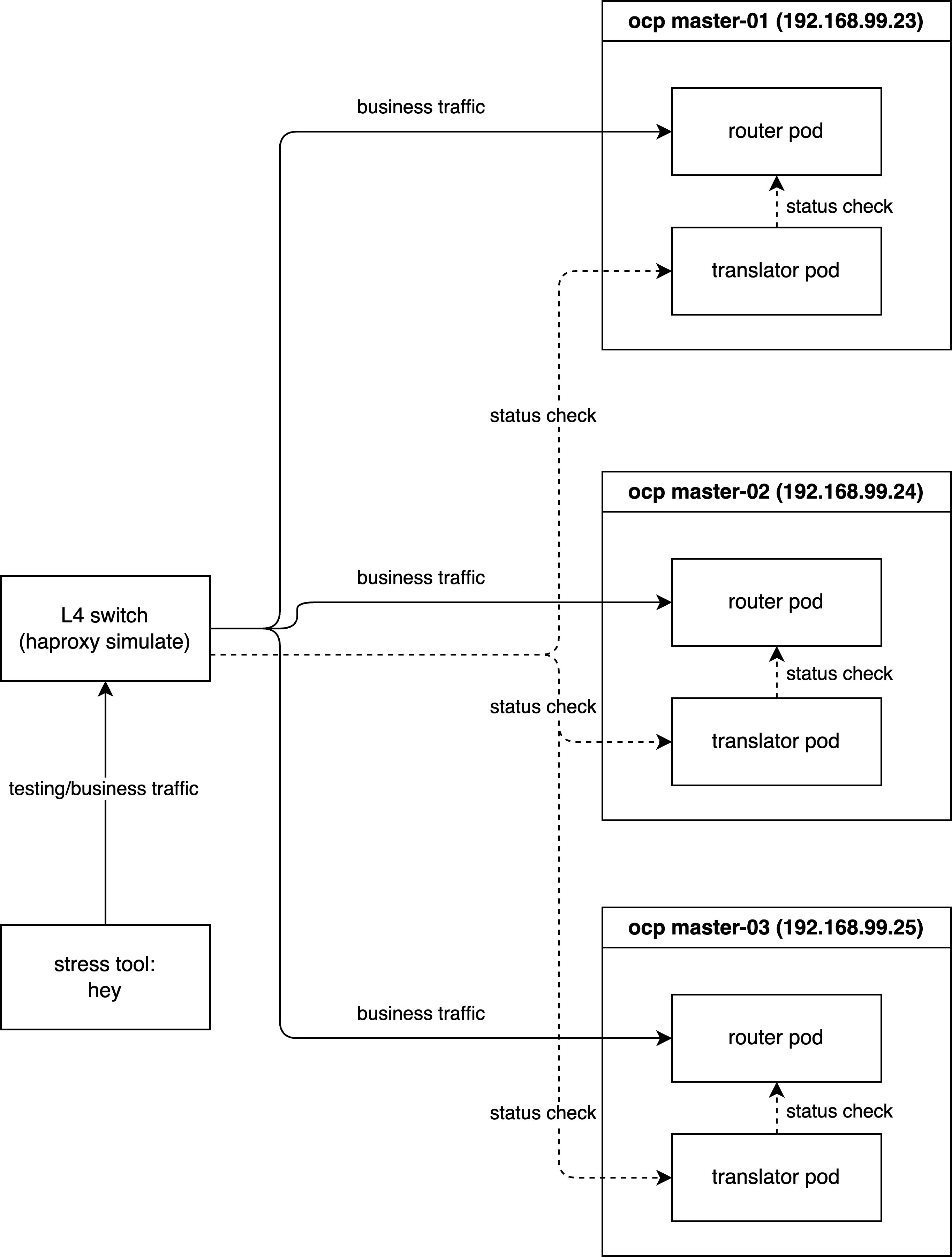
The proposed solution deploys a daemon (DaemonSet) on every node hosting an OpenShift Router. This “Sidecar” agent acts as a proxy for health status.
Functional Logic
- Monitor (L7): The daemon continuously polls
the local Router’s application health endpoint
(
http://localhost:1936/healthz/ready). - Translate (Logic):
- Healthy State: If the router returns
200 OK, the daemon opens a dedicated TCP port (e.g.,18898) on the host. - Unhealthy State: If the router returns any
error or times out, the daemon actively closes or refuses
connections on port
18898.
- Healthy State: If the router returns
- Route (L4): The external L4 switch is
configured to perform its TCP health check against this
Translator Port (
18898) instead of the traffic ports (80/443). Traffic is only forwarded to the node when the Translator Port is open, confirming that the underlying Router application is truly ready.
Workflow Diagram
sequenceDiagram
    participant LB as External L4 Load Balancer
    participant Agent as Health Check Translator<br/>Sidecar DaemonSet
    participant Router as OpenShift Router<br/>HAProxy

    Note over Agent, Router: Continuous Loop Monitoring
    Agent->>Router: HTTP GET /healthz/ready
    alt Router is Healthy 200 OK
        Router-->>Agent: 200 OK
        Agent->>Agent: Open TCP Port 18898
    else Router is Unhealthy
        Router-->>Agent: Error or Timeout
        Agent->>Agent: Close TCP Port 18898
    end

    Note over LB, Agent: L4 Health Check Process
    LB->>Agent: TCP SYN to Port 18898
    alt Port Open
        Agent-->>LB: TCP SYN-ACK
        LB->>LB: Mark Backend UP
        LB->>Router: Forward User Traffic Port 80 443
    else Port Closed
        Agent-->>LB: TCP RST or No Response
        LB->>LB: Mark Backend DOWN
        LB->>LB: Stop Routing Traffic
    end
3. Simulation Environment & Verification
To rigorously validate this solution, we will simulate the environment using a local HAProxy instance acting as the external Load Balancer. The verification is conducted in three phases:
- Phase 1 (Baseline): Establishing the ideal behavior using L7 health checks.
- Phase 2 (Problem Reproduction): Demonstrating the failure mode with standard L4 checks.
- Phase 3 (Solution Verification): Proving the efficacy of the L4 Health Check Translator.
Demo Deployment Architecture:
3.1 Phase 1: Baseline with Layer 7 Health Checks
First, we install HAProxy to act as our load balancer simulator.
# Install HAProxy on the bastion/test machine
dnf install -y haproxy
We verify that SELinux allows HAProxy to connect to any port (necessary for our simulation).
# Allow HAProxy to make outbound connections
setsebool -P haproxy_connect_any 1
We configure HAProxy as an Layer 7 Load Balancer. Key configuration details:
mode http: Enables L7 inspection.option httpchk: Performs an HTTP GET request to/healthz/readyto determine health.check port 1936: Sends the health check to the router’s status port (1936), independent of the traffic port (80).
tee /etc/haproxy/haproxy.cfg << EOF
global
  log stdout format raw local0
  maxconn 20000

defaults
  log     global
  mode    http
  option  httplog
  option  dontlognull
  # option  forwardfor
  timeout connect 1000
  timeout client  50000
  timeout server  50000

frontend http_front
  bind *:8080
  stats uri /haproxy?stats
  default_backend http_back

backend http_back
  balance roundrobin
  # --- L7 Health Check Configuration ---
  # Perform HTTP GET to check readiness
  option httpchk GET /healthz/ready HTTP/1.0
  # Expect a 200 OK response for a server to be considered UP
  http-check expect status 200
  # Set default health check interval to 2 seconds (2000ms)
  default-server inter 2000
  # -------------------------------------
  # --- Backend Servers ---
  # Traffic goes to port 80, but Health Checks go to port 1936
  server pod-1 192.168.99.23:80 check port 1936
  server pod-2 192.168.99.24:80 check port 1936
  server pod-3 192.168.99.25:80 check port 1936
EOF

# Apply the configuration
systemctl restart haproxy
Next, we deploy a sample workload
(hello-openshift) to serve as our traffic
destination.
# Create a demo project
oc new-project l4-switch-demo

# Deploy the application manifest
tee $BASE_DIR/data/install/route-l4-pod.yaml << EOF
apiVersion: apps/v1
kind: Deployment
metadata:
  name: hello-openshift
  namespace: l4-switch-demo
  labels:
    app: hello-openshift
spec:
  replicas: 3
  selector:
    matchLabels:
      app: hello-openshift
  template:
    metadata:
      labels:
        app: hello-openshift
    spec:
      affinity:
        # Ensure pods are spread across different nodes for high availability
        podAntiAffinity:
          requiredDuringSchedulingIgnoredDuringExecution:
          - labelSelector:
              matchExpressions:
              - key: app
                operator: In
                values:
                - hello-openshift
            topologyKey: "kubernetes.io/hostname"
      containers:
      - name: hello-openshift
        image: docker.io/openshift/hello-openshift
        env:
          - name: "RESPONSE"
            value: "Hello World!"
        ports:
        - containerPort: 8080
          protocol: TCP
        - containerPort: 8888
          protocol: TCP
---
apiVersion: v1
kind: Service
metadata:
  name: hello-openshift
  namespace: l4-switch-demo
  labels:
    app: hello-openshift
spec:
  ports:
  - name: 8080-tcp
    port: 8080
    protocol: TCP
    targetPort: 8080
  - name: 8888-tcp
    port: 8888
    protocol: TCP
    targetPort: 8888
  selector:
    app: hello-openshift
  type: ClusterIP
---
apiVersion: route.openshift.io/v1
kind: Route
metadata:
  name: hello-openshift
  namespace: l4-switch-demo
  labels:
    app: hello-openshift
spec:
  to:
    kind: Service
    name: hello-openshift
    weight: 100
  port:
    targetPort: 8080-tcp
  wildcardPolicy: None
EOF

oc apply -f $BASE_DIR/data/install/route-l4-pod.yaml
To generate load, we use hey, a modern HTTP load
testing utility.
# Download and install hey (Suitable for amd64 architecture)
wget https://hey-release.s3.us-east-2.amazonaws.com/hey_linux_amd64
chmod +x hey_linux_amd64
mv hey_linux_amd64 ~/.local/bin/hey
Test Execution: We start the load generator. While the test runs, we manually delete a router pod. Since L7 checks are active, HAProxy should instantly detect the failure and stop routing traffic to that pod.
# Step 1: Retrieve the Route hostname
ROUTE_HOST=$(oc get route hello-openshift -n l4-switch-demo -o jsonpath='{.spec.host}')

# Step 2: Verify the hostname
echo "The route hostname to access is: ${ROUTE_HOST}"

# Step 3: Connectivity check using curl
# -v enables verbose output for debugging
curl -v --header "Host: ${ROUTE_HOST}" http://127.0.0.1:8080/

# Step 4: Start Stress Test
# -c 2: 2 concurrent workers
# -z 30m: Run for 30 minutes (we will interrupt manually)
# -host: Override the Host header
hey -c 2 -z 30m -t 10 -host "${ROUTE_HOST}" http://127.0.0.1:8080/

# In a separate terminal, monitor router pods
watch oc get pod -n openshift-ingress -o wide

# Trigger Fault: Delete a router pod to simulate failure/restart
router_pod_to_delete=$(oc get pods -n openshift-ingress -l ingresscontroller.operator.openshift.io/deployment-ingresscontroller=default -o jsonpath='{.items[0].metadata.name}')
echo ${router_pod_to_delete}
oc delete pod ${router_pod_to_delete} -n openshift-ingress
Result Analysis: The test logs show a 100% success rate (200 OK). This confirms that L7 health checks correctly handle pod churn.
Summary:
  Total:        88.6920 secs
  Slowest:      0.0297 secs
  Fastest:      0.0003 secs
  Average:      0.0011 secs
  Requests/sec: 1835.6119

  Total data:   2116452 bytes
  Size/request: 13 bytes

Response time histogram:
  0.000 [1]     |
  0.003 [162047]        |■■■■■■■■■■■■■■■■■■■■■■■■■■■■■■■■■■■■■■■■
  0.006 [565]   |
  0.009 [122]   |
  0.012 [33]    |
  0.015 [13]    |
  0.018 [7]     |
  0.021 [7]     |
  0.024 [3]     |
  0.027 [3]     |
  0.030 [3]     |


Latency distribution:
  10% in 0.0007 secs
  25% in 0.0009 secs
  50% in 0.0011 secs
  75% in 0.0012 secs
  90% in 0.0015 secs
  95% in 0.0015 secs
  99% in 0.0021 secs

Details (average, fastest, slowest):
  DNS+dialup:   0.0000 secs, 0.0003 secs, 0.0297 secs
  DNS-lookup:   0.0000 secs, 0.0000 secs, 0.0000 secs
  req write:    0.0000 secs, 0.0000 secs, 0.0018 secs
  resp wait:    0.0010 secs, 0.0002 secs, 0.0296 secs
  resp read:    0.0000 secs, 0.0000 secs, 0.0019 secs

Status code distribution:
  [200] 162804 responses
3.2 Phase 2: Reproducing the Race Condition (L4)
Now, we degrade the simulation to mimic a standard L4 switch. We disable HTTP health checks and rely solely on TCP port availability.
tee /etc/haproxy/haproxy.cfg << EOF
global
  log stdout format raw local0
  maxconn 20000

defaults
  log     global
  mode    http
  option  httplog
  option  dontlognull
  # option  forwardfor
  timeout connect 1000
  timeout client  50000
  timeout server  50000

frontend http_front
  bind *:8080
  stats uri /haproxy?stats
  default_backend http_back

backend http_back
  balance roundrobin
  # --- L4 Health Check Configuration ---
  # We comment out the L7 checks to simulate a dumb L4 switch
  # option httpchk GET /healthz/ready HTTP/1.0
  # http-check expect status 200

  # Default interval remains 2 seconds
  default-server inter 2000
  # -------------------------------------
  # --- Backend Servers ---
  # Health checks now default to simple TCP connectivity on port 1936
  server pod-1 192.168.99.23:80 check port 1936
  server pod-2 192.168.99.24:80 check port 1936
  server pod-3 192.168.99.25:80 check port 1936
EOF

systemctl restart haproxy
Test Execution: We repeat the exact same load test and fault injection.
# Step 1: Get the Route hostname
ROUTE_HOST=$(oc get route hello-openshift -n l4-switch-demo -o jsonpath='{.spec.host}')

# Step 2: Verify hostname
echo "The route hostname to access is: ${ROUTE_HOST}"

# Step 3: Curl check
curl -v --header "Host: ${ROUTE_HOST}" http://127.0.0.1:8080/

# Step 4: Start Stress Test
hey -c 2 -z 60m -t 10 -host "${ROUTE_HOST}" http://127.0.0.1:8080/

# Monitor pods in parallel
watch oc get pod -n openshift-ingress -o wide

# Trigger Fault: Delete a router pod
router_pod_to_delete=$(oc get pods -n openshift-ingress -l ingresscontroller.operator.openshift.io/deployment-ingresscontroller=default -o jsonpath='{.items[0].metadata.name}')
echo ${router_pod_to_delete}
oc delete pod ${router_pod_to_delete} -n openshift-ingress
Result Analysis: We observe 6 failed requests (503 errors). This downtime corresponds to the window where the new router pod’s OS opened the port, but HAProxy was not yet ready. The L4 switch routed traffic into a “black hole”.
Summary:
  Total:        72.8544 secs
  Slowest:      3.0055 secs
  Fastest:      0.0003 secs
  Average:      0.0013 secs
  Requests/sec: 1543.8737

  Total data:   1462778 bytes
  Size/request: 13 bytes

Response time histogram:
  0.000 [1]     |
  0.301 [112471]        |■■■■■■■■■■■■■■■■■■■■■■■■■■■■■■■■■■■■■■■■
  0.601 [0]     |
  0.902 [0]     |
  1.202 [0]     |
  1.503 [0]     |
  1.803 [0]     |
  1.803 [0]     |
  2.104 [0]     |
  2.404 [0]     |
  2.705 [0]     |
  3.006 [6]     |


Latency distribution:
  10% in 0.0008 secs
  25% in 0.0009 secs
  50% in 0.0011 secs
  75% in 0.0013 secs
  90% in 0.0015 secs
  95% in 0.0016 secs
  99% in 0.0021 secs

Details (average, fastest, slowest):
  DNS+dialup:   0.0000 secs, 0.0003 secs, 3.0055 secs
  DNS-lookup:   0.0000 secs, 0.0000 secs, 0.0000 secs
  req write:    0.0000 secs, 0.0000 secs, 0.0016 secs
  resp wait:    0.0012 secs, 0.0002 secs, 3.0054 secs
  resp read:    0.0000 secs, 0.0000 secs, 0.0032 secs

Status code distribution:
  [200] 112472 responses
  [503] 6 responses
3.3 Phase 3: Implementing the L4 Health Check Translator
We now deploy the Health Check Translator to fix the issue identified in Phase 2.
Step 1: Deploy the Logic Script We create a
ConfigMap containing the Python logic. This script
uses standard library modules to check the router and manage a
TCP listener process.
apiVersion: v1
kind: ConfigMap
metadata:
  name: health-check-script
  namespace: l4-switch-demo
data:
  check.py: |
    import http.server
    import socketserver
    import threading
    import time
    import requests
    import os
    import signal
    import sys

    # --- Configuration ---
    # The local OpenShift Router health endpoint
    ROUTER_HEALTH_URL = "http://localhost:1936/healthz/ready"
    # How often to poll the router health (in seconds)
    HEALTH_CHECK_INTERVAL = 1
    # The TCP port exposed to the external L4 Load Balancer
    LISTENING_PORT = 18898
    LISTENING_IP = "0.0.0.0"

    # --- Global State ---
    server_process = None
    is_healthy = False

    def start_listener():
        """
        Starts a simple TCP server in a child process to indicate 'Healthy'.
        When this port is open, the L4 switch considers the node ready.
        """
        pid = os.fork()
        if pid == 0:
            # Child process: Runs the actual TCP listener
            try:
                handler = http.server.SimpleHTTPRequestHandler
                with socketserver.TCPServer((LISTENING_IP, LISTENING_PORT), handler) as httpd:
                    print(f"Child process serving on port {LISTENING_PORT}")
                    httpd.serve_forever()
            except Exception as e:
                print(f"Child process failed: {e}")
            finally:
                os._exit(0)
        else:
            # Parent process: Tracks the child PID
            print(f"Parent process started listener child with PID: {pid}")
            return pid

    def stop_listener(pid):
        """
        Terminates the listener process to indicate 'Unhealthy'.
        When this port is closed, the L4 switch stops sending traffic.
        """
        if pid:
            print(f"Stopping listener process with PID: {pid}")
            try:
                os.kill(pid, signal.SIGKILL)
                os.waitpid(pid, 0)
                print(f"Listener process {pid} killed.")
            except ProcessLookupError:
                print(f"Listener process {pid} not found, already stopped?")
            except Exception as e:
                print(f"Error killing listener process {pid}: {e}")
        return None

    def check_router_health():
        """Performs the actual L7 health check against the Router."""
        try:
            response = requests.get(ROUTER_HEALTH_URL, timeout=0.5)
            if response.status_code == 200:
                return True
            else:
                print(f"Router health check failed with status code: {response.status_code}")
                return False
        except requests.exceptions.RequestException as e:
            print(f"Router health check failed with exception: {e}")
            return False

    def main_loop():
        global server_process
        global is_healthy

        while True:
            current_health = check_router_health()

            # State Transition: Unhealthy -> Healthy
            if current_health and not is_healthy:
                print("Router is healthy. Starting listener.")
                is_healthy = True
                if server_process:
                    server_process = stop_listener(server_process)
                server_process = start_listener()

            # State Transition: Healthy -> Unhealthy
            elif not current_health and is_healthy:
                print("Router is unhealthy. Stopping listener immediately.")
                is_healthy = False
                if server_process:
                    server_process = stop_listener(server_process)

            time.sleep(HEALTH_CHECK_INTERVAL)

    if __name__ == "__main__":
        print("Starting router health checker...")

        # Register signal handlers for graceful shutdown
        def signal_handler(sig, frame):
            print("Shutdown signal received. Stopping listener...")
            if server_process:
                stop_listener(server_process)
            sys.exit(0)

        signal.signal(signal.SIGINT, signal_handler)
        signal.signal(signal.SIGTERM, signal_handler)

        main_loop()
Step 2: Deploy the DaemonSet We deploy the script as a DaemonSet. Key configuration points:
hostNetwork: true: Crucial. Allows the pod to bind the port18898on the node’s IP interface, making it accessible to the external physical network.privileged: true: Often required for host network operations and accessing local loopback services of other pods (context dependent).
# Create ServiceAccount with necessary permissions
oc create sa router-health-check -n l4-switch-demo
oc adm policy add-scc-to-user privileged -z router-health-check -n l4-switch-demo

# Deploy the Sidecar Agent
tee $BASE_DIR/data/install/router-health-check.yaml << EOF
apiVersion: apps/v1
kind: DaemonSet
metadata:
  name: router-health-check
  namespace: l4-switch-demo
  labels:
    app: router-health-check
spec:
  selector:
    matchLabels:
      app: router-health-check
  template:
    metadata:
      labels:
        app: router-health-check
    spec:
      serviceAccountName: router-health-check
      # IMPORTANT: Ensure this runs on the same nodes as your Ingress Routers
      nodeSelector:
        node-role.kubernetes.io/worker: ""
      hostNetwork: true
      tolerations:
      # Tolerate master/infra taints if routers are placed there
      - key: "node-role.kubernetes.io/master"
        operator: "Exists"
        effect: "NoSchedule"
      - key: "node-role.kubernetes.io/infra"
        operator: "Exists"
        effect: "NoSchedule"
      containers:
      - name: health-checker
        image: registry.redhat.io/ubi9/python-312:latest
        command: ["/usr/bin/python3", "/scripts/check.py"]
        volumeMounts:
        - name: script-volume
          mountPath: /scripts
        securityContext:
          privileged: true
      volumes:
      - name: script-volume
        configMap:
          name: health-check-script
          defaultMode: 0755
EOF

oc apply -f $BASE_DIR/data/install/router-health-check.yaml
Step 3: Update Load Balancer Configuration We finally reconfigure HAProxy to use the Translator Port (18898) for health checks.
tee /etc/haproxy/haproxy.cfg << EOF
global
  log stdout format raw local0
  maxconn 20000

defaults
  log     global
  mode    http
  option  httplog
  option  dontlognull
  # option  forwardfor
  timeout connect 1000
  timeout client  50000
  timeout server  50000

frontend http_front
  bind *:8080
  stats uri /haproxy?stats
  default_backend http_back

backend http_back
  balance roundrobin
  # --- L4 Health Check Configuration ---
  # (L7 Options disabled)
  # option httpchk GET /healthz/ready HTTP/1.0
  # http-check expect status 200
  default-server inter 2000
  # -------------------------------------
  # --- Backend Servers ---
  # CRITICAL CHANGE: Health checks are now directed to the Translator Port 18898
  server pod-1 192.168.99.23:80 check port 18898
  server pod-2 192.168.99.24:80 check port 18898
  server pod-3 192.168.99.25:80 check port 18898
EOF

systemctl restart haproxy
Test Execution: One final run of the load test with the solution in place.
# Step 1: Get Route
ROUTE_HOST=$(oc get route hello-openshift -n l4-switch-demo -o jsonpath='{.spec.host}')

# Step 2: Verify
echo "The route hostname to access is: ${ROUTE_HOST}"

# Step 3: Connectivity
curl -v --header "Host: ${ROUTE_HOST}" http://127.0.0.1:8080/

# Step 4: Stress Test
hey -c 2 -z 60m -t 10 -host "${ROUTE_HOST}" http://127.0.0.1:8080/

# Monitor
watch oc get pod -n openshift-ingress -o wide

# Trigger Fault
router_pod_to_delete=$(oc get pods -n openshift-ingress -l ingresscontroller.operator.openshift.io/deployment-ingresscontroller=default -o jsonpath='{.items[0].metadata.name}')
echo ${router_pod_to_delete}
oc delete pod ${router_pod_to_delete} -n openshift-ingress
Result Analysis: The results confirm the fix. We achieve a 100% success rate, effectively bringing L7-like resilience to L4 infrastructure.
Summary:
  Total:        65.1206 secs
  Slowest:      0.0254 secs
  Fastest:      0.0003 secs
  Average:      0.0011 secs
  Requests/sec: 1739.1271

  Total data:   1472289 bytes
  Size/request: 13 bytes

Response time histogram:
  0.000 [1]     |
  0.003 [112550]        |■■■■■■■■■■■■■■■■■■■■■■■■■■■■■■■■■■■■■■■■
  0.005 [557]   |
  0.008 [103]   |
  0.010 [24]    |
  0.013 [8]     |
  0.015 [4]     |
  0.018 [0]     |
  0.020 [4]     |
  0.023 [1]     |
  0.025 [1]     |


Latency distribution:
  10% in 0.0008 secs
  25% in 0.0009 secs
  50% in 0.0011 secs
  75% in 0.0013 secs
  90% in 0.0015 secs
  95% in 0.0016 secs
  99% in 0.0022 secs

Details (average, fastest, slowest):
  DNS+dialup:   0.0000 secs, 0.0003 secs, 0.0254 secs
  DNS-lookup:   0.0000 secs, 0.0000 secs, 0.0000 secs
  req write:    0.0000 secs, 0.0000 secs, 0.0029 secs
  resp wait:    0.0011 secs, 0.0002 secs, 0.0253 secs
  resp read:    0.0000 secs, 0.0000 secs, 0.0039 secs

Status code distribution:
  [200] 113253 responses
4. Reliability Verification: Cluster Upgrade
To demonstrate that this solution is robust enough for production, we conducted a long-running test during a full OpenShift Cluster Upgrade. This process involves rolling updates of all nodes and router pods, presenting the ultimate stress test for health checking and traffic draining.
# Step 1: Get Route
ROUTE_HOST=$(oc get route hello-openshift -n l4-switch-demo -o jsonpath='{.spec.host}')

# Step 2: Verify
echo "The route hostname to access is: ${ROUTE_HOST}"

# Step 3: Connectivity
curl -v --header "Host: ${ROUTE_HOST}" http://127.0.0.1:8080/

# Step 4: Endurance Test (10 Hours)
hey -c 2 -z 10h -t 10 -host "${ROUTE_HOST}" http://127.0.0.1:8080/

# Monitor Upgrade Progress
watch oc get pod -n openshift-ingress -o wide
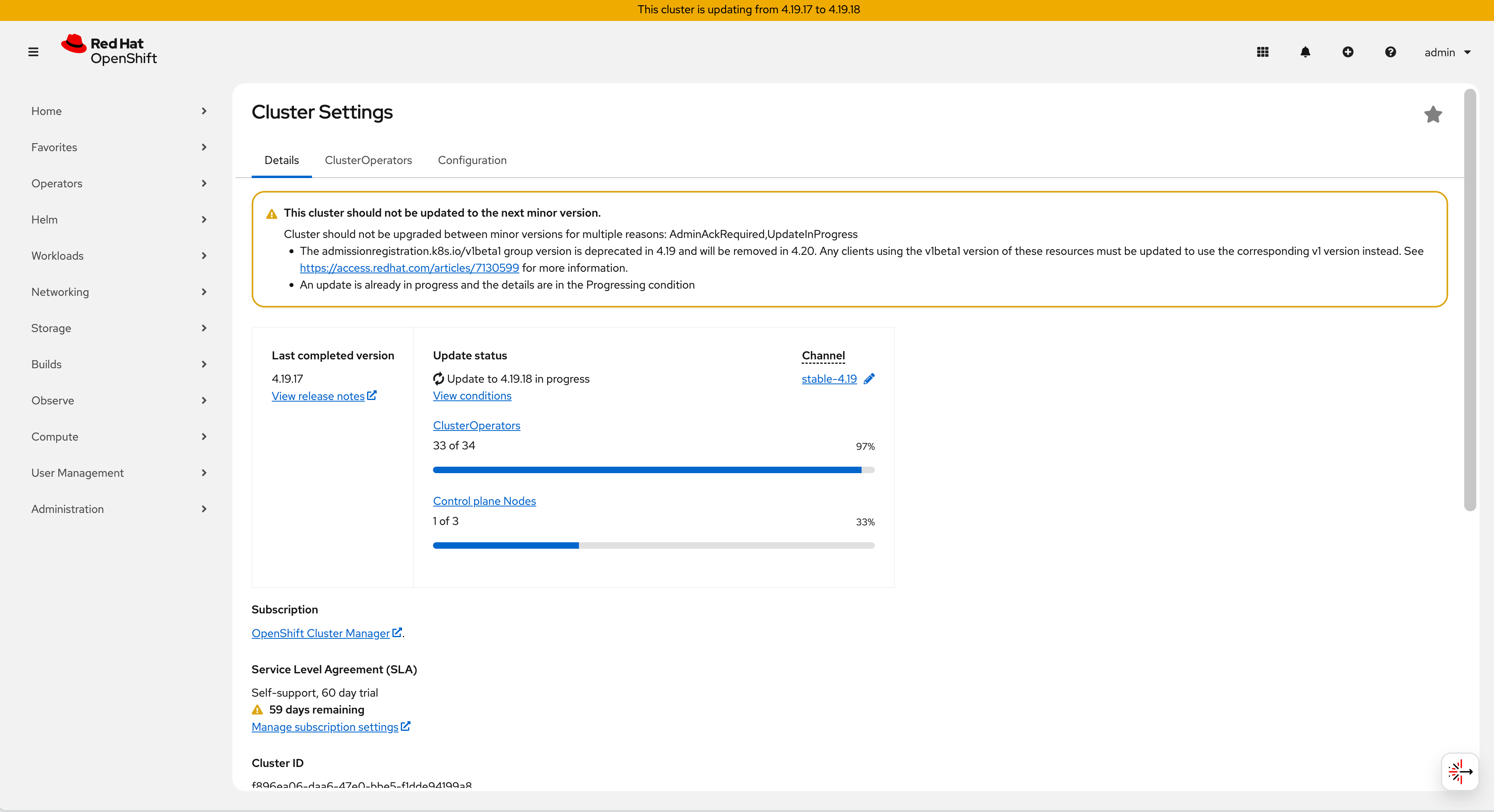
Upgrade Monitoring:
Initiation: The operator begins the upgrade process.
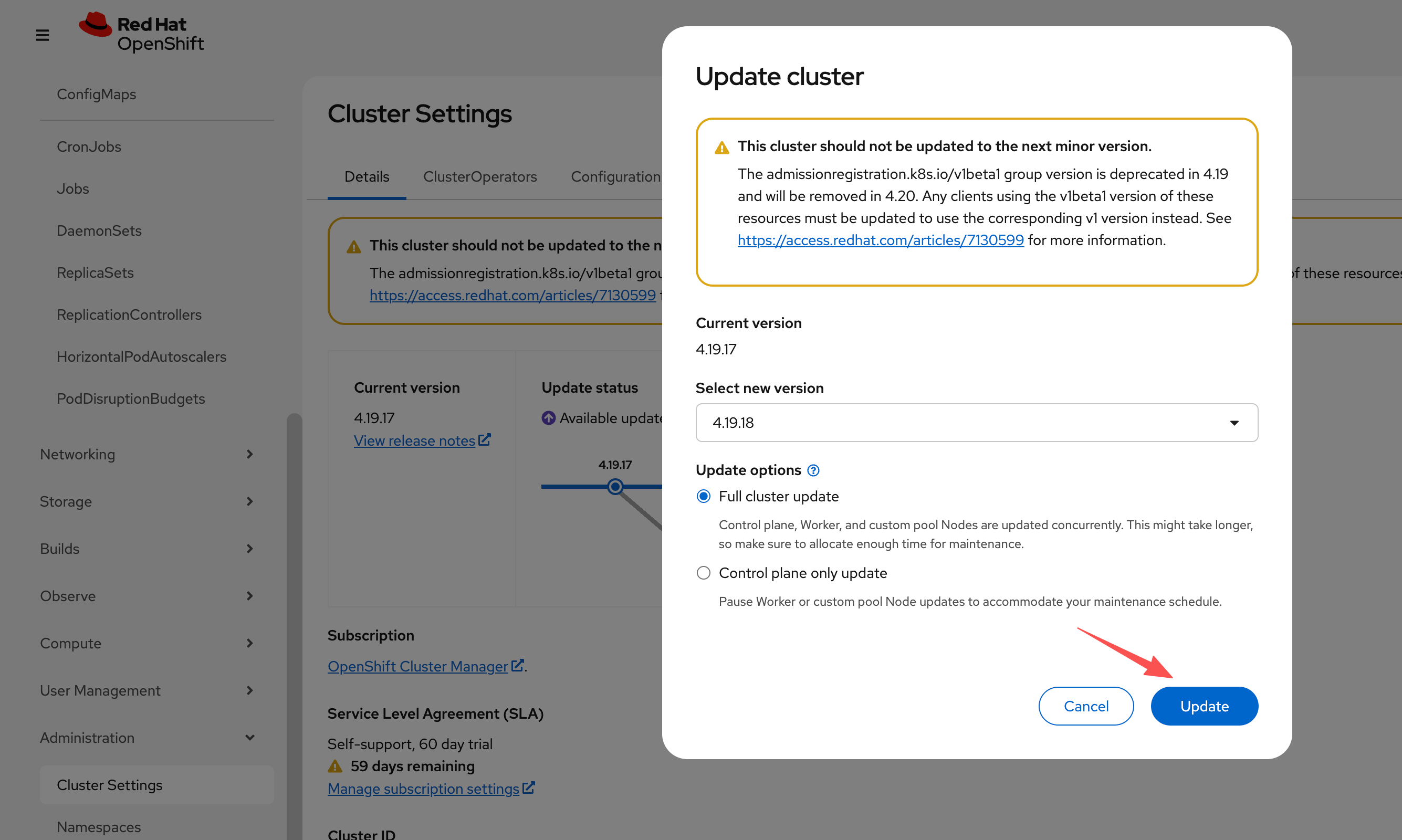
Progress: Components update, triggering pod restarts and migrations.
Completion: The cluster reaches the new version state.
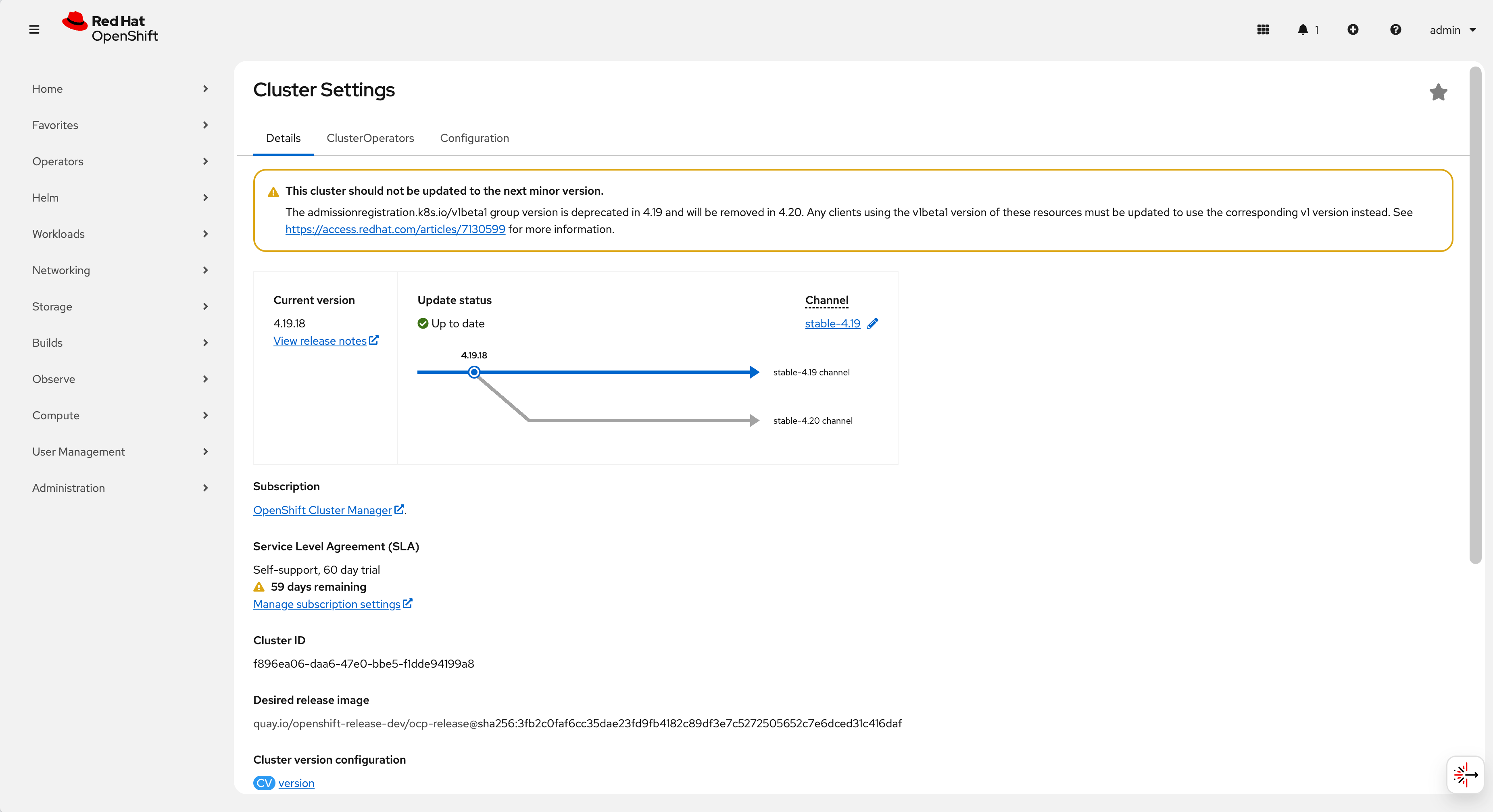
Final Result: The endurance test successfully served 1,000,000 responses with zero failures, proving that the L4 Health Check Translator allows for safe, zero-downtime maintenance operations even with basic L4 networking equipment.
Summary:
  Total:        3989.5204 secs
  Slowest:      0.2107 secs
  Fastest:      0.0002 secs
  Average:      0.0080 secs
  Requests/sec: 1903.0485

  Total data:   98699263 bytes
  Size/request: 98 bytes

Response time histogram:
  0.000 [1]     |
  0.021 [999993]        |■■■■■■■■■■■■■■■■■■■■■■■■■■■■■■■■■■■■■■■■
  0.042 [4]     |
  0.063 [0]     |
  0.084 [0]     |
  0.105 [0]     |
  0.127 [0]     |
  0.148 [0]     |
  0.169 [0]     |
  0.190 [0]     |
  0.211 [2]     |


Latency distribution:
  10% in 0.0007 secs
  25% in 0.0009 secs
  50% in 0.0011 secs
  75% in 0.0012 secs
  90% in 0.0014 secs
  95% in 0.0015 secs
  99% in 0.0020 secs

Details (average, fastest, slowest):
  DNS+dialup:   0.0000 secs, 0.0002 secs, 0.2107 secs
  DNS-lookup:   0.0000 secs, 0.0000 secs, 0.0000 secs
  req write:    0.0001 secs, 0.0000 secs, 0.0018 secs
  resp wait:    0.0073 secs, 0.0002 secs, 0.2106 secs
  resp read:    0.0003 secs, 0.0000 secs, 0.0051 secs

Status code distribution:
  [200] 1000000 responses
5. Conclusion & Recommendations
The solution documented here provides a viable bridge for utilizing Layer 4 switches in an OpenShift environment, addressing the inherent race conditions of TCP-based health checks. It enables organizations to leverage existing network infrastructure without sacrificing application availability.
Production Considerations
While this Proof of Concept (PoC) demonstrates functional validity, enterprise deployments should consider the following enhancements:
- High-Performance Rewrite: Migrating the agent logic from Python to Golang or Rust to minimize memory overhead and garbage collection pauses, ensuring microsecond-level reaction times.
- Security Hardening:
- Restrict the
privilegedsecurity context if possible by using specific capabilities (CAP_NET_BIND_SERVICE). - Implement
iptablesornftablesrules to whitelist access to port18898exclusively from the Load Balancer’s IP addresses.
- Restrict the
- Observability: Instrument the agent to
export Prometheus metrics (e.g.,
router_health_status,check_latency_ms), allowing platform teams to monitor the translator’s performance and the underlying router’s stability.
Disclaimer: This documentation describes a custom implementation. For fully supported, SLA-backed architecture designs, we recommend engaging with Red Hat Consulting.