Red Hat RHAI vLLM 3.4.1 - Qwen 3.5 122B 1M Context Stress Report
| Field | Value |
|---|---|
| Test date | 2026-06-10 |
| Target host | computeinstance-e00d5cpyn31hqd5x9m over SSH
proxy 127.0.0.1:5085 |
| OS/runtime | Ubuntu 24.04.4 LTS, Docker 29.5.3, NVIDIA Container Toolkit 1.19.1 |
| GPU | 4 x NVIDIA L40S, 46,068 MiB each, driver 580.159.04, CUDA 13.0 |
| Model | RedHatAI/Qwen3.5-122B-A10B-FP8-dynamic |
| Serving image | registry.redhat.io/rhaii/vllm-cuda-rhel9:3.4.1,
vLLM 0.18.0+rhaiv.11 |
| Report package | solution/files/solution-2026-06-10-19-35/final-qwen35-122b-rhai341-report/ |
Executive conclusion
The observed single-GPU utilization drop is not the standalone root cause. It is a symptom that appears in some phases, especially short-prompt concurrency and startup/loading samples. During true long-prompt prefill, the 512K and 980K tests drove all four L40S GPUs close to full utilization.
The root-cause chain is:
- The 1M serving profile is far beyond the model
config/tokenizer native 262,144-token position limit and
requires
VLLM_ALLOW_LONG_MAX_MODEL_LEN=1. - On 4 x L40S, Qwen 3.5 122B FP8 leaves very limited memory after model weights and KV cache reservation.
- The safe 1M profile requires
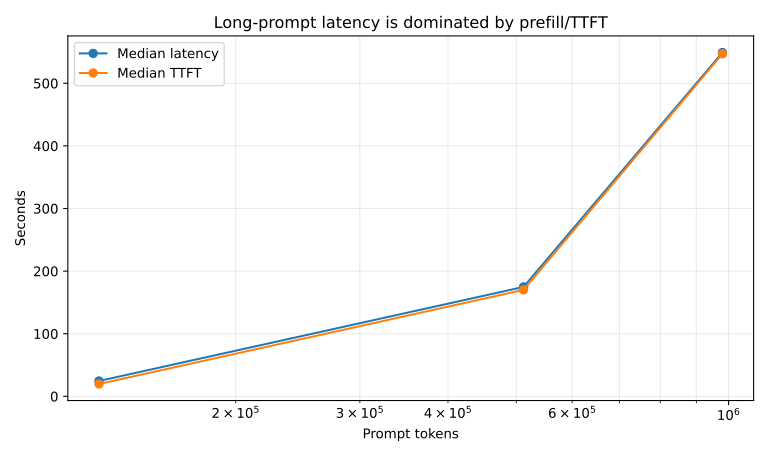
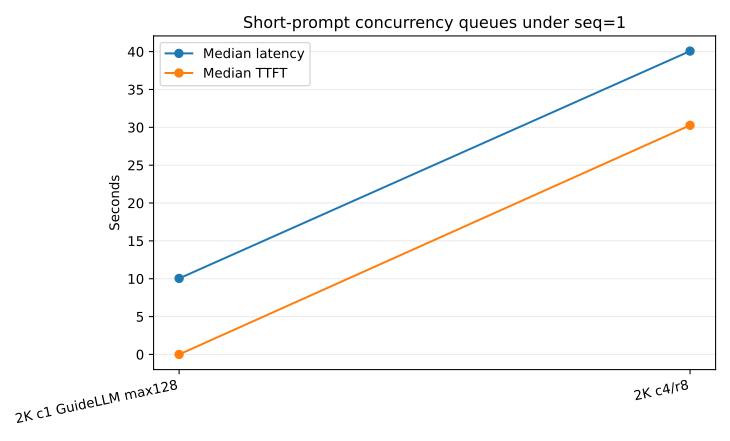
max_num_seqs=1, which serializes requests and makes short-prompt concurrency look like no-response/slow-response. - Very long prompts are dominated by prefill: the custom 980K input reached about 547 seconds TTFT before the first token, while the API process was still alive and GPUs were busy.
- Raising
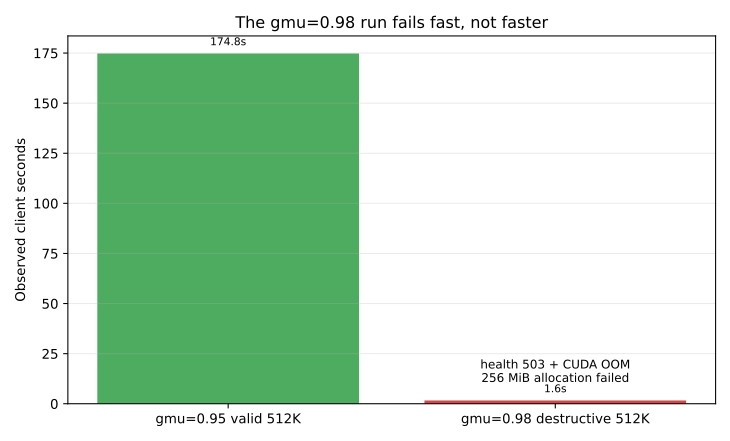
gpu_memory_utilizationto0.98increases KV capacity but removes runtime headroom; a 512K request then failed with CUDA OOM and/healthreturned 503.
Recommended profile
Use this as the validated 1M-context operating profile for this host:
vllm serve RedHatAI/Qwen3.5-122B-A10B-FP8-dynamic \
  --served-model-name qwen35-122b-fp8 \
  --tensor-parallel-size 4 \
  --max-model-len 1010000 \
  --gpu-memory-utilization 0.95 \
  --max-num-seqs 1 \
  --max-num-batched-tokens 32768 \
  --kv-cache-dtype fp8 \
  --enable-chunked-prefill \
  --enforce-eager \
  --disable-custom-all-reduce \
  --language-model-only \
  --reasoning-parser qwen3
This profile started successfully, returned
/v1/models with max_model_len=1010000,
and completed 128K, 512K, and 980K summary requests. It is slow
for near-1M inputs, but it does not crash in the validated
tests.
Avoid treating gpu_memory_utilization=0.98 as
the best profile. It starts and reports more KV cache, but it
crashed on a 512K request due to a runtime 256 MiB allocation
failure inside the Triton/FLA Qwen3.5 path.
Performance summary
| Case | Prompt tokens | Concurrency | Requests | Max output tokens | Median latency s | Median TTFT s | Median TPOT ms | Completed | Status |
|---|---|---|---|---|---|---|---|---|---|
| 2K c4/r8 | 2,000 | 4 | 8 | 128 | 40.07 | 30.27 | 75.9 | 8/8 | OK |
| 128K c1 | 128,000 | 1 | 1 | 64 | 24.60 | 19.80 | 73.9 | 1/1 | OK |
| 512K c1 | 512,000 | 1 | 1 | 64 | 174.82 | 170.12 | 73.5 | 1/1 | OK |
| 980K c1 | 980,000 | 1 | 1 | 32 | 549.13 | 547.06 | 69.1 | 1/1 | OK |
| 512K c1 gmu=0.98 | 512,000 | 1 | 1 | 64 | 1.64 | 1.64 | 0.4 | 1/1 | OOM/503 |
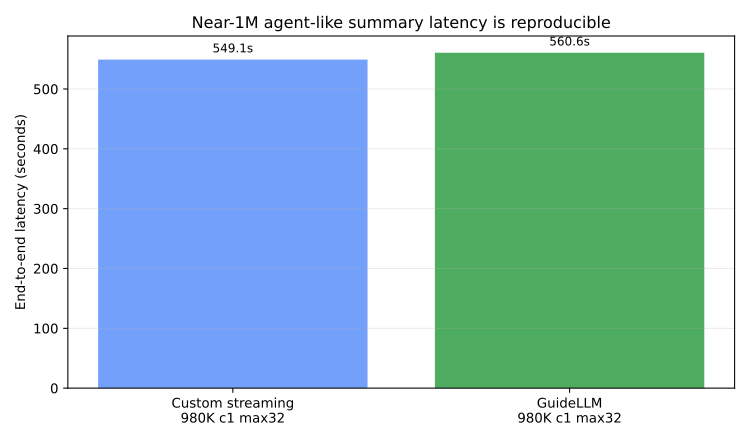
The GuideLLM long-reasoning/agent-like validation used the
same OpenAI-compatible /v1/chat/completions
endpoint and a 980K-token operational-summary prompt. It
completed one request in 560.6 seconds, which matches the custom
client result closely enough to show that the multi-minute
response time is reproducible outside the custom harness.
| Case | Prompt tokens | Concurrency | Requests | Max output tokens | Latency s | Output tokens | TPOT ms | Total tokens/s | Completed | Status |
|---|---|---|---|---|---|---|---|---|---|---|
| GuideLLM 980K c1 max32 | 980,010 | 1 | 1 | 32 | 560.61 | 32 | 17518.9 | 1748.2 | 1/1 | OK |
GPU utilization interpretation
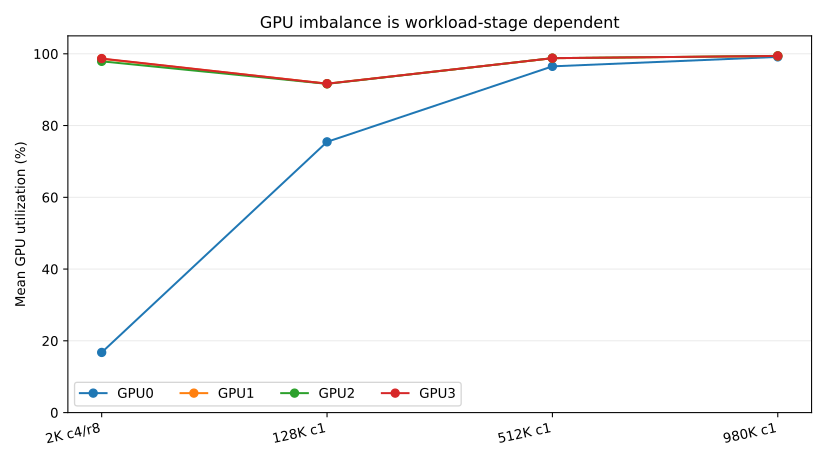
The GPU drop is workload-stage dependent:
- In the 2K concurrent custom test, GPU0 averaged only 16.8%
while GPU1-3 averaged about 98%. The same test had 30.3s median
TTFT and 40.1s median latency because requests queued behind
max_num_seqs=1. - In the 512K and 980K single-request prefill tests, all four GPUs averaged around 96-99%, and TTFT dominated the end-to-end latency.
- In the GuideLLM 980K run, GPU0-GPU3 averaged 97.6%, 97.8%, 97.8%, and 97.7% respectively during the monitored request.
- Therefore, the GPU0 drop is useful evidence of rank/scheduler imbalance in short/concurrent work, but it is not the primary root cause of the multi-minute no-response behavior.
| Case | GPU0 mean % | GPU1 mean % | GPU2 mean % | GPU3 mean % |
|---|---|---|---|---|
| 2K c4/r8 | 16.8 | 98.6 | 97.9 | 98.7 |
| 128K c1 | 75.5 | 91.7 | 91.6 | 91.7 |
| 512K c1 | 96.5 | 98.8 | 98.8 | 98.8 |
| 980K c1 | 99.1 | 99.4 | 99.4 | 99.4 |
| GuideLLM case | GPU0 mean % | GPU1 mean % | GPU2 mean % | GPU3 mean % |
|---|---|---|---|---|
| GuideLLM 980K c1 max32 | 97.6 | 97.8 | 97.8 | 97.7 |
Startup-parameter findings
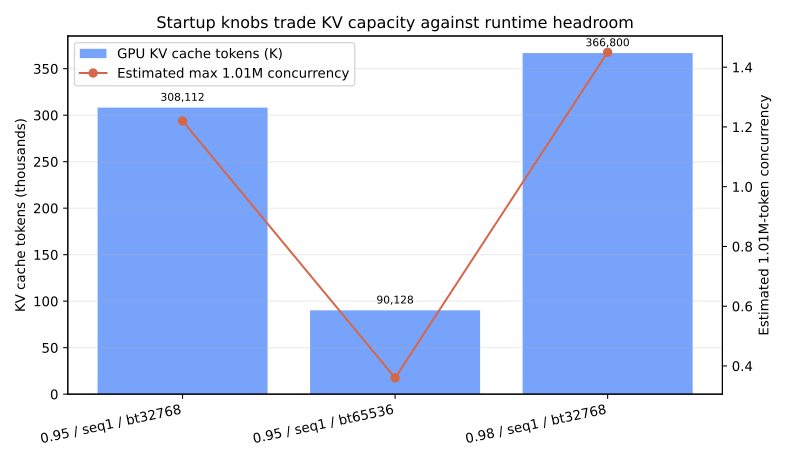
| Profile | Startup/API result | KV cache evidence | Operational interpretation |
|---|---|---|---|
gmu=0.90, seq=4,
bt=65536 |
Failed startup | Available KV cache memory -1.49 GiB;
No available memory for the cache blocks |
Destructive startup boundary |
gmu=0.95, seq=1,
bt=32768 |
Ready and validated | GPU KV cache 308,112 tokens; estimated 1.01M
concurrency 1.22x |
Recommended profile |
gmu=0.95, seq=1,
bt=65536 |
Ready but poor KV | GPU KV cache 90,128 tokens; estimated 1.01M
concurrency 0.36x |
Not useful for 1M requests |
gmu=0.98, seq=1,
bt=32768 |
Ready, then crashed on 512K | GPU KV cache 366,800 tokens; estimated 1.01M
concurrency 1.45x; runtime OOM |
Destructive runtime boundary |
Destructive evidence
The gpu_memory_utilization=0.98 run is the
clearest destructive runtime parameter:
(Worker_TP1 pid=510) (Worker_TP3 pid=512) ERROR 06-10 13:01:40 [multiproc_executor.py:932] torch.OutOfMemoryError: CUDA out of memory. Tried to allocate 256.00 MiB. GPU 0 has a total capacity of 44.39 GiB of which 151.31 MiB is free. Including non-PyTorch memory, this process has 44.24 GiB memory in use. Of the allocated memory 43.37 GiB is allocated by PyTorch, and 37.70 MiB is reserved by PyTorch but unallocated. If reserved but unallocated memory is large try setting PYTORCH_ALLOC_CONF=expandable_segments:True to avoid fragmentation. See documentation for Memory Management (https://pytorch.org/docs/stable/notes/cuda.html#environment-variables)After this error the vLLM worker processes shut down and
/health returned HTTP 503. The client-side timing
from that run is intentionally not counted as successful
performance because output_chars_total=0 and the
server was unhealthy.
Earlier destructive startup evidence also exists: the higher
sequence/batch baseline with
gpu_memory_utilization=0.90,
max_num_seqs=4, and
max_num_batched_tokens=65536 failed KV-cache
initialization with
Available KV cache memory: -1.49 GiB.
Host evidence
The host had no NVMe devices in this redeployed VM, so model
cache, temporary files, logs, and results were placed under
root-backed /mnt/bench-root.
## gpu
Wed Jun 10 11:38:05 2026
+-----------------------------------------------------------------------------------------+
| NVIDIA-SMI 580.159.04             Driver Version: 580.159.04     CUDA Version: 13.0     |
+-----------------------------------------+------------------------+----------------------+
| GPU  Name                 Persistence-M | Bus-Id          Disp.A | Volatile Uncorr. ECC |
| Fan  Temp   Perf          Pwr:Usage/Cap |           Memory-Usage | GPU-Util  Compute M. |
|                                         |                        |               MIG M. |
|=========================================+========================+======================|
|   0  NVIDIA L40S                    On  |   00000000:8D:00.0 Off |                    0 |
| N/A   30C    P8             34W /  350W |       0MiB /  46068MiB |      0%      Default |
|                                         |                        |                  N/A |
+-----------------------------------------+------------------------+----------------------+
|   1  NVIDIA L40S                    On  |   00000000:91:00.0 Off |                    0 |
| N/A   31C    P8             36W /  350W |       0MiB /  46068MiB |      0%      Default |
|                                         |                        |                  N/A |
+-----------------------------------------+------------------------+----------------------+
|   2  NVIDIA L40S                    On  |   00000000:AB:00.0 Off |                    0 |
| N/A   31C    P8             35W /  350W |       0MiB /  46068MiB |      0%      Default |
|                                         |                        |                  N/A |
+-----------------------------------------+------------------------+----------------------+
|   3  NVIDIA L40S                    On  |   00000000:AF:00.0 Off |                    0 |
| N/A   31C    P8             35W /  350W |       0MiB /  46068MiB |      0%      Default |
|                                         |                        |                  N/A |
+-----------------------------------------+------------------------+----------------------+

+-----------------------------------------------------------------------------------------+
| Processes:                                                                              |
|  GPU   GI   CI              PID   Type   Process name                        GPU Memory |
|        ID   ID                                                               Usage      |
|=========================================================================================|
|  No running processes found                                                             |
+-----------------------------------------------------------------------------------------+
## nvidia-smi topo -m
    GPU0    GPU1    GPU2    GPU3    CPU Affinity    NUMA Affinity   GPU NUMA ID
GPU0     X  PHB SYS SYS 0-63    0       N/A
GPU1    PHB  X  SYS SYS 0-63    0       N/A
GPU2    SYS SYS  X  PHB 64-127  1       N/A
GPU3    SYS SYS PHB  X  64-127  1       N/A

Legend:

  X    = Self
  SYS  = Connection traversing PCIe as well as the SMP interconnect between NUMA nodes (e.g., QPI/UPI)
  NODE = Connection traversing PCIe as well as the interconnect between PCIe Host Bridges within a NUMA node
  PHB  = Connection traversing PCIe as well as a PCIe Host Bridge (typically the CPU)
  PXB  = Connection traversing multiple PCIe bridges (without traversing the PCIe Host Bridge)
  PIX  = Connection traversing at most a single PCIe bridge
  NV#  = Connection traversing a bonded set of # NVLinks
## storage
NAME TYPE SIZE FSTYPE MOUNTPOINTS MODEL SERIAL
vda disk 1.3T boot-disk
├─vda1 part 1.2T ext4 /
├─vda14 part 4M
├─vda15 part 106M vfat /boot/efi
└─vda16 part 913M ext4 /boot
vdb disk 1M iso9660
Filesystem Type Size Used Avail Use% Mounted on
tmpfs tmpfs 76G 2.0M 76G 1% /run
/dev/vda1 ext4 1.3T 17G 1.2T 2% /
tmpfs tmpfs 378G 0 378G 0% /dev/shm
tmpfs tmpfs 5.0M 0 5.0M 0% /run/lock
/dev/vda16 ext4 881M 258M 562M 32% /boot
/dev/vda15 vfat 105M 6.2M 99M 6% /boot/efi
cloud-metadata virtiofs 756G 16K 756G 1% /mnt/cloud-metadata
tmpfs tmpfs 76G 16K 76G 1% /run/user/1001
cloud-metadata on /mnt/cloud-metadata type virtiofs (ro,relatime)Risks and next steps
- The model’s native config/tokenizer position limit is 262,144 tokens. The 1M service profile was operationally tested, but it is an override profile, not proof that model quality is guaranteed at 1M.
- For customer-facing summary workflows, prefer chunked/application-level summarization unless near-1M direct prompts are truly required.
- If direct 1M prompts must be supported, keep
gpu_memory_utilizationbelow the destructive headroom boundary, cap concurrency explicitly, and expose progress/streaming indicators because TTFT can be several minutes. - Further tuning could test
gpu_memory_utilization=0.96or CPU offload, but0.98should be treated as a failure boundary on this 4 x L40S host.
Source artifacts
- Full audit log:
steps/steps-2026.06.10.19.35.md - Raw command output:
steps/files/steps-2026-06-10-19-35/ - Packaged benchmark data:
solution/files/solution-2026-06-10-19-35/round13-results/qwen35-round13-results.tgz - Local extracted benchmark data:
solution/files/solution-2026-06-10-19-35/round13-results/qwen35-round13/ - Model references:
https://huggingface.co/RedHatAI/Qwen3.5-122B-A10B-FP8-dynamic