[!TIP] Ongoing and occasional updates and improvements.
Integrate RHDH with GitHub Repo
We previously had a demo, following the documentation here.
The old demo used GitLab as the source code repository, but this time we will switch to using GitHub.
The upstream demo repositories containing the newest code are:
- https://github.com/redhat-gpte-devopsautomation/agnosticg.git
- https://github.com/redhat-gpe/rhdh-demo-entities.git
- https://github.com/redhat-gpe/janus-idp-gitops.git
- https://github.com/redhat-gpte-devopsautomation/backstage-workshop.git
- https://github.com/redhat-gpte-devopsautomation/software-templates.git
However, we will still fork the old repository for this demo:
- https://github.com/nepdemo/rhdh-book1-templates/blob/wzh-2025.05
The forked repository will focus on:
- Using a GitHub repository as the source code repository for new projects instead of GitLab.
- Triggering the pipeline by monitoring the GitHub repository for new commits using a cronjob instead of a GitHub webhook.
- Modifying the pipeline to compile a new image with a different tag and updating the deployment with the new tag.
The overall architecture for the changes: 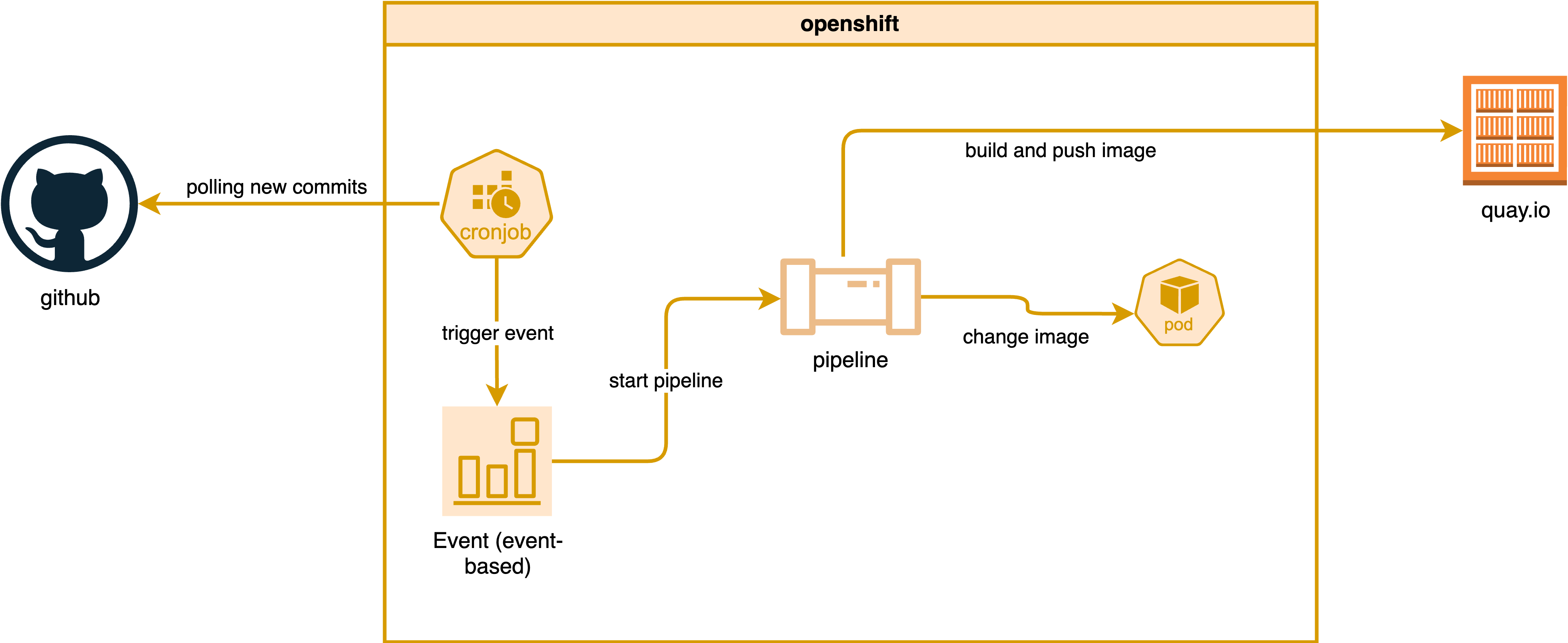
mermaid version:
graph TD
    subgraph openshift
        cronjob["cronjob"]
        event["Event (event-based)"]
        pipeline["pipeline"]
        pod["pod"]
        cronjob --> |trigger event| event
        event --> |start pipeline| pipeline
        pipeline --> |change image| pod
    end
    github["github"]
    quayio["quay.io"]
    github --> |polling for new commits| cronjob
    pipeline --> |build and push image| quayio
Prepare the GitHub Environment
Follow the official documentation:
- https://docs.redhat.com/en/documentation/red_hat_developer_hub/1.5/html/authentication_in_red_hat_developer_hub/authenticating-with-github#enabling-authentication-with-github
Create a personal access token in GitHub, giving it only
read permission, and copy the token.
- https://github.com/settings/personal-access-tokens
Readaccess to code, commit statuses, and metadata
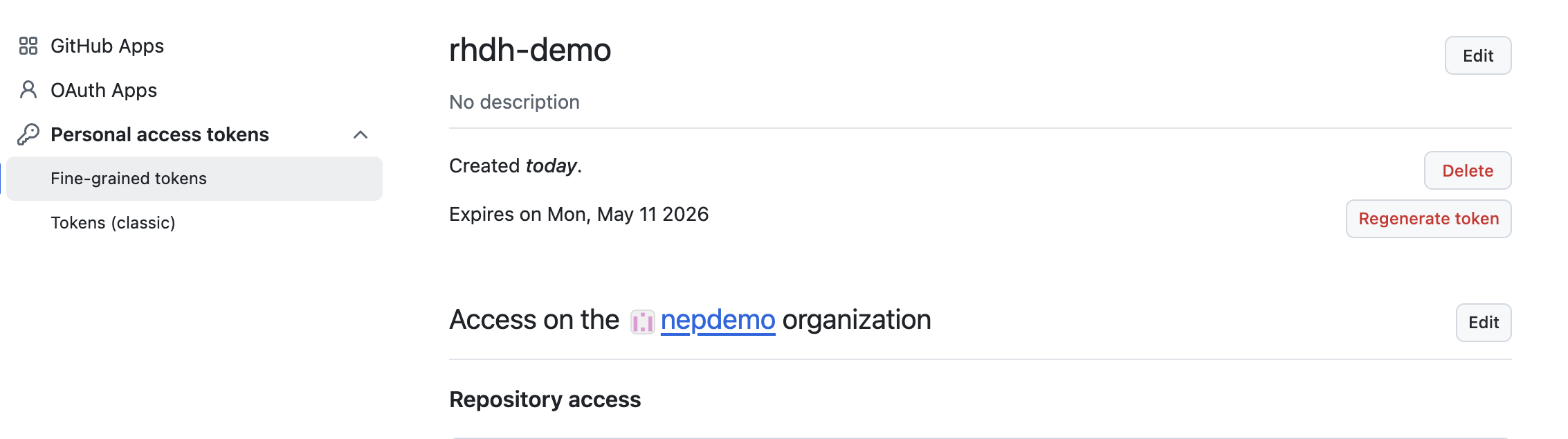
Create a GitHub App:
- https://github.com/settings/apps/new
Patch for Demo Environment
Create a secret under the backstage
namespace:
kind: Secret
apiVersion: v1
metadata:
  name: wzh-rhdh-credentials
data:
  GITHUB_CLIENT_SECRET: xxxxxxxxxxxxxxxxxxxx
  AUTH_GITHUB_CLIENT_ID: xxxxxxxxxxxxxxxxxxxx
  GITHUB_WEBHOOK_URL: xxxxxxxxxxxxxxxxxxxx
  GITHUB_ORGANIZATION: xxxxxxxxxxxxxxxxxxxx
  GITHUB_WEBHOOK_SECRET: xxxxxxxxxxxxxxxxxxxx
  GITHUB_PRIVATE_KEY_FILE: xxxxxxxxxxxxxxxxxxxx
  GITHUB_ORG_URL: xxxxxxxxxxxxxxxxxxxx
  AUTH_GITHUB_APP_ID: xxxxxxxxxxxxxxxxxxxx
  GITHUB_HOST_DOMAIN: xxxxxxxxxxxxxxxxxxxx
type: Opaque
For the Red Hat demo environment, patch this file:
- https://
/gitops/janus-idp-gitops/-/blob/main/charts/backstage/backstage-values.yaml?ref_type=heads
global:
  dynamic:
    plugins:
      - package: ./dynamic-plugins/dist/backstage-plugin-scaffolder-backend-module-github-dynamic
        disabled: false
upstream:
  backstage:
    # patch for secrets
    extraEnvVarsSecrets:
      - wzh-rhdh-credentials

    appConfig:
      integrations:
        github:
          - host: ${GITHUB_HOST_DOMAIN}
            apps:
              - appId: ${AUTH_GITHUB_APP_ID}
                clientId: ${AUTH_GITHUB_CLIENT_ID}
                clientSecret: ${GITHUB_CLIENT_SECRET}
                webhookUrl: ${GITHUB_WEBHOOK_URL}
                webhookSecret: ${GITHUB_WEBHOOK_SECRET}
                privateKey: |
                  ${GITHUB_PRIVATE_KEY_FILE}

      enabled:
        github: true
        githubOrg: true
Then, update the backstage-gitops ArgoCD
application in gitops to trigger the update.
And create some secrets in the target namespace so we can access GitHub and image repositories (like quay.io).
# oc delete project demo-play

oc new-project demo-play

oc create secret generic github-pat-secret --from-literal=pat='github_pat_xxxxxxxxxxx'

# create k8s secret from podman authfile
oc delete secret wzh-docker-authfile -n demo-play
oc create secret generic wzh-docker-authfile --from-file=config.json=podman_authfile.json -n demo-play

# https://github.com/tektoncd/catalog/tree/main/task/kaniko/0.7
Remove all completed and error pods:
oc get pods -n demo-play | grep -E 'Error|Completed' | awk '{print $1}' | xargs oc delete pod -n demo-playCreate the Test Environment
Import the template into RHDH:
- https://github.com/nepdemo/rhdh-book1-templates/blob/wzh-2025.05/quarkus-with-angular/template.yaml
There will be an updated pipeline that generates a new Docker
image with a customized tag and updates the deployment with the
new image.
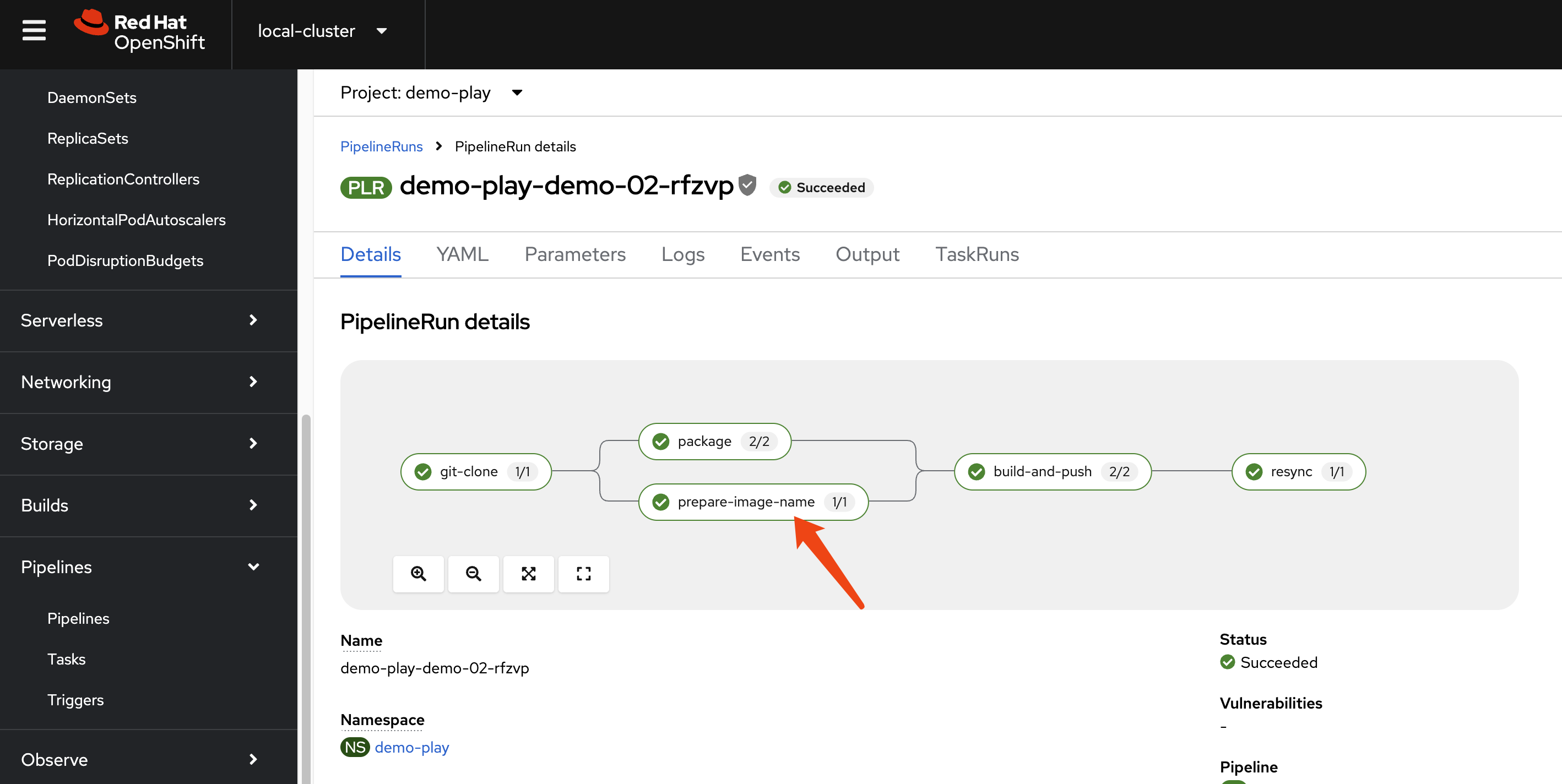
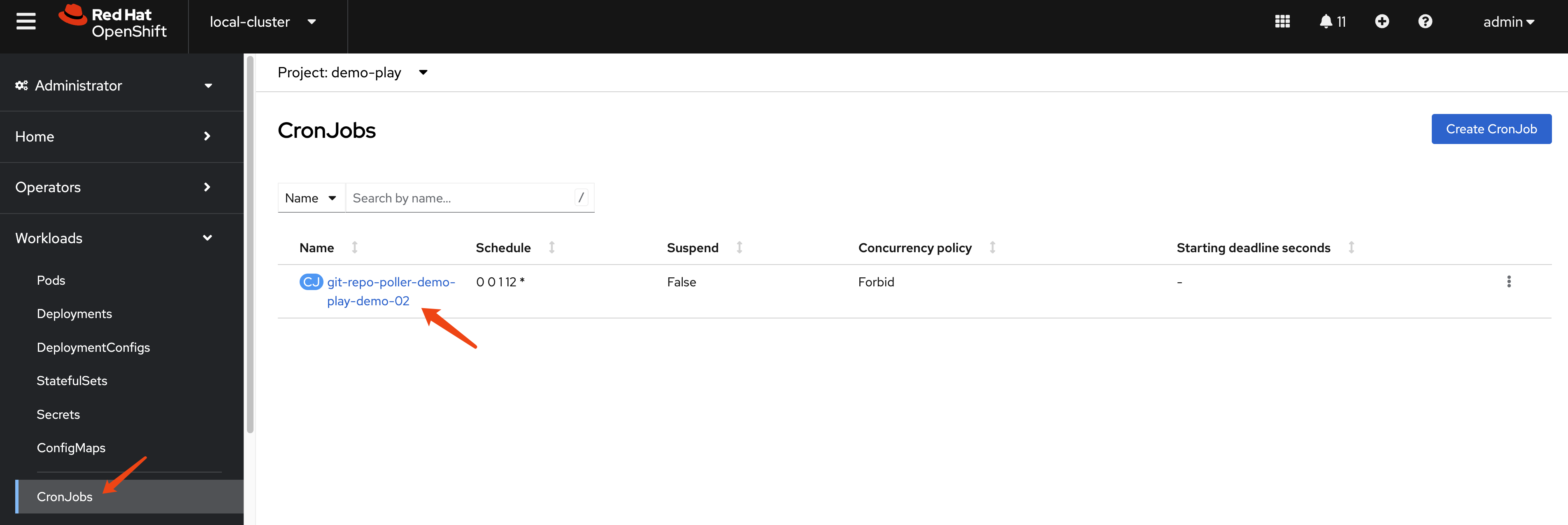
It also includes a cronjob that will repeatedly poll the
repository every 5 minutes, fetch the latest commit hash, update
the state ConfigMap, and curl the event listener if a new commit
is detected.
Show Me the Code
The rendered project is here:
- https://github.com/nepdemo/demo-play-demo-02-gitops
There are git-*.yaml files under templates,
which include the polling script, ConfigMap, role, and
cronjobs.
- https://github.com/nepdemo/demo-play-demo-02-gitops/tree/main/helm/build/templates
There is a new Tekton task to generate the image name; the
generated image looks like
quay.io/wangzheng422/qimgs:20250513023432-3038.
- https://github.com/nepdemo/demo-play-demo-02-gitops/blob/main/helm/build/templates/prepare-image-name-task.yaml
And an updated Tekton resync task to update the image in a deployment.
- https://github.com/nepdemo/demo-play-demo-02-gitops/blob/main/helm/build/templates/resynctask.yaml
The command used to update the image is:
oc set image deployment/$(params.COMPONENT_ID) -n $(params.NAMESPACE) quarkus-template=$(params.IMAGE)
Since the deployment is managed by an Argo CD application, we need to ignore certain changes to monitored fields in the Deployment and ConfigMap to allow polling and automatic updates to work correctly.
- https://github.com/nepdemo/demo-play-demo-02-gitops/blob/main/argocd/demo-play-demo-02-argocd-app-dev.yaml
- https://github.com/nepdemo/demo-play-demo-02-gitops/blob/main/argocd/demo-play-demo-02-argocd-app-dev-build.yaml
  ignoreDifferences:
    - group: ""
      kind: ConfigMap
      name: git-polling-state-demo-play-demo-02
      jsonPointers:
      - /data/last-commit-sha

  ignoreDifferences:
    - group: apps
      kind: Deployment
      jsonPointers:
      - /spec/template/spec/containers/0/image
Argo CD Patch
Update the SSO config for argocd
- https://docs.redhat.com/en/documentation/red_hat_openshift_gitops/1.16/html/access_control_and_user_management/configuring-sso-for-argo-cd-using-dex
The basic idea is to enable the SSO option in Argo CD login,
assign the argocd role to OCP groups, and apply
policy for the role.
spec:
  sso:
    provider: dex
    dex:
      openShiftOAuth: true
      groups:
        - argocd

  rbac:
    defaultPolicy: 'role:admin'
    policy: |
      p, role:dev, application, get, */*, allow
      g, argocd, role:dev

      g, system:cluster-admins, role:admin
    scopes: '[groups]'
OCP Auth with Groups
We need group information during OCP SSO login, but the default demo system does not configure with groups, so we need to patch the OCP OAuth config to add group information.
For oauth/cluster,
spec:
  identityProviders:
    - mappingMethod: claim
      name: rhsso
      openID:
        claims:
          email:
            - email
          groups:
            - groups
          name:
            - name
          preferredUsername:
            - preferred_username
        clientID: idp-4-ocp
        clientSecret:
          name: openid-client-secret-xxxxxx
        extraScopes: []
        issuer: 'https://keycloak-rhsso.apps.cluster-xxxxxx.xxxxxx.sandboxxxxxxx.opentlc.com/auth/realms/openshift'
      type: OpenID
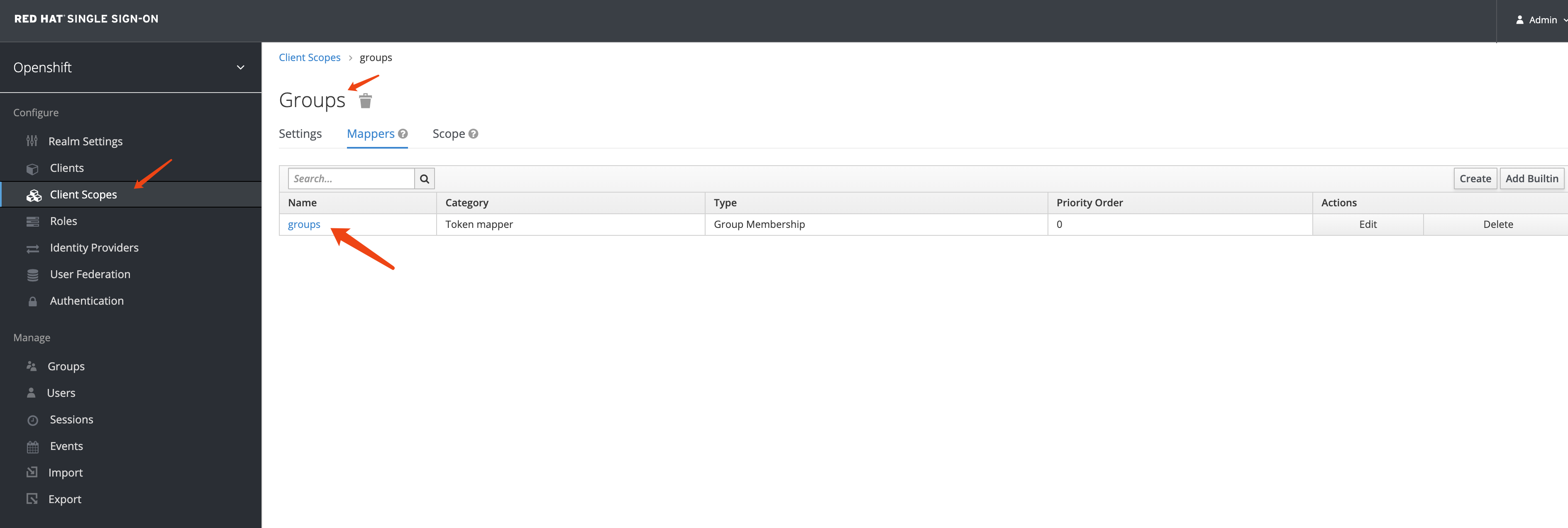
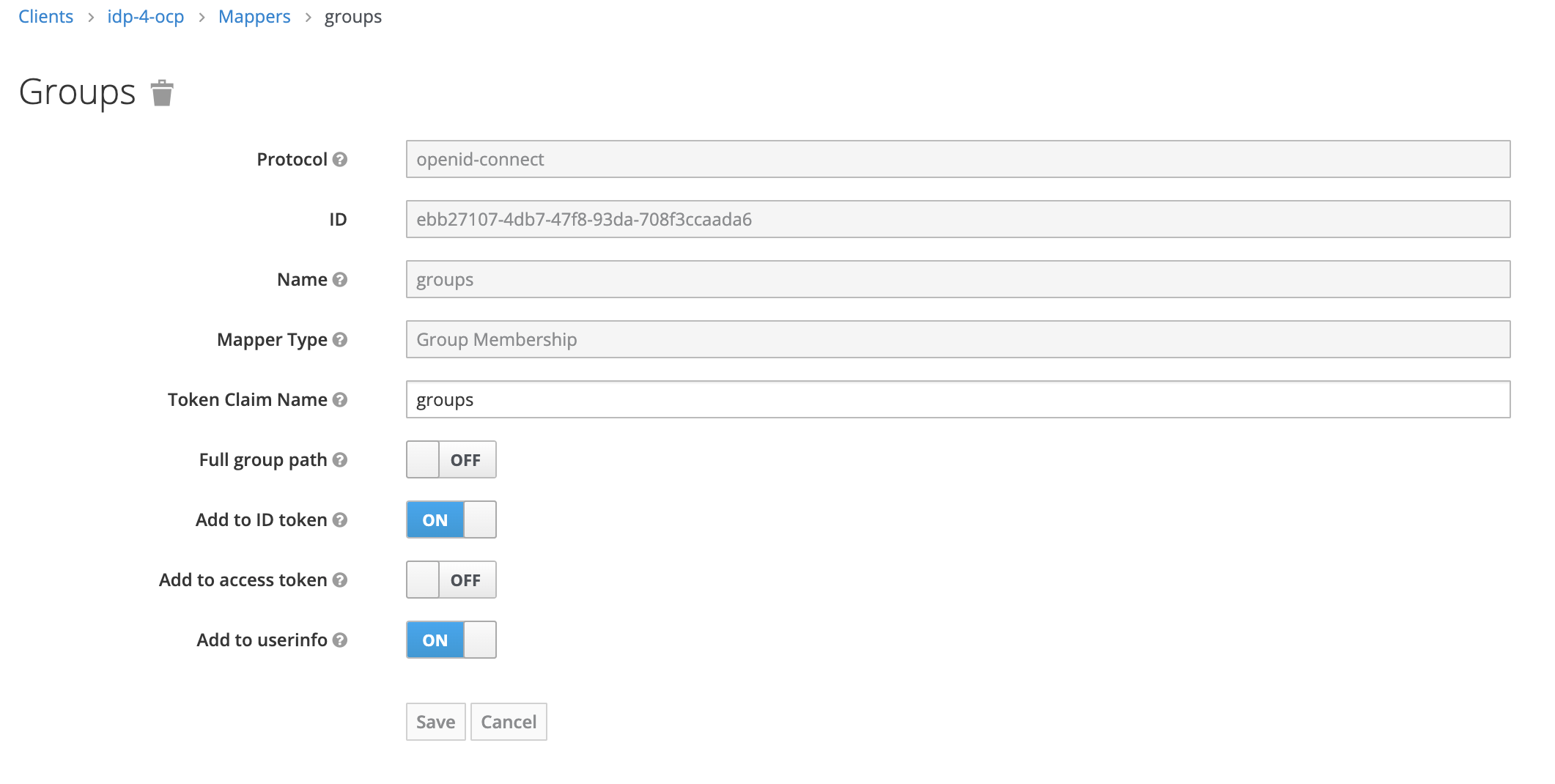
We need to add group mapping in RH-SSO
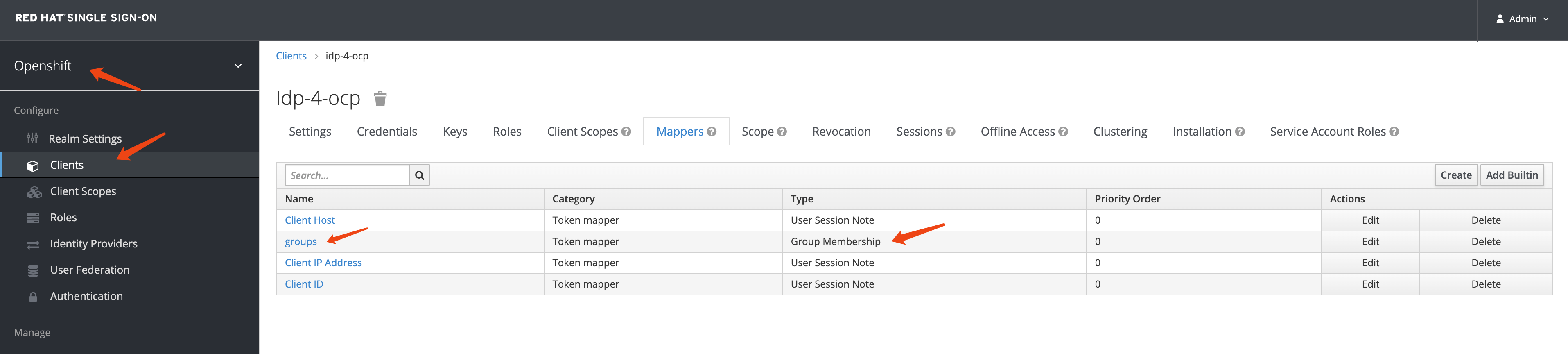
Set the mapping with the name groups, disable
full group path, and enable
add to access token
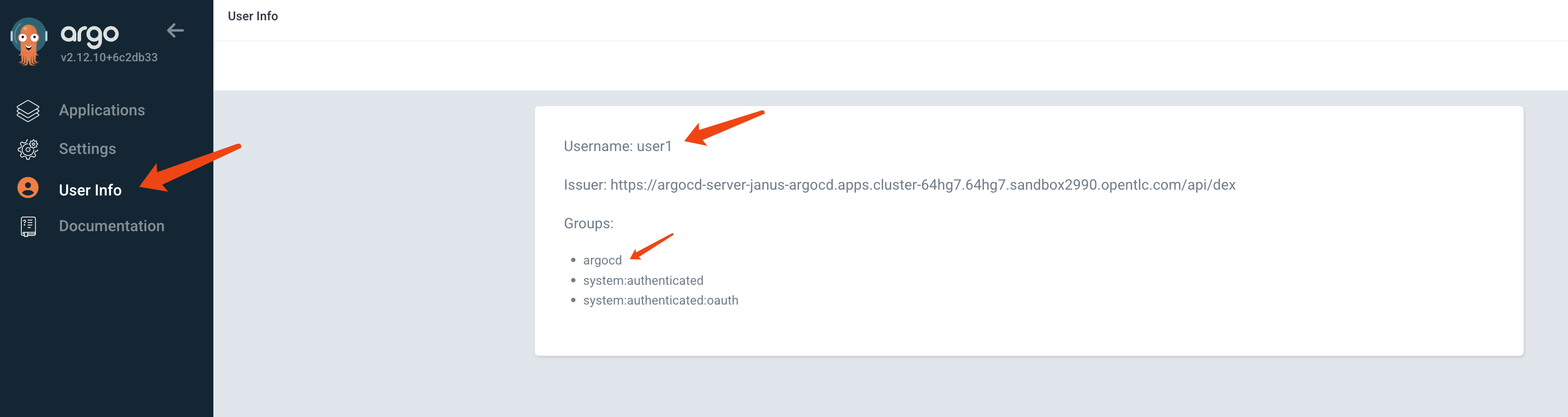
After successful configuration, you can see groups created in OCP after user login.
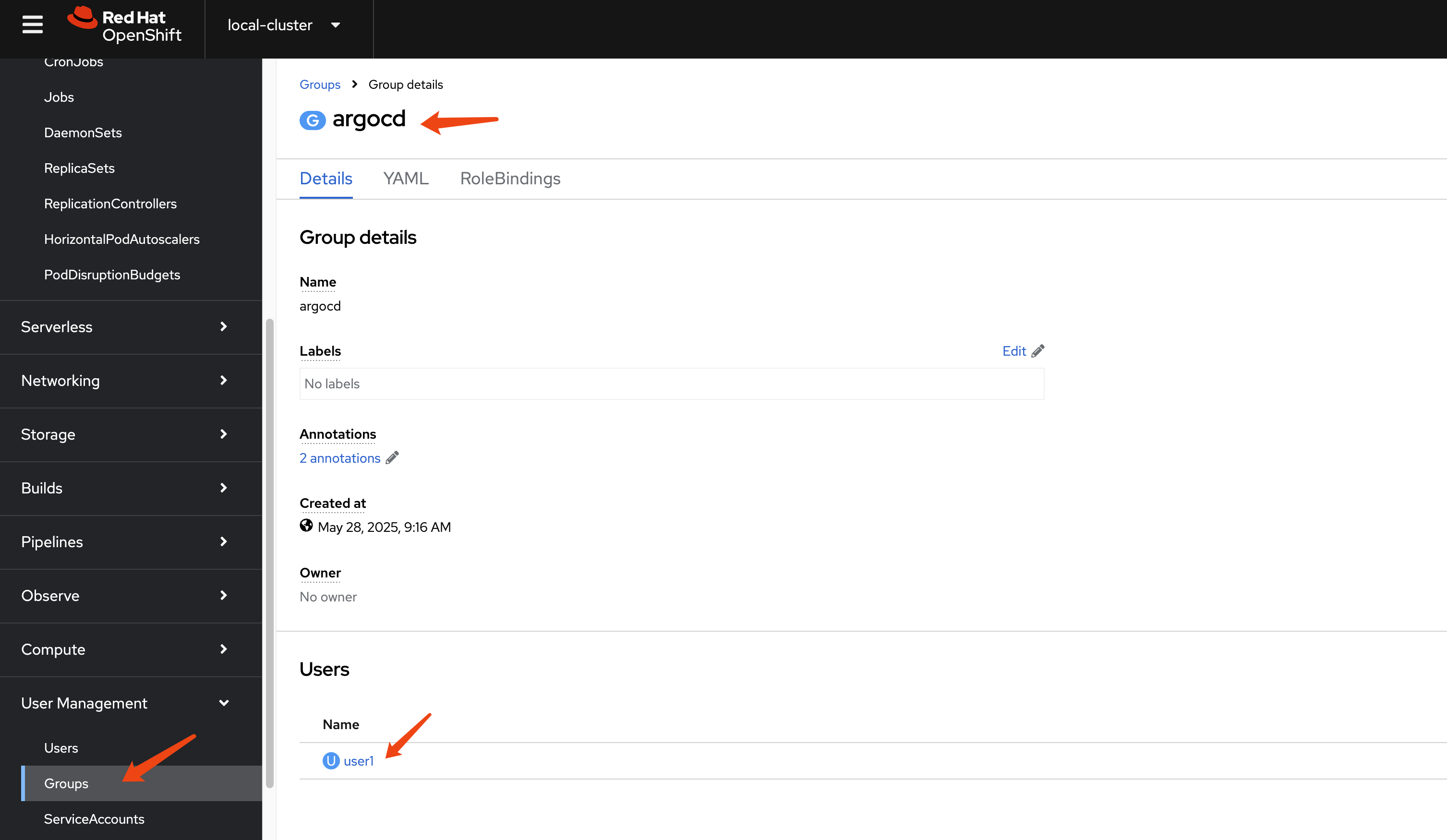
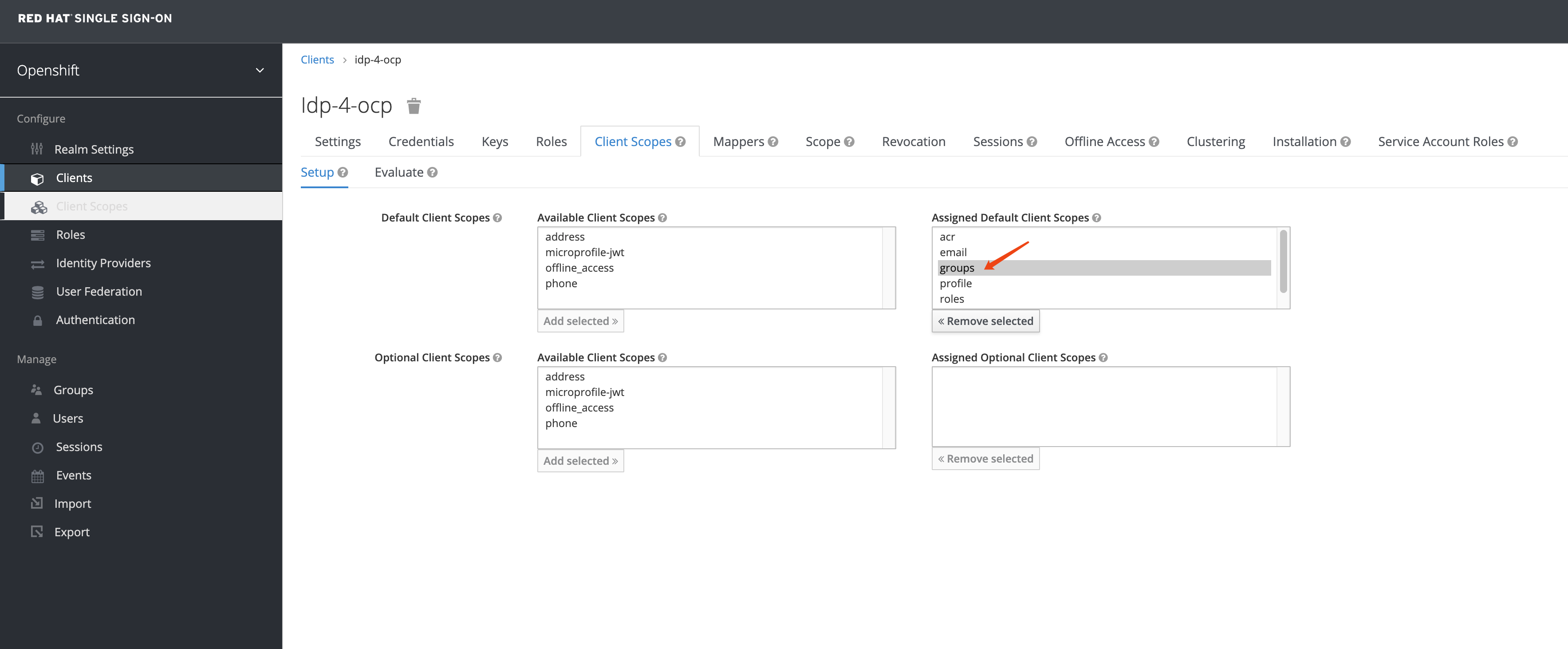
If you cannot see the groups created in OCP, you can add a client scope in RH-SSO.